You spent years building Dragon a word list full of client names and jargon. Then you got a new Mac, which Dragon left in 2018, or started wondering how long your Windows copy has left.
If you're shopping for a Dragon NaturallySpeaking alternative, five are worth your time. Amical is for writing, Windows voice access and Mac Voice Control are for controlling your computer, Talon is for hands-free coding, and Wispr Flow is for cloud dictation.
Our top pick is Amical, an AI dictation app that writes the finished email or message for whatever app you're in, on Mac, Windows, iPhone, iPad, and Android. It keeps your own word list too: custom vocabulary is on the free plan. Full disclosure, since we have a stake here: Amical publishes this blog, and its paid cloud plan is how we make money.
One gap up front, because Dragon users ask about it first. Amical's voice commands are coming soon, so it doesn't control your computer yet. If that's your main job, picks two to four do it today.
Even if your Dragon still works, it's a fair moment to look. The awkward part is the word list: years of names that no other app knows yet.
Is Dragon NaturallySpeaking discontinued?
No, not all of it. "Dragon NaturallySpeaking" is the name most people still search for, but the desktop product sold today is Dragon Professional, and you can still buy it for Windows. What's gone depends on which Dragon you had:
- Mac: Dragon Professional Individual for Mac was discontinued in October 2018.
- Home and v15: Dragon Home and the other v15 editions went off sale after Feb 27, 2023, per Nuance's advisory notice.
- Phone: Dragon Anywhere's sales ended July 1, 2026, according to two competing dictation vendors, though Dragon's own page still mentions it.
What's left is Dragon Professional v16, for Windows only. Nuance's page calls it "optimized for Windows 11" and shows a "Contact us" button where a price would be. In early October 2026, a competitor's price tracker and an Amazon listing put it at about $699. Microsoft has owned Nuance since March 2022, when it completed a $19.7 billion purchase.
So Dragon isn't dead. But it's Windows only, with no public price list, and the same two vendors report no major release since v16 shipped in February 2023.
If you dictate medical notes, Microsoft still sells Dragon Medical One and Dragon Copilot; this guide doesn't cover them.
Follow an old Nuance link for Dragon Professional and you land on a Microsoft healthcare page that names only Dragon Copilot and Dragon Medical One. It's not a goodbye, but it isn't a welcome mat either.
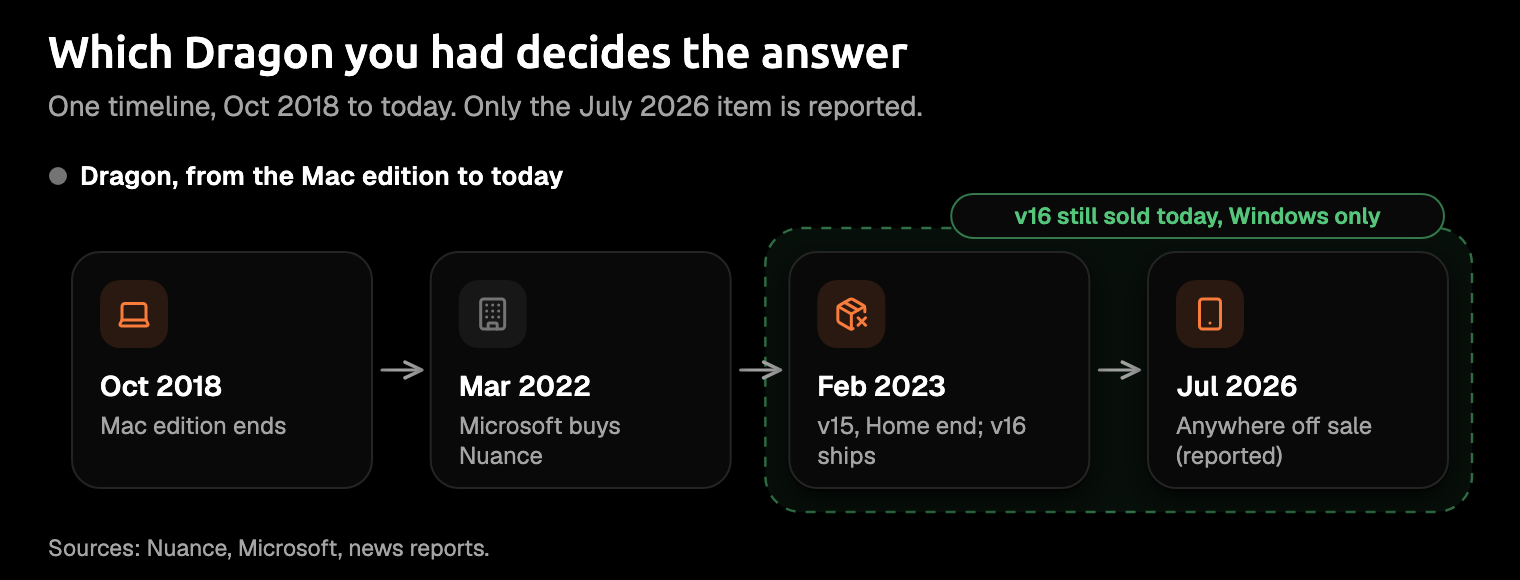
A Mac user lost Dragon years ago, a phone user is losing it now, and a Windows user can still buy it. For a feature-by-feature look, see Amical vs Dragon.
The three jobs Dragon did
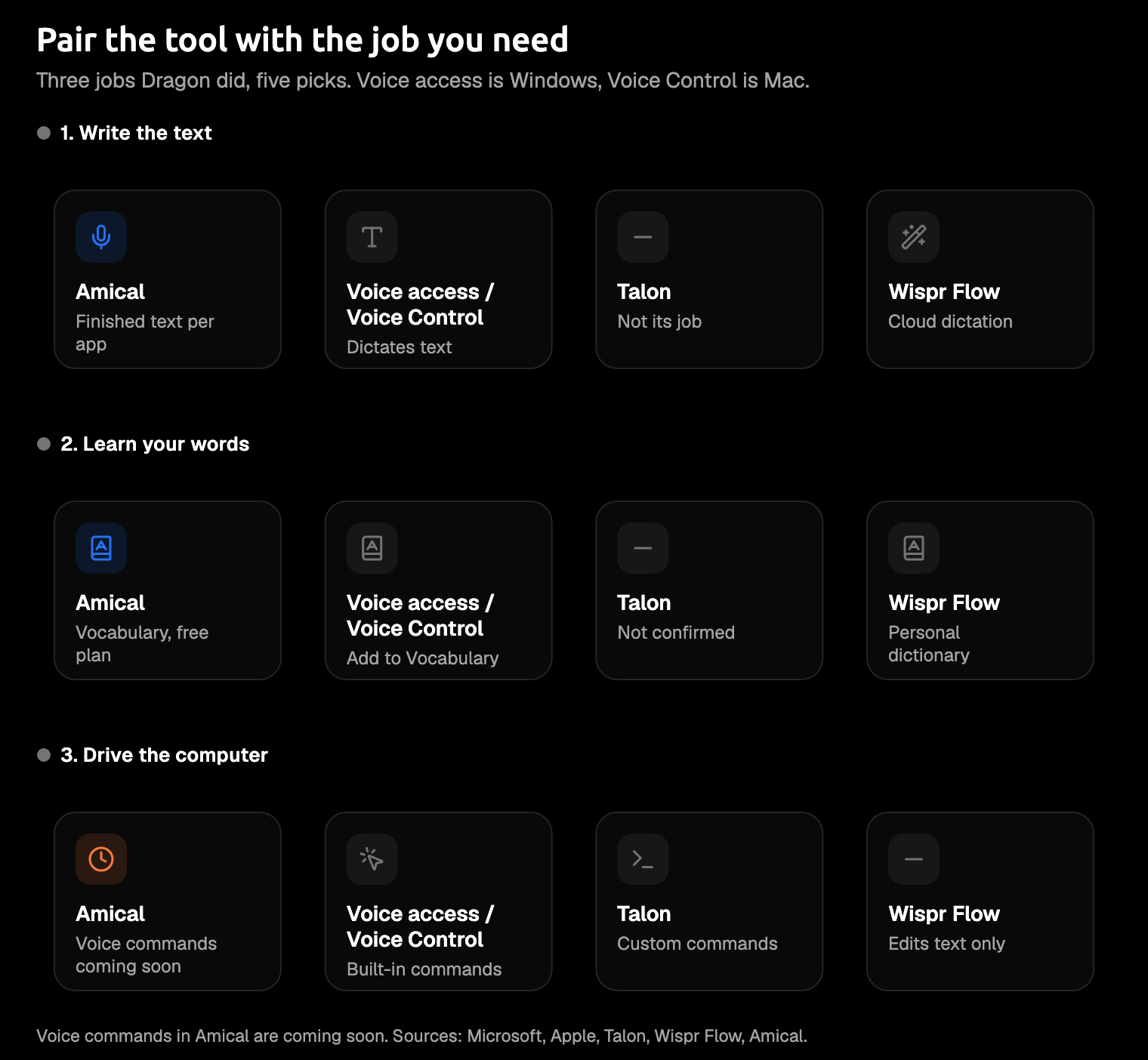
Dragon did three jobs: it wrote the text, it learned your words, and it let you control the computer by voice. Most tools today do one or two of these well, so it helps to know which ones you used.
Writing the text. Dragon types what you say. Built-in tools such as Mac Dictation do the same, with spoken punctuation, "new line", and "new paragraph". AI dictation goes further. Amical rewrites what you said into a finished message for the app you're typing in.
Learning your words. Dragon keeps your custom words and Auto-texts (saved blocks of text you insert by voice), and offices share them through Nuance Management Center. Most modern tools have a version of this. Amical has custom vocabulary and snippets, Wispr Flow has a personal dictionary, Windows voice access has "Add to Vocabulary", and Mac Voice Control takes up to 1,000 terms per language.
Controlling the computer. This is "Select That", "Correct That", custom commands, and macros. It's the hardest job to replace, and Dragon has rough edges here too: v16's own release notes say Select That and Correct That don't work correctly in Notepad on Windows 11. Windows voice access, Mac Voice Control, and Talon cover this job. Amical isn't there yet, and Wispr Flow's Command Mode edits text rather than driving the computer.
Our view: AI dictation has changed the writing job most, because you get the finished message instead of a transcript. Most of the picks take your own word list, and the third job needs a different tool. If you can't remember the last time you said "Click File", you were using Dragon to write, and your choice just got easier.
Quick picks
- Amical: best overall, and the pick on Mac and phone, for finished writing with your own vocabulary.
- Windows voice access: best for free voice control on Windows 11.
- Mac Voice Control: best for voice control on a Mac.
- Talon: best for hands-free coding and heavy custom commands.
- Wispr Flow: best for cloud dictation with spoken edits.
Dragon Professional is the first row, as the baseline.
| Tool | Platforms | Price | Custom vocabulary | Controls the computer | Works offline |
|---|---|---|---|---|---|
| Dragon Professional (baseline) | Windows 11 and 10 | About $699 in retail listings; Nuance lists no price | Yes, shareable across a team | Yes, commands and macros | Not stated |
| Amical | Mac, Windows, iPhone, iPad, Android | Free plan; Premium $10/month or $84/year | Yes, on the free plan | Coming soon | Yes, in local mode on desktop |
| Windows voice access | Windows 11 (22H2 or later) | Included with Windows | Yes | Yes | Yes, on-device |
| Mac Voice Control | macOS | Included with macOS | Yes, up to 1,000 terms per language | Yes | Not stated |
| Talon | macOS, Windows, Linux (X11) | Free, funded on Patreon | Not stated | Yes, including the mouse | Not stated |
| Wispr Flow | Mac, Windows, iPhone, Android | Free 2,000 words/week on desktop; Pro $15/month or $12/month billed yearly | Yes, personal dictionary | No; Command Mode edits text | No, transcription is in the cloud |
Prices checked October 25th, 2026. "Not stated" means the vendor pages we checked don't say either way.
The alternatives
1. Amical (our pick)
Best for: writing finished emails, messages, and documents by voice on desktop and phone, with your own vocabulary along.
If you mostly used Dragon to write, this is where you'll feel the difference. Dragon types what you say. Amical transcribes it, then rewrites it to suit where your cursor is: a proper email in Gmail or Outlook, a quick message in WhatsApp, a clean prompt in Cursor.
Here's an illustration, not a recorded result. With your cursor in Gmail, you say:
tell the Henderson team the site visit moves to Thursday and I'll bring the revised drawings
And you'd get something like this:
Hi all,
The site visit is moving to Thursday. I'll bring the revised drawings.
Best,
In WhatsApp, the same illustration would come out as one relaxed line: "Site visit's moved to Thursday, I'll bring the revised drawings."
Your Dragon word list can come with you: add the names and jargon you taught Dragon to your custom vocabulary. On Premium, a team shares one vocabulary, the job Dragon offices gave to Nuance Management Center. Snippets handle text expansion by voice, the work you used Auto-texts for.
You also choose where your speech is processed. Amical Cloud is Amical's own speech model, built for speed. By Amical's own figures, a short dictation comes back in under 300 ms, so the text is usually there before you've looked up. Your audio and some formatting context, such as the app name and the text near your cursor, go to Amical Cloud. The stated policy is no data retention and no training on your data.
In local mode, Amical transcribes on your computer with Whisper or Parakeet, two open speech-to-text models. Your audio stays on your machine, you don't need an account, and it works offline once a model is downloaded. Your text leaves only if you pick a cloud provider for formatting. Local AI models covers the setup.
Price: the free plan includes unlimited local dictation, 2,000 cloud words a week, and custom vocabulary. Premium is $10 a month or $84 a year for unlimited cloud words and a shared team vocabulary.
Where it falls short:
- No voice commands yet. They're coming soon. If controlling the PC is your main job, picks two to four fit better today.
- No accuracy figure. Amical hasn't published one, and we found no independent benchmark covering these tools; Dragon's "up to 99%" is Nuance's own claim. The fair test is your own email.
- No Linux. Talon runs there (X11).
- Sign-in on phones and Amical Cloud. Both need an account, and the phone apps aren't part of the open source code. Local mode on desktop needs no account, and the desktop app is open source under the MIT license.
- Older Macs. Local Whisper needs macOS 15 or later and is slower on Intel Macs; Parakeet runs on macOS 14 and Intel Macs, and Amical Cloud has no macOS 15 requirement.
- Silence ends a hands-free session. In hands-free mode, a recording stops after 5 seconds of silence; one session runs up to 2 hours. If you pause to think mid-report, hold
Fninstead.
Mostly paid Dragon to write? This is the pick that writes the message, not just the words. If you're the Mac user who ran Dragon in a Windows virtual machine, or gave up on it in 2018, start here.
How to start:
- Install Amical and open it.
- Add a few names from your Dragon word list to your custom vocabulary.
- Click into an email, hold
Fn, and say what you want it to say. - Let go of
Fn. The text lands where your cursor is.
For a longer dictation, press Fn+Space to go hands-free. Both shortcuts can be changed in Shortcuts, which helps if your keyboard has no Fn key.
2. Windows voice access
Best for: Dragon users staying on Windows who want voice control without paying for it.
Voice access is the closest thing to Dragon's command side, and it costs nothing extra. It comes with Windows 11 (22H2 or later) and began replacing Windows Speech Recognition in September 2024. Microsoft calls it on-device speech recognition that "works even without the internet."
You can dictate and correct text, open and switch apps, use the mouse and keyboard, and create your own voice shortcuts. New words go in through "Add to Vocabulary". If you never left Windows, it may be the cheapest upgrade you'll ever make: it's already on your PC.
Where it falls short: it types plain text, with no rewriting into an email. It needs Windows 11, so a Windows 10 PC is out. Microsoft doesn't publish a full language list. And it isn't Windows voice typing (Win+H), a separate feature that needs internet.
How to start: follow Microsoft's voice access guide. Amical vs Windows voice access and our guide to offline dictation on Windows go further.
3. Mac Voice Control (with Dictation)
Best for: Mac users who want to control their Mac by voice, at no extra cost.
Voice Control is what Mac users have wanted since Dragon left in 2018, and it's already on your machine. It understands built-in commands such as "Open Mail", "Scroll Down", and "Click Done", and "Show numbers" or "Show grid" overlays the screen for anything a command can't name. Its vocabulary holds up to 1,000 terms per language, imported from a text file with one term per line. Get your Dragon word list into a plain text file, and it can come along.
Where it falls short: standard Dictation is off while Voice Control is on, and neither rewrites your words into a finished email. On Macs with an M3 chip or later, Apple's improved Dictation in macOS 27 adds punctuation and formatting. It still takes no custom vocabulary.
How to start: open System Settings > Accessibility > Voice Control. Amical vs Apple Dictation and AI dictation vs Mac Dictation go deeper.
4. Talon
Best for: fully hands-free work and coding, if you're willing to build your own commands.
Talon is the heir to Dragon's macros. It's built for "powerful hands-free input" on macOS, Windows, and Linux (X11), and it's free, funded by Patreon donations. You write your own commands in .talon files, and you can click with a pop sound and scroll with a hiss. A hiss that scrolls the page sounds odd until your wrists thank you for it.
Where it falls short: setup means editing configuration files, so start with the community command set the Talon wiki recommends for beginners. It's built for control, not polished prose, and languages other than English are still in development.
How to start: download it from talonvoice.com, then add that community set. See Amical vs Talon, and dictation for RSI if typing hurts.
5. Wispr Flow
Best for: cloud AI dictation with spoken edits to text you've already written.
Select a paragraph, say "make this shorter", and Wispr Flow's Command Mode rewrites it. Command Mode works on highlighted text on Mac and Windows, and needs a paid plan or a trial. The dictation itself runs on Mac, Windows, iPhone, and Android, with a personal dictionary and snippets on the free plan.
Price: the free plan gives you 2,000 words a week on desktop; Pro is $15 a month, or $12 a month billed yearly.
Where it falls short: its privacy page says "Transcription always happens in the cloud," so there's no offline option. Command Mode edits text; it doesn't open apps or click buttons. If you want this style with offline models, look at Superwhisper, though its offline models run well only on Apple Silicon.
It's the most direct way here to edit text by voice. Amical's closest feature is Draft, which writes from a spoken instruction and lets you review the result before it goes in, on Amical Cloud only.
How to start: try the free plan on your desktop. Amical vs Wispr Flow and our free Wispr Flow alternatives go further.
On your phone
With Dragon Anywhere reportedly off sale, your phone is where switching gains you the most. The report you used to save for your desk can get finished on the train.
Amical runs on iPhone and iPad (iOS 18.3 or later) and on Android, transcribing with Amical Cloud, so you sign in. On iPhone, Premium is an in-app purchase called Amical Pro, at $9.99 a month or $83.99 a year. The iOS quick start and Android quick start cover setup.
If you only need the basics, the mic in Gboard (Google's keyboard) takes spoken punctuation such as "period", "comma", and "new line", though not in every language. For more options, see the best dictation apps for iPhone and Android.
Should you stay on Dragon?
Stay on Dragon Professional if you run its macros and drive Windows apps hands-free all day, or your team depends on a vocabulary managed in Nuance Management Center. Dragon still does that, and on commands, the alternatives here are a step down. A decade of macros you'd hate to rebuild is a fair reason to stay.
Otherwise, you were mostly paying for the writing, and that's the job AI dictation has changed most.
Which one should you try first?
- You mostly write, on Mac, Windows, or phone, and want your word list along: try Amical.
- You want free voice control on Windows 11: try voice access.
- You want voice control on a Mac: try Voice Control.
- You code by voice or live on custom commands: try Talon.
- You want cloud dictation with spoken edits: try Wispr Flow.
Most readers belong in the first line, and the ones who don't already know who they are.
Try it on one email you'd type anyway
Download Amical, add five words from your Dragon vocabulary (start with the client name you'd hate to see misspelled), and dictate one real email you'd normally type. The free plan covers all of it.
Let the email decide. When you're ready to move the rest, How to switch from Dragon has the steps.