You like Wispr Flow. You talk, it types, and the keyboard has started to feel like a step backwards. Then Pro asks for $15 a month, or the free plan's word warning turns up on a Wednesday, halfway through an email.
If you're looking for a free Wispr Flow alternative, you can keep most of what you like. The trick is picking the right kind of free. The word hides very different deals: apps that run on your computer with no limit, weekly cloud allowances, dictation built into your computer, and trials.
Six free options made this list, each judged on what kind of free it is and what it gives up against Wispr Flow. Prices and limits come from each vendor's own pages and repositories, as of October 2026.
Our advice is to try Amical first. Amical publishes this blog, so read the pick with that in mind. Its free plan gives you 2,000 cloud words a week, plus unlimited local dictation on Mac and Windows that never counts toward them. It also includes what most of the other free alternatives here leave out or switch off by default: AI formatting that writes the message for the app you're in.
Quick picks
- Best overall: Amical. AI formatting on your computer and your phone, plus unlimited local dictation on Mac and Windows.
- Best with no paid plan at all, and best on Linux: Handy.
- Best for local dictation on an Apple Silicon Mac: Superwhisper's free plan.
- Best if you bring your own API keys: OpenWhispr.
- Best if you'd rather install nothing on a Mac: Apple Dictation.
- Best if you'd rather install nothing on Windows: voice typing with
Win+H.
Every row below is measured against Wispr Flow's free plan: 2,000 words a week on desktop (new dictation stops at 5,000), less on phones, and all of it in the cloud, on Mac, Windows, iOS, and Android. Its Pro plan costs $15 a month, or $12 a month billed yearly.
| Kind of free | Weekly limit | Works offline | AI cleanup on the free plan | Platforms on the free plan | Paid tier | |
|---|---|---|---|---|---|---|
| Amical | Local and unlimited, plus a weekly cloud cap | Unlimited local on Mac and Windows; 2,000 cloud words, phones included | Yes, in local mode | Yes, formatted for each app | Mac, Windows, iPhone, iPad, Android (phones use Amical Cloud) | Premium $10/month or $84/year |
| Handy | Local and unlimited | None, it's all local | Yes | Optional, off by default; needs a key or a local endpoint | Mac, Windows, Linux | None (sponsors and donations) |
| Superwhisper (free plan) | Local and unlimited, after a Pro trial | Unlimited local Whisper; 3,000 words of Pro to start | Yes, best on Apple Silicon | No; up to two modes without AI processing | Mac, Windows, iOS, Android | Pro $8.49/month or $84.99/year |
| OpenWhispr | Local and unlimited, plus a weekly cloud cap | Unlimited local; 2,000 cloud words; unlimited with your own keys | With local models | Local AI models, or your own keys | Mac, Windows, Linux (iPhone and iPad on Pro) | Pro $80/user/year |
| Apple Dictation | Built in | None; stops after 30 seconds of silence | For some languages | No; auto-punctuation, and Writing Tools as a separate step | Mac | None, built in |
| Windows voice typing | Built in | None stated | No, on most PCs | Fluid dictation on Copilot+ PCs only | Windows | None, built in |
Prices and limits from each vendor's own pages, as of October 2026.
Read the weekly limit column first. It's where "free" keeps its fine print.
What Wispr Flow's free plan gives you
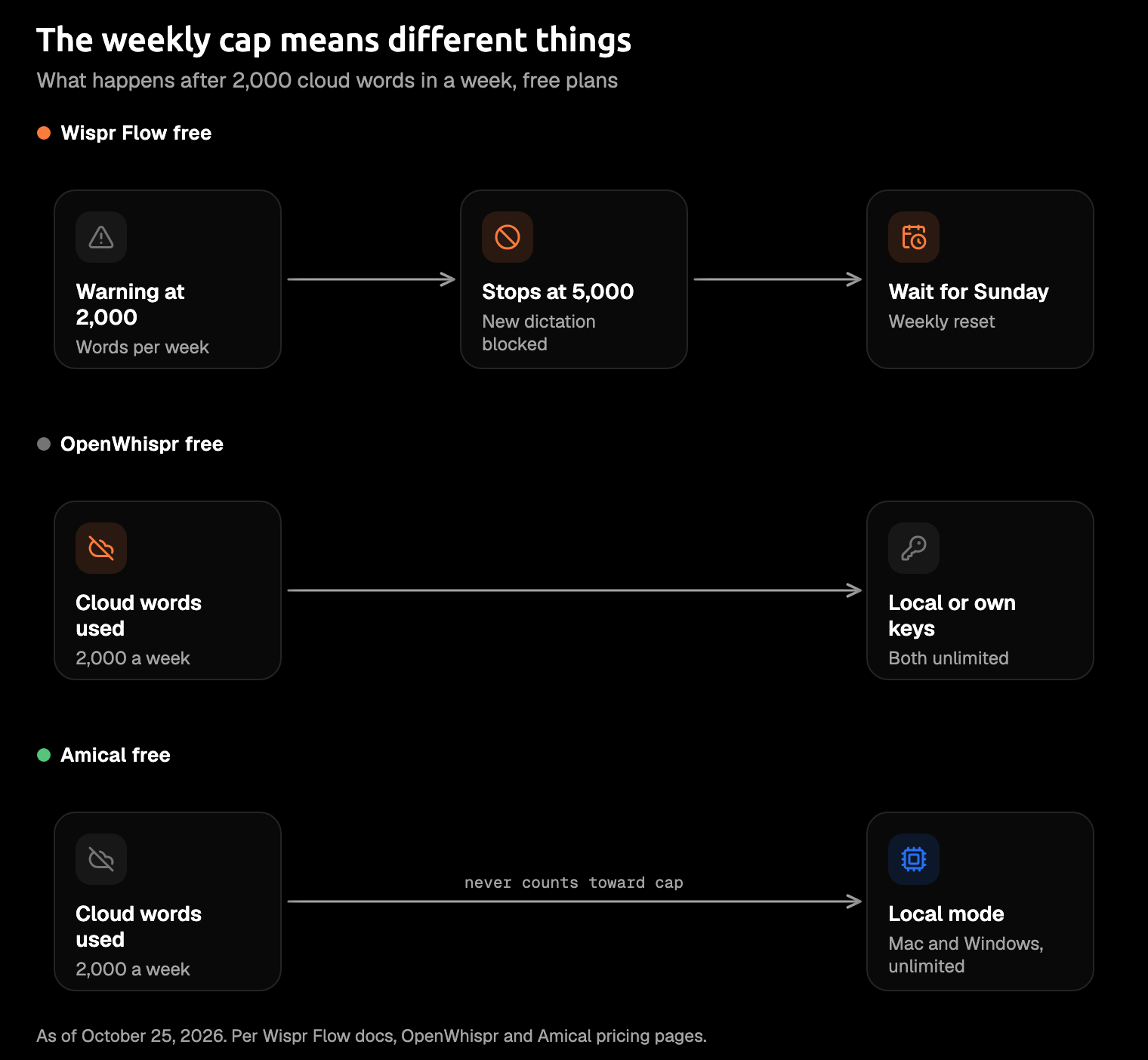
Wispr Flow's free plan costs $0 and covers desktop and mobile, with a weekly word limit on each. On Mac and Windows, the pricing page says 2,000 words a week. Wispr's docs fill in the detail: you get a warning at 2,000, and new dictation stops above 5,000.
Phones get less: a few hundred words a week on iPhone and about 1,000 on Android, per Wispr's docs, which say individual accounts can differ.
The count resets every Sunday, whether or not your busy week does, and unused words don't carry over.
Everything runs in the cloud. Wispr's privacy page says "Transcription always happens in the cloud", and your audio is deleted once it's transcribed, unless you've turned on Dictation cloud storage. No on-device mode is described, so when the words run out, there's nothing local to switch to.
In fairness, the paperwork is serious: Wispr Flow is SOC 2 Type II and ISO 27001 certified, two security standards many IT teams ask for.
It's a fair free plan for light use. If you write most of your day by voice, the meter becomes part of your week. Amical vs Wispr Flow has the full head to head.
Four kinds of "free"
"Free" on a pricing page and free on a Thursday afternoon aren't always the same thing. The options here fall into four deals, and the deal matters more than any feature list.
- Local and unlimited. The speech model runs on your computer, so there's no meter. Handy, Superwhisper's free plan, Amical's local mode, OpenWhispr's local mode, and Spokenly's free tier all work this way.
- A weekly cloud cap. A server does the work for free, up to a point. On desktop, Wispr Flow warns at 2,000 words a week and stops new dictation at 5,000; Amical Cloud and OpenWhispr's cloud allow 2,000 words a week.
- Built in. Apple Dictation and Windows voice typing come with your computer.
- A trial. Superwhisper gives new accounts 3,000 words of Pro, then drops back to its free plan. Spokenly's free tier comes with a one-time cloud allowance that doesn't reset.
A cap only hurts when the cloud is all you have. If the same app also has unlimited local dictation, the cap stops being a wall and becomes a limit on the cloud alone.
Amical and OpenWhispr are both kinds at once: local and unlimited, plus a weekly cloud cap. On desktop, their local dictation is still there when the cloud words run out.
The free alternatives
1. Amical (our pick)
Best for: writing whole messages by voice, on your computer and your phone.
Most dictation hands you a transcript, and you wanted a message. Amical turns your speech into text, then its AI formatting rewrites it for the app you're in: email, chat, coding tools, notes, and hundreds more. That's on the free plan, along with custom vocabulary and unlimited devices.
Here's the idea, as an illustration rather than a recorded result. You say:
hi dana um the launch slipped to thursday because of the payment bug, I'll send notes tonight, thanks
In Gmail, you'd get a short email, with the greeting, body, and sign-off on their own lines:
Hi Dana,
The launch has slipped to Thursday because of the payment bug. I'll send notes tonight.
Thanks
In Slack, the same words stay one relaxed message: "Hi Dana, the launch slipped to Thursday because of the payment bug. I'll send notes tonight, thanks!" It sounds like you, minus the "um".
You also choose where it runs.
In local mode, Amical runs Whisper or Parakeet, speech models that work on your own computer. Your audio stays on your computer, and transcription works offline once a model is downloaded. Your text leaves only if formatting uses a cloud provider. To keep formatting local, connect Ollama, an app that runs AI models on your own computer, or any local server that works like OpenAI's. You can also use your own key for OpenAI, Anthropic, or another major provider. Local AI models covers the setup.
With Amical Cloud, our own speech model does the work, and it's built for low latency. By our own figures, a short dictation comes back in under 300 ms and a longer one in under 500 ms.
Amical Cloud covers 100+ languages and handles Japanese and English mixed in one sentence; local Whisper works in one language at a time. In cloud mode, your audio and some context for formatting, such as the app name and the text around your cursor, go to Amical Cloud. Cloud vs local dictation goes deeper on the trade.
Amical runs on Mac (Apple Silicon and Intel), Windows, iPhone, iPad, and Android. The desktop app is open source under the MIT license, on GitHub. If you outgrow the free plan, Premium costs less than Wispr Pro (the prices are further down). Put together, it's a free plan you can lean on all day at your desk.
Where Amical falls short:
- Linux. Amical doesn't run on Linux. If you're on Linux, Handy is your pick.
- Phones. The iPhone, iPad, and Android apps transcribe with Amical Cloud only, so there's no local mode to fall back on. On a phone, the free plan's 2,000 cloud words a week are all you get, the same allowance as on your computer.
- Sign-in. Amical Cloud and the phone apps need an account. On your computer, local mode doesn't.
- Cloud words alone. On desktop, Wispr's free plan goes further on cloud dictation: new dictation stops at 5,000 words a week, against Amical's 2,000 cloud words. Amical's answer is local mode, which never counts toward the cap.
- Older Macs, for local Whisper. Local Whisper needs macOS 15 or later and is slower on Intel Macs. Parakeet runs on macOS 14 and on Intel Macs, and Amical Cloud has no such limit.
- Setup for local formatting. In local mode, AI formatting needs Ollama or your own provider key. With Amical Cloud, formatting works once you've signed in, with nothing else to set up.
2. Handy
Best for: never seeing a pricing page, and Linux.
Handy is free and MIT-licensed, with no paid plan at all; it runs on sponsors and donations. It's free in the old-fashioned way: people who like it pay for it because they want to.
It works completely offline, with Whisper or Parakeet V3 running on your computer, so your audio stays on your machine. Hold a shortcut, talk, and let go, and Handy pastes the text into the field you're typing in. It runs on Mac, Windows, and Linux. The website shows only an Apple Silicon download, so on Windows or Linux, get it from GitHub Releases.
If you never want to see a price, this is the one, and it's our Linux pick. Our open source dictation roundup has the install commands.
What you give up with Handy:
- There's no phone app listed.
- AI cleanup is off by default, and turning it on means a provider key or a local endpoint.
- On Linux with Wayland, typing needs extra tools such as wtype or dotool.
- Under load, the clipboard paste can occasionally paste older clipboard text.
3. Superwhisper (free plan)
Best for: local dictation on an Apple Silicon Mac.
Superwhisper's free plan includes unlimited dictation with local Whisper models, custom vocabulary, text replacements, and up to two modes without AI processing. New accounts start with 3,000 words of Pro, then drop back to the free plan, and nothing is deleted. It's a trial that tends to end right about when you've got used to it.
The free plan lists Mac, Windows, iOS, and Android. Pro costs $8.49 a month, $84.99 a year, or $249.99 once for a lifetime license, with the same features whichever way you pay.
It's a polished free plan for Apple Silicon Macs, with the AI kept behind Pro. Amical vs Superwhisper compares the two directly.
What you give up with Superwhisper's free plan:
- AI modes, cloud models, and file transcription need Pro.
- Offline models run well only on Apple Silicon; Superwhisper says Intel Macs work best with cloud models, which are Pro.
4. OpenWhispr
Best for: open source, with your own API keys for the cloud.
OpenWhispr is open source under the MIT license, and its free plan mixes local and cloud. You get unlimited local dictation and local AI models, 2,000 cloud words a week, and unlimited cloud use with your own API keys. An API key is your account key for an AI provider's service, so that usage goes on the provider's bill, not OpenWhispr's.
The free plan covers Mac, Windows, and Linux. Pro costs $80 per user per year and adds unlimited cloud, agent mode, sync, and the iPhone and iPad app.
If you already pay an AI provider, OpenWhispr's free plan fits neatly: your own keys take the cloud limit off. The open source roundup covers its local engines.
What you give up with OpenWhispr's free plan:
- There's no phone app on the free plan: the iPhone and iPad app is Pro only.
- Agent mode and sync are Pro features too.
5. Apple Dictation (Mac)
Best for: short notes, with nothing to install.
Apple Dictation is built into your Mac: press the microphone key, or choose Edit > Start Dictation. There's no overall time limit; it stops only after 30 seconds of silence. It adds punctuation on its own in supported languages and follows spoken commands like "new line" and "new paragraph". For some languages it runs on your Mac, and Keyboard settings show whether yours does.
macOS 27 adds a better on-device model that handles capitalization, punctuation, and formatting, on Macs with M3 or later and 12 GB or more of memory. Once you've dictated, Writing Tools on Apple Intelligence Macs can rewrite the text you select.
It's fine for short notes. It transcribes; it doesn't write the message, which is how you end up with a reply you dictated in seconds and then fixed by hand anyway. AI dictation vs Mac dictation and Amical vs Apple Dictation go further.
What you give up with Apple Dictation:
- As of macOS 27, it doesn't adapt its output to each app or take a custom vocabulary.
- Rewriting is a separate step on selected text, not part of dictating.
6. Windows voice typing
Best for: the quickest thing to try on a PC.
Press Win+H in any text field and start talking. You can turn on automatic punctuation and use commands like "delete that" or "select that". It needs an internet connection, because it runs on Microsoft's Azure Speech services. On Copilot+ PCs, fluid dictation also cleans up grammar, punctuation, and filler words, using models on the device.
It's the quickest free option to try on a PC, and the weakest once you're offline. On a train with no Wi-Fi, most PCs simply stop listening. AI dictation vs Windows voice typing compares the two in more detail.
What you give up with voice typing:
- It needs internet on most PCs, so it's no help offline.
- The cleanup is for Copilot+ PCs only.
- The command list varies by language.
Also worth a look
Three more names keep turning up in these searches. Only two are free.
- Spokenly has a free Local tier with unlimited on-device transcription and no account, plus a one-time cloud trial; paid tiers start at $29 one-time.
- FreeFlow is free, MIT-licensed, and Mac only; it runs on your own Groq API key (free to get) or a local server.
- VoiceInk is cheap, not free: $25 once for one Mac, with a trial (the length isn't published).
If you outgrow free
If you hit a cap every week, a paid plan is the fix. A year of one costs between $80 and $144, depending on the app.
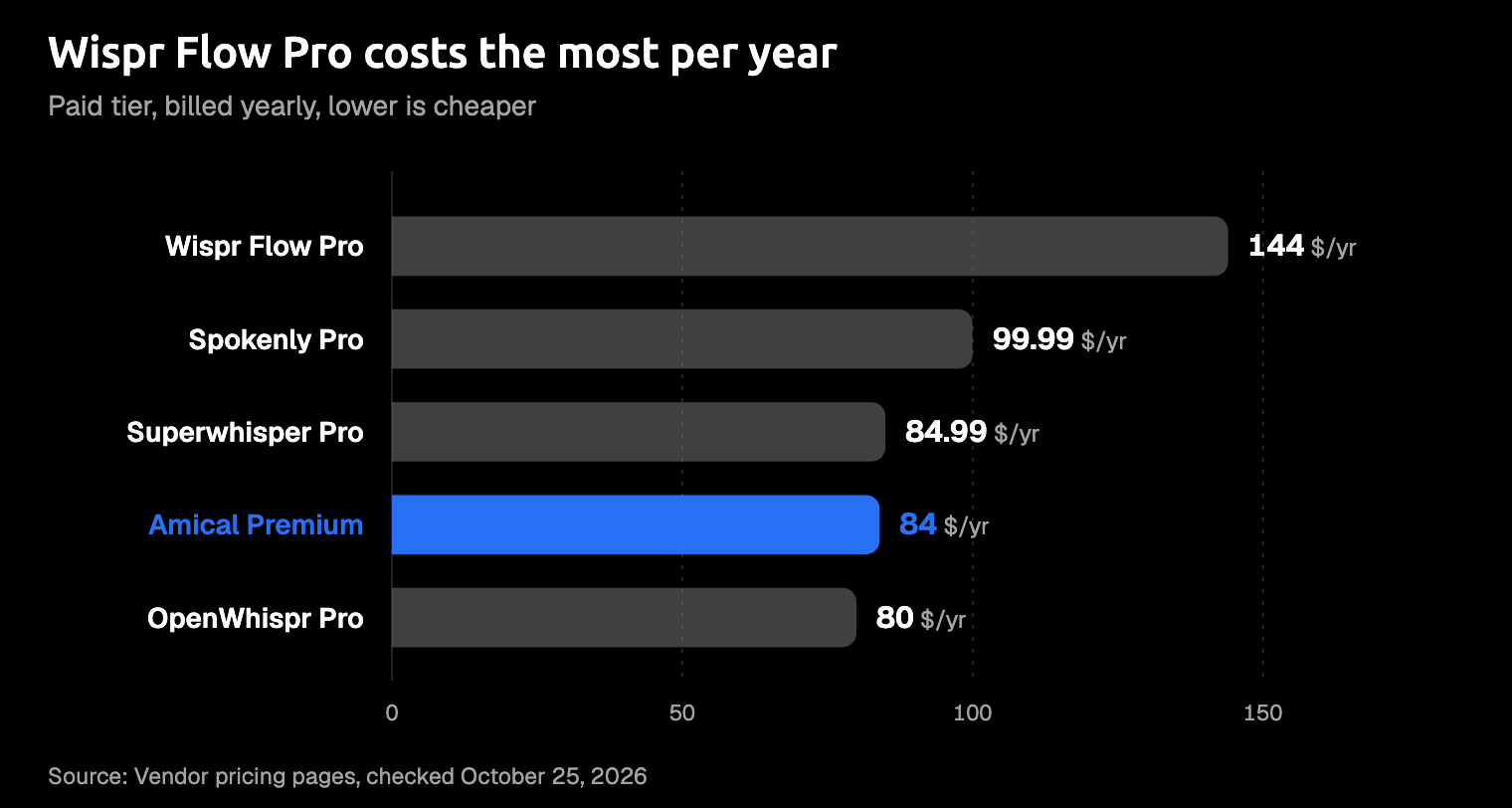
Wispr Flow Pro is the priciest of the five. Amical Premium is $10 a month or $84 a year for unlimited Amical Cloud: about the same as Superwhisper Pro, and a little more than OpenWhispr Pro. Paying every month to talk instead of type sounds odd, right up until you've cleared a week of email that way.
You may not need to pay at all, though. On Amical's free plan, local mode on Mac and Windows stays unlimited, so a heavy week doesn't have to end on a checkout page.
Which free option should you try?
Most people don't need the perfect dictation app. They need one that's still working on Thursday.
- If you want finished messages on your computer and your phone, with unlimited local dictation at your desk, pick Amical.
- If you never want to see a price, or you're on Linux, pick Handy.
- If local dictation on an Apple Silicon Mac is all you need, Superwhisper's free plan will do.
- If you want open source and already have API keys, pick OpenWhispr.
- If you dictate the odd note, use what's built in: Apple Dictation on a Mac, or
Win+Hon Windows.
Try Amical first. Switch only if one of the others' strengths is the thing you can't do without.
Dictate one real message today
You'll learn more from one real message than from any table. Download Amical, click into the email or Slack reply you were about to type, and say it instead. Try it in local mode or with Amical Cloud; the free plan covers both. If what lands in the box sounds like you on a good day, you've found your free Wispr Flow alternative.