You tap the mic key, say a quick reply, and get back one long sentence with a colleague's name spelled wrong. Fixing it takes longer than typing would have. Apple's built-in dictation types what you said. It doesn't write the message you meant.
This guide ranks the five best dictation apps for iPhone, with the price inside each app, its free limits, the catch, and how to start.
Our pick for the best dictation app for iPhone is Amical. It adds punctuation and capitals and drops the "um"s, in any text field you type in. It runs on Amical Cloud, Amical's own speech model built for speed. By Amical's own figures, Amical Cloud turns a short dictation around in under 300 ms (a figure for the engine, not one measured on a phone).
Amical publishes this blog, so you should know we're not a neutral judge. Every price and limit below comes from each app's own App Store listing or website, so you can check our work.
For a note to yourself, the mic key is fine. For messages other people read, a voice keyboard earns the minute it takes to set up.
Quick picks
Five apps, five different reasons to switch keyboards, and one reason not to:
- Amical: best overall, for people who send a lot of messages, often in more than one language.
- Wispr Flow: best for starting dictation from the Action Button or Back Tap.
- Superwhisper: best for an on-device option on a recent iPhone.
- Aqua Voice: best for editing text by voice.
- Typeless: best for heavy cleanup when you think out loud.
- Apple Dictation: best when you want nothing to install, because it's already on your phone.
| App | Best for | Free on iPhone | Paid in-app (month / year) | Needs iOS | Where audio goes | Full Access |
|---|---|---|---|---|---|---|
| Amical | Lots of messages, in more than one language | Yes, with a weekly limit | $9.99 / $83.99 | 18.3 or later | Amical Cloud (streamed, not stored) | Yes |
| Wispr Flow | Action Button starts | Limited weekly use | $15.00 / $143.99 | 18.3 or later | Wispr Flow's cloud | Yes |
| Superwhisper | An on-device option | A free tier (per its site) | $8.49 / $84.99 | 26.0 or later | Your iPhone with an offline model, otherwise its cloud | Yes |
| Aqua Voice | Editing by voice | Starts free with 1,000 words | $12.99 (period not stated) / $119.00 | 17.0 or later | Aqua's servers | Yes |
| Typeless | Cleaning up rambling | A weekly word limit | See note | 16.1 or later | Typeless's servers | Not stated on its listing |
| Apple Dictation (the baseline) | Already on your phone | Free, built in | None | Built in | Your iPhone in many languages, otherwise Apple's servers | Not needed |
Prices are iPhone in-app prices from each App Store listing, as of October 2026. Typeless's listing doesn't say which period each price covers, so its entry below gives the web prices.
What the mic key already does
Apple Dictation is free, built in, and needs no account. Turn it on in Settings > General > Keyboard > Enable Dictation, then tap the mic on your keyboard and talk. In many languages it runs on the iPhone itself, with no internet needed. In supported languages it adds commas, periods, and question marks as you go.
It stops when you tap the mic again, say "Stop dictation," or go quiet for 30 seconds. That middle option takes some nerve in a quiet office.
iOS 27 adds a better on-device model that improves spelling, punctuation, and capitalization. It works in English only, on iPhone 17 Pro, 17 Pro Max, Air, or later. So unless you bought a recent Pro or Air, your iPhone keeps the older model.
Where your audio goes depends on the mode. When dictation runs on the device, Apple says it isn't sent to Apple's servers. Otherwise it goes to Apple, and it isn't stored unless you opt in to Improve Siri and Dictation.
Apple's page doesn't list filler-word removal or a custom vocabulary. The apps below are for messages other people read. For the full head-to-head, see AI voice keyboard vs iPhone dictation or Amical vs Apple Dictation.
How these apps work on iPhone
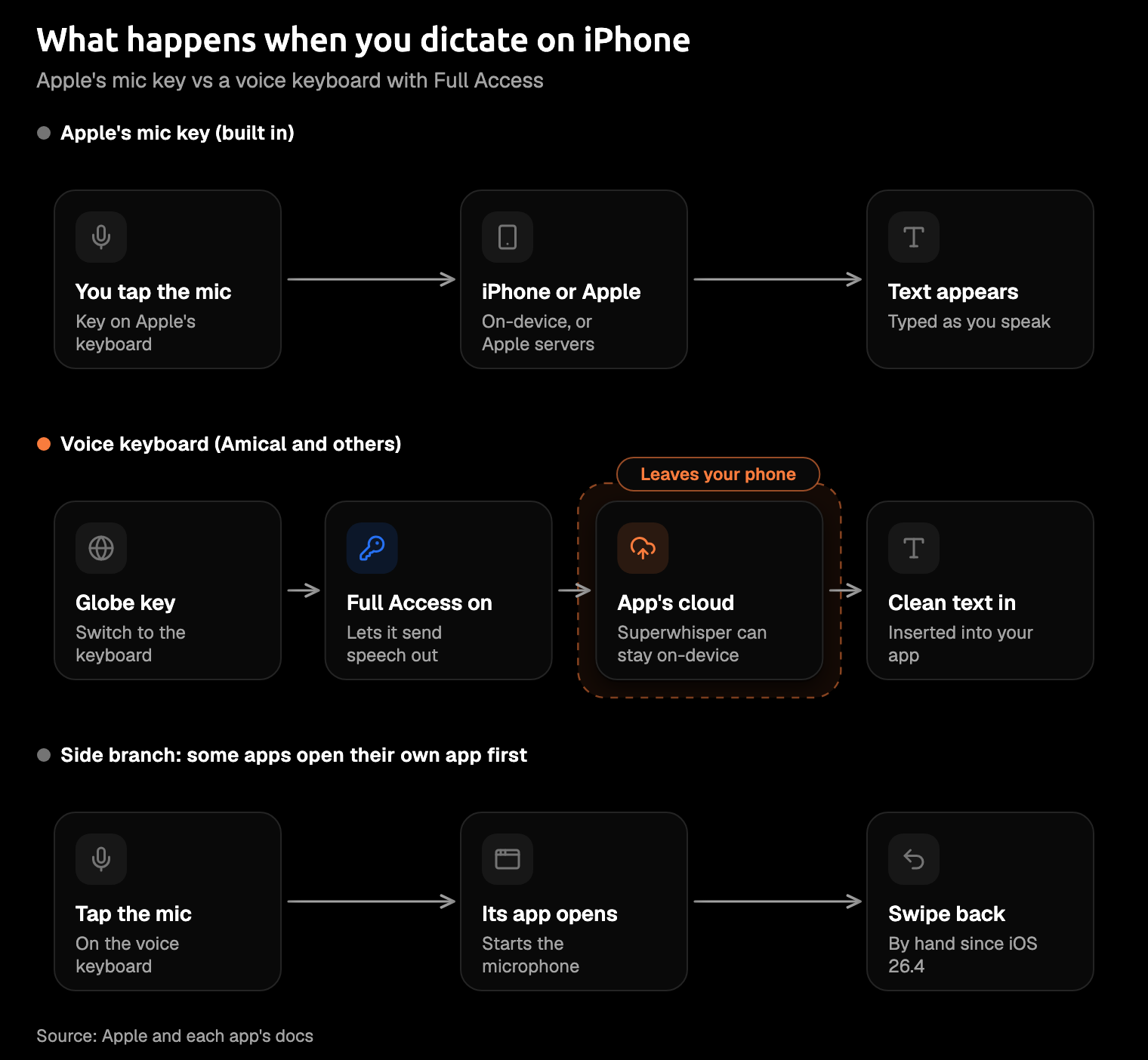
Every app in the top five is a custom keyboard. You add it once under Settings > General > Keyboard > Keyboards > Add New Keyboard, then switch to it with the globe key whenever you want to talk.
The step that makes people pause is Allow Full Access. It lets a voice keyboard send your speech off the phone to the app's service, and without it Amical's keyboard still types but can't dictate. Amical, Wispr Flow, Superwhisper, and Aqua Voice all document the step, while Typeless's listing doesn't mention it.
Amical's listing adds that it doesn't read what you type on other keyboards or collect the contents of the apps you use it in. The other apps say what they do on their own privacy pages, and the table's "Where audio goes" column has the short version.
Some apps, Aqua Voice among them, open their own app to start the microphone. Superwhisper's docs explain that since iOS 26.4, a keyboard can't send you back to the previous app on its own, so you swipe back yourself. The first time it happens mid-reply, you'll think your message vanished. Swipe back and it's waiting for you.
Wispr Flow's docs add one more quirk: phone, number, and email fields switch you to Apple's keyboard, so you'll type those the old way. Amical's listing doesn't say how its keyboard handles either case.
The setup takes a minute, once. After that, the only new habit you need is the globe key.
The 5 best dictation apps for iPhone
1. Amical (our pick)
Best for: people who send a lot of messages, in more than one language, and want the same vocabulary on their phone and their computer.
Here's the idea, as an illustration rather than a recorded run. You say:
um hi siobhan so the review moved to friday morning can you send me the new deck before then thanks
And something like this lands in the text field:
Hi Siobhan, the review moved to Friday morning. Can you send me the new deck before then? Thanks!
Getting Siobhan right is the job of custom vocabulary: add her name once, and the colleague your phone has misspelled for a year finally gets her name back. Your vocabulary and preferences also sync with Amical on Mac and Windows.
Amical Cloud covers 100+ languages and detects which one you're speaking. It also handles Japanese and English mixed in one sentence. If you work in a second language, that's the part you'll feel every day, and multi-language support has the details.
Amical's App Store listing says that with Amical Cloud, your audio is streamed for transcription and isn't stored on Amical's servers, and your transcripts stay on your phone. It doesn't say whether formatting context, such as nearby text, is also sent from the phone. Amical Cloud's stated policy rules out training on your data.
Snippets and voice notes come along too, and Amical also runs on iPad, Mac, Windows, and Android. The synced vocabulary is the quiet reason to pick it: teach it a name on your laptop, and your phone already knows it.
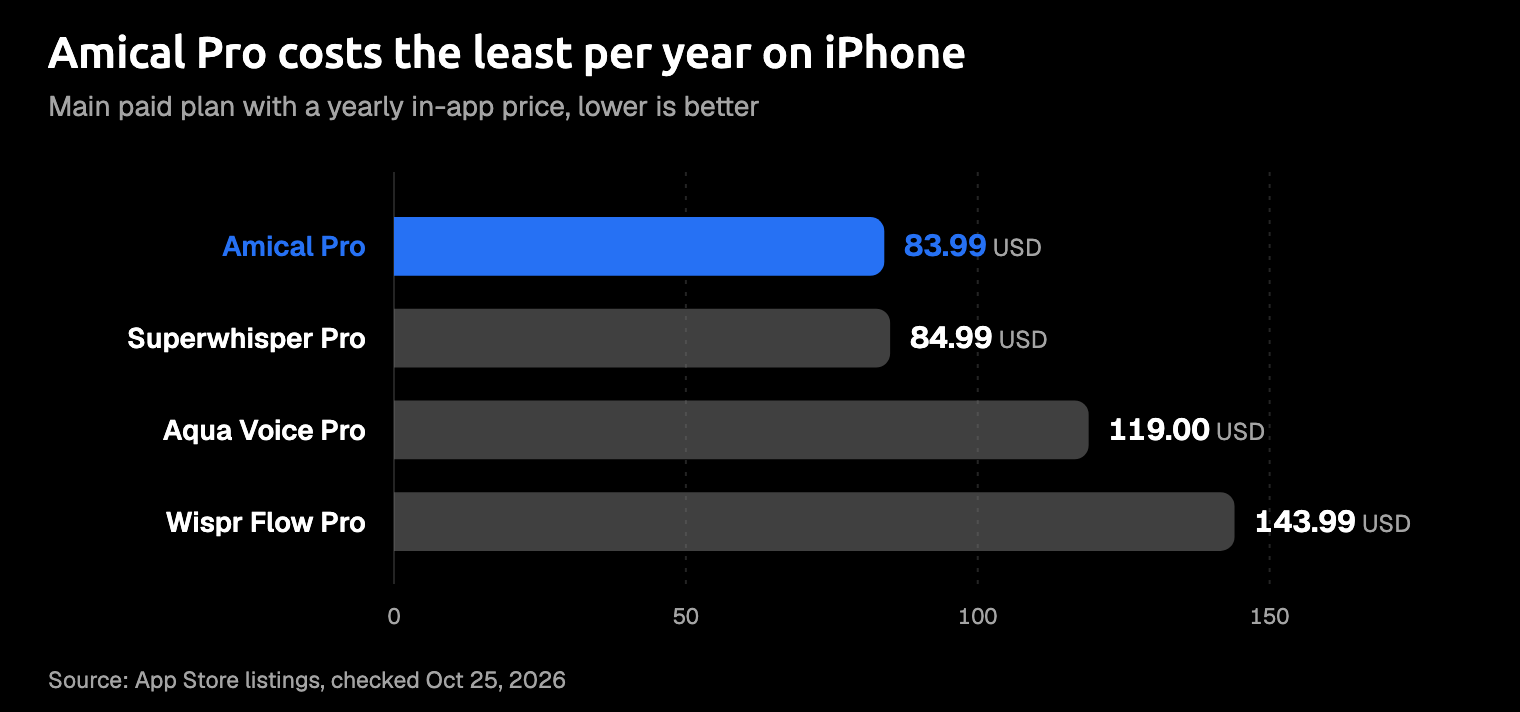
On iPhone: free with a weekly limit, or Amical Pro at $9.99 a month or $83.99 a year, the lowest yearly price of any main paid plan here. Students can pay less with Wispr Flow, whose student plan is $72.00 a year. Amical needs iOS 18.3 or later.
The catch: three things, all Amical's own.
- No offline dictation on the phone. The iPhone app uses Amical Cloud only, so it needs a connection. For offline, local mode in Amical on Mac and Windows transcribes your speech on your computer and works with the Wi-Fi off once a model is downloaded. Cloud vs local dictation covers that trade. On the phone itself, Apple's mic key works offline in many languages.
- You need to sign in. That same account is what carries your vocabulary to your computer.
- The mobile app isn't open source. The desktop app is, under the MIT license, on GitHub.
How to start (the iOS quick start has more detail):
- Install Amical from the App Store, open it, and sign in.
- Allow the microphone when asked.
- Go to Settings > General > Keyboard > Keyboards > Add New Keyboard and choose Amical.
- Tap Amical in that list and turn on Allow Full Access.
- In any text field, long-press the globe key, pick Amical, and tap the mic.
2. Wispr Flow
Best for: starting dictation from the Action Button, Back Tap, or Control Center.
Wispr Flow is the best-known app here, going by its ratings count. Its App Store listing showed 4.8 stars from 18K ratings in October 2026, against 846 for Superwhisper and 774 for Typeless. It covers 100+ languages. For teams with compliance boxes to tick, it has SOC 2 Type II and ISO 27001, and it offers HIPAA support with a signed BAA (the agreement US healthcare work needs).
Transcription happens in the cloud only. Wispr Flow deletes your audio once it's transcribed, unless you've turned on its cloud storage for dictation.
On iPhone: a free plan with limited weekly use. Dictation slows as you near the cap, stops at it, and resets at midnight Pacific time each Sunday. Pro costs $15.00 monthly or $143.99 yearly in the app, with weekly and student plans too, and needs iOS 18.3 or later.
The catch: its yearly Pro plan is the priciest of the main plans with a labelled yearly price. It also needs sign-in, internet, Full Access, and Live Activities switched on for those shortcut starts.
On a phone, the shortcuts are the real draw. You press the Action Button with the phone still half in your pocket, and you're already talking.
How to start:
- Install Wispr Flow, open it once, and sign in.
- Allow the microphone, add the Flow keyboard, and turn on Full Access.
- Turn on Live Activities, then set up the Action Button, Back Tap, or a Control Center widget.
- Press your shortcut and talk.
Weighing it against our pick? Amical vs Wispr Flow compares the two. Our list of free Wispr Flow alternatives covers the cheaper routes.
3. Superwhisper
Best for: privacy-minded people on a recent iPhone who want an on-device option, output shaped by modes, or their own API keys.
Superwhisper is the only one of the five keyboards here with a documented on-device option (Apple's mic key also works on the phone). Superwhisper says its offline models keep recordings on the device and its cloud models need internet, though its iOS docs don't spell out which models run on the phone. Bring your own API keys, and the AI processing runs through providers you choose. A Pro license covers the iPhone app too. If a reply on a plane with the Wi-Fi off matters to you, the offline setting is the one to try before you board.
On iPhone: there's a free tier, per its website. Pro is $8.49 a month, $84.99 a year, or $249.99 for a lifetime license.
The catch: it needs iOS 26.0 or later and runs on iPhone only, not iPad. When it opens its own app, you swipe back yourself. As of October 2026, its iOS docs say modes and vocabulary are stored per device, so your Mac setup doesn't carry over.
With an offline model on a new enough iPhone, it's the strongest privacy option among the keyboards here. Amical vs Superwhisper compares the two.
How to start:
- Install Superwhisper and add its keyboard in Settings > General > Keyboard > Keyboards.
- Turn on Allow Full Access.
- Long-press the globe key, choose Superwhisper, and tap record.
4. Aqua Voice
Best for: editing by voice: select text and say what should change.
Aqua Voice is built around voice editing. Highlight a paragraph that ran long, say something like "make this shorter," and let it do the trimming. It runs its own speech model, Avalon, and a Quick Dictation shortcut starts it from the Action Button on supported iPhones. One subscription covers Mac, Windows, iPhone, and Android.
With Aqua's cloud dictation, your audio and nearby text go to its servers. Turn on Privacy Mode and your transcripts aren't stored there.
On iPhone: it starts free with 1,000 words. Pro is $119.00 a year in the app, about the same as the web's $10 a month billed yearly. The listing's other Pro price, $12.99, doesn't state its period; on the web, Pro month to month is $12. You'll need iOS 17.0 or later.
The catch: the iOS app is iPhone only (no iPad version), and it opens its own app to start a session. It speaks 49 languages, fewer than the others here.
Voice editing is the feature the others don't put first. If you rewrite more than you write, that's your reason to try it.
How to start:
- Install Aqua Voice, enable its keyboard, and turn on Full Access.
- Allow the microphone.
- Switch to Aqua with the globe key; it opens its app to start the mic, and then you dictate.
5. Typeless
Best for: people who think out loud and want heavy cleanup.
Typeless is built for the ramble. It removes filler and repetition, handles self-correction, and adds "Speak to edit" and "Help me write," which drafts from a spoken instruction. It covers 100+ languages and has the lowest iOS floor here, 16.1. The voice memo you'd record on the walk home and never replay is exactly the input it's made for.
Typeless transcribes in the cloud: your audio and limited context, such as the active app and nearby text, are processed on its servers in real time. The audio isn't stored, and your dictation isn't used for training.
On iPhone: free with a weekly word limit. The App Store lists Pro at three prices with no period on any of them, so the web prices are the clear ones: $12 a month billed yearly, or $30 month to month.
The catch: you can't tell from the listing which period an in-app price buys, so check before you pay. The iOS app is also iPhone only (no iPad version), and a large download.
It's the best fit for rambling. If you do pay, the yearly web plan costs less than half as much per month as paying month to month.
How to start:
- Install Typeless from the App Store and open it.
- Follow its setup to add the keyboard under Settings > General > Keyboard > Keyboards.
- Long-press the globe key, pick Typeless, and talk through something messy.
Also worth a look
Willow is another voice keyboard, for iOS 18.0 or later, with a free weekly word limit and Pro at $15.00 a month or $143.99 a year in the app.
Folded your phone in half? There's a separate roundup for iPhone Duo owners. And if your other phone runs Android, see the best dictation apps for Android.
What these cost per year on iPhone
Every app here has a free way in, so price only matters once you're hooked. Among the main paid plans with a yearly price labelled in the app, Amical Pro is the lowest, a dollar under Superwhisper, and Wispr Flow is the highest. Typeless sits out of the chart because its App Store prices carry no labelled periods (its entry above has the web prices).
A dollar between the two cheapest is a rounding error. Past that, the gap is a few restaurant dinners a year. If you'd rather buy on the web, Amical's plans are listed there under their own names and prices.
Which one should you install?
Pick the app that fits how your messages actually happen.
- You send a lot of messages, in more than one language, and want the same vocabulary on your laptop: Amical.
- You want dictation one press away on the Action Button: Wispr Flow.
- You want an on-device option, and your iPhone runs iOS 26.0 or later: Superwhisper.
- You edit more than you dictate: Aqua Voice.
- You think out loud and want it tidied up: Typeless.
- You only dictate short notes to yourself: keep the mic key.
If you're still unsure, Amical's free plan is the cheapest way to find out. Start with the reply you've been putting off all morning.
Try it on your next reply
Download Amical from the App Store, add the keyboard with the iOS quick start, and dictate the next message you'd otherwise thumb-type. Read what comes back, then hit send. The free plan lets you try it, up to a weekly limit, before you pay anything.