On this page
- What "texting thumb" actually is
- Why phones are hard on thumbs
- What helps, according to the health sources
- When to see a doctor
- Move your texting to your voice
- Option 1: the voice typing already on your phone
- Option 2: an AI voice keyboard that writes the text for you
- Set it up before your next reply
- Make it a habit your thumb notices
- FAQ
- Can texting cause thumb pain?
- Does voice typing help texting thumb?
- Is voice typing private?
- Send the reply you've been putting off
Your thumb aches, and the group chat hasn't noticed. So you've started answering long messages with "ok," because a real reply means more tapping.
If you have thumb pain from texting, here's the short answer. "Texting thumb" is a nickname for a few different thumb and wrist problems, not one diagnosis. The health sources start with rest and a few habit changes. Pain that keeps going needs a clinician, and the easiest habit to keep is talking instead of tapping. This guide covers what the health sources say, when to see someone, and how to set up voice typing on your phone. It's general information from those sources, not medical advice.
Full disclosure: Amical publishes this blog, and for the voice part we recommend our own app, an AI voice keyboard for iPhone, iPad, and Android. You'll see the free options already on your phone too. Our view either way: the best break for a sore thumb is one that doesn't mean going quiet.
What "texting thumb" actually is
"Texting thumb" isn't a medical term. WebMD calls it "not a clearly defined condition" and says it can mean trigger thumb or De Quervain's tenosynovitis. The hand experts quoted by AP add thumb arthritis and carpal tunnel to the possibilities. Even the nickname isn't settled: Cedars-Sinai uses it for trigger thumb alone.
Here's how the sources describe three of them that come up most. A clinician can tell these apart; this isn't a checklist for diagnosing yourself.
- Trigger thumb. The thumb catches, pops, or locks when you bend it, and there may be a tender lump at its base on the palm side. It's often worse after rest, such as first thing in the morning.
- De Quervain's tenosynovitis. Pain and swelling near the base of the thumb, on the thumb side of the wrist, with trouble gripping or pinching and a sticking feeling.
- Thumb-base arthritis. Pain at the base of the thumb when you grip, pinch, or turn things, an ache after long use, and sometimes pain at night.
The morning click, when your thumb won't bend until it suddenly does, is exactly the kind of detail to mention to whoever you see.
The name matters less than how long it's lasted. Pain that keeps coming back is a reason to get it looked at, whatever it's called.
Why phones are hard on thumbs
Texting asks one small joint to repeat the same motion all day. Mayo Clinic (via its Care Network) says the exact cause of De Quervain's is unknown, but repeating the same hand or wrist motion can irritate the tendon sheath until it thickens and swells.
How you hold the phone adds to the load. Cedars-Sinai's hand surgeon links texting thumb more with smaller phones, while bigger phones gripped against the pinky put the strain on the pinky instead. Euronews adds wrists and elbows locked in one position for hours. If you've held your phone up at eye level for a whole train ride, your wrist has opinions about it.
The evidence that texting itself causes these problems is limited. A 2014 survey of 300 physical therapy students in Karachi found thumb and wrist pain associated with how often they texted, but a survey like that can't show cause. A 2020 review of 18 studies on phone users called for better research. Mayo Clinic's other risk factors include being 30 to 50, being a woman, pregnancy, caring for a baby, and repetitive hand work.
Whatever the label, the repeated motion is the part you can change. Breaks and switching hands spread it around, and a call or a voice message skips the typing altogether.
Voice typing sits in between: you still send a text, but your thumb no longer types the words.
What helps, according to the health sources
The sources agree on a short list, and most of it is about doing the painful motion less. The ice and medicine timings come from Mayo Clinic and Cleveland Clinic pages on De Quervain's.
- Rest the thumb and avoid the moves that hurt, especially pinching or gripping while moving your wrist side to side (Mayo Clinic).
- Ice, with a towel or thin cloth against your skin, for up to 20 minutes at a time (Cleveland Clinic).
- An over-the-counter anti-inflammatory such as ibuprofen, but not more than 10 days in a row without talking to a provider (Cleveland Clinic).
- A splint or brace that keeps the thumb and wrist straight (Mayo Clinic). It also makes thumb-typing even harder, which is a hint in itself.
- Phone habits. Take breaks, switch hands or type with an index finger, add a grip ring, make the text bigger, and stretch daily (AP, via Euronews). WebMD adds keeping messages short and sending voice messages or calling instead.
- Voice typing. Kaiser Permanente suggests the voice dictation feature to give your thumb a break, and AP lists voice-to-text too.
Of everything on that list, voice is the one you can keep up without texting less. You still answer everyone.
Your thumb just stops doing the spelling.
When to see a doctor
Self-care has a limit, and the sources say where it is. If your thumb still hurts after rest, avoiding the painful motion, ice, and an over-the-counter anti-inflammatory, Mayo Clinic says to see a healthcare professional. AP's experts add aching, numbness, or tingling that won't go away, partly to rule out something more serious. Cleveland Clinic says go sooner: as soon as you notice symptoms, and especially if they get worse during or after activity.
Going early pays off. Mayo Clinic says treatment that starts within six months of symptoms often leads to full recovery. It usually starts simple, with a splint and perhaps a steroid injection, and surgery is kept for cases that don't respond.
You don't need a specialist to start. Kaiser Permanente says a primary care doctor or physical therapist is a good first stop.
So don't wait it out for months. "It'll settle down" is a fine plan for a day. Said every morning for weeks, it's a poor one.
Move your texting to your voice
Voice typing takes the words off your thumb, and the words are most of a text.
It's quick, too. In a 2016 Stanford study, speech was nearly three times as fast as typing on an iPhone keyboard in English (with a different speech engine, so not an Amical figure). There's more on the research in speaking vs typing speed.
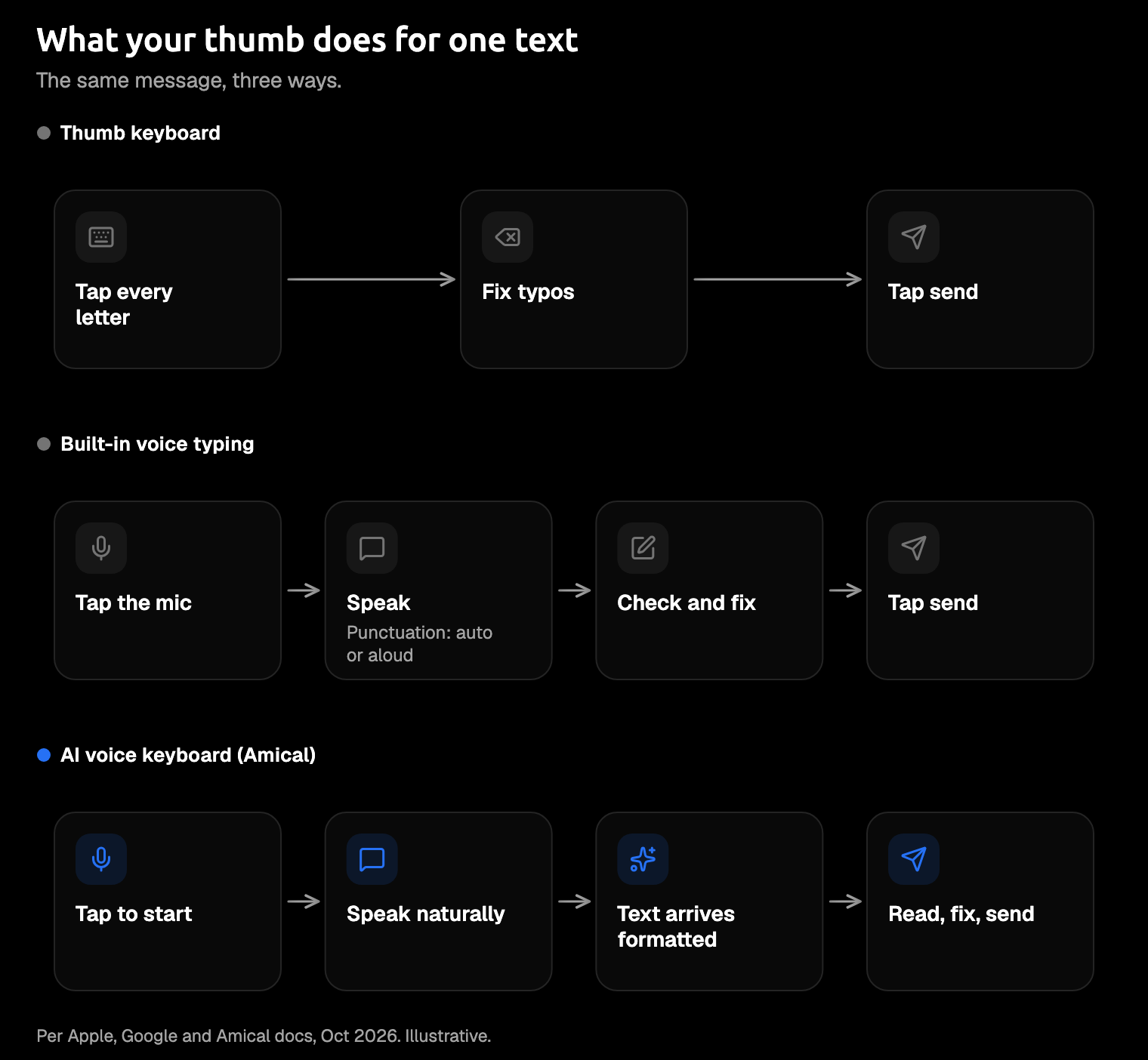
What voice doesn't remove is the tapping around the words. You still start dictation, check what came out, fix anything it got wrong, and press send. So the useful question isn't which tool hears you best. It's how many taps each one leaves for your thumb.
Picture dictating a perfect sentence, then tapping back in to fix your friend's name. That's the work to shrink.
Option 1: the voice typing already on your phone
iPhone and Android both have voice typing built in, and it costs nothing. It's a good place to start tonight, and here's how it works as of October 2026.
On iPhone, turn on Enable Dictation, which on recent iOS versions sits in Settings > General > Keyboard, then tap the microphone key and talk. On the newer models Apple lists (iPhone 17 Pro and Pro Max, iPhone Air, iPhone 18 Pro and Pro Max, and iPhone Duo), iOS 27's improved Dictation adds capitals, punctuation, and formatting as you speak. On other iPhones, you can add punctuation by saying it ("comma," "new paragraph"), and on supported models Dictation works without an internet connection.
On Android, tap the mic at the top of Gboard and talk after "Speak now." You can say "comma," "period," or "question mark" where you want them. On a Pixel 6 or later, Advanced voice typing processes your speech on the phone in six languages.
It's a fine first step. If your phone has you speak the punctuation, saying "question mark" to it in a quiet café takes a certain confidence. For the details, see AI voice keyboard vs iPhone Dictation and AI voice keyboard vs Gboard.
Option 2: an AI voice keyboard that writes the text for you
An AI voice keyboard lets you talk the way you'd talk to a friend and does the cleanup itself. It adds punctuation and capitals, fixes grammar, and shapes the text for the app you're in, so a WhatsApp reply reads like a text and an email reads like an email.
For this, we'd pick Amical. Its AI formatting turns what you said into a message you can send, so fewer taps go into fixing it. Here's an illustration of the idea, not a test run:
What you say: hey can you tell jo I'm running late um save me a seat near the front and I'll explain the train thing later
What lands in the chat: Hey, can you tell Jo I'm running late? Save me a seat near the front, and I'll explain the train thing later.
Names are where a lot of leftover taps hide. Add your friends, your street, and your kid's teacher to custom vocabulary, so Amical knows how you spell them and they're less likely to need a fix. Snippets handle the replies you send every day, like your address.
The same app runs on iPhone, iPad, and Android, works in 100+ languages with Amical Cloud, and starts on a free plan.
- Formatting can slip. AI formatting can still miss a name or a detail, so read the text before you send it. Custom vocabulary cuts down the misses.
- Sign-in and a connection. The phone apps need sign-in and transcribe with Amical Cloud only. On iPhone, Apple's Dictation stays on hand as your offline fallback.
- What leaves your phone. With Amical Cloud, your audio and some context for formatting (such as the app name and the text near your cursor) go to Amical Cloud, which does the formatting there. Amical's App Store privacy statement, our own declaration rather than an audit, says audio is streamed for transcription and not stored on Amical's servers, and transcripts are kept on your device. So the cloud sees your words while it works; the statement covers what's kept afterwards.
- Allow Full Access. On iPhone and iPad, Amical's keyboard needs this iOS switch to send your speech to Amical's transcription service and bring the text back; without it, it's a regular keyboard.
- A recent iOS. The iPhone and iPad app needs iOS or iPadOS 18.3 or later.
- A weekly cap on the free plan. It includes 2,000 cloud words a week, enough to find out whether texting by voice suits you; Premium makes cloud words unlimited.
This is where most of the leftover taps go away: you speak, read it over, and send.
If you're still comparing, see the best dictation apps for iPhone and for Android.
Set it up before your next reply
On iPhone or iPad (the iOS quick start has more):
- Install Amical: AI Voice Keyboard from the App Store.
- Open it and sign in.
- Add Amical as a keyboard in your iPhone's keyboard settings.
- Turn on Allow Full Access so the keyboard can reach Amical's transcription service.
- Allow microphone access.
- Tap any text field, switch to Amical with the globe key, and dictate your message.
On Android (see the Android quick start):
- Install Amical from Google Play.
- Open it and sign in.
- Grant three permissions: Accessibility Service so it can put text into the app you're in, Display over other apps for its floating bubble, and Microphone so it can hear you.
- Open any app with a text field. Amical's floating bubble appears over the app you're in and inserts your dictation there.
Then add the names you text most to your custom vocabulary. Do it now, while it's quiet. And read the permissions screen once, since it's the one everyone taps straight through.
Make it a habit your thumb notices
The goal is fewer taps, not zero. Use voice for anything longer than a quick "ok," and save your thumb for the send button.
For the taps that are left, switch hands or use an index finger, and keep the breaks and stretches from the list above. For a long back-and-forth, WebMD's tip still works: send a voice message or just call.
You'll feel the urge to thumb-type "lol" anyway. Allow yourself that one; it's short.
If you also type all day at a computer, the same app runs on Mac and Windows, so the habit comes with you to your desk. Dictation for RSI covers that setup, and Amical for RSI shows how it fits a workday.
FAQ
Can texting cause thumb pain?
Repeating the same thumb and wrist motion is associated with tendon irritation, and Mayo Clinic counts repetitive hand work as a risk factor. The evidence that texting itself is the cause is limited: the studies so far show links, not proof.
Does voice typing help texting thumb?
It gives your thumb a break, which is why Kaiser Permanente and AP both suggest it. It isn't a treatment, so pain that persists still needs a clinician.
Is voice typing private?
It depends on the tool and the mode. On supported iPhones, Apple's Dictation can work offline, and on a Pixel 6 or later, Advanced voice typing keeps your spoken text on the phone, except when you use "Fix it" or detailed edits. Amical's phone apps use Amical Cloud; what's sent there and what's kept is under "What leaves your phone" above.
Send the reply you've been putting off
You know the one: the message that deserved more than "ok." Download Amical, set up the keyboard, and send that reply by voice. Start on the free plan and give your thumb the evening off.