On this page
- The short answer
- What each one actually is
- Hardware: where the real difference is
- On a Mac
- On Windows with an NVIDIA card
- On Windows with AMD or Intel graphics, or CPU only
- Speed: what the published numbers say
- Memory, quantization and model files
- Silence, VAD and live streaming
- Install and packaging: building vs dictating
- Who ships which
- Dictating with whisper.cpp: the Amical example
- Which should you use?
- Try it in Amical
You have two GitHub tabs open, whisper.cpp in one and faster-whisper in the other, and a terminal that's half set up. Both promise fast, private Whisper (OpenAI's open speech-to-text model) on your own computer. You'd just like to know which one to finish installing.
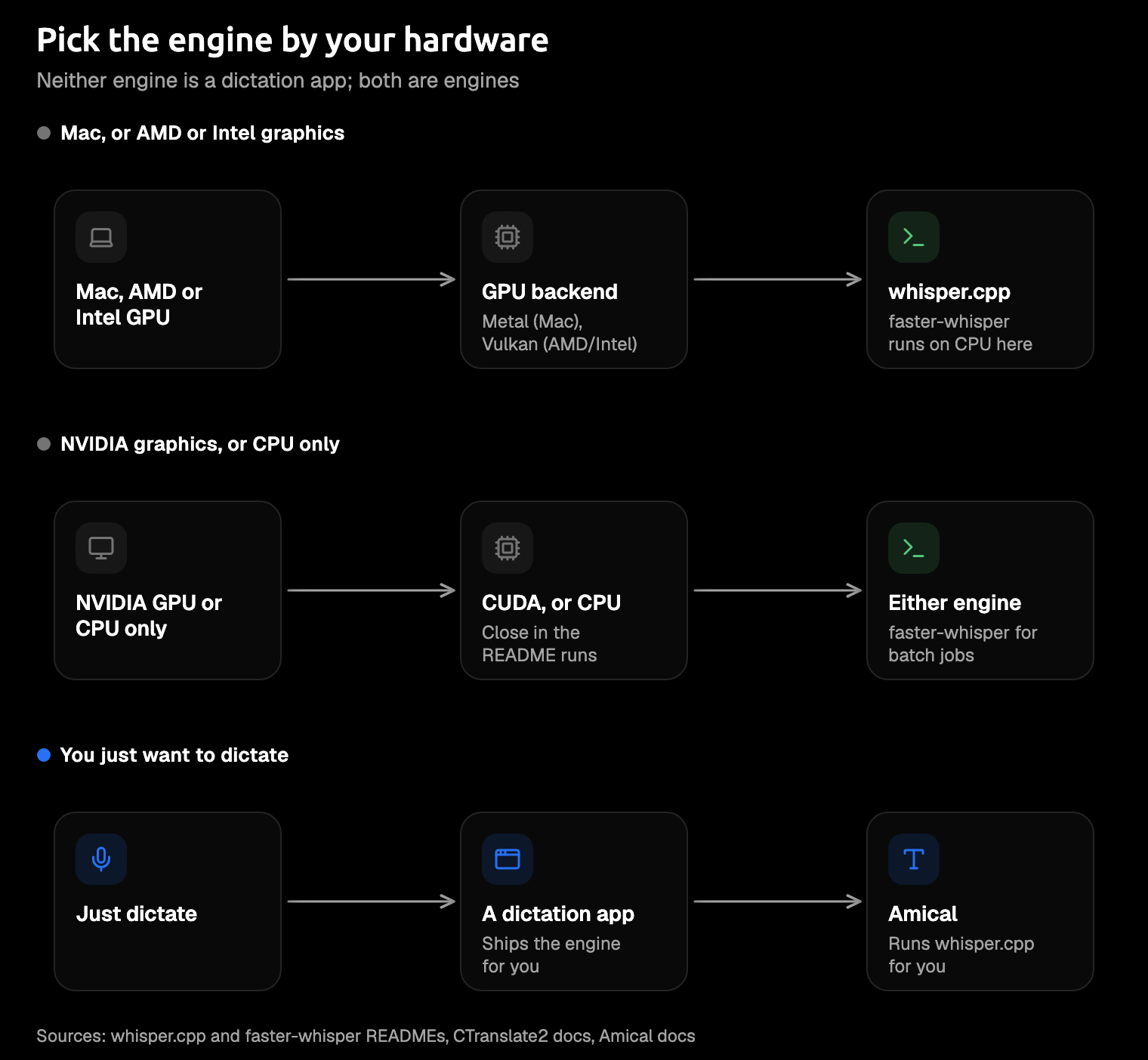
For dictation, your hardware decides this, not a benchmark. On a Mac, or a PC without an NVIDIA graphics card, use whisper.cpp: it can put your GPU to work there, and faster-whisper documents no way to. On an NVIDIA card, either is fine. faster-whisper pulls clearly ahead only on batched jobs (many chunks of a long file at once), and a dictation has nothing to batch.
Neither one is a dictation app, though. They're engines: no hotkey, no text box, no tidy email at the end. If you'd rather dictate than build, Amical runs whisper.cpp for you in a desktop app for Mac and Windows, with no CMake or Python to set up. Amical publishes this blog, so we have a stake in that last suggestion; most of the engine facts below come from the projects' own pages.
The short answer
whisper.cpp is a C/C++ program that runs on nearly any computer and can use Apple, NVIDIA, AMD, and Intel GPUs. faster-whisper is a Python library that's quick on NVIDIA cards; on a Mac, or a Windows PC without one, it runs on the CPU.
The real question is which one your machine can actually speed up.
| whisper.cpp | faster-whisper | |
|---|---|---|
| Written in | C/C++, no Python | Python, running on CTranslate2 |
| Runs on | macOS, Windows, Linux, iOS, Android, WebAssembly | Python 3.9+ on x86-64 or ARM64 CPUs |
| Apple GPU | Yes, Metal (plus Core ML for Apple's Neural Engine) | No Metal backend documented |
| NVIDIA GPU | Yes, CUDA | Yes, CUDA 12 with cuDNN 9 |
| AMD or Intel GPU | Yes, Vulkan (also ROCm and OpenVINO) | None documented for Windows or Mac |
| CPU speed (README run, small model) | 2m05s at fp32, 1m45s with OpenVINO; not run quantized | 2m37s at fp32, 1m42s at int8 |
| Quantization | Integer ggml models, such as Q5_0 | float16, int8_float16, or int8, picked at load |
| VAD | Silero, with --vad | Silero, with vad_filter=True |
| Live mic streaming | Yes, whisper-stream | Not built in; community projects add it |
| Install | Build with CMake; latest release lists no binaries | pip install faster-whisper |
| Licence | MIT | MIT |
| Last release | v1.9.5, October 2026 | v1.2.1, October 2025, with commits since |
What each one actually is
whisper.cpp is a port of Whisper to plain C/C++, built on ggml, a small C library for running AI models. You download one model file, build the program, and run it, with no Python anywhere.
faster-whisper is a Python library that reimplements Whisper on CTranslate2, an inference engine (software that runs a trained model efficiently). You install it with pip and call it from your own Python code. Both projects are MIT-licensed.
If you arrived expecting an app, that's the surprise. You get a command line or a function call, plus a README that assumes you already know what a compute type is.
On accuracy, there isn't much to compare. Both run OpenAI's Whisper weights, so the reasonable expectation is the same words from the same model. When your results differ, check the settings first (quantization and VAD, both covered below), not the engine.
Comparing these two on accuracy is like comparing two printers on what the novel says.
Hardware: where the real difference is
Hardware is where these two really part ways. whisper.cpp has a GPU path for nearly every machine you're likely to own; it's sometimes called a CPU-only tool, and it isn't.
faster-whisper's GPU path is CUDA (NVIDIA's toolkit for running code on its cards), through CTranslate2. CTranslate2's hardware page lists only NVIDIA GPUs for its prebuilt binaries. The faster-whisper README documents no Metal backend for Apple GPUs. CTranslate2's own README does mention packages for AMD cards (ROCm), but faster-whisper documents nothing for AMD or Intel graphics on a Windows PC or a Mac.
On a Mac
On Apple Silicon, whisper.cpp runs the model fully on the GPU through Metal, Apple's way for apps to use its graphics chips. faster-whisper has no documented Metal backend, so it runs on the CPU. Even WhisperX, a transcription tool built on faster-whisper, uses --device cpu --compute_type int8 in its README's Mac example.
On a Mac, this isn't close. Your GPU is sitting right there, and only one of these engines documents a way to ask it for help.
On Windows with an NVIDIA card
Both use CUDA here. whisper.cpp's latest release lists no binaries, so the README has you build it yourself with GGML_CUDA=1. faster-whisper needs NVIDIA's CUDA libraries installed separately. The README's pip route for them is Linux-only, so on Windows you download a community-built archive instead.
That's a fine afternoon for a developer. For a dictation setup you wanted working by lunch, it's a chore.
On Windows with AMD or Intel graphics, or CPU only
whisper.cpp's Vulkan backend (a graphics standard that works across GPU makers) needs only a driver that supports Vulkan. Buzz, a whisper.cpp-based transcriber, says in its README that this covers most GPUs, integrated ones included. Intel machines also get an OpenVINO path, Intel's own toolkit for running AI models. faster-whisper documents no GPU path here, so it runs on the CPU.
If your laptop's graphics say Intel or AMD, that quietly settles it. On the CPU alone, the race is closer than you'd think.
Speed: what the published numbers say
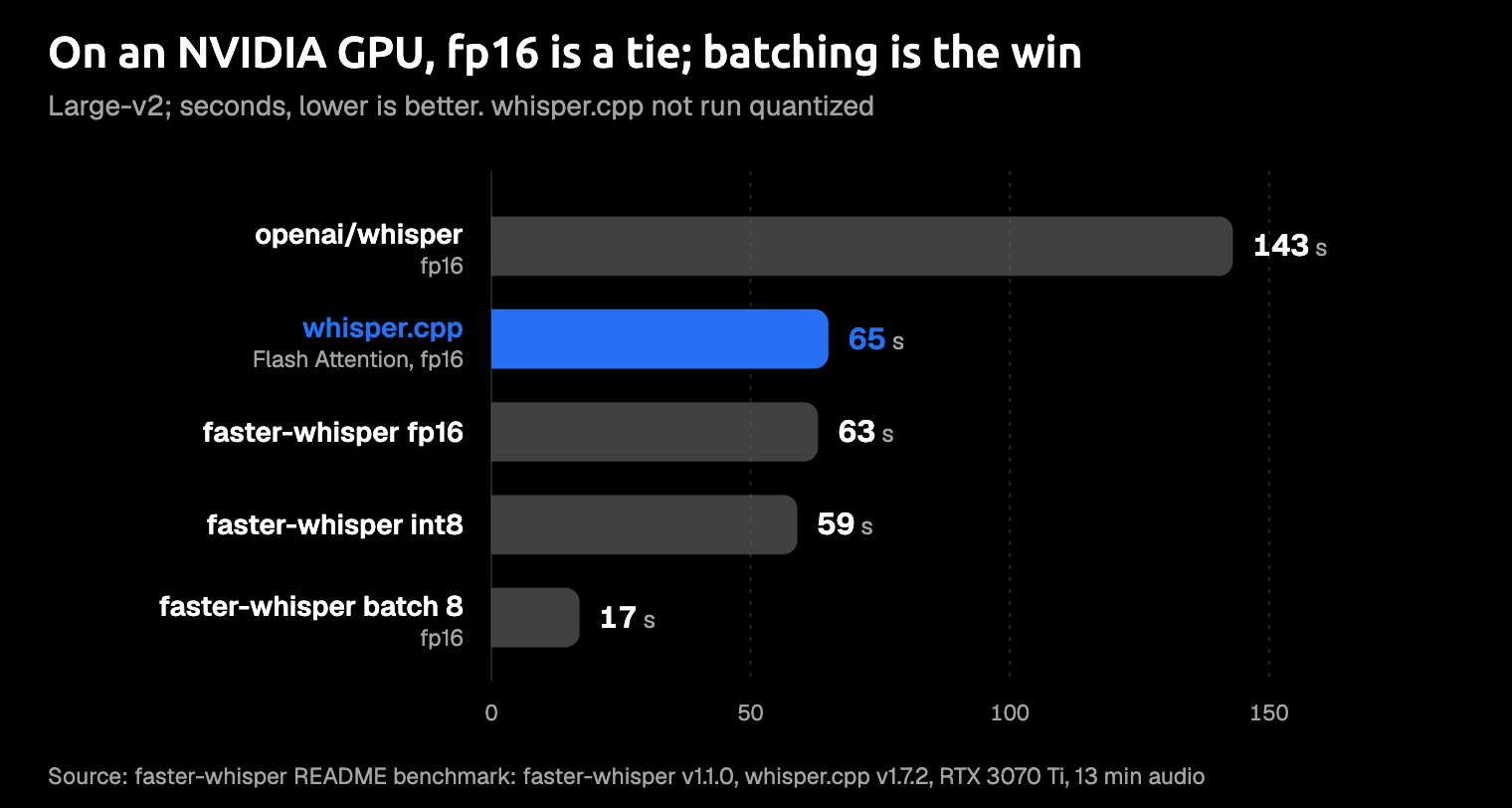
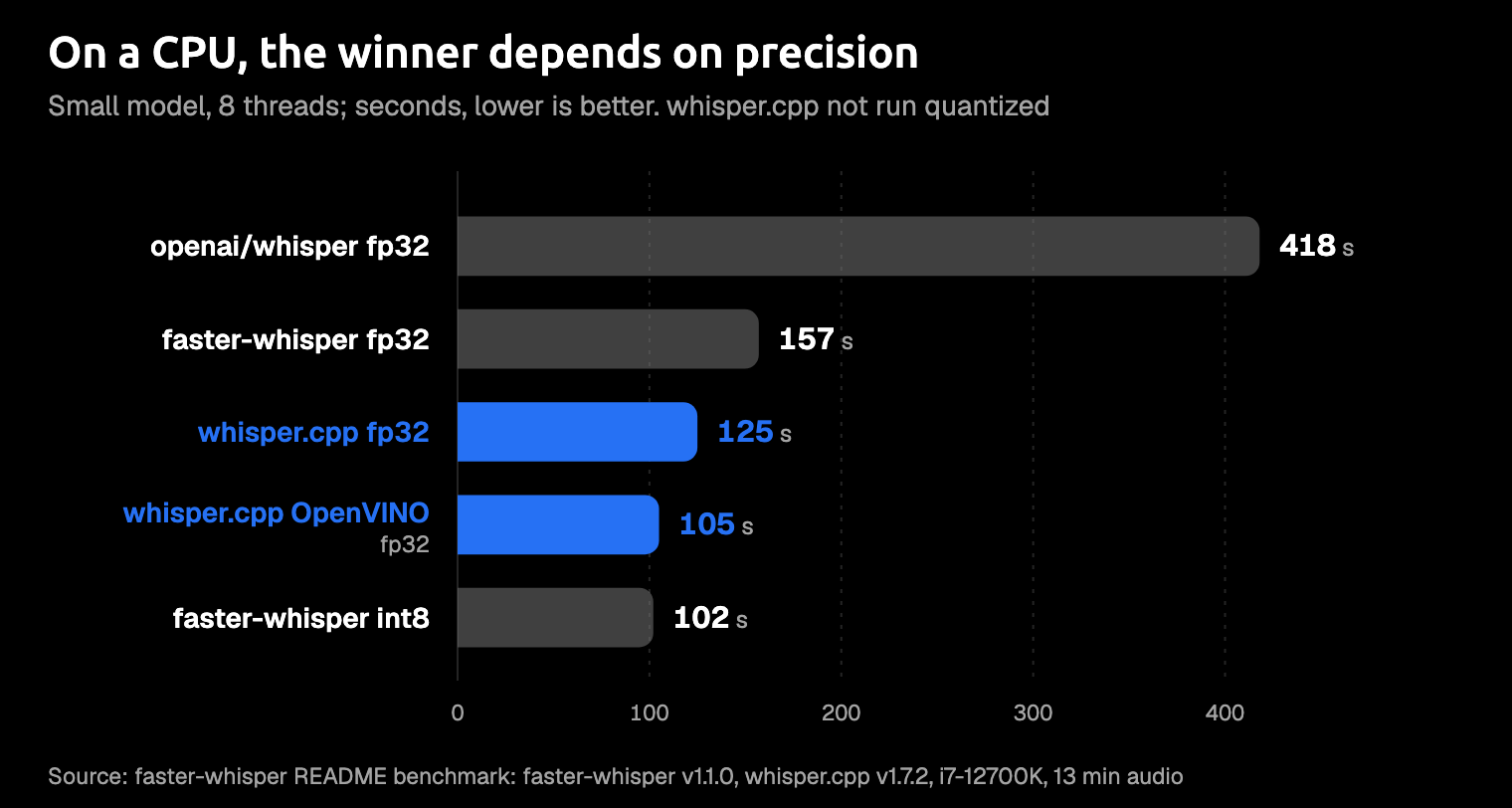
There's one solid source, and it isn't us: the faster-whisper project's own benchmark, in its README. It has no Apple Silicon rows, so read it as one data point. It pits faster-whisper v1.1.0 against whisper.cpp v1.7.2 on 13 minutes of audio, and whisper.cpp has had releases since that the run doesn't cover.
On the GPU run (the large-v2 model on an NVIDIA RTX 3070 Ti), whisper.cpp took 1m05s and faster-whisper took 1m03s, both at fp16, or half precision. Batching eight chunks at once cut faster-whisper to 17s, the one big gain. Its int8 run took 59s, but whisper.cpp wasn't run quantized at all, so that row isn't like for like.
On the CPU run (the small model, 8 threads of an Intel Core i7-12700K), the order flips with precision. At fp32, or full precision, whisper.cpp took 2m05s and faster-whisper took 2m37s. Add OpenVINO, and whisper.cpp drops to 1m45s; switch to int8, and faster-whisper drops to 1m42s.
Batching won't help your dictation. It splits a long file into chunks and runs them side by side, which is great for a podcast archive. A dictation is a few seconds of you talking. The like-for-like rows are the ones that matter for you, and on the GPU they finished two seconds apart over a 13-minute file.
And the "up to 4 times faster" in faster-whisper's description? That's measured against OpenAI's original Python Whisper, not against whisper.cpp. It's easy to read it as the final word on this question. It isn't.
Memory, quantization and model files
Quantization means storing a model's weights in fewer bits. You get a smaller file that usually runs faster, and accuracy drops a little.
whisper.cpp uses ggml model files, and its quantize tool makes integer versions such as Q5_0 that use less memory and disk. Its README lists the plain ggml files from 75 MiB for tiny up to 2.9 GiB for large.
faster-whisper uses models in CTranslate2's format, converted from the Hugging Face versions with the ct2-transformers-converter tool. You pick the precision when you load the model: float16, int8_float16 on a GPU, or int8 on a CPU or GPU. In the README's GPU run, int8 used about 2.9 GB of graphics memory, against about 4.5 GB at fp16.
In our view, that gap matters most on a laptop, where int8 leaves more graphics memory for everything else you have open. And if you've ever watched a model download eat the last of your disk, you'll like the smaller files too.
Silence, VAD and live streaming
VAD (voice activity detection) finds the stretches where nobody's speaking, so Whisper doesn't invent words to fill the silence. Both engines ship Silero VAD, a small open model that spots speech. In whisper.cpp you add --vad and download a separate VAD model; in faster-whisper you set vad_filter=True, which by default skips only silences longer than 2 seconds.
Live microphone input is where they differ. whisper.cpp ships whisper-stream, which transcribes your mic continuously. faster-whisper leaves streaming to community projects such as WhisperLive.
For push-to-talk dictation, we'd argue streaming matters less than how fast the text lands after you let go of the key. You're not watching words appear.
You're waiting to hit send.
Install and packaging: building vs dictating
whisper.cpp asks you to clone the repo, download a model with its script, and build with CMake, a build tool for C and C++ code. Its latest release, v1.9.5 from October 2026, lists no ready-made binaries, and whisper-cli wants 16-bit WAV input (the README suggests converting to 16 kHz mono with FFmpeg, a common audio tool).
faster-whisper is one line, pip install faster-whisper, on Python 3.9 or later. It bundles FFmpeg through PyAV, so you don't need to install that. The catch is the GPU: you'll still need NVIDIA's libraries, as above.
So faster-whisper is the easier library to install. Shipping it is another matter. A desktop app can bundle one native program, while a whole Python environment is a heavy thing to put in an installer. That's why we think whisper.cpp is the easier engine to ship. If you're on your third CUDA install guide of the evening, you'll see the appeal of an installer that does it all for you.
Who ships which
Most dictation apps that name their engine picked whisper.cpp, going by each project's own page.
- whisper.cpp: Amical; OpenWhispr, which adds sherpa-onnx for Parakeet; VoiceInk, which credits it under Core Technology; and Buzz, which lists whisper.cpp with Vulkan among its backends (Buzz transcribes files and isn't a dictation app).
- faster-whisper: WhisperX, a transcription tool built on top of it.
- Neither: Handy runs every model through a ggml-based engine,
transcribe-cpp. - Not published: as of October 2026, MacWhisper's and Superwhisper's sites don't name an engine.
That looks less like a popularity contest than a packing list. Whatever goes into an installer has to run on whatever laptop it lands on, NVIDIA card or not. If you want a wider look at these apps, our open source dictation apps roundup covers them.
Dictating with whisper.cpp: the Amical example
Maybe you wanted dictation and ended up with a build system. Amical does the build for you: its desktop app runs whisper.cpp in local mode on Mac and Windows. On Apple Silicon Macs, local Whisper runs on the GPU through Metal.
You pick a Whisper model in the app, from Tiny (about 78 MB) to Large v3 (about 3.1 GB), with Large v3 Turbo (about 1.5 GB) as the sensible middle. Or you pick Parakeet v3, an open speech model that also runs on Intel Macs and macOS 14 (here's how it compares with Whisper).
Then you hold Fn on a Mac, talk in any app, and let go. Amical's AI formatting rewrites the transcript for the app you're in, so you get a Slack reply or an email, not a raw transcript. Here's an illustration of the idea, not a measured run. Say this in Slack:
ok so the release is moving to thursday, QA found a login bug, um, and I'll update the doc tonight
And Amical types something like:
Heads up: the release is moving to Thursday because QA found a login bug. I'll update the doc tonight.
whisper.cpp gave you the words. AI formatting gave you the message.
In local mode, dictation works offline once the model is downloaded and needs no account, and no audio leaves your computer. Formatting is the one step that can go online: your text leaves only if you pick a cloud provider for it. To keep the whole thing offline, point formatting at Ollama, a free app that runs language models on your computer, as Local AI models explains. Local Whisper handles one language at a time, so for mixed Japanese and English, Amical Cloud is the better fit.
Amical has weak spots too, and each one has an answer:
- Amical doesn't use faster-whisper. On a Mac, faster-whisper documents no GPU path anyway, and its biggest lead, batching, doesn't apply to a few seconds of speech.
- Local Whisper on a Mac needs macOS 15 or later and is slower on Intel Macs. Parakeet runs on macOS 14 and Intel Macs, and Amical Cloud skips the local model entirely.
- There's no Linux version. On Linux, you can run either engine directly, or try Handy or OpenWhispr, which both run there.
- Amical's repo has far fewer GitHub stars than either engine. Stars measure attention: the engine inside is the same whisper.cpp, and Amical adds formatting and a cloud option on top. The source is on GitHub.
When speed matters most, switch to Amical Cloud, Amical's own speech model. By Amical's own figures, finished, formatted text is ready in under 300 ms for short dictations. Amical Cloud needs a sign-in, and your audio plus some context for formatting (such as the app name and the text near your cursor) go to Amical Cloud. Our cloud vs local dictation guide walks through that trade.
Which should you use?
Pick the engine for the job, and for dictation, the job is an app.
- You want to dictate on a Mac or Windows PC, privately. Use Amical's local mode with whisper.cpp or Parakeet; local dictation is unlimited on the free plan.
- You're building on a Mac, or on AMD or Intel graphics. Use whisper.cpp; you get Metal or Vulkan.
- You're building a Python pipeline on NVIDIA, or batch-transcribing files. Use faster-whisper, or WhisperX on top of it, since batching is where faster-whisper pulls clearly ahead.
- You're running a CPU-only server. Either works. Test faster-whisper at int8 against whisper.cpp on your own files, because the README's CPU results flip with precision.
- You want dictation on a Linux desktop. Try Handy or OpenWhispr, since Amical doesn't run on Linux.
If you're wondering whether local Whisper sends anything to OpenAI, this explainer answers it. And if the model, not the engine, is your real question, start with the best speech recognition models.
Try it in Amical
- Download Amical and install it. The desktop quick start covers setup.
- Open Settings → AI Models, go to the Speech tab, and download a Whisper model: Large v3 Turbo for balance, or Base or Small on an older computer. Pick Parakeet instead if your Mac runs macOS 14.
- Set your model as the Default Speech Model.
- Click into a real email you'd otherwise type, hold your push-to-talk key (
Fnon a Mac), and say it. Let go and read what lands.
The free plan gives you unlimited local dictation plus 2,000 cloud words a week, so you can try both modes before deciding anything; pricing has the rest. One real email will tell you more than we can.