On this page
- The short answer
- What changes as you go up a size
- Outside English, size matters far more
- Should you use the .en models?
- Download size, memory, and the unit trap
- Speed: what the numbers do and don't tell you
- Turbo, Medium, or Large v3?
- Raspberry Pi and Home Assistant
- What about Distil-Whisper?
- Which size for your machine
- How to try two sizes in Amical
- Start with Turbo
You've decided to run Whisper, OpenAI's open speech-to-text model, on your own computer. Then the download list appears: six sizes, from about 78 MB to about 3.1 GB, and not a word about which one suits your laptop.
So which Whisper model is best? For dictation on a modern laptop, start with Large v3 Turbo. On an older or Intel machine, drop to Small. Move up to Large v3 if you dictate in a language Whisper heard less of in training, or if you need translation. Leave Tiny and Base to very weak hardware running English, like a Raspberry Pi.
Every model speed and accuracy figure below comes from OpenAI, the Whisper paper, or a named open source project. The picks are our reasoning from those published figures, not our own benchmarks.
Amical publishes this blog, so you should know our stake. Amical's local mode ships all six sizes on Mac and Windows, works offline once a model is downloaded, and needs no account; local dictation is unlimited on the free plan. If you'd rather not pick a model at all, or you mix two languages in one breath, Amical Cloud runs Amical's own speech model instead. It needs sign-in and an internet connection, where local mode needs neither.
The short answer
Most laptops only need three of these rows: Turbo, Small, and Large v3. The table makes the middle look crowded, but the other sizes exist for good reasons, just probably not yours.
| Size | Parameters | Download in Amical | Relative speed (OpenAI) | Graphics memory (OpenAI) | Clean English WER (paper) | English-only twin | Pick it when |
|---|---|---|---|---|---|---|---|
| Tiny | 39M | ~78 MB | ~10x | ~1 GB | 7.6% | Yes | Raspberry Pi, English only |
| Base | 74M | ~148 MB | ~7x | ~1 GB | 5.0% | Yes | very old machine, English only |
| Small | 244M | ~488 MB | ~4x | ~2 GB | 3.4% | Yes | Intel Mac or older laptop |
| Medium | 769M | ~1.5 GB | ~2x | ~5 GB | 2.9% | Yes | rarely: translation on a budget |
| Large v3 | 1550M | ~3.1 GB | 1x | ~10 GB | 2.7% (large-v2) | No | other languages, translation, spare disk |
| Large v3 Turbo | 809M | ~1.5 GB | ~8x | ~6 GB | not in the paper | No | most laptops: start here |
WER, short for word error rate, is the share of words a model gets wrong, so lower is better. The scores come from the clean English test in the Whisper paper, which came out before Large v3 and Turbo. OpenAI measured speed and memory on a data-center graphics card, so read those two columns as relative, not as what your laptop will do.
If your eyes went straight to the last column hunting for your own machine, that's the right instinct.
What changes as you go up a size
Every Whisper size is the same design, scaled up: from 4 layers and 39M parameters in Tiny to 32 layers and 1550M in Large. Parameters are the values a model learns in training. More of them buys accuracy on hard audio and on other languages, and costs you disk, memory, and speed.
On clean English, the gap is smaller than most people expect. In the paper's LibriSpeech test, which is clean audiobook reading, Small gets 3.4% of words wrong and large-v2 2.7%.
That's less than one word in a hundred between them, for a model more than six times the size.
Harder audio widens the gap. On LibriSpeech's "other" set, the harder recordings from the same collection, Small scores 7.6% and large-v2 5.2%. Your dictation is probably messier than either set: LibriSpeech is a person reading a book aloud into a decent microphone, not you replying to a client with the dishwasher running.
If you mostly dictate English in a quiet room, that flat stretch is good news. You don't need the biggest download to get your words right; you need one that keeps up with you.
Outside English, size matters far more
The ladder gets much steeper once you leave English. On Fleurs, a test of read speech in many languages, Tiny gets 27.8% of German words wrong and large-v2 gets 4.5%. On the same Fleurs test, English goes from 12.4% to 4.2%.
More than one German word in four wrong isn't a draft you edit; it's one you retype.
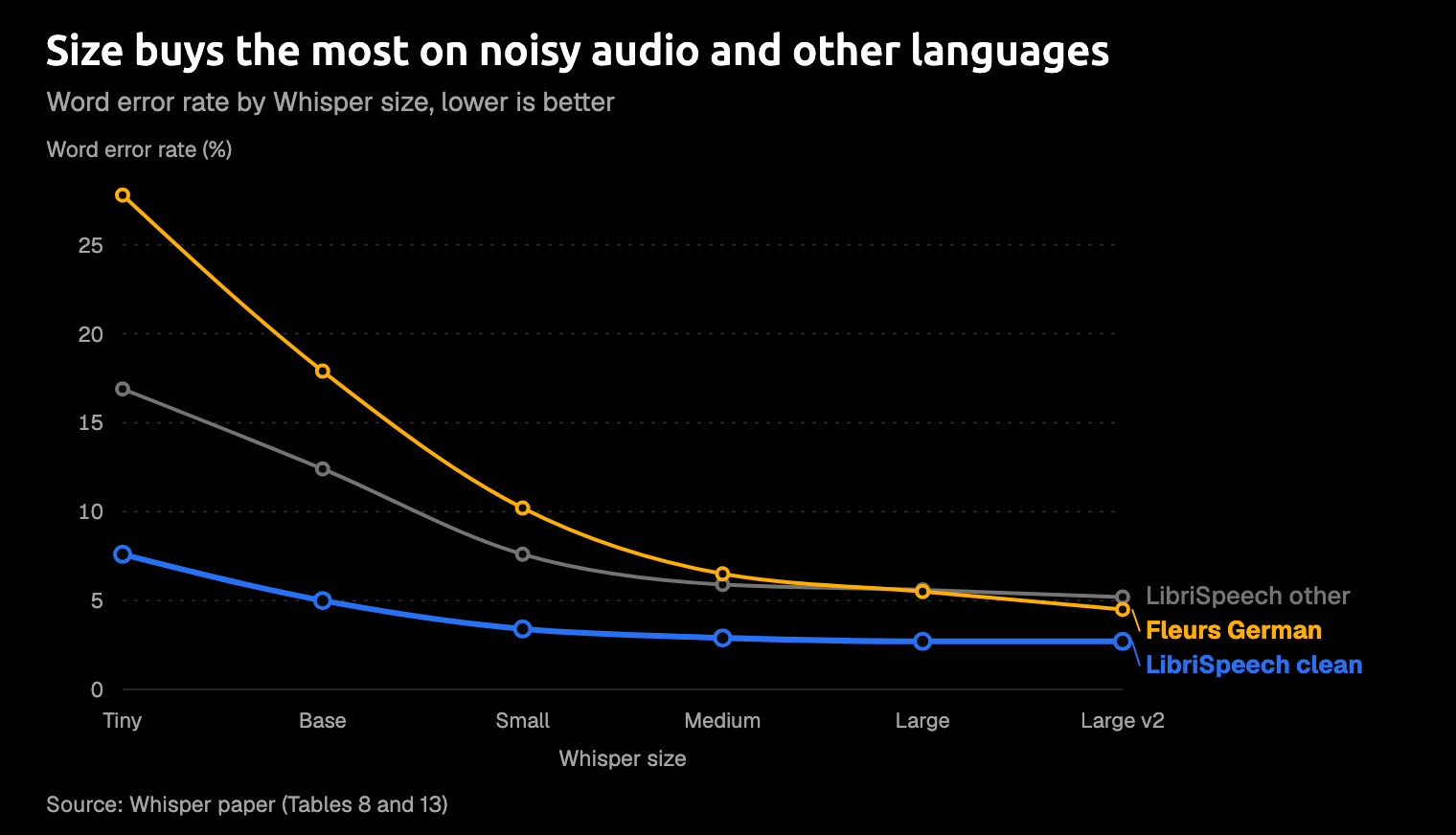
Three lines from the Whisper paper: clean English, harder English, and German. Clean English flattens by Small; the other two fall much further before they level off.
The reason is training data. Whisper heard far more English than anything else, and OpenAI's model card says accuracy in each language is directly tied to how much training data it had.
So if you dictate in anything but English, skip Tiny and Base entirely and treat Small as your floor. Even Small still misses about one German word in ten. Large v3 moves the top up again: OpenAI says it makes 10% to 20% fewer errors than large-v2.
If you tried Tiny in your first language and got back something only loosely related to what you said, the model wasn't broken. It was simply too small for that language.
Amical's local mode covers 99 Whisper languages plus auto-detect, and Multi-language support shows how to set yours. Local Whisper handles one language at a time, though. If you switch between, say, Japanese and English mid-sentence, Amical recommends Amical Cloud, which covers 100+ languages. Does Whisper support multiple languages? goes deeper on that.
Should you use the .en models?
Tiny, Base, Small, and Medium each come with an English-only twin, marked .en. Large and Turbo come only in the multilingual version.
The twins help most at the bottom of the ladder. On the paper's clean English test, tiny.en gets 5.6% of words wrong against 7.6% for Tiny, and base.en 4.2% against 5.0%. By Medium the gain is gone: medium.en scores 3.1% and plain Medium 2.9%. OpenAI's README says the same thing in words: the .en advantage shrinks as the models grow.
So .en is worth it only if you're stuck on Tiny or Base and you only ever speak English. Specializing helps a small model the way a phrasebook helps a traveler: a lot at first, much less once you're fluent.
Amical downloads only the multilingual files, with no .en versions. That costs you little in practice, because the .en gain has mostly faded by Small, and Small is already our pick for an older laptop.
Download size, memory, and the unit trap
Disk is the cost you see first. The download column in the table is what Amical lists for each size.
Other apps often offer quantized files too: copies with the model's numbers stored at lower precision, so the file shrinks. On Hugging Face, the site that hosts the model files, a quantized copy of Turbo is 574 MB against 1.62 GB for the full one. The catch is accuracy: Home Assistant's docs, for one, say its int8 builds (another quantized format) are slightly less accurate.
Amical fetches the full-size files, not quantized builds. Its answer to "I want a smaller Large" is Turbo, which is already about half the download of Large v3 and keeps every language.
Then there's the unit trap. Turbo's full file shows as 1.62 GB on Hugging Face and 1.5 GB in the README of whisper.cpp, a version of Whisper built to run fast on ordinary computers. Nobody trimmed your model on the way down. Hugging Face counts in decimal units and whisper.cpp in binary ones, so the same bytes give a smaller number. Amical lists Turbo at about 1.5 GB, but the file it fetches is that same 1.62 GB one from Hugging Face.
Memory is where big numbers scare people off. OpenAI lists about 10 GB of graphics memory for Large, but that's for its own Python version of Whisper. The whisper.cpp README lists far less: about 273 MB of memory for Tiny, up to about 3.9 GB for Large, with no figure for Turbo. whisper.cpp vs faster-whisper compares it with another fast runtime.
If you saw "10 GB" and closed the tab, come back.
On a typical modern laptop, memory rarely decides it; disk space and speed do.
Speed: what the numbers do and don't tell you
What you feel when you dictate isn't how fast a model gets through an hour of audio. It's the pause between letting go of the key and seeing your words, which none of the figures below measure directly.
OpenAI's speed column is relative to Large and was measured on English speech. OpenAI itself notes that real speed depends on the language, how fast you talk, and your hardware. So Turbo's 8x tells you where it sits on the ladder, not how long you'll wait.
The clearest timing on an ordinary processor, with no graphics card, is in faster-whisper's README. Small transcribed a 13-minute recording in 2 minutes 5 seconds with whisper.cpp on an Intel i7-12700K, about 6x faster than real time. OpenAI's own Python version took 6 minutes 58 seconds on the same machine, more than three times as long, so the runtime matters a lot. That i7 is a recent desktop chip. An older laptop or Intel Mac will be slower, so treat Small there as a cautious place to start, not a measured fit.
On Apple Silicon, whisper.cpp can also run part of the model on Apple's Neural Engine through Core ML, which its README says makes that part more than three times faster than the processor alone. Amical's docs say its local Whisper runs on Apple Silicon's Metal graphics backend and don't mention Core ML, so don't count on that particular boost in Amical.
Turbo is the odd one out on this ladder. Its file is about the size of Medium's (1.62 GB against 1.53 GB on Hugging Face), yet OpenAI clocks it at about 8x, close to Base's 7x. The trick is in the decoder, the part that writes your words: Turbo has 4 decoder layers where Large v3 has 32. That's why it's our default pick, and why OpenAI made it the default in its own whisper command-line tool.
If you've been watching a cursor blink while a big model catches up, Turbo is the size to try before you give up on running Whisper locally.
Turbo, Medium, or Large v3?
This is the crowded middle, and Medium is the size most people should skip. It takes about the same disk as Turbo, at about a quarter of Turbo's speed by OpenAI's measure.
Medium was the sensible middle before Turbo arrived; now it's mostly a translation tool.
Translation is the one thing Turbo can't do. OpenAI didn't train it for translation, so if you ask Whisper to turn foreign speech into English text, Turbo hands back the original language. OpenAI points to Medium or Large for that job. It matters only if you run Whisper yourself to translate audio; in Amical, these models transcribe your dictation.
Large v3 earns its 3.1 GB elsewhere. Turbo is fine-tuned from a pruned (cut-down) Large v3, and OpenAI says it performs about like large-v2 across languages, with bigger drops in some, such as Thai and Cantonese. If you dictate in a language like those, or Turbo keeps missing your words and you have disk to spare, try Large v3. The full head-to-head is in Whisper Large v3 Turbo vs Large v3.
Raspberry Pi and Home Assistant
Home Assistant, the open source smart-home platform, runs Whisper through an add-on for voice commands, and its docs make the size choice for you. As of October 2026, the default setting, auto, picks tiny-int8 on ARM boards such as a Raspberry Pi 4 and base-int8 everywhere else. Those int8 builds are the quantized kind: smaller and faster than the full files.
The same docs say automatic language detection makes the add-on "much slower", so set your language. They also list distilled models as faster, smaller options. The add-on publishes no timings for any model on a Pi.
On a Pi taking English commands, accept Tiny and set the language. If your commands still come out wrong, move the add-on to a faster computer before you move up a size. In another language, Tiny is the size we told you to skip, so try the add-on's small-int8 option and expect a longer wait, or move to a faster computer.
A bigger model on the same small board mostly means a longer wait for the same lights to turn on.
Amical's local mode is for Mac and Windows, with no Linux version, so a Pi is a job for the Home Assistant add-on.
What about Distil-Whisper?
Distil-Whisper is the fast English-only cousin: handy if you're building your own transcription setup, no use if you ever switch languages. Hugging Face trained these smaller "student" models to copy Whisper. The main one, distil-large-v3, has 756M parameters and runs at about 6.3 times Large v3's speed.
The accuracy cost is modest. On Hugging Face's own short-clip test, distil-large-v3 gets 9.7% of words wrong against 8.4% for Large v3. That's a different test from the paper's, so don't compare those numbers with the table above.
For any other language, Hugging Face itself points you to Turbo. Amical doesn't ship Distil-Whisper.
Which size for your machine
- Modern Apple Silicon Mac or Windows laptop: Large v3 Turbo.
- Intel Mac or older laptop: Small.
- Another language or translation, with disk to spare: Large v3.
- English only, very old machine: Base, or tiny.en or base.en in apps that ship them.
- Raspberry Pi, English commands: Tiny, with the language set.
- Raspberry Pi, another language: the add-on's small-int8, or a faster computer.
- Two languages in one dictation: Amical Cloud.
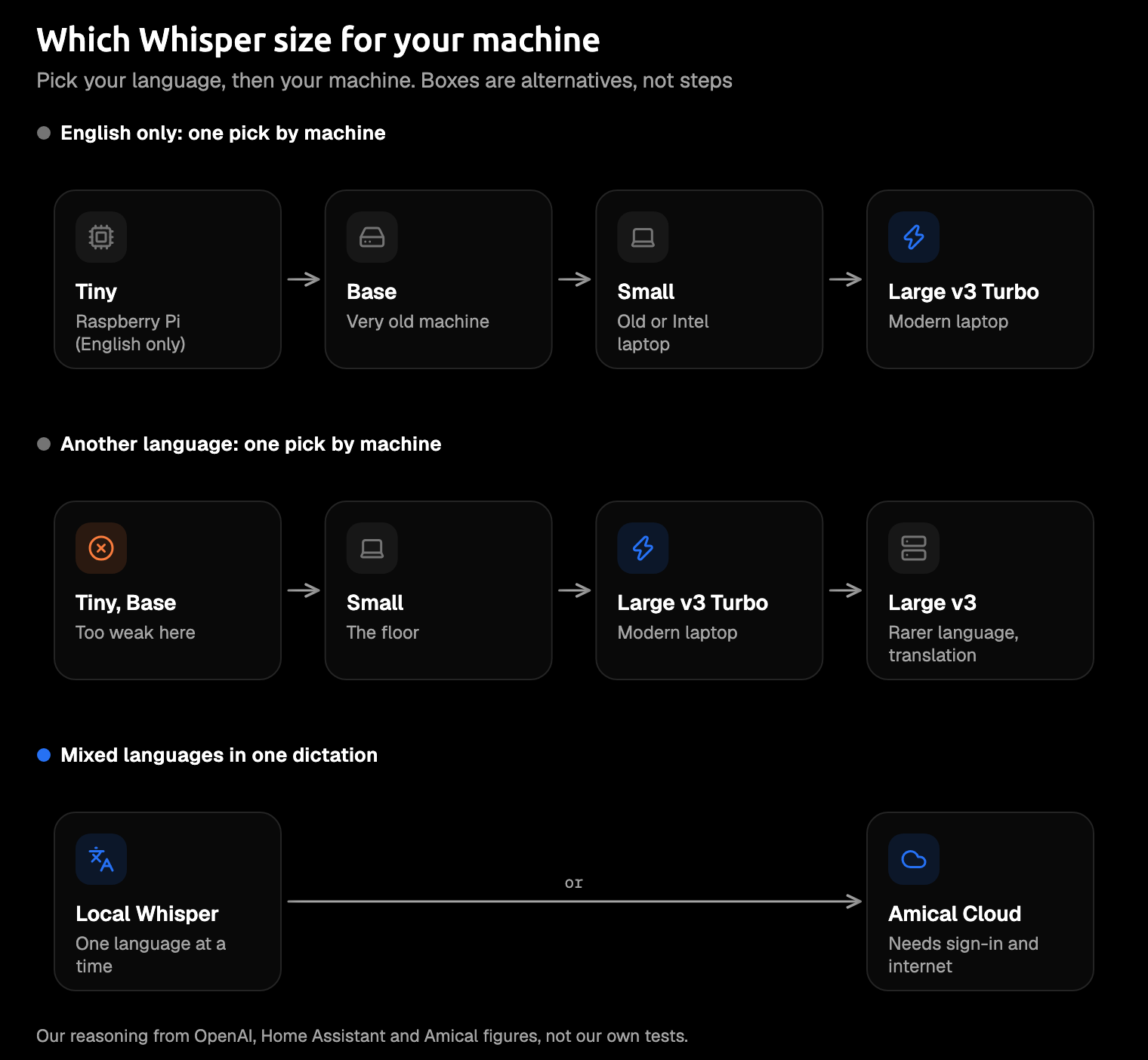
Language first, then machine.
In Amical's local mode, all six sizes run through whisper.cpp on your own computer, offline once downloaded and with no account. Your audio stays on your computer, and your text does too unless you point AI formatting at a cloud provider. Formatting then shapes your words for the app you're in: a proper email in Gmail, a short reply in Slack. Switching sizes is a download and a click, so try two on the same paragraph and keep the one that gets your words right.
A table can't hear your accent; your own paragraph can.
On a Mac, local Whisper needs macOS 15 or later and runs slower on Intel Macs, which go without Metal graphics acceleration. If that's your Mac, start with Small, or use Amical Cloud, which has neither limit because it runs on Amical's servers rather than your hardware. Parakeet, NVIDIA's open speech model, is Amical's other local option, and Parakeet vs Whisper compares the two.
If you'd rather not choose a model at all, Amical Cloud is the easy route. By Amical's own figures, it returns finished, formatted text for a short dictation in under 300 ms. Cloud vs local dictation covers that trade-off. To see where Whisper stands against other models, read the best speech recognition models.
How to try two sizes in Amical
The test takes one paragraph and two downloads. Local AI models shows where the model list lives in Amical's settings.
- Download Amical from the download page and follow the desktop quick start.
- Open the local model settings, download Large v3 Turbo (listed at about 1.5 GB), and set it as your speech model.
- Dictate a real paragraph you'd normally type: an email, a Slack reply, or a prompt.
- Download Small (about 488 MB), or Large v3 (about 3.1 GB) if you dictate in another language, then switch and dictate the same paragraph.
- Keep the one that gets your words right, and delete the other to free up disk.
If either size types words you never said during a pause, that's a known Whisper habit, not a ghost in your microphone. Whisper hallucination covers what to do about it.
Start with Turbo
Download Amical, set Large v3 Turbo as your speech model, and dictate one real email with it. If it's fast enough and gets your words right, keep it. If not, step down to Small, or up to Large v3 if it keeps missing your language. Local dictation is unlimited on the free plan, which also gives you 2,000 Amical Cloud words a week if you want to compare; pricing has the details.