On this page
- The short answer
- Whisper on your own computer: nothing goes to OpenAI
- OpenAI's API: your audio goes to OpenAI, under API rules
- ChatGPT dictation and voice: the consumer rules
- Apps that say "Whisper": the word doesn't tell you where it runs
- How to check any app in a few minutes
- Where Amical fits
- Which should you use?
- Try it with the Wi-Fi off
You open a dictation app, and the settings page says "powered by Whisper". Whisper is OpenAI's speech-to-text model. So does Whisper send your data to OpenAI, including that slightly blunt note about the budget you just dictated?
It depends which Whisper you're using. Run the open model on your own computer and your audio stays on it: the code that loads the model goes online only to download each model file the first time you use it. Use OpenAI's API and your audio goes to OpenAI by design, under rules that keep it out of training by default. Use an app that says "Whisper" and you have to check what that app does.
Full disclosure, since this is a privacy question: Amical publishes this blog, sells Amical Cloud, and runs open Whisper in its free local mode. The guide ends with a test you can run with the Wi-Fi off, on any app.
The short answer
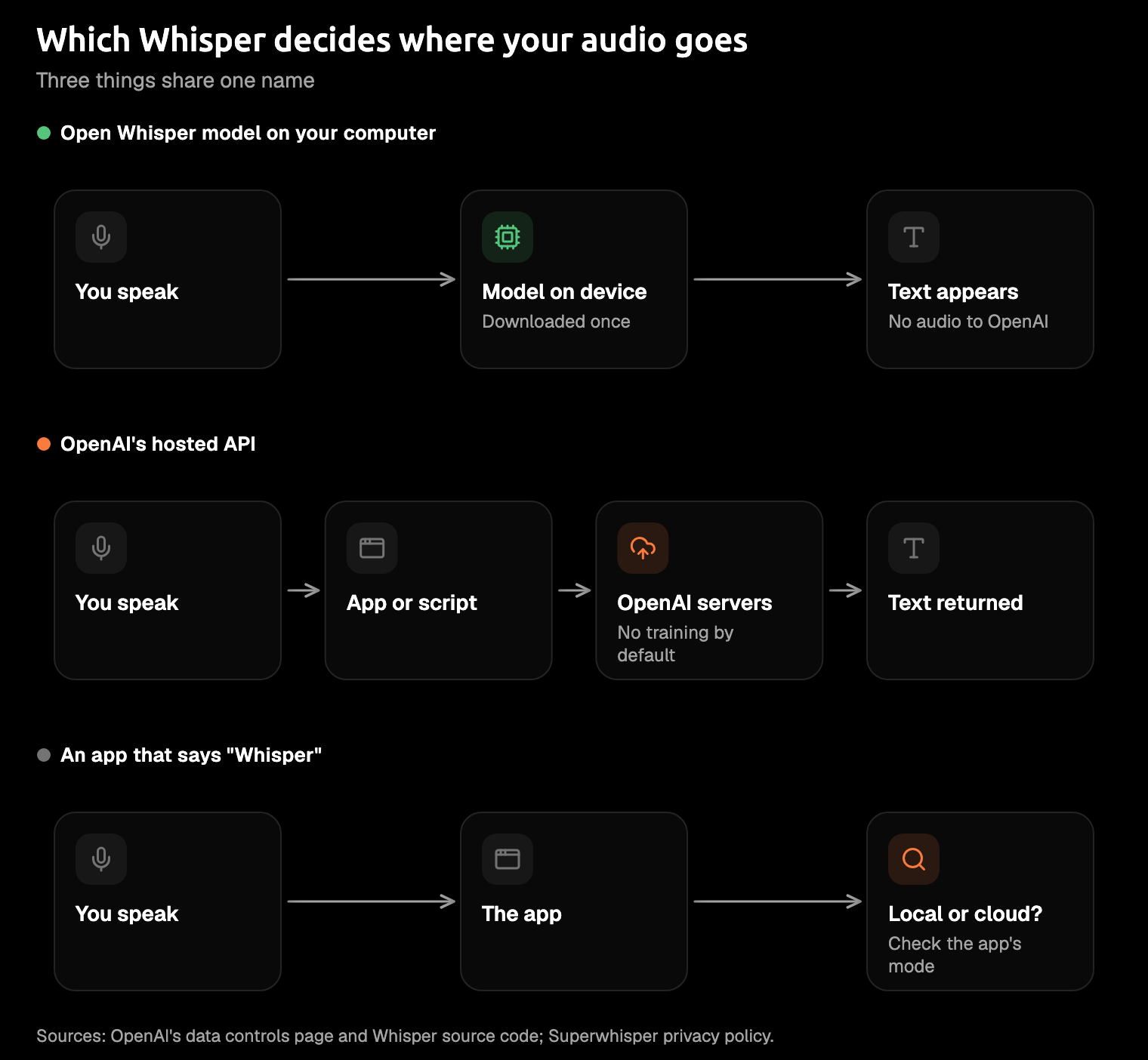
"Whisper" covers several things that treat your audio very differently, and ChatGPT's mic button often gets mixed in with them.
| Path | Does your audio reach OpenAI? | Is it kept? | Used for training? | How to tell |
|---|---|---|---|---|
| Open Whisper on your own computer | No. Its loader only downloads each model file, once | Only where you save it, on your computer | No: OpenAI never receives it | It still transcribes with the Wi-Fi off |
OpenAI's API (whisper-1, gpt-transcribe) | Yes, by design | For transcription, none listed | No, unless you opt in | The app says "Whisper API", or asks for your OpenAI key |
| An app that says "Whisper" | Depends on the app | The app's policy decides | The app's policy decides | Its privacy page and its local or cloud setting |
| ChatGPT dictation and voice | Yes | Dictation: as long as the chat stays in your history | Only if you chose to share audio | You pressed the mic in ChatGPT |
Amical's local mode, with Whisper, is the first row for audio. Amical Cloud is Amical's own hosted, self-built speech model, and it gets its own section below.
One word is covering three different setups, and it isn't telling you which.
The question that matters is simpler: where does the model run?
Whisper on your own computer: nothing goes to OpenAI
Open Whisper is a model file plus the code that runs it, and both live on your machine. OpenAI released it in September 2022 under an open licence (MIT on GitHub), and you can install it with one line: pip install -U openai-whisper.
The code goes online once per model. The first time you use a model, Whisper downloads it from OpenAI's file host (openaipublic.azureedge.net) and saves it in ~/.cache/whisper. It checks the file against a SHA256 checksum, a fingerprint that proves it arrived intact. After that, the loader uses the copy on your disk. In the loader's code, that download is the only network call, and there's no telemetry or analytics.
If you've been reading forum threads with a growing sense of unease, this is the calming part. The model file is just a file, and it doesn't report back any more than a photo in your Downloads folder does.
Other ways to run Whisper work the same way, except the model files come from Hugging Face, a public host for AI models. That covers whisper.cpp (a port of Whisper to plain C/C++), faster-whisper (another reimplementation), and Hugging Face's own transformers library. whisper.cpp vs faster-whisper compares the first two.
Hugging Face's libraries do collect some usage data by default, but it goes to Hugging Face, not OpenAI, and one setting, HF_HUB_DISABLE_TELEMETRY=1, turns it off.
What you won't find is an official OpenAI page that says the open model sends nothing. Even a reply in OpenAI's own community forum says it can't point to one. The case rests on the code, which anyone can read. The Wi-Fi test at the end of this guide adds the part you can see: the transcription itself runs on your computer.
OpenAI's API: your audio goes to OpenAI, under API rules
OpenAI's API is the hosted version. An API is how one program asks another for work: your app sends the audio file to OpenAI's servers and gets text back. The speech models there are whisper-1 and the newer gpt-transcribe, which OpenAI now recommends for recorded speech.
This is the path where "Whisper" really does mean OpenAI's servers. The good news is that it comes with paperwork, and for transcription the paperwork is stricter than the forum folklore. A 2023 forum reply recalled 30 days of retention; as of October 2026, the endpoint table on OpenAI's data controls page lists none for transcription.
- The general rule. Across the API, abuse-monitoring logs (the records OpenAI keeps to spot misuse) are kept for up to 30 days by default, and OpenAI's enterprise privacy page says the same of inputs and outputs, with exceptions for some endpoints. The endpoint table is the more specific of the two.
- Realtime. Live audio through the Realtime API is different: its logs are kept for 30 days.
- Training. Since March 1, 2023, data you send to the API isn't used to train OpenAI's models unless you opt in.
- Zero data retention (ZDR). Under ZDR, OpenAI keeps none of it. Transcription is eligible, with OpenAI's approval and a qualifying use case.
- The law. OpenAI notes these logs can be kept longer if the law requires it.
OpenAI's consumer Privacy Policy doesn't cover content processed for API customers, so ChatGPT's rules below don't apply here. And if you reach OpenAI's models through Microsoft's Azure cloud, Microsoft says what you send isn't available to OpenAI.
One date to know: whisper-1 shuts down on February 26, 2027, and the notice says nothing about the open model on your computer. GPT-Transcribe vs Whisper covers the switch.
ChatGPT dictation and voice: the consumer rules
ChatGPT is a different product with a different rulebook. When you tap the mic to dictate, your audio goes to OpenAI's models for transcription.
"I only used the mic button" still means OpenAI. It just means the consumer rules, not the API's.
- Dictation. Your audio is kept as long as the chat stays in your history, and deleted within 30 days of you deleting the chat, unless it's needed for security or legal reasons.
- Voice mode. Standard voice deletes audio after it's transcribed; Live and Advanced voice save clips with the chat and keep them for 30 days.
- Training. On a personal account, OpenAI may train on your audio only if you chose to share it; the switches are in Settings > Data Controls. Business accounts aren't trained on by default.
The dictation and voice mode help pages say this as of October 2026, and neither names the model that does the transcribing. For your privacy, the settings above matter more than the model's name.
Apps that say "Whisper": the word doesn't tell you where it runs
When an app says "Whisper", it's naming the model, not telling you where it runs. The app makes that choice. These examples come from each app's own pages, as read in October 2026, and they cover the range.
- Some apps call OpenAI's API. MagicSchool says it transcribes speech with OpenAI's Whisper API. TypingMind's OpenAI Whisper option runs on your own API key, and its docs don't say where the audio is processed.
- Superwhisper says that with a local model, your audio and transcripts never leave your device. Its cloud models process audio in memory without storing it and may pass it to providers such as OpenAI under their own terms; with your own API key, requests go straight to that provider. Its policy also says your data isn't used to train AI models.
- Wispr Flow is a separate company's dictation app, not OpenAI's Whisper. Its privacy page says transcription always happens in the cloud, audio is deleted once it's transcribed unless you turn on cloud storage, and a setting controls whether your data is used for training. Its pricing page lists SOC 2 Type II, ISO 27001, and HIPAA with a BAA.
Whisper, Wispr Flow and Superwhisper sound alike, but they're three different things with three different answers.
How to check any app in a few minutes
You don't need to read code for this:
- Read the privacy page for the words "local" and "cloud", and see whether it describes the two modes separately.
- Find the model or mode setting. A list of models to download usually means a local option exists. An app with no such setting should say on its privacy page where transcription runs.
- Download a model, turn off your Wi-Fi, and dictate. If text still appears, the transcribing happened on your computer. The privacy page tells you what the app does once you're back online.
- Check where formatting runs. AI cleanup can use a cloud model even when speech stays local; local dictation and AI cleanup covers that step.
An app that won't tell you which mode you're in has answered the question for you.
Where Amical fits
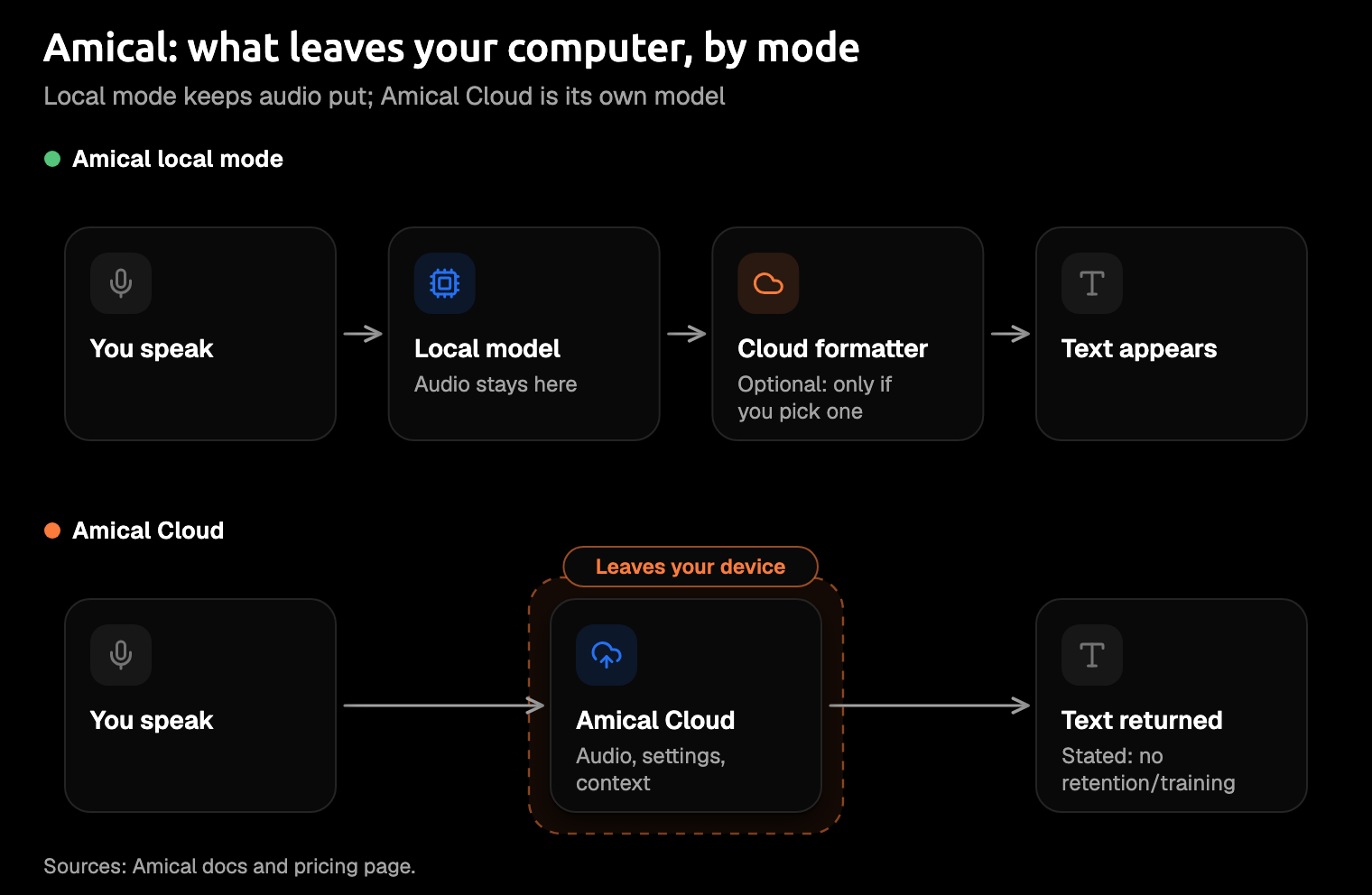
Amical is an AI dictation app that makes this a setting you choose, not a guess. You pick the speech model yourself, local or cloud, so you're never wondering which one your voice just went through. Then Amical rewrites what you said for the app you're in: an email in Gmail, a short reply in Slack.
In local mode, Amical runs open Whisper through whisper.cpp, from Tiny to Large v3 Turbo, or Parakeet, another open speech model. There's no account, no audio leaves your computer, and dictation works offline once the model is downloaded. Local AI models shows the setup.
Your text leaves the computer in local mode only if you set a cloud provider for AI formatting, such as OpenAI, Anthropic or OpenRouter. Then the transcript and the text around your cursor go to that provider, and OpenAI sees them only if it's the one you set. A formatter running on your own computer, through Ollama or LM Studio (tools that run language models locally), keeps it all there.
With Amical Cloud, your audio goes to Amical's own hosted, self-built speech model. Your language and vocabulary settings go too, plus some formatting context: selected text, up to 500 characters around your cursor, the app name, and the browser URL. The pricing page states no data retention and no training on your data. Cloud AI models has the details.
Amical also sends anonymous telemetry by default. It excludes what you dictate, and you can turn it off; Telemetry explains how. The desktop app is open source under the MIT licence, so you don't have to take this section on trust: the code is on GitHub.
On a Mac, local Whisper needs macOS 15 or later and is slower on Intel Macs. Parakeet runs on macOS 14 and on Intel Macs, and Amical Cloud has no macOS 15 requirement. The iPhone, iPad and Android apps transcribe with Amical Cloud only and need sign-in, while local mode on the desktop needs no account.
Which should you use?
Amical is our pick: local mode when your audio has to stay on your computer, Amical Cloud when you want speed and finished text under a stated no-retention policy. By Amical's own figures, Amical Cloud has finished, formatted text ready in under 300 ms for short dictations and under 500 ms for longer ones. Both live in one app, so you can switch when the work changes.
Other situations call for other tools:
- You're building with OpenAI's model. Use the API's transcriptions endpoint, and ask OpenAI about zero data retention if your use case needs it.
- You want a raw transcript and you're at home in a terminal. Run openai-whisper or whisper.cpp directly.
- You transcribe recordings, not live dictation. Buzz transcribes audio files offline on your computer and is open source.
- You work in a regulated field. HIPAA and similar rules are a separate question, and nothing here is legal advice. Where the audio goes is the first thing your compliance team will ask, not the last.
For the bigger picture, cloud vs local dictation weighs the two approaches, and the best open source dictation apps compares the local options.
Try it with the Wi-Fi off
This test works on any app, Amical included. Download Amical, pick a Whisper model in local mode, and let it download. If you've set a cloud formatter, switch to a local one first.
Then turn off your Wi-Fi and dictate one real message, like the Slack reply you've been putting off. When the text appears anyway, that transcription ran on your computer. For what the app does once you're back online, the open code is the place to look.
The free plan includes unlimited local dictation plus 2,000 Amical Cloud words a week, for when the Wi-Fi comes back on; pricing has the details.