You tap the mic key, say a quick reply, and iPhone dictation gets most of it down. Then you fix the capital it missed, delete the "um", and retype the name it guessed. That's three fixes for one short reply.
If you're looking for an iPhone dictation alternative, the difference is simple. Built-in dictation gets your words down, and then you tidy them. An AI voice keyboard, a third-party keyboard that sends your speech to an AI model and cleans up the text, types the message you meant.
Our view: if you dictate messages every day, switch, and try Amical first. Amical publishes this blog, so we've given Apple's dictation a fair hearing below. Everything here compares against iOS 27, released in September 2026.
The short answer
iPhone dictation is a good free transcriber that's already on your phone, and on the newest iPhones it's a better one. An AI voice keyboard adds a cleanup step: it drops filler words and tidies punctuation and capitals before the text reaches the chat box.
Use the built-in for quick notes and anything offline. Use an AI voice keyboard for the messages other people read.
| iPhone dictation (iOS 27) | AI voice keyboards (as of October 2026) | |
|---|---|---|
| Cost | Built in, nothing to buy | Most have a capped free tier (Willow announced unlimited free dictation); Pro plans from $8.49 to $15 a month |
| Cleanup | Auto-punctuation; on newer iPhones, better spelling, punctuation, and capitals in English | Removes filler words and tidies punctuation and capitals |
| Custom vocabulary | Not in Apple's dictation guide | Personal dictionaries in Wispr Flow, Superwhisper, and Amical |
| Languages | The languages of the keyboards you've added | From 49 to 100+, depending on the app |
| Where speech is processed | On your iPhone in many languages, otherwise on Apple's servers | Mostly in the maker's cloud |
| Offline | Yes, where processing is on-device | Cloud models need a connection |
| Setup | One switch in Settings | Install, add the keyboard, allow Full Access, usually sign in |
| Which iPhones | Any with Dictation on; the newer model needs iPhone 17 Pro, 17 Pro Max, Air, or later | Varies, from iOS 16.1 (Typeless) to iOS 26.0 (Superwhisper) |
| Example | The Dictate button on Apple's keyboard | Amical: free plan with a weekly limit, Pro $9.99 a month, iOS 18.3 or later, 100+ languages |
Our pick is Amical. In any text field, from Messages and Mail to WhatsApp and Slack, it punctuates, formats, and removes filler words, and it keeps a custom vocabulary for the names you use. Per-app formatting, where an email reads like an email and a chat reply like chat, is documented for Amical on Mac and Windows, not on iPhone.
It handles 100+ languages with automatic detection, including Japanese and English in the same sentence. It's built for speed, too: Amical Cloud returns short dictation in under 300 ms and longer dictation in under 500 ms, by Amical's own figures for the service rather than a timed iPhone run.
How each one turns speech into text
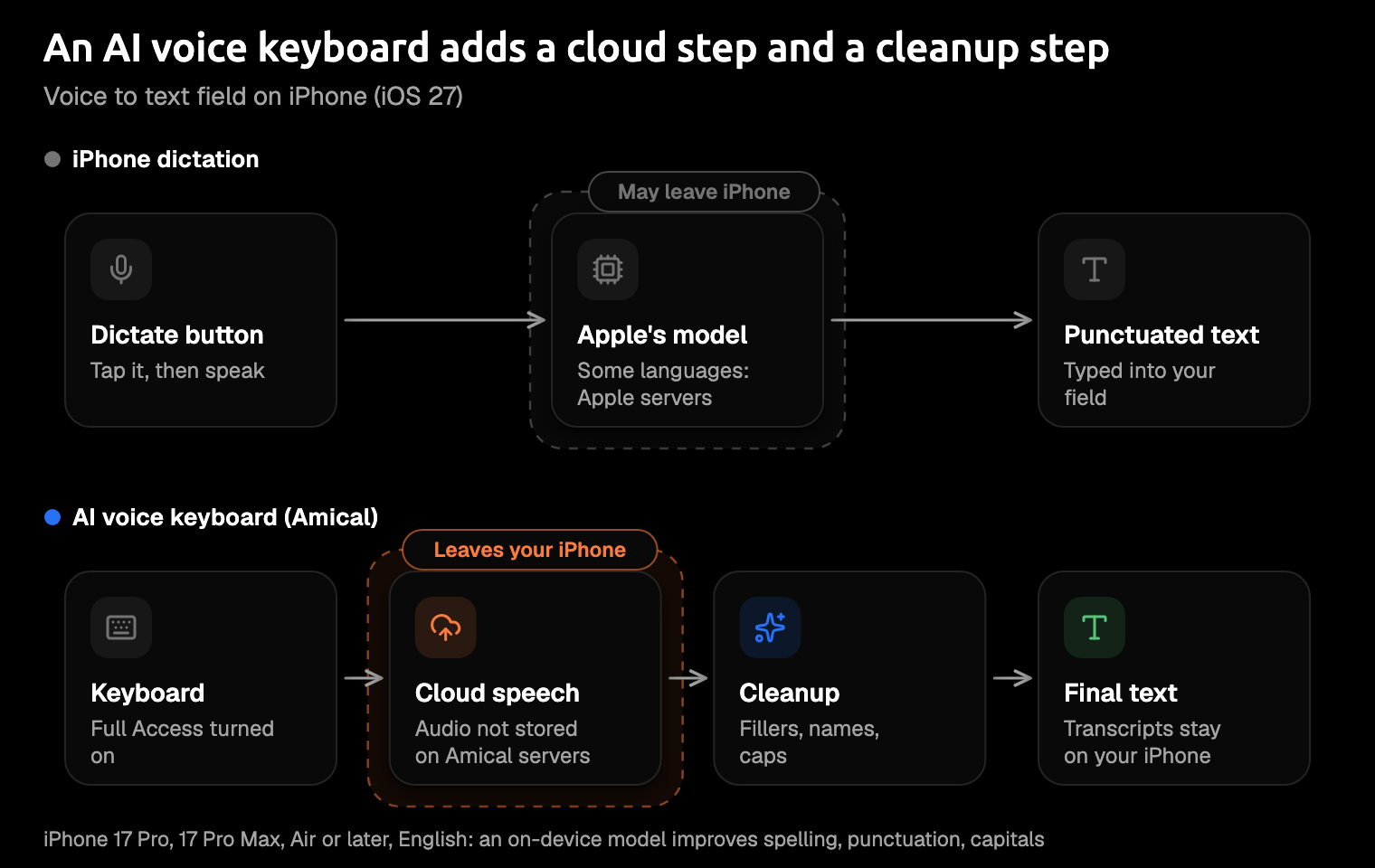
iPhone dictation transcribes with Apple's model, on your iPhone in many languages and on Apple's servers for the rest, and in supported languages it adds punctuation as you go. On an iPhone 17 Pro, 17 Pro Max, Air, or later with Apple Intelligence, an on-device model also improves spelling, punctuation, and capitalization, in English.
An AI voice keyboard is a separate keyboard. You switch to it with the globe key, the one you've probably tapped by accident while reaching for the space bar. Most send your audio to a cloud speech model, get the transcript back, and run a cleanup step before the text appears.
That's why Amical, for one, asks for Full Access, an iOS permission for third-party keyboards: it needs it "to send your speech to our transcription service and bring the text back".
As of October 2026, the cloud is the common design. Wispr Flow says its transcription always happens in the cloud, Willow describes a cloud model, and Superwhisper's cloud models need internet. On iPhone, Amical transcribes with Amical Cloud.
The cleanup step is the whole difference. Transcription gets your words right; cleanup gets the message right.
Same message, two results (illustrative)
Here's a reply you might say while walking to a meeting, with a filler, a change of mind, and a name. It shows what each design is built to do; it's not a recorded run.
What you say:
um hey siobhan can we move the sync to thursday no wait friday and I'll bring the deck
What plain dictation might type, with auto-punctuation on:
Um hey Shivon, can we move the sync to Thursday no wait Friday and I'll bring the deck.
What an AI voice keyboard aims for, with Siobhan in your custom vocabulary:
Hey Siobhan, can we move the sync to Friday? I'll bring the deck.
The difference shows in the correction, not the punctuation. Apple describes its newer model as improving spelling, punctuation, capitalization, and formatting; it doesn't list removing fillers or acting on "no wait". That's the cleanup step's job. Typeless lists handling for self-corrections like this one. Amical's listing names filler-word removal along with punctuation, capitals, and formatting, but not self-corrections.
Read the message once before you send it. Cleanup can still get a detail wrong, and the day you meant matters more than any comma.
What iPhone dictation does well
Apple's dictation is better than its reputation, and for plenty of jobs it's all you need.
- Built in, anywhere you type. Turn it on in Settings and, as Apple's Dictate text guide puts it, you can dictate text anywhere you can type it.
- Type and talk together. The keyboard stays open while you dictate, so you can fix a word by hand mid-sentence.
- On-device and offline in many languages. In Apple's words, dictation "is processed on your iPhone in many languages, and no internet connection is required." English (US) and Japanese are both on Apple's on-device list.
- Auto-punctuation. In supported languages, it adds commas, periods, and question marks for you.
- Spoken commands. Say "new paragraph", "caps on", or "question mark", and it does that; Apple's dictation commands list the rest.
- Emoji by name. In supported languages, say "heart emoji" and you get a heart, which beats scrolling the emoji picker.
- Edit by voice. "Change Thursday to Friday", "Delete", and "Undo" work in US English on iPhone 12 and later, except iPhone SE.
- A better model on newer iPhones. With iOS 27, iPhone 17 Pro, 17 Pro Max, Air, and later get an on-device model that improves spelling, punctuation, and capitalization in English.
Early reports on that newer model are anecdotal. One AppleVis user tried iOS 27 on an iPhone 17 Pro Max in July 2026, before its public release. They were "definitely happier" than with iOS 26 dictation, but found it "not anywhere near as accurate as WhisperFlow" (their spelling of Wispr Flow).
For a shopping list, none of what follows matters. Milk doesn't need a greeting.
Where iPhone dictation falls short
The gaps show up in messages other people read, not in notes to yourself.
It types what you said, not what you meant
Apple's dictation now does more than transcribe. On newer iPhones, Apple's newsroom says it captures speech as "polished text", with capitalization, punctuation, and formatting handled automatically. What Apple doesn't list is removing filler words or acting on a change of mind mid-sentence; Laxis, which sells a rival dictation app, says it has no filler cleanup.
Users have reported rougher edges too, though these are anecdotes from iOS 26 and earlier, not tests. In an Apple Communities thread from February 2026, an iPhone 16 Pro owner found that dictated text no longer capitalized its first letter, and 11 people added "Me too". The auto-capitalization setting fixed it for the poster, but not for a later user. An AppleVis user on iOS 18.5 wrote that "the first words I say, including punctuation, aren't recorded".
An AI voice keyboard treats your transcript as a first draft. Typeless lists filler removal and self-correction handling, and Amical's listing promises punctuation, capitals, formatting, and filler-word removal. So the "um" stays on the sidewalk, not in the team chat.
It doesn't know your names
Apple's dictation guide doesn't list a vocabulary setting, or anywhere to tell it how a colleague spells her name.
AI voice keyboards keep a personal dictionary. Wispr Flow has one, and Superwhisper stores vocabulary on each device. Amical's custom vocabulary syncs with Amical on Mac and Windows, so a name you add at your desk is already on the list when you pick up your phone. Custom vocabulary shows how to add words.
Your manager's name should only need correcting once.
The better model needs a newer iPhone
Apple's improved model works in English, on iPhone 17 Pro, 17 Pro Max, Air, or later, with Apple Intelligence. Apple's newsroom also lists iPhone Duo and the iPhone 18 Pro models, and the standard iPhone 17 isn't on its list. If your iPhone is a few years old and still works fine, it keeps the older model.
Cloud keyboards sidestep the hardware question, because the heavy work happens on a server. Amical needs iOS 18.3 or later, and since it transcribes in Amical Cloud, an older iPhone gets the same cleanup as a 17 Pro.
Your phone doesn't need to be new for your messages to look polished.
Mixing languages
iPhone dictation works in the languages of the keyboards you've added, and Apple notes that features vary by language and region. Apple's guide doesn't describe mixing two languages in one sentence.
If your sentences often start in one language and finish in another, that's the case to test before you rely on it.
Amical handles 100+ languages with automatic language detection, and Amical Cloud copes with Japanese and English in the same sentence. Wispr Flow also lists 100+ languages. Multi-language support has the details.
What switching asks of you
An AI voice keyboard usually asks for a few things Apple's doesn't: Full Access, a connection, an account, and often a subscription.
Full Access. This is the permission that lets a keyboard send your speech to its service, and the wording of the switch is enough to make anyone pause. Superwhisper's setup guide asks for it, and so does Amical; without it, Amical's keyboard still types but can't dictate. Full Access is reasonable when the maker says plainly what it sends, so read that before you tap. Amical's developer says the keyboard doesn't read what you type on other keyboards or collect app contents.
A connection and an account. Cloud keyboards need internet. On iPhone, Amical uses Amical Cloud only, so it needs a connection and a sign-in, while Apple's on-device dictation keeps working on a plane. If you need offline dictation, Amical's local mode on Mac and Windows needs no account: audio stays on your computer, and text leaves only if you pick a cloud provider for formatting. Cloud vs local dictation walks through that choice.
Where your audio goes. With Amical Cloud, your audio goes to Amical's servers for transcription, and the listing says it "is not stored on our servers"; transcripts stay on your device. The privacy labels include audio data, email address, and user ID as linked to you. Those are the developer's own statements, which Apple doesn't verify, and the iPhone app's code isn't in Amical's public repo the way the MIT-licensed desktop app's is. So for iOS, the listing is what you have to go on.
Often a subscription. Most AI voice keyboards pair a capped free tier with a paid plan. Amical's free plan has a weekly dictation limit, and Pro is $9.99 a month or $83.99 a year in the app. Pricing explains the plans.
One more change to know about: according to Superwhisper's docs, iOS 26.4 "no longer lets third-party keyboards return you to the previous app automatically". That matters for keyboards that open their own app to record.
When to stick with iPhone dictation
Plenty of people are better off with the built-in, and that's a real group, not a footnote:
- You need offline. On-device dictation needs no connection in many languages.
- You never want audio to leave the phone. When dictation is processed on your iPhone, Apple says it isn't sent to Apple's servers; with Amical, audio goes to Amical Cloud.
- You dictate notes, not messages. A transcript is fine when you're the only reader.
- You'd rather not add a keyboard with Full Access. That's a fair line to draw, and Amical and Superwhisper both need it to dictate.
- You have an iPhone 17 Pro or Air, dictate in English, and the newer model is enough. Then you may already have what you came looking for.
Which AI voice keyboard to try
Start with Amical if you also dictate on a computer or mix languages. Its vocabulary and preferences sync with Amical on Mac and Windows, so the list you built at your desk follows you to your phone. The same app runs on iPad, and there's an Android version too.
As of October 2026, Amical's iPhone app has no App Store rating yet, while Wispr Flow shows 4.8 from about 18K ratings. The free plan answers that: trying Amical costs you one message, not a subscription.
The others each fit a different reader:
- Wispr Flow has the most App Store ratings of these keyboards, plus a personal dictionary and 100+ languages. Pro is $15.00 a month or $143.99 a year, on iOS 18.3 or later. See Amical vs Wispr Flow.
- Superwhisper is cheaper per month at $8.49 ($84.99 a year, or $249.99 lifetime), but it needs iOS 26.0 or later. Its docs say modes and vocabulary are stored per device, which matters less if you dictate on one phone. See Amical vs Superwhisper.
- Aqua Voice starts you with 1,000 free words; after that, Pro is $12.99 a month or $119.00 a year. It supports 49 languages on iOS 17.0 or later.
- Typeless is built around cleanup, with filler removal, self-correction handling, and "Speak to edit". It runs on iOS 16.1 or later, which makes it the one to look at on an older iPhone, though its listing doesn't state a free limit.
- Willow announced free, unlimited dictation on iOS in July 2026, with Pro at $15 a month, though its settings still showed a Pro prompt when that was reported.
If you want only free options, free Wispr Flow alternatives goes further, and iPhone Duo owners have their own roundup.
How to set up both
iPhone dictation
- Open Settings > General > Keyboard and turn on Enable Dictation, accepting the prompt if one appears.
- Tap in a text field, then tap the Dictate button on the keyboard.
- Speak when the dictation icon appears near your cursor.
- Stop by tapping Dictate, saying "Stop dictation", or staying quiet for 30 seconds.
To see how your language is processed, tap About Dictation & Privacy below the dictation settings.
Amical keyboard
These steps follow the App Store listing and the iOS quick start:
- Install Amical from the App Store; it needs iOS 18.3 or later.
- Open Amical and sign in.
- Allow microphone access.
- Go to Settings > General > Keyboard > Keyboards > Add New Keyboard and choose Amical.
- Turn on Full Access for the Amical keyboard, so it can send your speech for transcription.
- In any app, long-press the globe key and choose Amical.
- Tap the microphone and speak.
Before your first real message, add the names you type most to your custom vocabulary: a colleague, a client, a product. It saves you fixing the same name every week.
FAQ
Is iPhone dictation private?
It depends on your language. When dictation is processed on your iPhone, Apple says it's "not sent to Apple servers"; otherwise it's processed on Apple's servers. What Apple keeps from those requests, and for how long, depends on your settings, including Improve Siri and Dictation; its Siri and Dictation privacy page spells it out. Apple links those requests to a random identifier that rotates multiple times per hour, not to your Apple Account. Dictation into a search field may also be sent to the search engine.
Is it safe to give a keyboard Full Access?
It's a judgment call. Full Access is what lets a keyboard send your speech to its service, so read the privacy section of its App Store listing before you flip the switch. Amical's says the keyboard doesn't read what you type on other keyboards or collect app contents.
Is Amical free on iPhone?
Yes, there's a free plan with a weekly dictation limit, and Pro is an in-app purchase for when you need more.
Does Amical work on Mac and Windows too?
Yes. On Mac and Windows, AI formatting adapts to the app you're in, so an email comes out as an email and a WhatsApp reply gets chat formatting. Local mode there runs offline without an account, and your vocabulary and preferences sync with your iPhone. Our comparisons with Mac dictation and Windows voice typing cover each one.
Try it on a message you'd normally fix
Pick one real message, ideally one with a colleague's name and an "um" or two in it. Download Amical, follow the iOS quick start, and dictate it with the Amical keyboard.
Then say the same thing with the Dictate button and put the two side by side. The free plan covers the experiment, and your own message, typed both ways, will settle the question faster than any comparison can.