A landing page tells you dictation is several times faster than typing. There's a tidy chart, a big number, and no footnote. If a "faster" claim has burned you before, good: you're asking the right question. Here's what the research on speaking vs typing speed actually measured, so you can judge it before you change how you write.
In the best-known study, dictating short given phrases on a phone was nearly three times faster than typing them. In a 2020 Waterloo study, people composed their own sentence and the clock started before they spoke: the whole task took 29% less time by voice. So the real gap depends on how much you think and how much you fix, and this guide ends with a way to measure yours.
Amical publishes this blog and makes a dictation app, so we have a stake in the answer. Before the Amical section, nearly every number comes from a published study or thesis you can open and check. The exceptions are a landing-page chart we quote and check, and some older figures that the best-known study quotes from earlier work. Our view: speaking is much faster than typing. Writing by voice is somewhat faster, and that's still worth having.
The short answer
Each figure below comes from a different task, and the task matters as much as the speed.
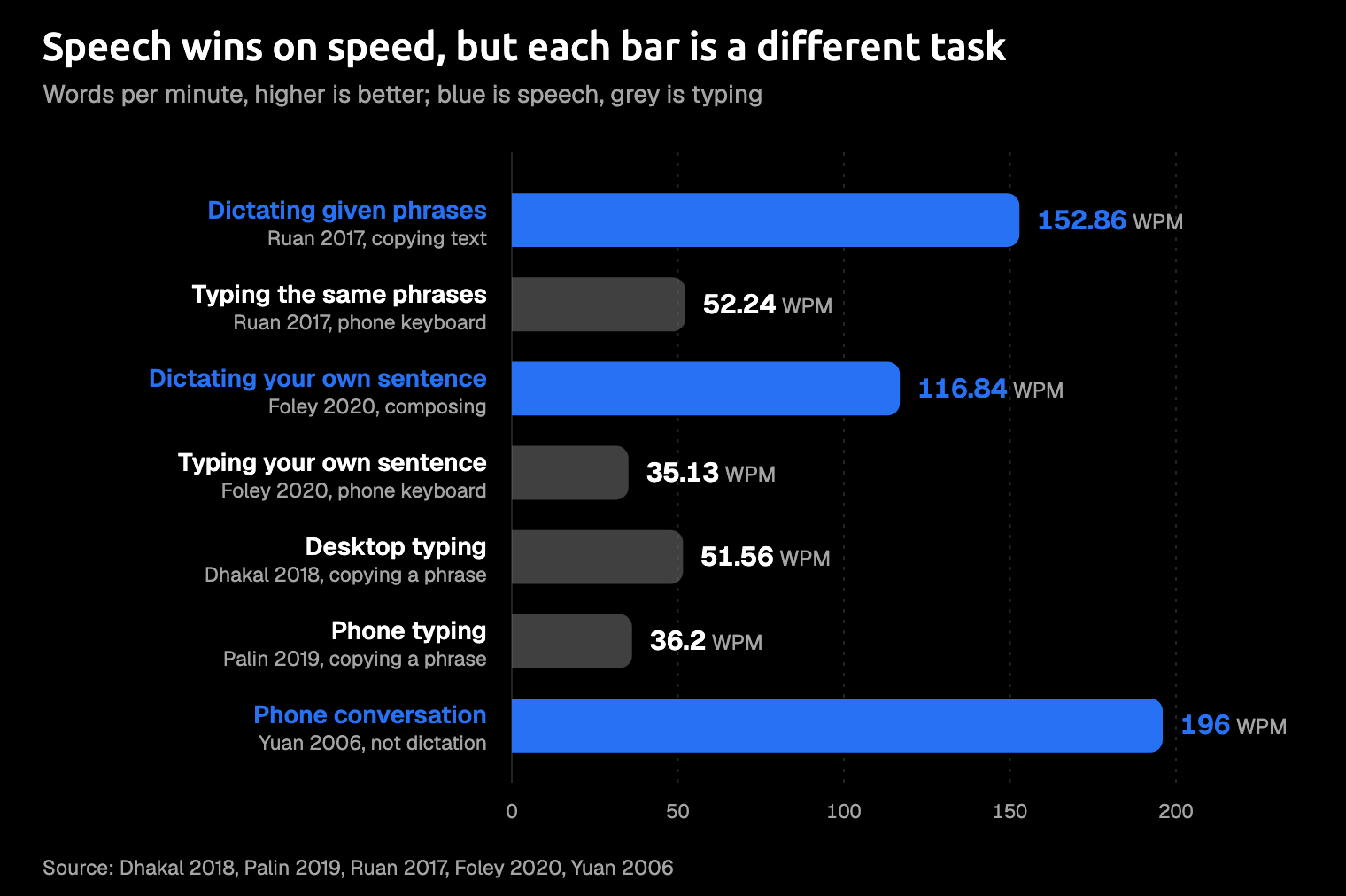
| How the words got onto the screen | Words per minute | What was measured |
|---|---|---|
| Typing on a computer keyboard | 51.56 | Memorize a sentence, then type it; typing-test volunteers (Dhakal, 2018) |
| Typing on a phone | 36.2 | The same task on a phone (Palin, 2019) |
| Dictating given phrases on a phone | 152.86 (keyboard: 52.24) | Copying short phrases with no punctuation, quiet room (Ruan, 2017) |
| Dictating a sentence you compose, on a phone | 116.84 (keyboard: 35.13) | One sentence describing three pictures, quiet room (Foley, 2020) |
| Phone conversation (not dictation) | 196 | Both speakers' words over total call time (Yuan, 2006) |
Read only the middle column and speech wins easily. Read the "What was measured" column and the story gets more modest: the fastest dictation figure comes from copying, and the fastest speaking figure isn't dictation at all. When you compose your own words, voice is a lot faster to say and somewhat faster to finish.
If you came for one number to quote in a meeting, you get a range instead: nearly three times faster when you copy short phrases, and about 29% less time when you compose your own sentence. The rest of this post shows which end of it you're likely on.
How fast do people type?
Two very large studies give you a typing baseline. A 2018 study of 168,960 volunteers on a typing-test site found a mean of 51.56 words per minute on a computer keyboard. A 2019 follow-up ran the same test on phones with 37,370 volunteers, who averaged 36.2. If you're an average typist, a phone costs you about 15 words per minute and doubles your errors, from 1.17% to 2.34%.
Both studies measured copying, which isn't how you write. Volunteers memorized a sentence and then typed it. The clock ran from the first keypress to the last, so deciding what to say was never part of it. These were people who seek out typing tests, not a random sample of your office: on desktop, their mean age was 24.5, and 72% had taken a typing course.
The spread matters more than the average. On a computer keyboard, the fastest tenth typed above about 78 words per minute, and the slowest tenth stayed below about 26. On phones, three quarters of people typed under 43.98.
You may be quietly wondering which tenth you're in. It's worth knowing, because a fast touch typist has far less to gain from dictation than someone who types with two fingers and checks each key.
How fast do people speak?
As far as we could trace them, the everyday speaking speeds you see quoted come from conversation, not dictation. The best-sourced figure we found is from a 2006 study of 2,438 recorded English phone conversations: 196 words per minute, counting both speakers' words over the total call time. Single calls ranged from 111 to 291. Counted turn by turn it's 164, and with the silences removed it's 236. People even spoke about 10% slower with strangers.
Talking to a person isn't dictating.
When you talk to a friend, they nod, laugh, and keep you going. A blank text box just waits. Dictation, as the table showed, runs well below conversation speed, whether you're copying phrases or composing your own.
So when you see a speaking number beside a typing number, ask what kind of speaking it measured. The landing-page charts we checked don't say.
Where "nearly three times faster" comes from
The figure comes from researchers at Stanford, the University of Washington, and Baidu (Ruan et al.). The journal version of their study, published in December 2017, tested 48 university students on an iPhone 6 Plus, seated in a quiet room. Speech was sent to Baidu's recognizer over a fast network, and the keyboard was iOS's built-in one, with autocorrect on.
In English, speech came out 2.93 times faster than the keyboard, and Mandarin's gap was 2.87 times. The keyboard side of that ratio was quick, though. On a phone, the keyboard group typed about as fast as the desktop average and well above the phone average, and the authors read them as experienced phone typists. So the ratio sets speech against a quick phone typist, not an average one.
It's a solid result about a narrow task, and probably not the task you do all day. People copied 50 given phrases averaging 28.3 characters, with no punctuation. Nobody composed a message, walked down a street, or dictated over the noise you'd find in a café. The authors call their result an upper bound under ideal lab conditions.
Two details rarely make the headlines. Speech speed was far less consistent from trial to trial: the typical gap from the average was about 98 words per minute, against about 17 on the keyboard. Your own result could land well above or below the average. And in English, speech left slightly more errors in the final text, 0.55% against 0.35%, while the mistakes people corrected along the way were close (3.93% for speech, 4.72% for the keyboard).
The round number is older than the journal paper. The first preprint, posted in August 2016, put a three-times claim in its title and reported 32 participants at 161.20 versus 53.46 words per minute. Stanford's press release repeated the claim. The peer-reviewed version, with more participants, is the one to cite. The paper states its limits plainly. The headline had room for one number.
App landing pages go further. As of October 2026, some say dictation is four times faster than your keyboard, beside a chart of 45 words per minute next to 220, with no source or method on the page. Even the arithmetic is loose: 220 divided by 45 is closer to five than four. That doesn't make those apps slow. It means you can't tell what task or clock the chart used.
The study is good science, but the slogan built on it isn't.
Speaking isn't writing
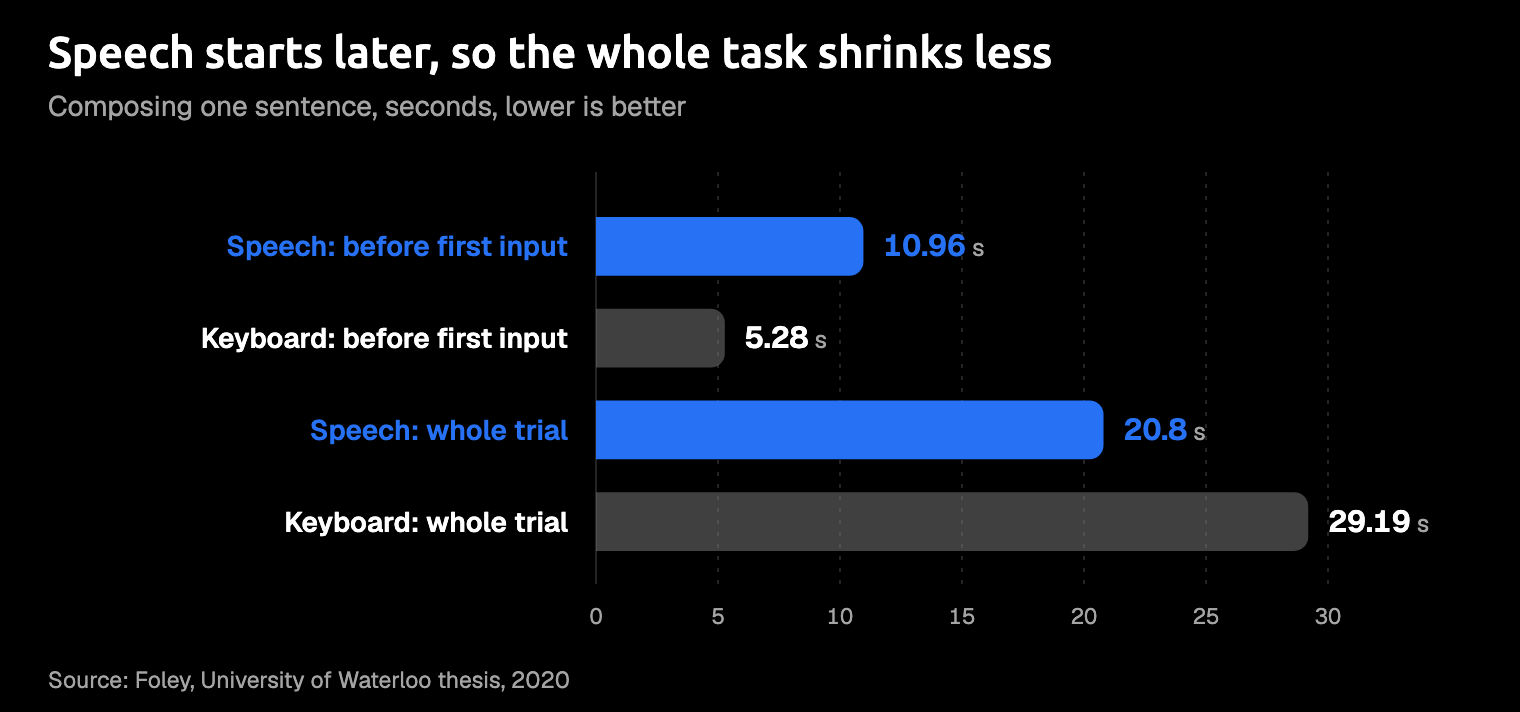
Speech still wins on words per minute when you compose, but the lead shrinks once the clock starts before you speak. In a 2020 thesis from the University of Waterloo (Foley), 28 people copied phrases and composed sentences describing three pictures, on a Pixel phone in a quiet room. Measured in words per minute, composing by voice won easily, as the table's fourth row shows.
The whole trial, from page load to last input, tells a smaller story. Composing took 20.8 seconds by voice and 29.19 by keyboard, 29% less time; copying took 45% less. The gap is the pause before the first word. When composing, people waited 10.96 seconds before speaking and 5.28 before typing.
Our read: a keyboard lets you start with half a thought and fix it as you go, while speaking pushes you to have the sentence ready first. If you've ever pressed the dictation key and then gone quiet, you've lived this result.
Composing by voice didn't feel easier, either. People rated the workload about the same, except physical demand, where speech did better. For composing, 14 preferred typing, 12 preferred speech, and 1 had no strong preference; participants mentioned awkwardness and privacy. For copying, 27 preferred speech. The thesis also notes its phrases were short, and that speech may lose its edge with more punctuation or longer sessions.
So dictation speeds up the saying, not the thinking.
That's why speaking first and tidying later works so well. The team behind Rambler, a research tool for editing dictated text, notes that writing by voice can produce rambling, wordy text that's hard to follow and needs heavy cleanup afterwards. That cleanup is exactly the part you'd want to hand to a tool. Ramble prompting shows the habit at work.
Where the time goes: waiting and fixing
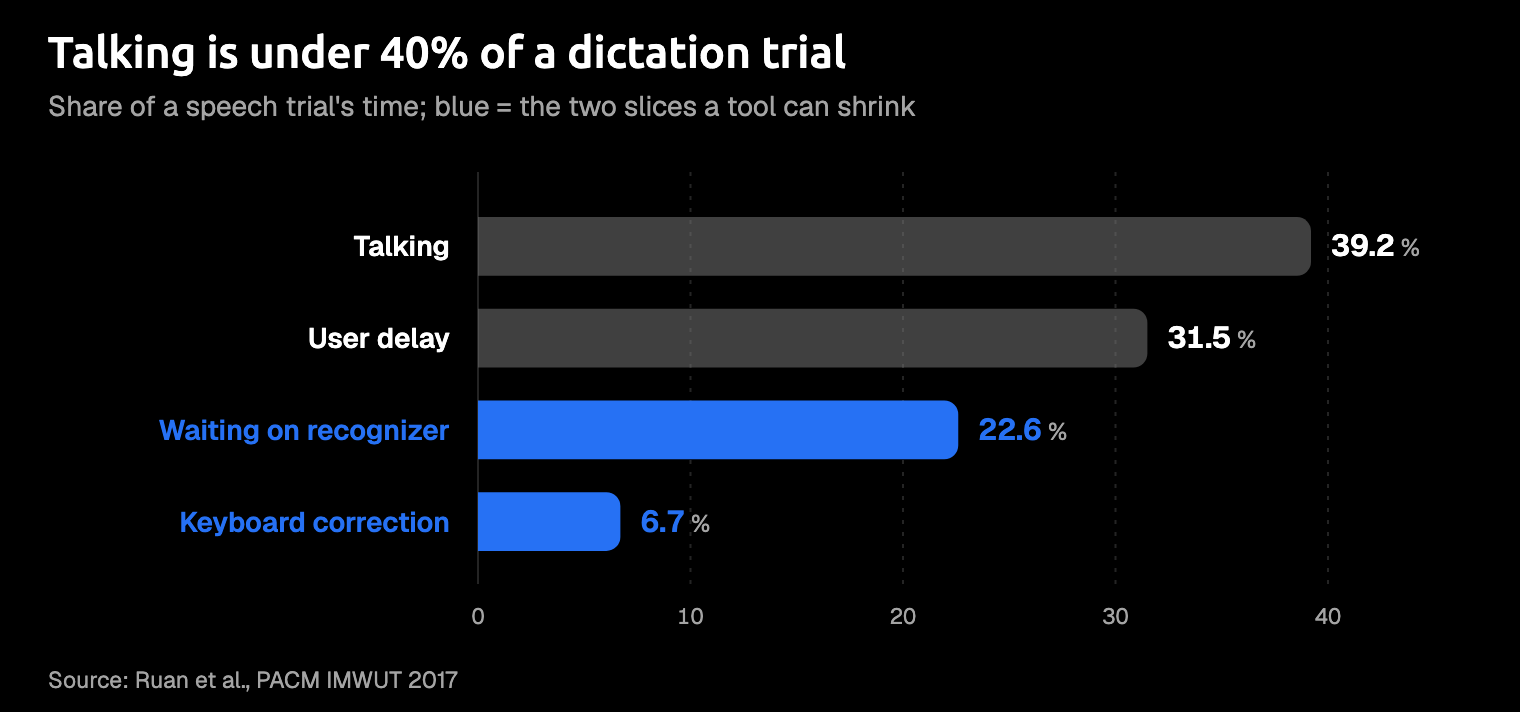
When you dictate, the time splits four ways: talking, user delay, waiting on the recognizer, and fixing. The Stanford-led study timed all four across each whole speech session, including the slow starts that its words-per-minute clock leaves out. If you dictated like those students, less than 40% of your time would go to talking.
User delay took 31.5%: people taking a moment to start speaking after switching the recognizer on, then hesitating before they pressed Done. Waiting on the recognizer took more than three times as long as fixing with the keyboard.
Fixing stayed small because there was little to fix. The recognizer's first transcript came out at 178.92 words per minute with 4.37% errors; after fixes, the final speed was 152.86. Almost all of the final text, 96.7% of characters, came straight from that first transcript, and people preferred the keyboard for the fixes.
When fixes do happen, they're expensive. In the Waterloo study, trials with a correction ran at 54.6 words per minute, against 141.1 for trials without one. That figure pools keyboard and voice, so it isn't a verdict on speech. It shows what a fix costs. Picture a colleague's name spelled wrong in the first line: you spot it, select it, retype it, and much of your lead is gone.
Older recognizers explain dictation's reputation. In a 1999 study quoted in the Stanford-led paper, people using that era's software managed 13.6 words per minute copying and 7.8 composing by voice, against 32.5 with a keyboard and mouse. If your opinion of dictation formed back then, it was a fair one.
We found no controlled study that times corrections with current recognizers such as Whisper (a widely used open speech model), or with AI formatting. Until one appears, the useful question is how much fixing your own tool leaves you.
Fixes decide whether dictation wins, and a recognizer that's fast but sloppy hands the time straight back.
What makes dictation fast in practice
Of those four slices, waiting and fixing are the two a tool can shrink. It can return text quickly, so you aren't watching a spinner. It can also return text that needs no tidying, with punctuation, capitals, names spelled right, and the shape the app expects. Thinking stays with you: no tool will decide what to tell your manager.
Amical is built around those two slices. It turns your speech into text, then AI formatting rewrites it for the app you're in, so a Gmail reply comes out as an email and a chat message stays casual. It fixes grammar as it formats, and custom vocabulary teaches it your names and jargon. For the wait, Amical Cloud returns finished, formatted text in under 300 ms for a short dictation and under 500 ms for a longer one, by Amical's own figures. Whether that feels instant to you is what the stopwatch test below will tell you.
Here's an illustration of the idea, not a measured result. With the cursor in a Gmail reply, you say:
hey sam so the launch moves to next week, um, legal wants another look at the pricing page, can you tell the team and I'll update the doc
And this is the kind of email that comes back:
Hi Sam,
The launch is moving to next week, because Legal wants another look at the pricing page.
Could you let the team know? I'll update the doc.
Thanks
You read it once, check the names, and send it.
A fast transcript you have to rewrite is a slow email. The best dictation tool is the one you don't have to clean up after, so our pick is Amical with Amical Cloud, because it goes after both the wait and the cleanup. It runs on Mac, Windows, iPhone, iPad, and Android, so you can test it on your phone too.
- No outside benchmark. There's no public benchmark for that speed figure, and Amical publishes no accuracy or editing-time figures, so the stopwatch test below is how you check.
- Local Parakeet waits for you to finish. In local mode, Parakeet transcribes after you stop speaking, so for speed use Amical Cloud, which works on every OS the app supports. Local Whisper also needs macOS 15 or later and is slower on Intel Macs; Parakeet runs on macOS 14 and Intel Macs. Keep local mode for offline work or for keeping your audio on your computer; with Amical Cloud, your audio and some on-screen context for formatting go to Amical Cloud.
- The phone apps need sign-in. On iPhone, iPad, and Android, Amical transcribes with Amical Cloud; on desktop, local mode needs no account.
Cloud vs local dictation walks through that choice in full.
When typing still wins
- You already type fast. If you're in the top tenth, above about 78 words per minute, dictation has less to give you. We'd still try it for long first drafts, where thinking out loud beats staring at a cursor. That's our opinion, not a finding: both lab studies used single short phrases or sentences.
- The room is noisy or shared. Both lab studies ran in quiet rooms. In an open-plan office, the person at the next desk hears your draft before your manager reads it, so save dictation for a closed door or a quiet hour.
- The edit is small. Changing one word inside a paragraph is a keyboard job. Even in the Stanford-led study, people fixed speech mistakes mostly with the keyboard, and they preferred it.
- Speaking aloud feels awkward. That's a real reason, not a flaw. The Waterloo participants named awkwardness and privacy too.
If you dictate because typing hurts, speed is a bonus rather than the point. Dictation for RSI covers that case.
It isn't either/or: speak the first draft and type the fixes, which is what the Stanford-led study's participants did anyway.
Time it yourself
Your own stopwatch beats every chart in this post, ours included. You need a timer and two real messages.
- Pick a message you'd send today, such as an email reply or a Slack update.
- Type it. Time it from the first key until it's ready to send, fixes included.
- Dictate a different message of the same kind, since you already know the words to the first one. Time it from the moment you press the key, pause included, until it's ready to send. In Amical on a Mac, hold Fn for this: push-to-talk listens for as long as you hold it, while hands-free mode stops after 5 seconds of silence and would cut off a long think.
- Count the words in each finished message, not the words you said.
- Divide words by minutes for each, then repeat with a longer message and on your phone.
AI dictation explains both Mac shortcuts, Fn for push-to-talk and Fn+Space for hands-free. Either way, one recording session runs up to 2 hours, far more than any email reply needs. On a phone, AI voice keyboard vs iPhone dictation shows how to set up a voice keyboard first.
Be honest about the typed one: nobody else needs to know how long that email really took.
This test uses the Waterloo clock, from the start of the task to the last edit, not the Stanford one that started at the first word. It's the clock your working day actually runs on.
Try it on one real message
We publish this blog and sell Amical, so you know which way we lean. That's why the fair test is yours: download Amical and time one real email or Slack reply this week. The free plan covers it, with unlimited local dictation and 2,000 Amical Cloud words a week. If the dictated message wins, you've found your number. If it doesn't, you've lost a few minutes and kept a keyboard you like.