You open the list of local speech models, and two big Whisper downloads sit side by side. One is about twice the size of the other, and the only hint about the difference is the word "turbo".
If you're choosing for dictation on a laptop, start with Whisper Large v3 Turbo over Large v3. It's half the download in Amical. OpenAI measured it at about 8x the speed of Large on English speech on an A100 GPU. On short English clips, it trails Large v3 by only about a tenth of a point of word error rate. Try Large v3 instead if you dictate in a language where OpenAI reports bigger drops for Turbo; it names Thai and Cantonese.
This guide is for you if you run Whisper, OpenAI's open speech-to-text model, on your own computer for dictation, for privacy or for offline work. We haven't run our own laptop test yet. Every speed and accuracy number for the models comes from OpenAI or Hugging Face, with its source named. The download sizes, the recording cap and the Amical Cloud figures are Amical's own.
A note on who's writing: Amical publishes this blog. Amical runs both models in local mode on Mac (macOS 15 or later) and Windows, offline once downloaded and with no account, and in local mode your audio never leaves your computer. Its AI formatting then turns what you said into a finished message, and you choose where that runs. A local model through Ollama (a tool that runs AI models on your own computer), or an OpenAI-compatible server running on your own computer such as LM Studio or llama.cpp, keeps the text on your computer. A cloud AI provider receives it, and you can also turn formatting off. If you'd rather not pick a model at all, Amical Cloud, Amical's own speech model, is built for speed: by Amical's own measurements, a short dictation comes back in under 300 ms and a longer one in under 500 ms.
The short answer
For most dictation, run Large v3 Turbo. It keeps Large v3's encoder design (the part that listens to you) and cuts its decoder (the part that writes your words) from 32 layers to 4, which is why it's smaller and faster. Large v3 is the one to try if Turbo keeps missing your words or your language.
Here's what you're choosing between:
| Large v3 | Large v3 Turbo | |
|---|---|---|
| Parameters | 1550M | 809M |
| Encoder layers | 32 | 32 |
| Decoder layers | 32 | 4 |
| Download size in Amical | ~3.1 GB | ~1.5 GB |
| Relative speed (OpenAI, A100 GPU, English) | 1x | ~8x |
| English short-form WER (Distil-Whisper v3.5 card, checked Oct 2026) | 7.14% | 7.25% |
| Languages (Hugging Face tag) | 99 | 99 |
| Translation into English (Whisper's translate task) | Yes | No |
| License | MIT (whisper repo) | MIT (whisper repo and model card) |
The speed and accuracy rows come from different sources and different hardware, so when you compare them, read each one with its label. Neither comes from a test we ran. OpenAI's speed table labels the Large row simply "large", and it describes Turbo as an optimized version of Large v3.
What "turbo" actually changes
Whisper works in two halves. The encoder listens to your audio and turns it into a summary of what you said. The decoder then writes the words, one small piece of a word at a time.
Turbo keeps the same 32-layer encoder design as Large v3 and cuts the decoder from 32 layers to 4. OpenAI points out that 4 is the same decoder depth as Whisper Tiny, the smallest model in the family. The result is 809M parameters (the values a model learns in training) against 1550M for Large v3.
That split explains most of the trade-off. The decoder runs again for every piece of a word, so a shorter decoder is where the speed comes from. The encoder, the part that hears you, keeps its full depth, which is likely why accuracy stays close. For you, that means the same listening half with a much lighter writing half.
How OpenAI made it: it pruned Large v3 (removed most of the decoder layers), then fine-tuned it for two more epochs, or full passes over the data, on the same multilingual transcription data, with the translation data left out. Some guides call Turbo "distilled", but OpenAI says it was inspired by Distil-Whisper and isn't a distilled model.
OpenAI released Turbo in October 2024, and it's the default model in OpenAI's own whisper command-line tool. If you've installed or updated that tool since then and never picked a model, you've probably been running Turbo already.
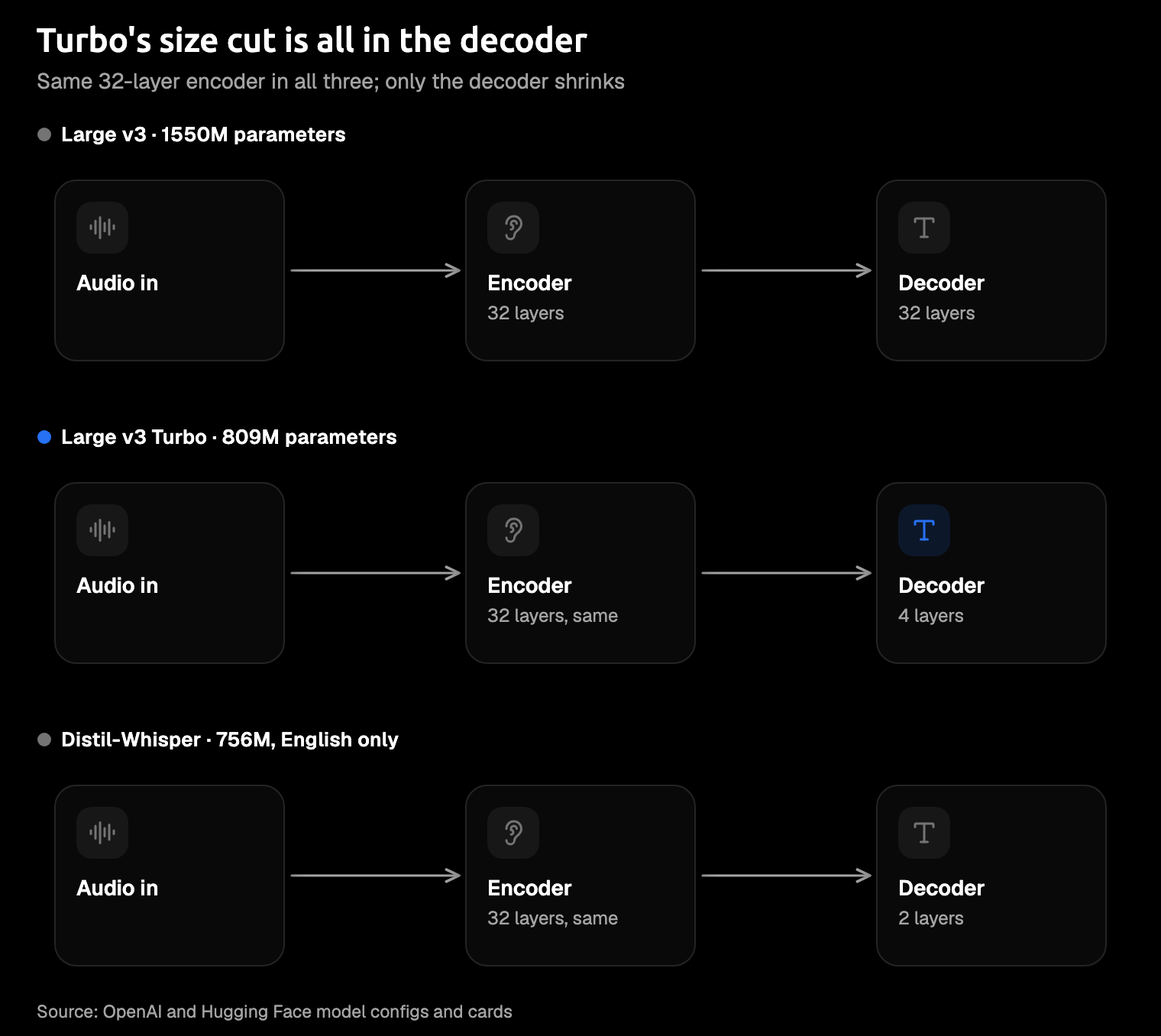
Same encoder design in all three. The size cut is all in the decoder.
Speed: what OpenAI measured, and what it means for you
OpenAI's own table in the Whisper repository puts Turbo at about 8x the speed of Large, which it sets at 1x. Those figures were measured transcribing English speech on an A100, a data-center GPU, and OpenAI notes that real-world speed varies with language, speaking speed and hardware. The Turbo model card sums it up as "way faster, at the expense of a minor quality degradation."
Your laptop isn't an A100, so don't expect the same multiple.
OpenAI publishes only that A100 figure, and we found no primary source that gives laptop speed for either model. So take 8x as the direction of the change, not the size of what you'll see.
For dictation, the number that matters to you is the wait between letting go of the key and seeing your text. A smaller decoder helps there, and Turbo is also half the download in Amical: about 1.5 GB against about 3.1 GB. OpenAI also lists about 6 GB of graphics memory for Turbo against about 10 GB for Large, but those figures are for its own Python version of Whisper on a GPU, not for whisper.cpp (a version of Whisper built to run fast on ordinary computers) on your laptop.
If you care most about the wait, Amical Cloud is the other route. By Amical's own measurements, it returns a short dictation in under 300 ms and a longer one in under 500 ms; there's no public benchmark for it yet. You don't download or pick a model, and you sign in to use it.
Tip: if you're on an older computer, or on an Intel Mac, where Amical's local mode runs without Metal (Apple's graphics acceleration) and is slower, a smaller model may feel better to you. That's a suggestion, not something we've measured.
Accuracy: the gap in English is small
Word error rate (WER) is the share of your words a model gets wrong, written as a percentage, so lower is better.
The cleanest like-for-like numbers we found use the method of the Open ASR Leaderboard, Hugging Face's public benchmark for automatic speech recognition (ASR) models, as reproduced on Hugging Face's Distil-Whisper v3.5 model card (checked October 2026). On short English clips, Large v3 averages 7.14% and Turbo 7.25%, a gap of about a tenth of a point. If you dictate short English emails or Slack replies, we'd expect a gap that size to be hard to notice, though we haven't tested it. Check names, numbers and jargon on your own voice with either model.
The chart below shows the gap on each English test set. It's widest on Earnings22, recorded earnings calls (11.29% against 11.63%), and on LibriSpeech "other", harder read speech (3.91% against 4.24%). On Tedlium, a set of recorded talks, Turbo actually scores better: 3.57% against 3.86% for Large v3. If your dictation sounds like a call, Earnings22 is the closest set, and even there you're looking at about a third of a point. For meetings, the closest set is AMI, recorded meetings, where Turbo scores 16.13% against 15.95% for Large v3, a gap of under a fifth of a point.
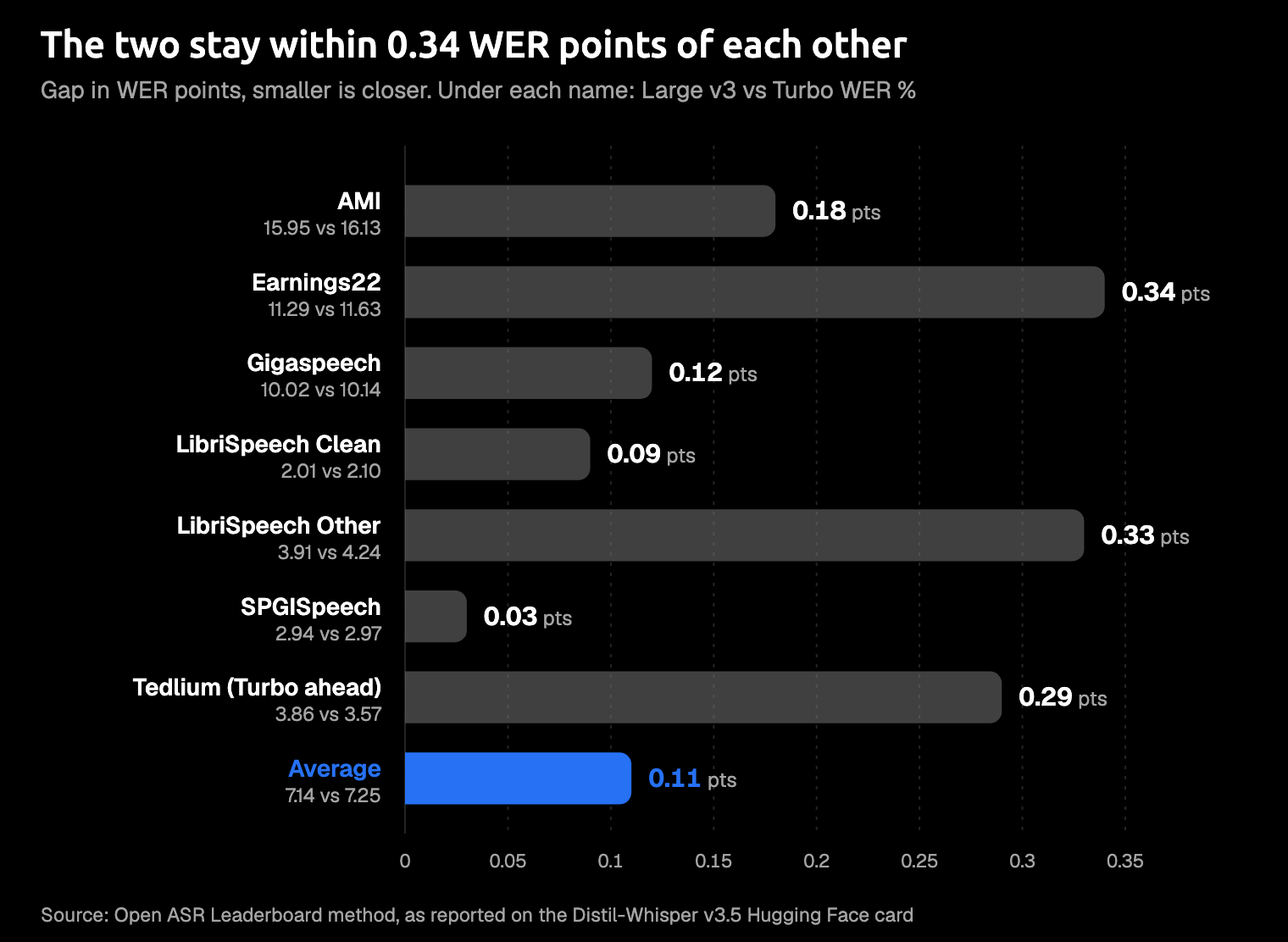
The gap in WER points on each dataset. Open ASR Leaderboard method, as reported on the Distil-Whisper v3.5 Hugging Face card (checked October 2026).
One caveat: the live leaderboard has changed its test sets since that table was made, and it dropped Tedlium in May 2026. Treat these numbers as a like-for-like snapshot of the two models, not as today's leaderboard. If you check the live leaderboard, you may see different numbers.
Both models also share Whisper's known limits. They can write text you never said or repeat a phrase, and they listen in 30-second windows, so longer audio gets processed in pieces. The model card adds that made-up text can be worse in low-resource languages. Push-to-talk dictation is usually short, though one Amical recording session can run up to 2 hours.
Languages and translation: where Large v3 earns its size
Both models are tagged with 99 languages on Hugging Face. That doesn't mean they're equally good at yours: the model card says Whisper performs unevenly across languages, with strong results in about 10 and weaker results in low-resource languages, the ones with less training audio.
For Turbo specifically, OpenAI says it performs about like Large v2 (the version before Large v3) across languages, with larger drops in some, notably Thai and Cantonese. We found no Large v3 comparison from OpenAI for those languages, so if you dictate in Thai or Cantonese, try Large v3 and see whether it gets more of your words right.
An OpenAI maintainer's reply in the release discussion gives Turbo's Urdu scores: 26.5% on Common Voice 15 and 21.9% on FLEURS. There's no Large v3 figure beside them, so you can't compare the two from that alone.
We couldn't find a public table that compares Turbo and Large v3 language by language. So if you dictate in a less common language, your own voice is the best test: dictate the same paragraph with both.
Translation is the clearer split, and it's a fact about the Whisper models, not an Amical setting. Turbo wasn't trained for translation, and if you ask it to translate with Whisper's --task translate option, it returns the original language instead. OpenAI's Whisper README recommends Medium or Large for turning speech into English text. This only matters if you run Whisper yourself to translate audio; in Amical, these models do speech-to-text for your dictation.
In Amical's local mode, you get the 99 Whisper languages plus auto-detect, and Multi-language support explains how to set your language.
What about Distil-Whisper?
Distil-Whisper is Hugging Face's distilled version of Large v3: a smaller student model trained to copy the bigger one. It keeps the 32-layer encoder and copies just 2 decoder layers, for 756M parameters, and it's MIT-licensed. The v3.5 version was trained on more than 98,000 hours of public audio, labelled by Large v3.
The catch: it's English only, so it's out if you dictate in any other language.
Its own model card says distil-large-v3.5 is about 1.5x faster than Turbo on long-form transcription. On short clips from test sets it wasn't trained on, its WER is 7.08% against 7.30% for Turbo, but on long recordings it's 11.39% against 10.25%, so Turbo is the more accurate one there.
It's worth a look if you only ever work in English and build your own transcription setup. For dictation in more than one language, Turbo is the half-size option that keeps all 99 languages.
Amical doesn't ship Distil-Whisper, and it downloads the full-size whisper.cpp files rather than the smaller compressed (quantized) versions.
In Amical, Turbo is already the half-size Large model, so it's the one to pick if you want a smaller Large.
All six Whisper sizes, and when to use each
Amical ships six Whisper sizes for local mode, and all of them run through whisper.cpp. Here's each one with OpenAI's parameter count and relative speed, and the download size in Amical. The last column is our reasoning from these figures, not a test result, so use it as a starting point for your own machine:
| Model | Parameters (OpenAI) | Download in Amical | Relative speed (OpenAI, A100 GPU, English) | Use it when |
|---|---|---|---|---|
| Tiny | 39M | ~78 MB | ~10x | very slow computer; check accuracy on your voice first |
| Base | 74M | ~148 MB | ~7x | slow computer; check accuracy on your voice first |
| Small | 244M | ~488 MB | ~4x | a middle ground on an older laptop |
| Medium | 769M | ~1.5 GB | ~2x | rarely for dictation: Turbo is the same size and faster |
| Large v3 | 1550M | ~3.1 GB | 1x | Turbo misses your language, or you have disk to spare |
| Large v3 Turbo | 809M | ~1.5 GB | ~8x | most everyday dictation: start here |
Tiny tops the speed column, but OpenAI's speed figures say nothing about accuracy, and a fast model that gets your words wrong saves you nothing.
Medium is about the same download as Turbo but, in OpenAI's table, about a quarter of its speed. So for dictation in Amical, Turbo is the better use of your disk space.
Our pick
For most people dictating on a laptop, our pick is Large v3 Turbo, for the reasons in the table at the top.
Pick Large v3 instead when:
- You dictate in Thai, Cantonese, or another language where OpenAI reports bigger drops for Turbo, and you want to test whether Large v3 does better.
- Turbo keeps missing your words, and you have about 3.1 GB of disk to spare.
- You want the last tenth of a point of English accuracy, knowing Turbo still wins on one test set (Tedlium).
What Amical adds
Both models run in Amical's local mode on Mac and Windows, offline once downloaded and with no account, and in local mode your audio stays on your computer. On a Mac, local transcription needs macOS 15 or later and is slower on Intel Macs.
On top of the transcript, AI formatting writes what you meant for the app you're in: a proper email in Gmail, a short reply in Slack, a clean prompt in Cursor. If you want your text to stay on your computer as well, point formatting at a local model through Ollama, or at an OpenAI-compatible server running on your own computer such as LM Studio or llama.cpp. You can also turn formatting off. With a cloud AI provider, that text goes to the provider.
Anonymous usage telemetry is on by default, and it never includes what you dictate. You can turn it off, and Telemetry explains how.
If you'd rather skip choosing a model, use Amical Cloud: it's built for speed, going by Amical's own measurements in the speed section above, and it needs sign-in.
Parakeet, NVIDIA's open speech model, is Amical's other local option if you want to look beyond Whisper.
Changing models takes a download and a switch in settings, so you can test both on your own voice instead of trusting anyone's table, ours included.
How to try both in Amical
Here's how to compare both models on your own voice. Local AI models shows where the model list sits in Amical's settings.
- Download Amical from the download page and follow the desktop quick start.
- Open Amical's local model settings, download Whisper Large v3 Turbo (about 1.5 GB), and set it as your speech model.
- Dictate a real paragraph you'd normally type: an email, a Slack reply, or a prompt.
- Download Large v3 (about 3.1 GB), switch to it, and dictate the same paragraph.
- Keep the one that gets your words right, and delete the other to free up disk space.
Try Turbo for a day
Amical publishes this blog, so weigh our nudge with that in mind: download Amical, set Turbo as your speech model, and dictate one real email with it today. If it keeps missing your language, switch to Large v3. The free plan includes unlimited local dictation plus a weekly allowance of Amical Cloud words, so the test costs you nothing; pricing has the details.