You stop talking for a moment, and the transcript ends with "Thank you." You didn't say thank you. Nobody in the room did.
That's Whisper hallucination: Whisper, OpenAI's open speech-to-text model, writing words that aren't in the audio. It's a known behaviour and usually not a fault in your setup. OpenAI's own model card warns that its output "may include texts that are not actually spoken". It often shows up when you hand Whisper silence or noise. So the fix that works best is also the plainest: cut the silence out before Whisper hears it.
This guide covers why it happens, how often, and the fixes in the order to try them, with exact settings if you run Whisper yourself. Using a dictation app instead? Skip to If you dictate rather than code.
Full disclosure: Amical publishes this blog, and Amical's local mode runs Whisper through whisper.cpp, so this quirk is ours to deal with too.
What Whisper hallucination looks like
You'll usually see one of a few familiar shapes.
Stock sign-offs on silence. Give Whisper a silent audio file and you may get "Thank you." Users in OpenAI's forum report phantom "thanks for watching" lines on empty sections, and you may have met them in ChatGPT's dictation too.
Subtitle credits, often in another language. In an openai/whisper discussion, large-v3 turned 30 seconds of silence into an Arabic subtitle credit, and another user got a German TV credit, "Untertitelung des ZDF für funk, 2017".
One sentence on repeat. The model card says Whisper is "prone to generating repetitive texts", which OpenAI's mitigations reduce but don't remove. You see a line, then again, then again, until it fills the transcript.
The phrases you get barely change from one user to the next. In a 2025 study by Barański et al., "thank you" made up 24.76% of what Whisper large-v3 invented on audio with no speech, and "thanks for watching" another 10.32%.
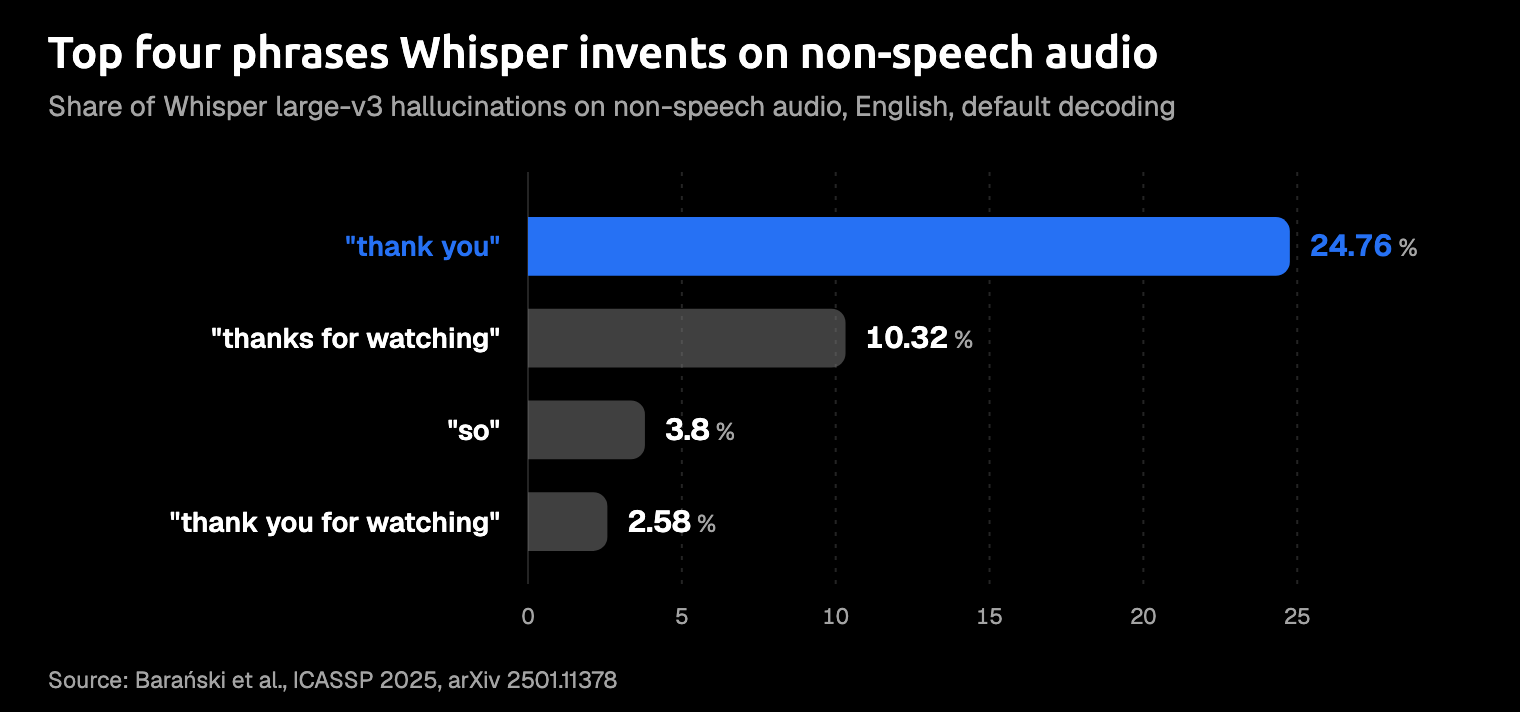
That's the tell. These aren't random typos so much as the model's best guess at what silence usually says.
Why Whisper makes things up
Your microphone and your install are usually fine. The behaviour comes from how Whisper was trained and how it reads audio.
It learned from web captions
Whisper was trained on 680,000 hours of weakly supervised audio: recordings from the web, paired with whatever transcript came with them. The Whisper paper admits some low-quality machine-made captions got past OpenAI's filters.
Why sign-offs, though? Commenters in the openai/whisper discussions blame subtitle files in the training data, and OpenAI hasn't confirmed it. If they're right, Whisper learned that when the talking stops, someone says thanks.
Every clip becomes a 30-second window
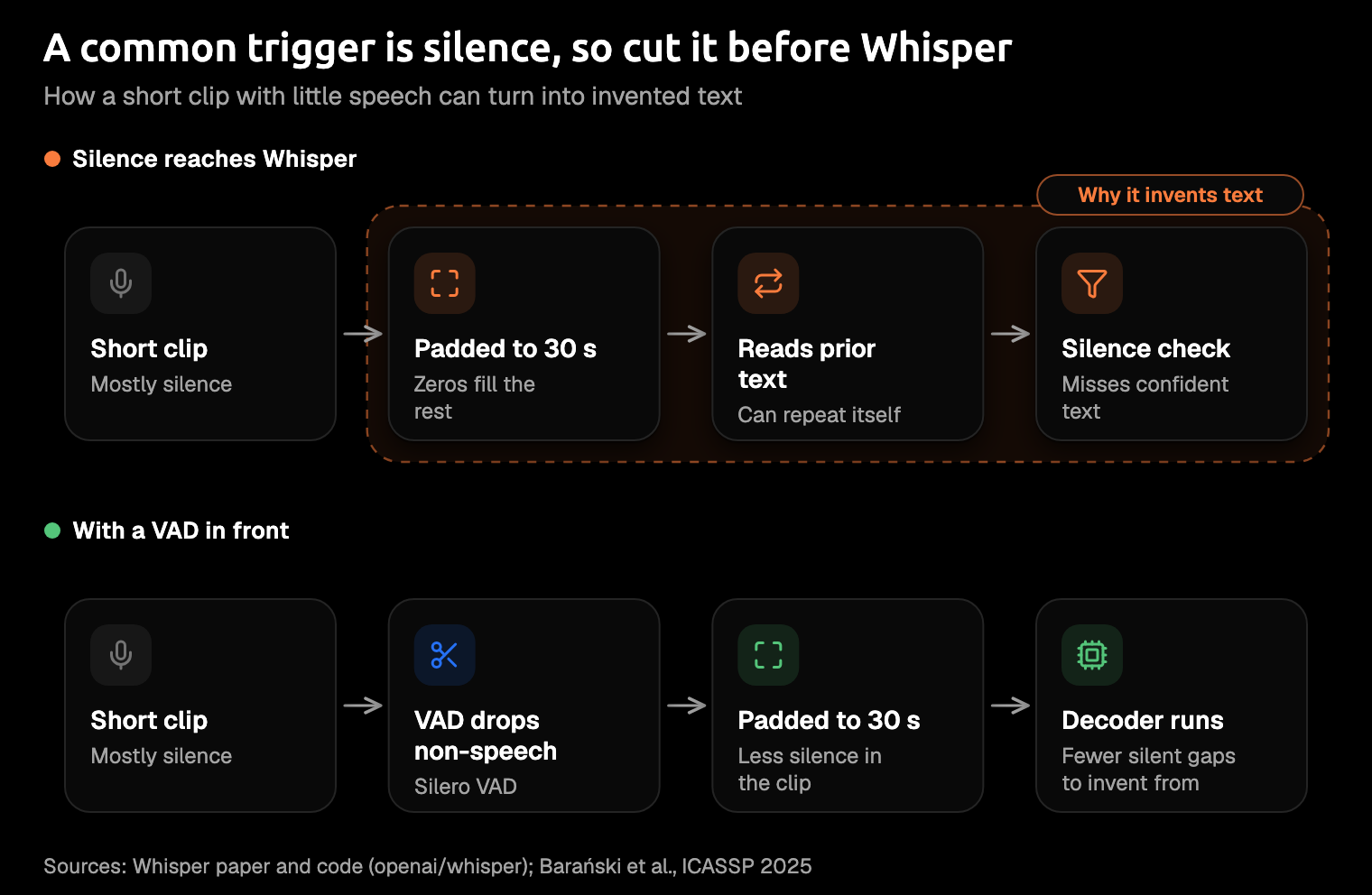
Whisper always reads audio in 30-second chunks. In openai/whisper's code, anything shorter you send is padded with zeros, which is silence, until it fills the window.
Say a quick "ok, send it", and Whisper gets your few words and a long, empty room.
The silence check needs two signals at once
Whisper gives each segment a no-speech probability, but the paper says that number alone isn't reliable enough. So openai/whisper skips a segment only when the no-speech probability is above no_speech_threshold and the decoder was also unsure of what it wrote.
The decoder is the part of Whisper that writes the text you see. "Unsure" means its average log probability fell below logprob_threshold. If Whisper writes "Thank you." and is sure of it, the second test says keep, and the invention lands in your text.
Its certainty is exactly what gets it through.
It reads its own last sentence
By default, openai/whisper feeds the previous transcript back in as context: condition_on_previous_text is True. In the paper's tests, that lowered errors on long recordings.
It also means an invented line becomes context for the next window. By our reading of the code, that's how one "Thank you." can grow into a loop.
How often does it happen?
There's no single rate. It depends on how much silence is in your audio, and the studies measured very different audio.
Careless Whisper (clear speech, spring 2023). Koenecke and colleagues ran 13,140 clips of clear speech through OpenAI's Whisper API, and about 1% of transcriptions contained whole invented phrases. Of those, 38% included harms such as violence or false authority. Speakers with aphasia, who leave longer pauses, got more: 1.7% against 1.2%. Treat this as history, not today's rate: in a December 2023 re-run, only 12 of 187 reliably hallucinating segments still did so, likely after OpenAI's late-November updates.
Barański et al. (speech plus silence, 2025). When the researchers added silence to short speech clips, 17.1% of the files in that test set came back with a detected hallucination. That's a different test from Careless Whisper's 1% on clear speech, so the two don't line up exactly, but they point the same way.
AP reporting (other audio, October 2024). The Associated Press quoted far higher counts, such as hallucinations in 8 of 10 transcriptions one researcher inspected, but gave no method, so you can't line them up against the studies. OpenAI warns against using Whisper in "high-risk domains", yet the same AP story reported that Nabla, a medical transcription tool built on it, erases the original audio.
If you transcribe anything clinical or legal, keep the audio and have a person check the text against it. (This isn't medical or legal advice.)
How to stop Whisper hallucinating
Start with silence and finish with thresholds. Removing silence takes away the usual trigger, while thresholds only act after the model has run.
If you call OpenAI's hosted API, you control what happens around the model: trimming silence before you upload, filtering phrases afterwards, and the language and prompt settings. The thresholds and switches further down live in the open-source code, so they're for when you run the model yourself.
1. Cut the silence before Whisper sees it (VAD)
For developers. A VAD (voice activity detection) is a small model that marks which parts of the audio hold speech. You drop the rest before Whisper sees it, which fixes the cause instead of cleaning up after it.
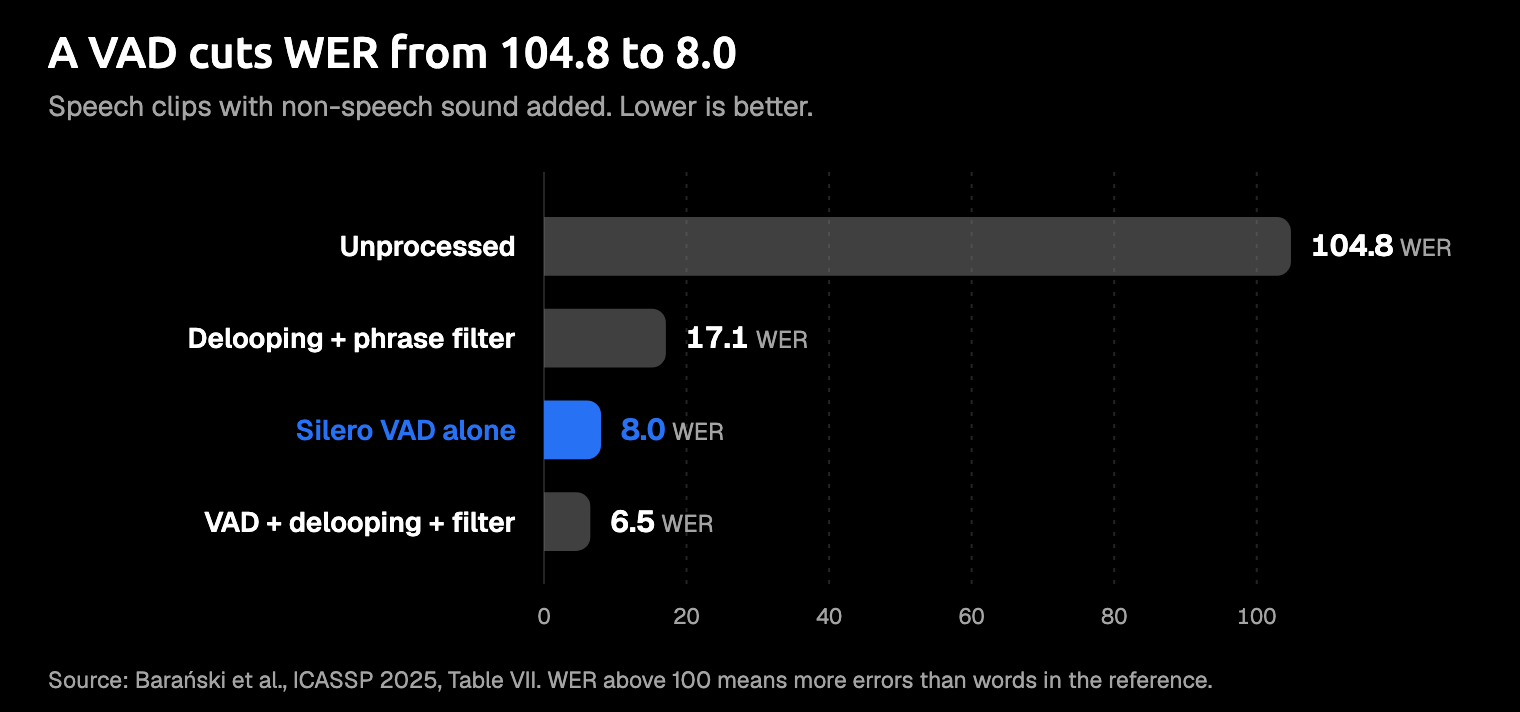
It also has the best evidence. Barański et al. took short clips of real speech, added non-speech sound before and after it, and measured word error rate (WER). WER counts wrong, missing and extra words, so lower is better, and when Whisper invents enough extra words the score climbs past 100. Unprocessed Whisper scored 104.8. Silero VAD, an open VAD model, cut that to 8.0 on its own. A loop remover plus a phrase filter helped less than the VAD alone, and all three together reached 6.5.
- whisper.cpp is a version of Whisper built to run fast on ordinary computers. It has had built-in Silero VAD since v1.7.6. Turn it on with
--vadand point--vad-modelat the model file, which the whisper.cpp README downloads with./models/download-vad-model.sh silero-v6.2.0. - faster-whisper is another fast version of Whisper, with Silero VAD built in. If you use it, set
vad_filter=True; by default the filter only removes silence longer than 2 seconds. - openai/whisper or OpenAI's API: trim the audio before you send it. One user in OpenAI's forum reports using the
silenceremovefilter in ffmpeg, the free command-line audio tool.
2. Stop it reading its own last sentence
For developers. If you run openai/whisper, set condition_on_previous_text=False; the default is True. In whisper.cpp, use -mc 0 (--max-context), which keeps previous text out of the prompt; its default is -1.
Either way, an invented line can no longer seed the next.
By our reasoning, there's a cost. Reading the previous text lowers errors on long audio, so turning it off may make names and punctuation a little less consistent from window to window.
A short dictation that fits in one window has no previous window to lose.
3. Tighten the thresholds
For developers. Thresholds decide when Whisper treats a segment as silence, or throws out its text and tries again. The confidence and repetition checks judge how sure the text looks, not whether anyone spoke. Even the silence skip needs the decoder to be unsure as well, which is why a confident "Thank you." walks straight past them.
Temperature is how much randomness the decoder allows. Whisper starts at 0, and when a result fails a check, it retries at a higher temperature. The defaults you'll start from come from openai/whisper's code and whisper.cpp, as of October 2026 on their master branches.
| What it controls | openai/whisper | Default | whisper.cpp | Default |
|---|---|---|---|---|
| When a segment counts as silence | no_speech_threshold | 0.6 | -nth | 0.60 |
| When confidence is too low | logprob_threshold | -1.0 | -lpt | -1.00 |
| When text is too repetitive | compression_ratio_threshold | 2.4 | -et (entropy) | 2.40 |
| Retries at a higher temperature | temperature | 0.0 to 1.0, in steps of 0.2 | -tp, -tpi | 0.00, 0.20 |
The repetition checks run in opposite directions. openai/whisper retries when the text compresses too well, a sign it repeats, while whisper.cpp's -et retries when entropy falls below the threshold. And -et only acts on outputs longer than 32 tokens, so it rarely touches a short dictation.
Treat these as starting points, and change one at a time:
- Lower
no_speech_thresholda little so more segments count as silence, and watch for quiet speech going missing. - Raise
logprob_thresholdtoward zero, so more unsure segments get skipped or retried. - Lower
compression_ratio_threshold, or raise-et, so repetition triggers a retry sooner. - Leave temperature fallback on; OpenAI names it as a mitigation for repetition. In whisper.cpp,
-nfturns it off and-snssuppresses non-speech tokens; both flags are off by default.
4. Skip long silences with word timestamps
For developers (openai/whisper). hallucination_silence_threshold skips silent stretches longer than the seconds you set, but only when Whisper suspects a hallucination. It needs word_timestamps=True, and both are off by default.
5. Filter the usual phrases afterwards
For developers. After decoding, you can drop segments that match known hallucinations. Barański et al. built their "bag of hallucinations" from Whisper's frequent outputs on non-speech audio. They kept only the ones an English language model rated very unlikely as real English.
People really do say thank you, though, and a phrase filter can't tell your polite one from an invented one. The paper cuts those false alarms by checking each match against the sounds in the audio (forced alignment), at the cost of extra compute.
6. Set the language
For developers, and in some apps. With auto-detect on, Whisper has to guess a language, even from silence. Setting it yourself removes that guess, and a couple of users say it helped. It's no cure: in the openai/whisper discussion, large-v3 still wrote the Arabic credit with the language set to Arabic. Still, if Whisper is going to thank you anyway, it may as well do it in your language. More in Does Whisper support multiple languages?
If you dictate rather than code
You'll never see no_speech_threshold in a dictation app, and you don't need to. Your lever is how much silence you send, and the recording mode decides most of it.
- Push-to-talk records only while you hold a key, so the clip ends when you let go.
- Hands-free keeps recording until you stop it or the app decides you've finished, so a clip can end with a quiet stretch.
The cheapest silence filter is your own finger on a key.
Amical is our pick for dictation without the quiet tail. On a Mac, you hold Fn to talk and let go to stop; push-to-talk never stops itself on silence. Press Fn+Space when you want hands-free, and it stops after 5 seconds of silence. On Windows, or if Fn doesn't suit you, set your own keys in Shortcuts. AI dictation covers both modes.
In local mode, you get six Whisper models through whisper.cpp, from Tiny up to Large v3 Turbo. Amical auto-detects your language unless you pick one of 99. The second local option is Parakeet TDT 0.6B v3, on Mac and Windows. It's NVIDIA's open speech model, built differently from Whisper. Amical Cloud uses Amical's own hosted speech model; it needs you to sign in, and the free plan covers 2,000 cloud words a week. Local AI models shows you how to switch.
- Amical's local Whisper models can hallucinate too. If a clip misbehaves, try another model on that clip and keep whichever writes only what you said.
- Hands-free can end on a quiet stretch. For short messages where every word matters, hold
Fninstead. - Local Whisper needs macOS 15 or later and runs slower on Intel Macs. If your Mac is older or Intel, Parakeet runs on macOS 14 and on Intel Macs.
- Amical hasn't published a hallucination rate for any mode, so treat Parakeet and Amical Cloud as things to try, not promises.
Does a newer model fix it?
Not as far as the documentation goes. No source we found compares hallucination rates between versions, and no release note we found promises your pauses will stay blank.
- large-v3. Its model card carries the same hallucination warning, and one commenter in its release thread says it hallucinates more than v2 did: one person's experience, not a measurement.
- large-v3-turbo. Turbo is large-v3 with the decoder cut from 32 layers to 4, then fine-tuned further. Its release post doesn't mention hallucination. Whisper large-v3 turbo vs large-v3 compares the two.
- Parakeet. NVIDIA's model card doesn't mention silence or hallucination. Parakeet vs Whisper covers what is known.
Whichever you pick, test it on your own audio, pauses and all.
The best speech recognition models this year covers the wider field.
FAQ
Why does Whisper write "Thank you for watching"?
Silence or noise sends it to its favourite inventions, and "thank you" and "thanks for watching" top the list for large-v3. Commenters blame subtitle files in its training data, which OpenAI hasn't confirmed. The fix that works best is to cut the silence before Whisper sees it.
Why does Whisper repeat the same sentence?
It reads its own previous text as context, so one invented line can feed the next. Stop it reading its own last sentence, and cut the silence too.
Does the OpenAI Whisper API still hallucinate?
It can. When the Careless Whisper team re-ran their test in December 2023, it hallucinated less, likely after OpenAI's late-November updates. We found no published rate for today's Whisper API. If you're weighing OpenAI's newer speech models, see GPT-Transcribe vs Whisper.
Try it on one real message
Download Amical, hold Fn on your Mac, and dictate the Slack reply you were about to type, using a local Whisper model. Then switch to Parakeet and say it again. Keep whichever writes only what you said. If your Mac can't run local Whisper, compare Parakeet with Amical Cloud instead. On Windows, pick your push-to-talk key first, then do the same swap.
Local dictation is unlimited on the free plan, so the comparison costs you nothing.