Does Whisper support multiple languages? You find out the day you dictate a Slack message the way it comes out of your head: "Can you send me the 見積もり (quote) by Friday?" Whisper gives you back one language. There's a small indignity in watching your own English come back translated into Japanese.
Yes, Whisper supports about 99 languages, but one at a time. Whisper, OpenAI's open speech-to-text model, picks one language for each recording and writes everything in it, so two languages in one sentence is exactly where it struggles. Its own maintainer says as much.
Full disclosure: Amical publishes this blog, and Amical Cloud, our pick for mixed speech, is how we make money. Our local mode offers Whisper too, and local Whisper has the same limit.
The short answer
"99 languages" is true and misleading at the same time. If you mix languages, the number that matters is how many Whisper will use in one recording, and that number is one.
| What you're doing | Does Whisper handle it? |
|---|---|
| Speaking one language per recording | Yes, though quality varies a lot by language |
| Using a different language in each recording | Yes, with auto-detect or with the language set |
| Mixing two languages in one recording or sentence | Not reliably; it wasn't built for that |
| Speaking Japanese and getting English back | Likely a wrong auto-detect guess, or the translate task is on |
If you speak one language at a time, set Whisper's language and it'll serve you well, right on your own computer. If you mix languages in one message, you need a different model. Amical Cloud is ours: Amical's own speech model, with 100+ languages. Mixed Japanese and English works on it, and Hinglish works well.
Which languages Whisper covers, and how well
Whisper's multilingual models cover 99 languages. You'll see other counts around the web: large-v3 added a language token for Cantonese, and OpenAI's API docs say 98 for whisper-1, its hosted version. As of October 2026, OpenAI lists whisper-1 as deprecated, shutting down on 2027-02-26.
The English-only models are a separate case. Their names end in .en, they come in sizes tiny through medium, and they transcribe English only; whisper.cpp ignores any language you set on them.
The count tells you which languages Whisper accepts, not how well it writes them. About a third of Whisper's training audio is non-English, and OpenAI's model card says it gets strong results in about ten languages. Accuracy follows the training data: the more hours of audio a language had, the fewer mistakes Whisper makes in it.
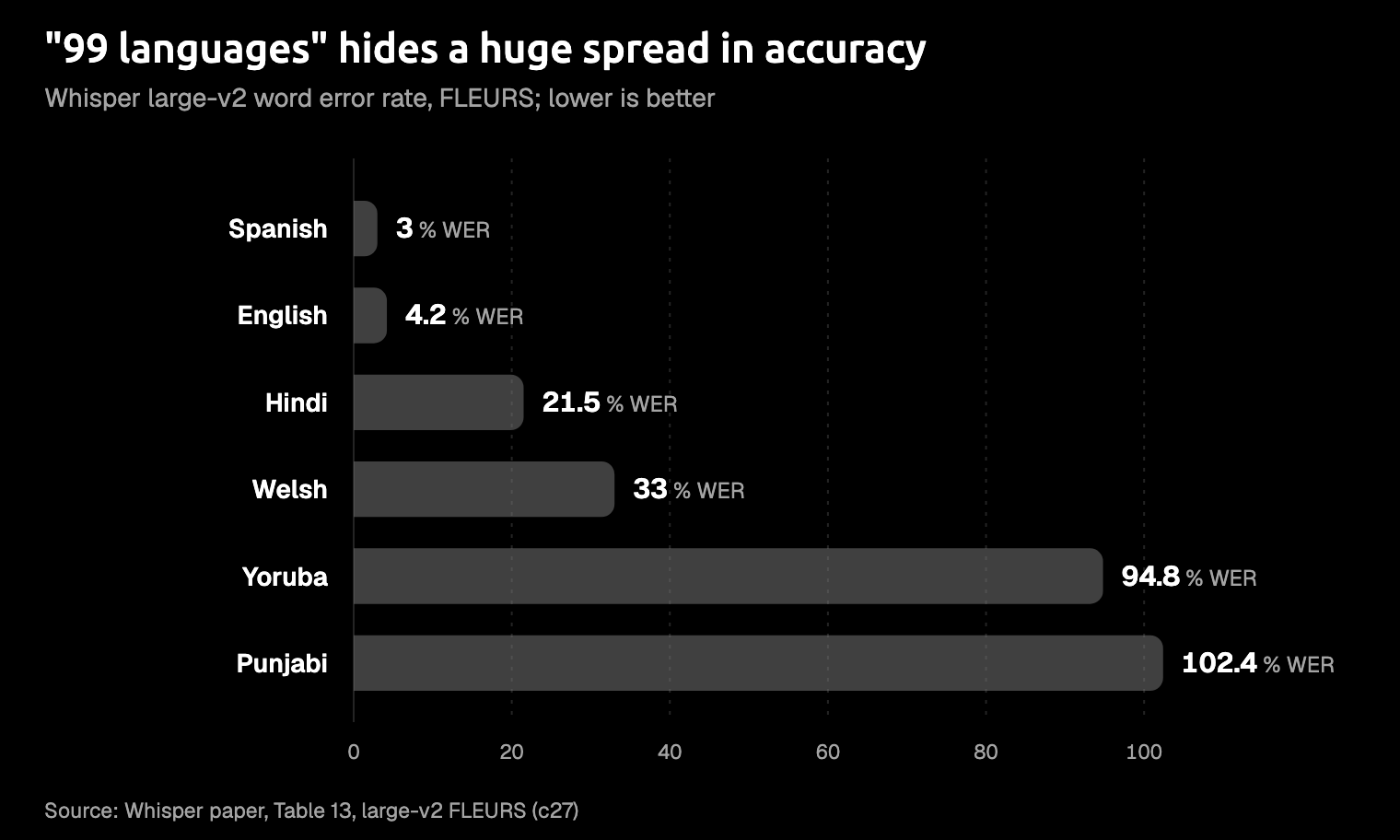
The spread is wide. On FLEURS, a standard test set of read speech, the large-v2 model's word error rate was 3.0% for Spanish, 4.2% for English, 21.5% for Hindi, 33.0% for Welsh, 94.8% for Yoruba, and 102.4% for Punjabi. Word error rate is the share of words that come out wrong, counting swapped, missing, and extra words. So Punjabi's score means the mistakes outnumbered the words spoken.
If Spanish dictation feels flawless to you and Punjabi feels like a rough draft, the training data is the likely reason.
Look up your language before you blame your microphone.
Those are large-v2 numbers; OpenAI says large-v3 cuts errors by 10 to 20% compared with large-v2. If you're choosing between the large models, Whisper large-v3 turbo vs large-v3 covers that trade-off.
Why two languages in one sentence trips Whisper up
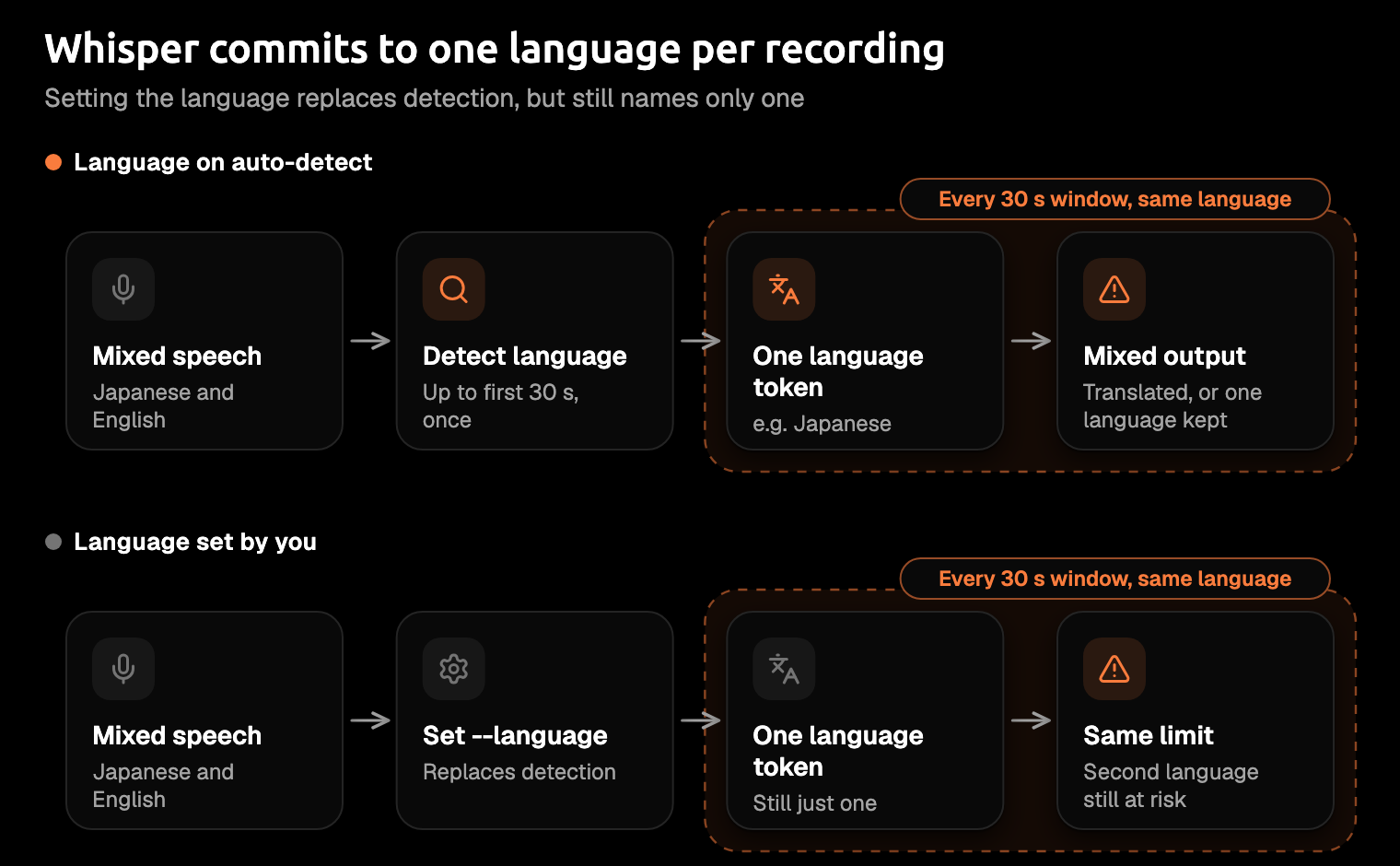
Whisper settles on one language before it writes anything. You'll meet it in a few common versions: openai-whisper is OpenAI's original code, faster-whisper is a quicker rewrite for Python, and whisper.cpp is a C++ rewrite, the engine behind Amical's local mode.
With no language set, openai-whisper and faster-whisper read up to the first 30 seconds of audio, pick one language, and decode every later 30-second window in it. whisper.cpp does the same once you turn on -l auto, detecting once before it transcribes; otherwise it assumes you're speaking English.
For a short dictation, those first 30 seconds are your whole message. Whisper hears both of your languages, picks the one that dominates, and writes everything in it.
The trouble isn't that it guesses too soon. It's that one guess has to cover the whole clip.
Users report what you'd see. In one GitHub thread, a recording that started in French and moved to English came out entirely in French, with the English translated. In another, someone mixing Cantonese and English says Whisper often translates the English words into the other language. A Marathi and English speaker in the same thread found that splitting by speaker doesn't help when one person does the switching, since Whisper commits to one language per 30-second window. And if a recording opens with silence or noise, the first guess can be the wrong language altogether.
These are reports, not measured rates, but they share one cause.
The people who built the tools agree. Whisper's maintainer wrote in 2023 that it's "intended for monolingual audio inputs" (audio in a single language) and "doesn't support code-switching inputs very well". Code-switching is the linguists' word for moving between languages in one conversation, or one sentence. The author of whisper.cpp reached the same view in 2023: bilingual transcription is "not really supported by the model".
This isn't a bug you can configure away. It's how the model was built.
What the research measured
Researchers have measured what you're seeing, and their numbers point the same way. A 2025 study built CS-FLEURS, a benchmark of 113 code-switched language pairs across four test sets, and ran Whisper large-v3 on it.
The measure is character error rate: like word error rate, but counted per character. If you mix Japanese and English, or Hindi in Devanagari with English, yours is the different-script kind of pair.
On the Read set, Whisper got 7.32% of characters wrong when both languages share a script and 32.33% when they don't. On the MMS set, where errors ran highest, the figures were 28.26% and 51.62%.
At those rates, your short message needs rewriting, not proofreading.
The authors put it plainly: "Whisper struggles with transcribing code-switched speech, especially for language pairs with distinct scripts". Sharing a script helps on every set, but it's no guarantee, as the MMS figures show.
Different scripts are where it falls apart.
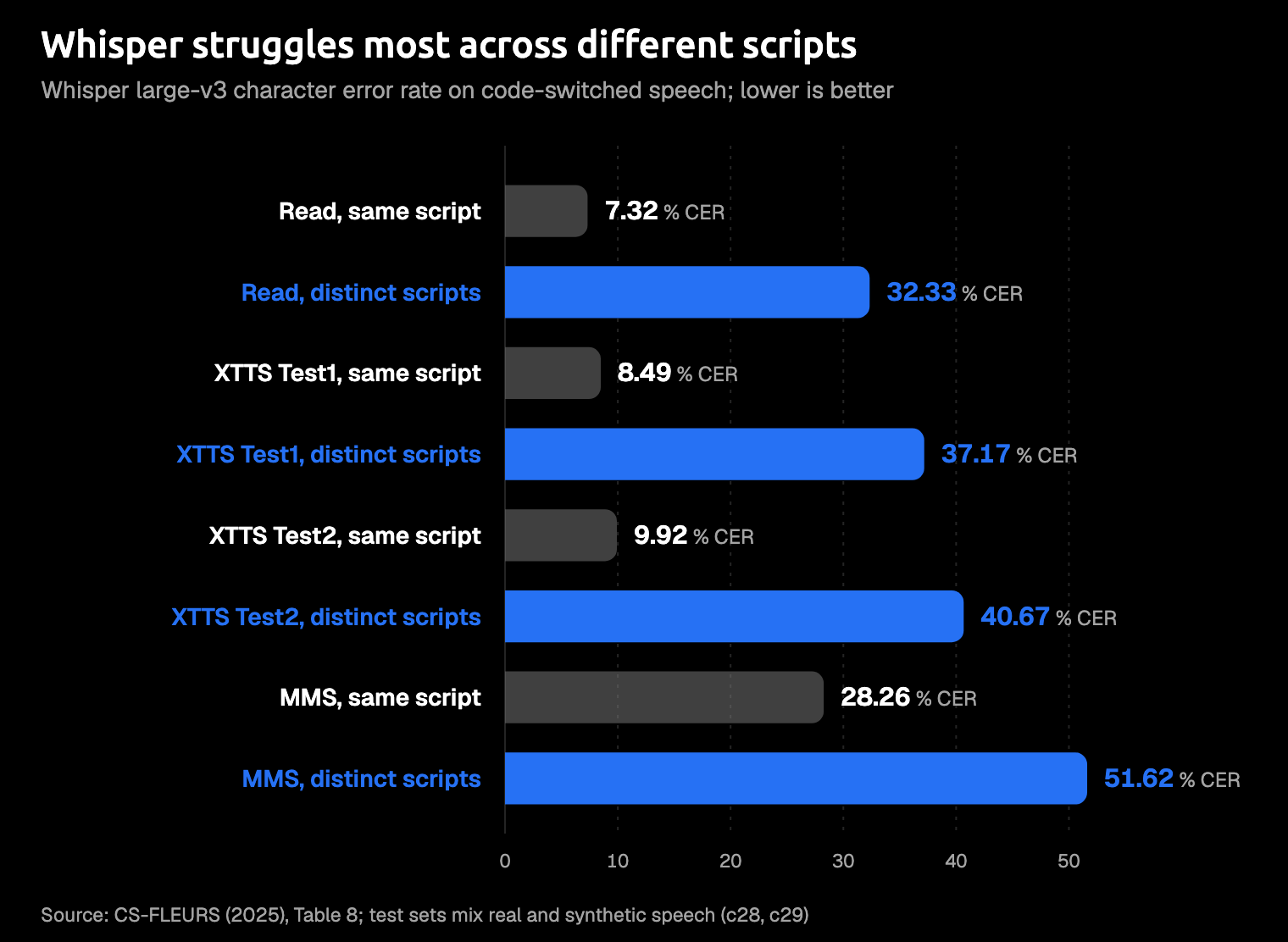
These test sets mix real recordings with synthetic speech, and the paper doesn't say whether the language was forced, so read the bars as a direction, not a forecast for your voice.
A separate 2025 study looked at Mandarin and English. Used as is, with no extra training, Whisper large-v3 had error rates of 61.18% and 60.14% on two SEAME dev sets and 18.41% on the ASRU2019 test set, better than the small and medium models managed.
What you can change in the settings
You can't make Whisper bilingual, but you can stop it guessing wrong. Using an app? Skip the code and look for the same setting by name.
Set the language instead of auto-detect
This is the most useful change you can make. Telling Whisper your main language removes the guess: if you dictate mostly in Japanese, set Japanese.
- openai-whisper:
--language Japanese - faster-whisper:
language="ja" - whisper.cpp:
-l ja. Its default isen, and-l autoturns detection on.
One user found that setting German on a clip that mixed German, English, and Spanish kept all three languages, where auto-detect gave all-English. That's one report, not a promise. Setting a language names your main language; it doesn't tell Whisper to expect a second.
Dictation apps document the same trade-off. As of October 2026, Superwhisper's help page calls a fixed language "the most reliable fix" for wrong-language output. It also says to use Automatic only when you mix languages inside a single dictation, and that a vocabulary hint can improve Automatic's detection, with results that vary by model. Wispr Flow's page says it "detects one language per dictation, not per word", and Hinglish is a language you select yourself.
So a fixed language is the standard cure for wrong-language output; mixing is where apps differ.
Re-detect per segment (faster-whisper only)
Since v1.1.0, faster-whisper has a multilingual=True option that runs language detection again on every segment. That helps a meeting in two languages more than a sentence in two. A segment is still a stretch of speech with one language, so it probably won't fix a switch mid-sentence (our inference, not a test). whisper.cpp's command-line tool has no equivalent yet, though a pull request to add one is open.
Transcribe, don't translate
If your Japanese came back as English, Whisper may have been told to translate. Its translate task always outputs English, while transcribe, the default, keeps the language you spoke. Drop --task translate in openai-whisper, or the -tr flag in whisper.cpp. The turbo model isn't trained for translation, so it returns your original language either way.
Long shots and heavier fixes
- Split the recording by language and transcribe each part with its language set. GitHub users do this with speaker detection plus language detection on each piece.
- Decode twice, once with each language forced, and keep the better result. It's a forum suggestion, and it doubles the work.
- Name both languages in a prompt. Some users say it helped and others say it didn't; OpenAI's guide says prompting techniques like these are "not especially reliable".
- Use a larger model. On Mandarin and English, large-v3 made fewer mistakes than small or medium. Fewer isn't few.
- Fine-tune the model on mixed speech. That's a research project, not a setting.
For dictation, these are workarounds for files, not for talking.
Nobody pauses mid-sentence to change a setting.
If you mix languages, use a model built for it
Amical makes a handy worked example, because it gives you both kinds of model: Whisper in local mode, and its own model in Amical Cloud.
In local mode, Amical runs Whisper through whisper.cpp, with models from Tiny to Large v3 Turbo and 99 languages. Auto-detect is on by default and works out the language from the audio for each recording. Local Whisper is for one language at a time, so turn off auto-detect in Settings > Dictation and pick the language you're speaking; Multi-language support shows where. Local Whisper needs macOS 15 or later, while Parakeet, Amical's other local model, runs on macOS 14 and Intel Macs. The local AI models guide covers setup.
For mixed messages, use Amical Cloud. It's the one we recommend for mixed Japanese and English, and Hinglish works well on it too. AI formatting then rewrites your words for the app you're in, so a bilingual Slack reply arrives as a Slack reply, not a transcript. Cloud AI models has the details.
If you've been quietly dictating everything in your second-best language to keep the app happy, you can stop.
Dictating in multiple languages walks you through the setup, and if English is your second language at work, dictation for non-native English speakers goes further.
- Amical Cloud needs sign-in, and your speech goes to Amical. Your audio, language settings, and formatting context are sent to Amical Cloud; its stated policy is no data retention and no training on your data. If you dictate in one language and want your audio to stay on your computer, use local mode, where text leaves only if you pick a cloud provider for formatting. Cloud vs local dictation compares the two.
- Amical has confirmed Japanese with English and Hindi with English, not every pair. The free plan's 2,000 cloud words a week is enough to test your own pair on real messages.
There's no Amical app for Linux. If that's your setup, the whisper.cpp and faster-whisper settings above are your best route.
How to try it on a real message
The test that counts is your own message, said your own way.
- Download Amical and follow the desktop quick start.
- Sign in and choose Amical Cloud as your speech model.
- Leave the language on auto-detect, the default, in Settings > Dictation.
- Click into a real Slack reply or email, hold your push-to-talk shortcut (see Shortcuts), and say the message with both languages in it, with no tidying up for the machine's sake.
- Release the key, read what Amical typed, and compare it with what your Whisper setup gave you.
Local dictation is unlimited on the free plan; Pricing has the cloud allowance and Premium.
FAQ
How many languages does Whisper support?
Its multilingual models support 99. You'll also see 98, from OpenAI's API docs, and large-v3 added a token for Cantonese.
Why does Whisper translate my speech into English?
Two common causes: the translate task is on, and it always outputs English, or auto-detect guessed English from your audio. Set the task to transcribe and set your language.
Does whisper.cpp auto-detect the language?
Only with -l auto; out of the box it assumes English, and when it does detect, it uses one language for the whole file.
Can Whisper transcribe Hinglish or Japanese mixed with English?
Not reliably. It's built for one language per recording, and researchers found it weakest on pairs written in different scripts. Mixed Japanese and English works on Amical Cloud, and Hinglish works well.
Try one message in both languages
Download Amical, switch to Amical Cloud, and dictate one real message in both your languages, the way you'd normally say it. The free plan's weekly cloud words are plenty to see whether it comes out as one message instead of two half-translations.