You dictate all day: emails, Slack replies, notes, prompts for Claude Code or Cursor. And every few weeks someone posts a new speech model that "beats Whisper", with a chart you can't easily check. So what's the best speech-to-text model in 2026 for your dictation, and does your choice even matter?
Here's the answer. On English, Granite Speech 4.1, Cohere Transcribe, and Parakeet Unified lead the open models, and Whisper large-v3 still covers the most languages you can run yourself, with 99. Your choice matters, but less than the charts suggest: five open models land between 5.33% and 6.65% on the same English test, so your languages, your hardware, and whether you need streaming usually decide more than accuracy does.
This guide maps the open models and cloud APIs that matter in October 2026: what each one is good at for dictation, its published numbers with the test named beside them, and what it needs to run, plus a "best for" map at the end.
Our pick, if you want dictation rather than a model project, is Amical. Amical Cloud, Amical's own hosted speech model, is built for speed: Amical says a short dictation comes back as finished text in under 300 ms (Amical's figure; there's no public benchmark yet). Its AI formatting then rewrites your words for the app you're in. In local mode, Amical runs Whisper and Parakeet TDT 0.6B v3 on your Mac or Windows PC, offline, free, and with no account.
Who's writing this: Amical publishes this blog and sells unlimited Amical Cloud use in its Premium plan, while local mode is free. Amical Cloud has no public accuracy figure yet, so it isn't ranked in the tables below; think of Amical as the easy way to put a good speech model behind a keyboard shortcut.
The short answer
If you're skimming, here's the answer by need. Every line is backed up in the sections below.
- Among the most accurate open models on English: Granite Speech 4.1 (5.33%), Cohere Transcribe (5.42%), and Parakeet Unified (5.91% offline), on the Open ASR Leaderboard English average in the model cards we checked.
- Most languages you can run yourself: Whisper large-v3, with 99.
- Fast and light: Parakeet TDT v3 for 25 European languages, or Moonshine for English on small devices.
- Runs on an ordinary laptop: Whisper and Parakeet TDT v3 (both in Amical's local mode), Moonshine, or Granite Speech 5.0 through llama.cpp or mlx-audio.
- Typing as you talk, with open weights: Parakeet Unified, Nemotron 3.5 ASR Streaming, or Voxtral Realtime.
- Cheapest API: MAI-Transcribe-2 at $0.10 an hour, a launch offer through the end of 2026, then AssemblyAI's Universal-2 at $0.15 an hour.
- Easiest for dictation: Amical, with Amical Cloud for speed and Whisper or Parakeet TDT v3 in local mode.
The full map, with a reason for each pick, is near the end.
How to read the numbers
Three things decide whether a model suits your dictation: how many words it gets wrong, how fast your text shows up, and whether you're allowed to run it the way you want.
Accuracy. Word error rate (WER) is the share of words a model gets wrong, so lower is better. The most common yardstick for open models is the Open ASR Leaderboard English average, which covers 8 English datasets (meetings, earnings calls, audiobooks, TED talks, and more) with punctuation and capital letters removed. FLEURS is a different, multilingual test, so a FLEURS score won't line up with that English average. When a vendor runs its own benchmark, it's the vendor's number, and you'll see it labelled that way here.
Two of the guides that rank for this question list text-to-speech models as speech recognition, so this one lists only speech-to-text models and keeps each test separate.
The open-model figures you'll see in this guide come from each model's card (read on 2026-10-25) and from the Open ASR Leaderboard paper of 2025-10-08, and the table says which source each number is from. The live leaderboard may have moved since then, so treat the order you see here as a snapshot.
Speed and streaming. A batch model transcribes after you stop talking. A streaming model types while you talk, and for streaming, latency is a dial rather than a switch. Parakeet Unified, for example, scores 5.91% offline, 8.44% with 0.16 s of delay, and 15.63% at 0.08 s, so the faster you want words on screen, the more of them it gets wrong.
Here's one piece of reasoning, not a measurement. With push-to-talk dictation, your text lands when you release the key, so a fast batch model on a short clip can be all you need. Streaming matters more when you dictate long stretches and want to watch the words appear.
Licenses and hardware. "Open weights" means you can download a model and run it on your own hardware, and MIT, Apache-2.0, and CC-BY-4.0 (which asks you to credit the source) let you use one at work with very few conditions. NVIDIA's own licenses, the NVIDIA Open Model License and OpenMDW, have their own terms, so if your company plans to build on a model, read its license first (this isn't legal advice).
Hardware is the other limit, since several NVIDIA model cards list NVIDIA GPUs and Linux as the target, and that's probably not the laptop you dictate on. The "Runs on" column in the next table shows what each card or library lists. If you're still deciding where your speech should be processed at all, see cloud vs local dictation.
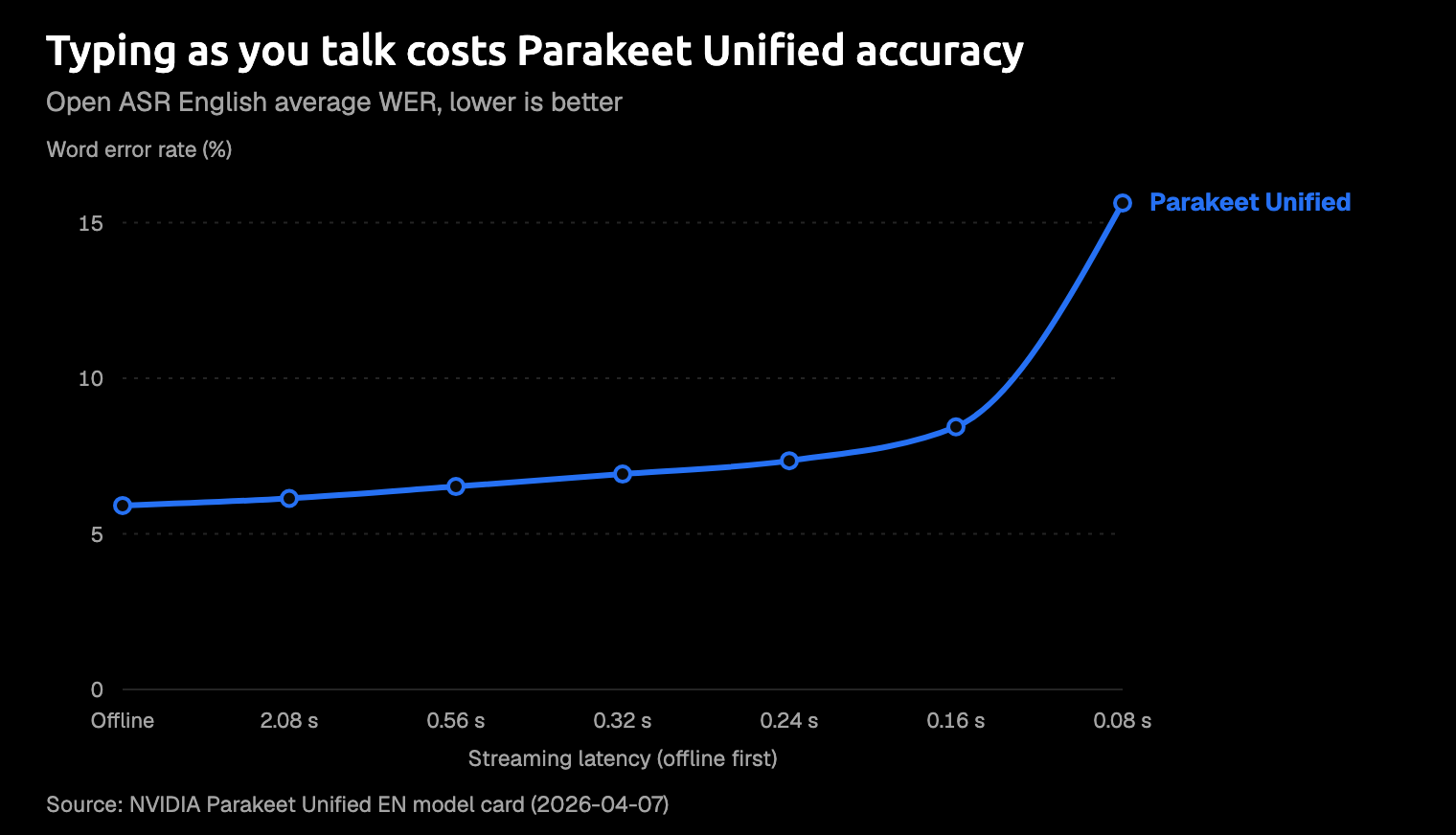
Source: NVIDIA's Parakeet Unified model card. Lower is better, and the card treats 160 ms as the practical minimum.
Open models you can run yourself
Here are the open models you should know about in October 2026. The table uses only the Open ASR English average, and the models whose published numbers come from other tests say "see below". "Runs on" is what the card or library lists, not a speed test.
| Model | Maker | Size | License | Languages | Open ASR English WER | Streaming | Runs on |
|---|---|---|---|---|---|---|---|
| Cohere Transcribe | Cohere | 2B | Apache-2.0 | 14 | 5.42% (as of 2026-03-26) | Not stated | No hardware listed (Transformers, vLLM) |
| Granite Speech 4.1 2B | IBM | 2B | Apache-2.0 | 6 | 5.33% (model card) | Not stated | Not listed |
| Parakeet Unified EN | NVIDIA | 600M | NVIDIA Open Model License | English | 5.91% offline (model card) | Yes | NVIDIA GPU, Linux preferred |
| Parakeet TDT v3 | NVIDIA | 600M | CC-BY-4.0 | 25 European | 6.32% (Open ASR paper, 2025-10-08) | Chunked, through NeMo | NVIDIA GPU on the card; laptops through apps like Amical and Handy |
| Moonshine Streaming Medium | Moonshine AI | 245M | MIT | English | 6.65% (model card) | Yes | Laptops, phones, Raspberry Pi |
| Whisper large-v3 | OpenAI | 1,550M | MIT (OpenAI's repo) | 99 | 7.44% (Open ASR paper, 2025-10-08) | No | Laptops through whisper.cpp, as in Amical |
| Whisper large-v3-turbo | OpenAI | 809M | MIT | 99 | 7.83% (model card) | No | Laptops through whisper.cpp, as in Amical |
| Nemotron 3.5 ASR Streaming | NVIDIA | 0.6B | OpenMDW-1.1 | 40 locales (19 transcription-ready) | See below | Yes | NVIDIA GPU, Linux |
| Qwen3-ASR | Alibaba Qwen | 0.6B and 1.7B | Apache-2.0 | 30 plus 22 Chinese dialects | See below | Yes | Not listed; streaming needs vLLM |
| Voxtral Mini 4B Realtime | Mistral | 4B | Apache-2.0 | 13 | See below | Yes | One GPU with 16 GB or more; community Mac ports |
Five of the models you see in this table land between 5.33% and 6.65% on the Open ASR English average, from Granite Speech 4.1 to Moonshine Medium. That's close enough that the order depends on when you look, so read the top of the table as a group of strong options, not a strict ranking. Whisper large-v3, the model you'll see most guides compare against, sits at 7.44%.
Two models you might expect here sit outside the table. NVIDIA's Canary-Qwen 2.5B scored 5.63% in the 2025-10-08 paper, inside that same group, and IBM's newer Granite Speech 5.0 2B joined the leaderboard on 2026-10-21 with no figure in its card text.
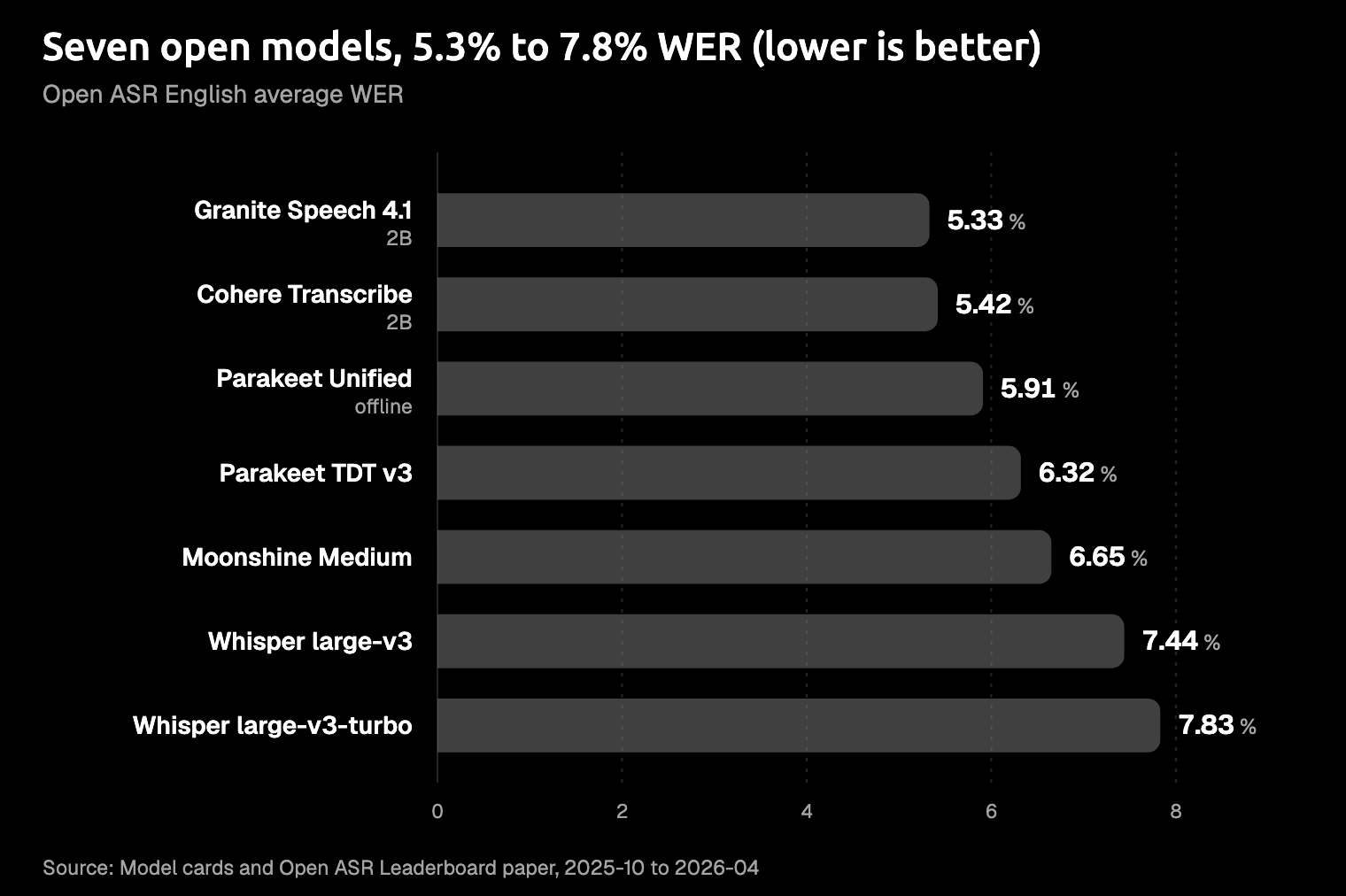
Source: Open ASR Leaderboard English average, from model cards and the Open ASR paper, dated 2025-10 to 2026-04. The live leaderboard may differ.
Whisper large-v3 and large-v3-turbo (OpenAI)
Whisper is the baseline everyone compares to, and for good reason: it covers 99 languages, and large-v3 has about 1,550M parameters. Turbo cuts that to 809M, and in OpenAI's README it runs about 8x faster on an A100 (a data-center GPU), with roughly 6 GB of GPU memory instead of 10 GB. On the same English average, large-v3 scores 7.44% and turbo 7.83%.
The trade-offs are real, and you should know them before you pick. Turbo loses more accuracy on some languages, such as Thai and Cantonese, and the model card warns that Whisper can write text nobody said; users report it happening more over silence. The license is MIT per OpenAI's repo, although Hugging Face tags large-v3 as Apache-2.0.
If you dictate in several languages, start with Whisper; if you only need English, the models above it in the table make fewer mistakes.
Amical runs both large-v3 and turbo in local mode through whisper.cpp (a version of Whisper built to run on ordinary computers), plus smaller sizes down to Tiny (about 78 MB) if your machine is older. Local AI models shows you how to set them up, and you can switch between sizes whenever you like.
Parakeet TDT 0.6B v3 (NVIDIA)
Parakeet TDT v3 is NVIDIA's fast multilingual model: 600M parameters, a CC-BY-4.0 license, and 25 European languages with automatic language detection. It scores 6.32% on the leaderboard's English average (the card's own table says 6.34%).
Its throughput is very high, with an RTFx of 3,332.74. RTFx counts how many seconds of audio a model gets through per second of compute, so higher is faster. It's a benchmark score, though, and it isn't the wait you'll have on your own laptop.
The model card lists NVIDIA GPUs and Linux, but apps let you run it on ordinary computers: Handy, an open source dictation app, ships a "CPU-optimized" Parakeet V3 build. If you dictate in Japanese, you'll want a different model, since all 25 of its languages are European.
This is the Parakeet you get in Amical's local mode on Mac and Windows, with custom vocabulary and AI formatting working on top of it.
If you want the full picture, read our Parakeet TDT v3 guide.
Parakeet Unified EN 0.6B (NVIDIA)
Parakeet Unified is one model for both offline and streaming use, English only, released on 2026-04-07 under the NVIDIA Open Model License. Offline, it scores 5.91% by the same measure, among the best you'll find in the table. In streaming mode, you choose the delay, and the chart above shows what it costs you: 6.52% at 0.56 s and 8.44% at 0.16 s.
The model card treats 160 ms as the practical minimum and points you to a separate NVIDIA streaming model for 80 ms. It runs on NVIDIA GPUs through NeMo (NVIDIA's toolkit for running its speech models), with Linux preferred, so as published it's a model for people who build their own setup.
No NVIDIA graphics card? Handy, the dictation app mentioned above, ships a 731 MB community build of it.
Next to Parakeet TDT v3, you give up the European languages and get live streaming in return.
Nemotron 3.5 ASR Streaming 0.6B (NVIDIA)
Nemotron streams by reusing work from the audio it has already heard instead of starting over for each chunk (NVIDIA calls this cache-aware streaming), and you can set chunks from 80 ms to 1.12 s. It lists 40 locales, of which 19 are "transcription-ready", under the OpenMDW-1.1 license.
NVIDIA reports its numbers on FLEURS, which is a different test from the table you just read. On its model card, the average across the 19 ready locales is 10.38% at the fastest setting (80 ms) and 8.84% at the slowest (1.12 s). To run it, you need NeMo on Linux with NVIDIA GPUs.
It's built for live text in many languages on a Linux machine with an NVIDIA GPU, not for the laptop you dictate on.
Cohere Transcribe (Cohere)
Cohere Transcribe topped the Open ASR English average when it launched, with 5.42% as of 2026-03-26. It's a 2B model under Apache-2.0 that covers 14 languages, including Japanese, Chinese, Korean, and Arabic, so like Granite, it's an accuracy leader you can use for Japanese plus English.
Cohere doesn't say it streams, so plan on batch use if you pick it. The model card suggests Transformers (Hugging Face's library for running models in Python) for offline use and vLLM (a server for running models at scale) for online serving. The download is gated, but access is approved automatically. It suits batch dictation where accuracy matters most, as long as you can host a 2B model yourself.
Granite Speech (IBM)
IBM's Granite Speech 4.1 2B posts the lowest figure in the table, 5.33% on the Open ASR English average, from its model card. It's Apache-2.0 and covers 6 languages: English, French, German, Spanish, Portuguese, and Japanese.
If you dictate outside those six, look elsewhere.
The newer Granite Speech 5.0 2B (card dated 2026-10-20) keeps the same languages, transcribes in segments of up to about 2 minutes, and doesn't mention streaming. It adds llama.cpp and mlx-audio, two tools for running models on ordinary computers (mlx-audio is for Apple silicon Macs), which on paper makes it one of the easier models here to try on your laptop. IBM's card gives no accuracy figure in its text for this version, so you won't find one here.
Qwen3-ASR (Alibaba Qwen)
Qwen3-ASR comes in 0.6B and 1.7B sizes under Apache-2.0, and it handles 30 languages plus 22 Chinese dialects, with offline and streaming in one model. If you want streaming, though, it only works through the vLLM backend.
In Qwen's own benchmarks on its model card, the 1.7B and Whisper large-v3 are close on English test sets, with Qwen ahead on most. On Chinese, the gap is wide: on WenetSpeech, Qwen scores 4.97% and Whisper 9.86%, and lower is better. Those are self-reported, on tests Qwen chose, so you can't line them up with the table above.
If you dictate in Chinese or a Chinese dialect, Qwen's own numbers make it the one to try first.
Voxtral Mini 4B Realtime (Mistral)
Voxtral Mini 4B Realtime is Mistral's open-weights streaming model, released under Apache-2.0 with 13 languages, including Japanese. You set the delay anywhere from 80 ms to 2.4 s, and Mistral recommends 480 ms. It needs a single GPU with at least 16 GB of memory, so you'll want a strong graphics card.
Mistral's own FLEURS average is 8.72% at 480 ms and 6.73% at 2.4 s. Mistral recommends vLLM, the model card also covers Transformers, and the community has ported it to MLX (Apple's framework for running models on Mac chips), which is the route if you're on a Mac.
Moonshine Streaming (Moonshine AI)
Moonshine is the small one: its streaming models run from Tiny at 34M parameters to Medium at 245M, under MIT, English only, built for edge devices with under 1 GB of memory. Medium scores 6.65% on the same English test, ahead of Whisper large-v3 (7.44%) at about a sixth of its size. You can run the Moonshine library on macOS, Windows, iOS, Android, and even a Raspberry Pi.
One catch: Moonshine's older non-English models use a non-commercial license, so check which one you download. If you're building English dictation for a phone or a small device, start here.
Cloud APIs
If you'd rather not host a model, you can call one. Prices below are as listed on each vendor's page on 2026-10-25, in the unit each vendor uses, so multiply a per-minute price by sixty to compare it with an hourly one. The accuracy column shows you only what each vendor publishes.
| Provider and model | Price (as listed) | Languages | Live option | Accuracy claim |
|---|---|---|---|---|
| OpenAI gpt-transcribe / gpt-live-transcribe | $0.0045 / $0.017 per minute | None listed | gpt-live-transcribe; docs also list streaming for gpt-transcribe | None shown |
| Mistral Voxtral 3: Mini, Small, Realtime Transcribe 3 | $0.0035 / $0.004 / $0.008 per minute | Over 50 batch, 35+ realtime | Realtime Transcribe 3, under 500 ms | Mistral's FLEURS figures (below) |
| Microsoft MAI-Transcribe-2 | $0.10 per hour, launch offer through end of 2026 | 60 | Not stated | 5.2% FLEURS average over 60 languages (Microsoft) |
| ElevenLabs Scribe v2 / Scribe v2 Realtime | $0.22 / $0.39 per hour | 90+ | Realtime, about 150 ms partials | None shown |
| AssemblyAI Universal-3.5 Pro / Universal-3.6 Pro Realtime | $0.21 / $0.45 per hour (streaming billed by session time); Universal-2 $0.15 per hour | 18 (Universal-2: 99) | Universal-3.6 Pro Realtime | None shown |
| Deepgram Nova-3 / Flux | $0.0043 to $0.0052 per minute batch; streaming $0.0048 to $0.0078 per minute, promotional | 55 (Flux multilingual: 10) | Nova-3 streaming, Flux | None shown |
OpenAI. gpt-transcribe is the cheaper option at $0.0045 a minute, and gpt-live-transcribe ($0.017 a minute) is OpenAI's low-latency live model. OpenAI's docs also list streaming under gpt-transcribe. OpenAI's model pages for these two list no word error rate or language list (checked 2026-10-25), which makes them hard for you to compare.
Mistral Voxtral 3. Voxtral 3 is a family of three models (Mini, Small, and Realtime Transcribe 3), available through the API as a public preview, with no open weights announced as of 2026-10-20. Mistral's own FLEURS tests put Small Transcribe 3 at 4.1% across 45 languages, against 16.0% for Whisper large-v3, and Realtime 3 at 6.4% with a 480 ms delay. Those are Mistral's numbers, read from its charts, so you should treat them as the vendor's case. Mini Transcribe 3, at $0.0035 a minute, is the cheapest of the three.
Microsoft MAI-Transcribe-2. Microsoft says it averages 5.2% WER on FLEURS across 60 languages, and its $0.10-an-hour launch price runs through the end of 2026. It's on Microsoft Foundry, MAI Playground, and OpenRouter, and Microsoft doesn't say whether it streams, so check that first if your app needs live text.
ElevenLabs Scribe v2. Scribe v2 covers 90+ languages and lets you pass up to 1,000 key terms, which helps with your names and jargon. The Realtime version returns partial transcripts in about 150 ms, at $0.39 an hour.
AssemblyAI. Universal-3.5 Pro costs $0.21 an hour for recorded audio and supports 18 languages, while the older Universal-2 covers 99 for $0.15. Streaming with Universal-3.6 Pro Realtime is $0.45 an hour, billed by session time, and new accounts get $50 in credit, per its pricing page. If you speak a less common language, check that it's on the list for the model you pick.
Deepgram. Nova-3 is $0.0043 a minute for one language and $0.0052 for multilingual audio, which covers 55 languages. Its pricing page marks the streaming and Flux rates as a limited-time promotion, and new accounts get $200 in credit. If you plan around a streaming price, check the standard rate first.
One thing all six have in common: they're APIs you build on. To dictate with one, you'd need to build an app around it, or find one that supports it, with a shortcut, a microphone, and a way to paste text where your cursor is.
Where Amical fits
Amical is a dictation app. You hold a shortcut, talk, and Amical types into whatever app you're in, formatted for it: a properly laid-out email, a short chat reply, tidy notes, or plain cleanup everywhere else. You get two ways to run the speech part, and AI formatting works with both.
Amical has no public accuracy figure for Amical Cloud yet, and the two local models it runs, Whisper and Parakeet TDT v3, trail Granite and Cohere by about 1 to 2 points on the English average.
What you get from Amical is the rest of the job: AI formatting that writes the message for the app you're in, the same Amical Cloud on iPhone, iPad, and Android, 100+ languages, and a free local mode. To settle accuracy for your own voice, dictate the same paragraph with each model, as in step 4 below.
Here's the kind of thing you might say into a new email. It's an illustration of the idea, not a test run:
hi sam um so the demo moved to thursday at three, can you send me the deck by wednesday so I can check it, thanks
And here's the kind of email Amical types:
Hi Sam,
The demo has moved to Thursday at 3. Could you send me the deck by Wednesday so I can check it?
Thanks
Amical Cloud. Amical Cloud is Amical's own hosted speech model, built for low latency, with 100+ languages, and you can mix Japanese and English in one dictation. Amical says a short dictation comes back as finished text in under 300 ms and a longer one in under 500 ms; those are Amical's figures, and there's no public benchmark yet. The faster numbers elsewhere in this guide, like Scribe v2 Realtime's partials in about 150 ms or streaming chunks of 80 ms and 160 ms, time the first words or a chosen delay, not the finished text, so they measure something different. There's nothing to set up beyond signing in, and it's the same engine you get on iPhone, iPad, and Android. Amical Cloud and the mobile apps need an account and aren't open source, while local mode on desktop needs no account. The free plan includes 2,000 Amical Cloud words a week, and Premium makes them unlimited; see pricing.
Local mode. In local mode, Amical runs Whisper in six sizes, from Tiny (about 78 MB) to Large v3 (about 3.1 GB) and Large v3 Turbo, plus Parakeet TDT 0.6B v3 for 25 European languages, on your Mac or Windows PC. Custom vocabulary and AI formatting work with both, so your names and jargon carry over. It works offline once you've downloaded a model, needs no account, and local dictation is free and unlimited. On a Mac, local transcription needs macOS 15 or later and runs slower on Intel Macs. The desktop app is open source under the MIT license, so you can read the code. There's no Linux version of Amical, so if you're on Linux, this part won't help you.
Amical doesn't run most of the models you've read about here: no Qwen3-ASR, Voxtral, Cohere, Granite, Nemotron, Moonshine, or any of the third-party APIs. The two it runs locally cover the common cases, with Whisper for 99 languages and Parakeet TDT v3 for 25 European ones, and Amical Cloud covers 100+ languages with nothing to set up. If you want to try the others, the sections above say what each one needs to run.
Two settings matter for your results whichever model you pick: custom vocabulary for names and jargon, and multi-language support if you switch languages. The full model lists are in Cloud AI models and Local AI models.
Best for… map
Our own three rows come first; the rest is our reading of the published numbers, not a test we ran.
| You want… | Pick | Why |
|---|---|---|
| Dictation with no setup, built for speed | Amical Cloud | Amical says under 300 ms for a finished short dictation (no public benchmark), plus AI formatting |
| Japanese plus English, no setup | Amical Cloud | Mixes both in one dictation, on desktop and phone |
| Private, offline dictation on your desktop | Amical local mode with Whisper or Parakeet TDT v3 | Offline, no account, free; no audio or text leaves your computer when AI formatting also runs locally (for example through Ollama, which runs language models on your computer) or is off |
| Best English accuracy, run yourself | Granite Speech 4.1 or Cohere Transcribe | Top of the Open ASR English average in the cards checked |
| Japanese plus English, run yourself | Whisper, Cohere, Voxtral Realtime, or Granite | All list Japanese |
| Chinese and dialects | Qwen3-ASR | 22 Chinese dialects, strong Chinese scores in Qwen's own tests |
| Typing as you talk, open weights | Parakeet Unified, Nemotron 3.5, or Voxtral Realtime | You choose the delay |
| Small devices | Moonshine | Built for under 1 GB of memory |
| Cheapest API | MAI-Transcribe-2, then AssemblyAI Universal-2 | $0.10 an hour until the end of 2026, then $0.15 an hour |
| Live partials from an API | Scribe v2 Realtime, gpt-live-transcribe, or Voxtral Realtime Transcribe 3 | All three are live models; Scribe returns partials in about 150 ms |
| Jargon-heavy API work | ElevenLabs Scribe v2 | Keyterm prompting, up to 1,000 terms |
How to try one in Amical
Switching models is one setting, though a local model has to download first:
- Download Amical and open Settings > AI Models > Speech.
- For Amical Cloud, click Sign In on the Amical Cloud row, then choose it under Default Speech Model.
- For local mode, download Whisper Large v3 Turbo and set it as your Default Speech Model; Parakeet TDT 0.6B v3 is the other local option. On an older machine, a smaller Whisper size such as Base or Small is a sensible place to start.
- Dictate the same paragraph with each model and compare the results on your own voice.
New to Amical? The desktop quick start walks you through setup.
Try it on one real email
Amical publishes this blog, so weigh our advice with that in mind: download Amical and dictate one real email with Amical Cloud. Then switch to a local model and dictate the same email again, so you can hear how each one handles your own words. The free plan includes unlimited local dictation and 2,000 cloud words a week, which is plenty for the test.