You want dictation that types straight into your editor, Slack, and email, and you'd rather not hand your voice to a closed tool. The best open source dictation apps for that in 2026 are Amical, Handy, OpenWhispr, FluidVoice, and VoiceInk. Amical is our pick for most people, and Handy is the pick if you're on Linux or want everything free with no account anywhere.
Many lists for this search come from companies with their own dictation app to recommend. And in this category, "open source" can mean "source on GitHub, paid app on the website", or "half the platforms are a waitlist".
This guide checks each app against its own repo and site on October 24, 2026. For each one, you get the license, the platforms that actually ship, the local speech engine, what's paid, what's missing, and how to install it.
A note on who's writing: Amical publishes this blog, and Amical is our top pick. It's the only app on this list that ships for Android as well as iPhone and iPad, next to Mac and Windows, and it rewrites what you say for the app you're in. On your computer, you choose local models or Amical Cloud, our own speech model, which leads the category on dictation speed by our own figures. The phone apps need sign-in, transcribe with Amical Cloud, and aren't part of the open source repo; on your Mac or PC, local mode needs no account. Its other weak spots are in its entry, too.
Quick picks
If you only have a minute, here's the short version:
- Best overall: Amical. Local or cloud on Mac and Windows, Amical Cloud on iPhone, iPad, and Android, and AI formatting for the app you're in.
- Best fully free, and best on Linux: Handy.
- Cross-platform with a hosted plan: OpenWhispr.
- Mac only, with on-device AI polish: FluidVoice.
- Pay once for a polished Mac app (or build it free): VoiceInk.
A few names in the table need a word first. Whisper is OpenAI's open speech-to-text model, and whisper.cpp is a version of it built to run fast on ordinary computers. Parakeet is NVIDIA's open speech model, and you'll see it in most of these apps.
| App | License | Platforms (released) | Local speech engine | AI cleanup | What's paid | Stars |
|---|---|---|---|---|---|---|
| Amical | MIT (desktop app; phone apps not in the repo) | macOS, Windows, iPhone/iPad, Android (phones use Amical Cloud); no Linux | Whisper (whisper.cpp), Parakeet; Mac and Windows only | AI formatting for the app you're in, with local or cloud models | Premium $10/mo or $84/yr for unlimited cloud | 1,569 |
| Handy | MIT | macOS, Windows, Linux | Whisper, Parakeet V3 | Optional, off by default | Nothing (sponsors) | 34,554 |
| OpenWhispr | MIT | macOS, Windows, Linux; iPhone/iPad with Pro | whisper.cpp, Parakeet | By voice ("clean this up") | Pro $80/user/yr | 9,909 |
| FluidVoice | GPL v3 | macOS 15+ only (Windows and iPhone in testing; Linux and Android on a waitlist) | Parakeet, Nemotron, Cohere, Whisper, Apple Speech | Your own OpenAI or Groq key, or a closed local model | Nothing listed | 12,446 |
| VoiceInk | GPL v3 (LICENSE file) | macOS only (Apple Silicon) | whisper.cpp, Parakeet, SenseVoice, GGUF models | Context-aware Smart Modes; optional cloud enhancement sends text only | Prebuilt app $25 / $39 / $49, one-time | 6,913 |
Checked against each repo and site on October 24, 2026.
If you came here looking for a Wispr Flow alternative in particular, our Amical vs Wispr Flow page covers that head to head.
How we checked
The bar for this list was simple. Each app needed an open source license in its repo, had to type into whatever app has focus, and had to ship a release in 2026. For each one, we read the GitHub API for the license and stars, the releases page for files and dates, the README, and the official site, all on October 24, 2026. Where those sources disagree, we say so. For Amical, a few details aren't in the public repo yet (Parakeet, Amical Cloud's speed and languages, and how the phone apps transcribe), so those come from our own team. We didn't install and test the apps for this round, so everything here is what each project publishes. Stars move every day, so check the repo before you decide.
Open source doesn't always mean free: four kinds of open
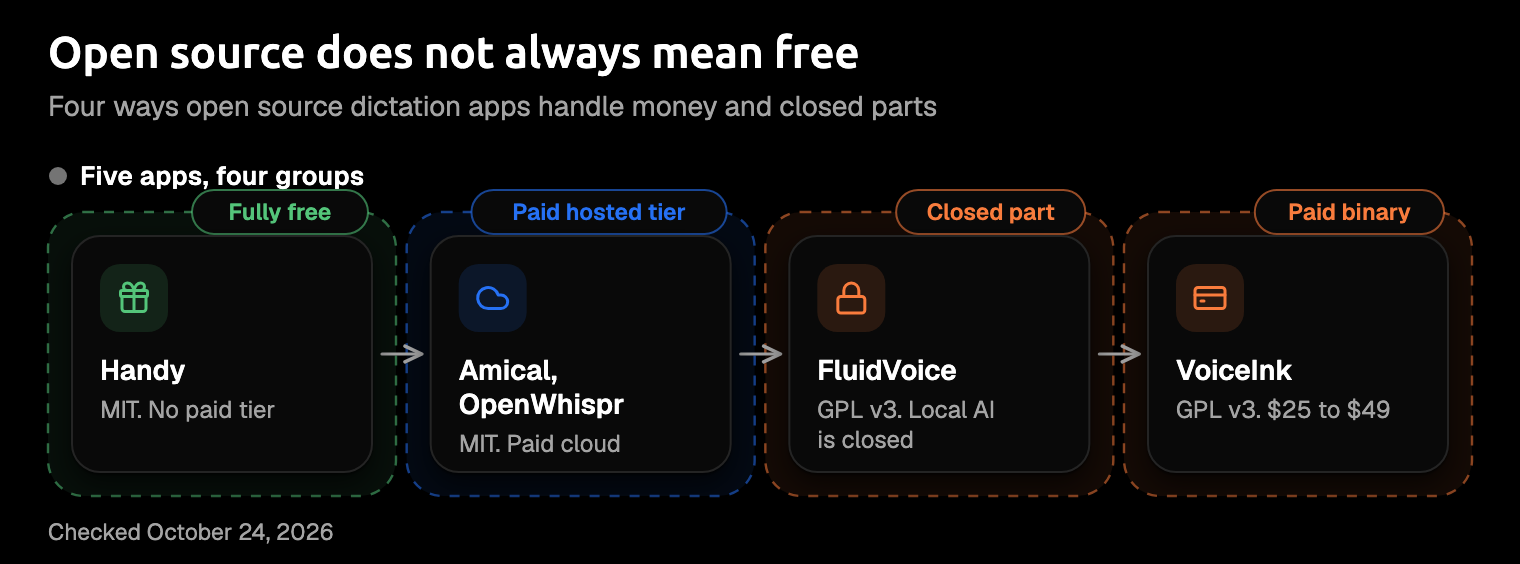
A license tells you that you can read the code. It doesn't tell you whether the app you download is free, or whether every part of it is open. The five apps here fall into four groups.
Fully free. Handy is the clean case: there's no paid plan at all, and the project runs on sponsors.
Open source app, paid hosted tier. Amical and OpenWhispr both put their desktop apps under the MIT license, and both keep local dictation free and unlimited. What you pay for is unlimited cloud: Amical Premium is $10 a month or $84 a year, and OpenWhispr Pro is $80 per user per year. Both free plans also give you 2,000 cloud words a week.
Open source with a closed part. FluidVoice's app is open source, but its optional local AI cleanup, Fluid Intelligence, is "a separate, privately maintained local AI runtime". The README is upfront about it: "We're keeping Fluid Intelligence private for now."
Open source, paid binary. VoiceInk's code is GPL v3, and you're free to build it yourself. The ready-made app costs $25 for one Mac, $39 for two, or $49 for three, paid once. If you build it yourself, you don't get iCloud dictionary sync or automatic updates.
The five apps
Each entry starts with who it's best for, then what it does, the fine print, and how you install it.
1. Amical (our pick)
Best for: one dictation app on your computer and your phone, with messages formatted for the app you're in.
This is our app, and Amical publishes this blog, so weigh our pick with that in mind. We've held it to the same checks as the other four, and the few details that come from our team are listed under How we checked.
Most dictation hands you a transcript, and you wanted an email. Amical turns your speech into text, then its AI formatting rewrites it for the app that has focus: a proper email in Gmail, a short reply in Slack, tidy notes in a notes app, and plain cleanup everywhere else. Here's an illustration of the idea, not a measured run. Say you dictate this:
tell maya the release moved to thursday because of the login bug and I'll send the changelog tonight
In Gmail, you'd get something like "Hi Maya, a quick update: the release has moved to Thursday because of the login bug. I'll send the changelog tonight." In Slack, it stays short: "Release moved to Thursday (login bug). Changelog coming tonight."
You also choose where it runs. Amical Cloud is our own speech model, built for low latency, and it covers 100+ languages, including Japanese and English mixed in one sentence. It leads the category on dictation speed: short dictations come back in under 300 ms, and longer ones in under 500 ms. Those are our own figures, and there's no public benchmark yet.
Or you can use local mode on Mac and Windows. Whisper runs on your computer through whisper.cpp and covers 99 languages, and Parakeet, which ships in a released build, is the other local option. In local mode, you don't need an account, and if you also format with a local model, your audio and text stay on your computer. For local formatting, you can run a model through Ollama (a free tool for running AI models on your own computer) or any OpenAI-compatible server. You can also format with OpenAI, Anthropic, OpenRouter, and the other major AI providers, which sends your text to them.
With Amical Cloud, more leaves your computer. Your audio, your language and custom-vocabulary settings, and context for formatting (selected text, the text around your cursor, the app name, and the browser URL) go to Amical Cloud. The stated policy is "No data retention" and "No training on your data". Separately, Amical sends anonymous telemetry, which is on by default, doesn't include what you dictate, and can be turned off.
Amical runs on Mac (Apple Silicon and Intel), Windows (x64 and ARM64), iPhone, iPad, and Android. The phone apps transcribe with Amical Cloud only, so local dictation is a Mac and Windows feature. The iOS quick start and Android quick start cover the phone apps. The free plan gives you unlimited local dictation and 2,000 cloud words a week, so on your phone, the free plan means those 2,000 cloud words. Premium is $10 a month or $84 a year for unlimited cloud. The pricing page has the details.
The fine print. Here's where Amical falls short, and what it offers you instead:
- Stars. Amical has 1,569 stars, and Handy has about 22 times as many; FluidVoice, OpenWhispr, and VoiceInk have more, too. Stars measure attention, not features. What Amical adds is the combination: phone apps, Amical Cloud's speed, and formatting for the app you're in, with a local option on your computer.
- No Linux. Amical doesn't run on Linux; our README says the app doesn't have a Linux native helper yet. If you're on Linux, Handy is your pick.
- Sign-in and the repo. The phone apps and the Amical Cloud service need sign-in, and neither is part of the open source repo. On desktop, local mode needs no account.
- macOS 15 and Intel. Local transcription needs macOS 15 or later, and it's slower on Intel Macs, which run it without Metal GPU support. That requirement is for local transcription only; with Amical Cloud, speech recognition runs on our hosted model instead of your Mac.
Coming soon, and not in the app yet: voice commands, MCP voice commands, and custom prompts. (MCP is a standard way for AI tools to connect to other apps.) The latest stable release is v1.12.5, from September 25, 2026.
Install: run brew install --cask amical, or get the installer from the download page or the GitHub repo. The desktop quick start walks you through setup.
2. Handy
Best for: an app with nothing to pay on Mac, Windows, and Linux, from the most-starred project here.
Handy is MIT-licensed and has 34,554 stars, the most of any app in this guide. It works on Windows, macOS, and Linux. You hold a key and talk, and it pastes the text into the app that has focus, then puts your old clipboard back after a short delay.
For speech, you pick a local Whisper model, which uses your GPU when there is one, or Parakeet V3, which is tuned to run well on a CPU and detects your language for you. AI cleanup is optional and off by default. When you turn it on, you can send text to OpenAI, Anthropic, OpenRouter, Groq, and others, use Apple Intelligence on an Apple Silicon Mac, or set a custom endpoint, which defaults to localhost:11434, the port Ollama usually uses. There's no paid plan, and the project takes sponsors.
The fine print. On Linux with Wayland, you'll need wtype or dotool installed for typing to work well. The website shows only an Apple Silicon download, so if you're on Windows or Linux, go to GitHub Releases instead. The Homebrew and winget packages are maintained by the community, not by Handy's developers. And while the code is MIT, the Handy name and logo aren't open source. It's shipping steadily, with three releases in ten weeks and v0.9.8 out on October 3, 2026.
Install: run brew install --cask handy or winget install cjpais.Handy, or grab the .deb, AppImage, rpm, or msi from Handy's GitHub page.
3. OpenWhispr
Best for: cross-platform local dictation now, with a hosted plan if you want one later.
OpenWhispr is MIT-licensed with 9,909 stars, and it ships for Mac (Apple Silicon and Intel), Windows, and Linux as AppImage, deb, rpm, and tar.gz. Locally, it runs Whisper through whisper.cpp or NVIDIA's Parakeet, with GPU support on Metal, CUDA, or Vulkan. You can also bring your own API keys for cloud models. AI cleanup works by voice: the site's examples are "clean this up" and "draft an email to Mike".
The free plan covers unlimited local dictation, 2,000 cloud words a week, and unlimited use with your own keys. Pro costs $80 per user per year and adds unlimited cloud, agent mode, sync, MCP, and the iPhone and iPad app. So if you want OpenWhispr on your phone, that's where it sits.
The fine print. The pricing page lists agent mode and MCP under Pro, while the README lists them with no Pro label, so we couldn't confirm which features the MIT build leaves out. If you're on an Intel Mac, speaker identification and voice fingerprinting for meetings aren't available. The latest release is v1.10.4, from October 22, 2026.
Install: download the installer from openwhispr.com or GitHub Releases, or use the community-maintained cask, brew install --cask openwhispr.
4. FluidVoice
Best for: AI cleanup that can run on the device, on a recent Mac.
FluidVoice has 12,446 stars, and it's been GPL v3 since February 23, 2026; earlier versions were Apache 2.0. Released builds are macOS only and need macOS 15 or later. Its Parakeet, Nemotron, and Cohere speech models need Apple Silicon, while Whisper and Apple Speech also run on Intel Macs.
For cleanup, you can use your own OpenAI or Groq key, or the optional Fluid Intelligence model, which runs locally but isn't open source. The app itself is free, with no paid plan listed.
The fine print. The site lists Windows and iPhone versions in testing and Linux and Android on a waitlist, and the README says iOS and Windows are "on the way", but the releases are macOS only. The README and the site also give different sizes for the local AI model: about 3.5 GB in the README, and under 1.5 GB or 600 MB for the two models on the site. Watch out for fluidvoice.org, which isn't the official site. The latest release is v1.6.12, from October 22, 2026.
Install: run brew install --cask fluidvoice, or download the dmg from FluidVoice's GitHub page.
5. VoiceInk
Best for: a polished Apple Silicon Mac app you pay for once, or build yourself for free.
VoiceInk is GPL v3 according to its LICENSE file, though GitHub's sidebar shows "Other", and it has 6,913 stars. It runs whisper.cpp, Parakeet, SenseVoice, and GGUF models locally. Its AI enhancement is context-aware: Smart Modes apply the settings you've saved for the app or website you're in, so the cleanup adapts to where you're writing. Cloud enhancement is optional, and when you use it, only text is sent.
The ready-made app costs $25 for one Mac, $39 for two, or $49 for three, paid once, with a 14-day money-back guarantee. There's a free trial, but the site doesn't say how long it lasts.
The fine print. Builds you make yourself are free, but they don't include iCloud dictionary sync or automatic updates. The project isn't accepting pull requests, though forks are welcome. The site says macOS 14.4 or later, while the README, the build guide, and the Homebrew cask all say macOS 15.0, so plan on 15.0 or later. The latest stable release is v2.21, from September 28, 2026.
Install: start the free trial from tryvoiceink.com, run brew install --cask voiceink, or build from source with the repo's BUILDING.md.
Close, but not dictation
If you search for open source dictation, you may also find these three. They're useful tools, but none of them types into your other apps today.
- Buzz (MIT, 22,178 stars) transcribes audio and video files and YouTube links offline with Whisper. It has live mic transcription, but its README doesn't mention typing into other apps, so it's best for recordings.
- Vibe (MIT per GitHub, 7,887 stars) is a file transcriber with mic and system-audio capture that works offline on Mac, Windows, and Linux. It doesn't list typing into other apps.
- Whispering shows up in older coverage as an app that pasted into other apps. The current repo no longer supports that: its README says "Dictating into other apps is not part of it" and calls the current build "a development milestone, not a release", and there's been no release since December 27, 2025.
Niche, inactive, or not open source
- nerd-dictation (GPL v3) does offline dictation for desktop Linux with VOSK and types through xdotool or wtype. It has no releases, and its last push was in October 2025, so it suits Linux users who like a script.
- WhisperWriter (GPL v3) types into the active window using faster-whisper or the OpenAI API, but it hasn't had a push since August 2024.
- Talon is voice control that's free to use, with a paid Talon+ tier, but it isn't open source: its license calls the source and binaries "trade secrets". See Amical vs Talon if you're weighing the two.
Which one should you install?
Here's the split by situation, starting with our pick:
- Most people, especially if you also dictate on your phone, want messages formatted for the app you're in, or want Amical Cloud's speed: Amical.
- You're on Linux, or you want everything free with no account anywhere: Handy. If you'd rather run a script, try nerd-dictation.
- You want cross-platform with a hosted plan from another project: OpenWhispr.
- You're Mac only and want AI cleanup on the device: FluidVoice, as long as you're fine with the cleanup model being closed.
- You're on a Mac and want to pay once and be done: VoiceInk.
- You mostly transcribe recordings: Buzz or Vibe.
Whichever you pick, check its repo's latest release before you install.
Try it on one real message
Amical publishes this blog, so take this as our suggestion: download Amical and dictate one real Slack reply or email with it today. The free plan gives you unlimited local dictation and 2,000 cloud words a week, which is plenty to find out whether talking beats typing for you.