On this page
- The short answer
- Is it broken, or just bad?
- Why iPhone dictation gets worse
- An update changed it
- Some languages need Apple's servers
- The better model skips older iPhones and most languages
- Reports from iPhone 18 Pro and 17 Pro owners
- Auto-punctuation and capitals guess wrong
- It doesn't know your names
- Accents and how you speak
- How to fix iPhone dictation
- Does iOS 27 fix it?
- When settings can't fix it: use a different keyboard
- FAQ
- Has iPhone dictation gotten worse?
- Why does iPhone dictation stop on its own?
- Does iPhone dictation send my voice to Apple?
- Can I add words to iPhone dictation?
- Try it on the message dictation keeps getting wrong
You dictate a quick reply between meetings. It lands with a capital in the middle, a comma where you only took a breath, and your colleague's name spelled like someone else's. You fix it three times before you hit send, and you start to wonder why iPhone dictation is so bad lately.
The cause may not be you at all. What goes wrong depends on your iOS version, your iPhone, and the language you speak, especially if you dictate in a second language or in French, German, or Hindi. Some of it a setting can fix. Some of it no setting will touch. This guide covers the likely causes, the fixes in order of effort, and what to use if it's still bad afterwards.
We found no Apple page or release note that names a cause, and Apple's dictation page has no troubleshooting section. So every cause here is user-reported or inferred from Apple's own pages, and we say which.
Amical publishes this blog and makes an iPhone keyboard. It's the last section, and every fix before it uses what's already on your phone.
Everything here reflects iOS 27 and its first update, iOS 27.0.1, as of late October 2026.
The short answer
Five causes come up again and again in user reports and Apple's own pages, and only some of them have a fix in Settings.
- An update changed it. Users tied accuracy drops to iOS 26.3, and to iOS 27 on the iPhone 18 Pro. Fix: watch for an update; Apple documents no setting that undoes a regression.
- Your language needs Apple's servers. Languages that aren't on Apple's on-device list need a connection, so dictation fails without one. Fix: a steady connection.
- The better model isn't for your iPhone or language. iOS 27's improved model is English only, on iPhone 17 Pro, 17 Pro Max, Air, or later. Fix: nothing short of a newer iPhone.
- Auto-punctuation and capitals guess wrong. Fix: switch Auto-Punctuation or Auto-Capitalization off, or on, in Keyboard settings.
- It doesn't know your names. Apple's page lists no custom vocabulary. Fix: Apple documents none.
If your problem is names, cleanup, or a language other than English, settings won't help. A different keyboard might, and the last section covers it, so you can skip straight there.
Is it broken, or just bad?
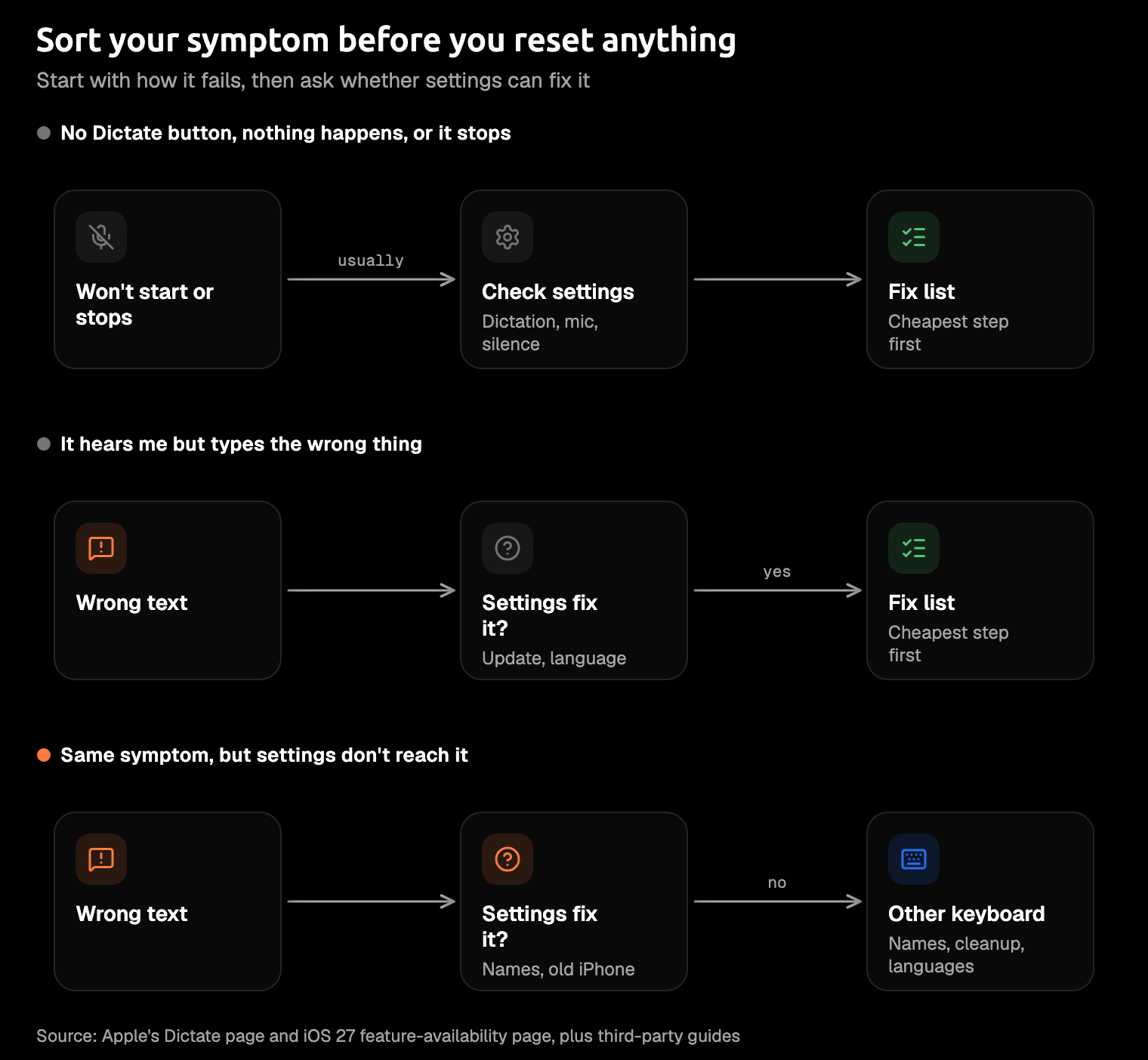
"Bad dictation" covers two different problems, and they need different fixes. The first is availability: there's no Dictate button, nothing happens when you tap it, or it stops on its own. The second is quality: it hears you fine, then types the wrong thing.
Availability problems are usually settings. A missing Dictate button usually means Enable Dictation is off, though a Screen Time restriction is worth checking too. Dictation also stops by itself after 30 seconds of silence. Quality problems usually aren't settings, and they fill most of this guide.
Test before you reset anything. Open Notes, dictate a sentence you'd really send, and speak at your normal pace. Some apps change dictated text on their own: one TidBITS user noticed that Gmail capitalizes the first word of each utterance, which looks exactly like a dictation bug.
If Notes gets it right, the problem is probably the app, and you've just saved yourself from blaming dictation for something Gmail did.
Why iPhone dictation gets worse
Users report problems that cluster on certain iOS versions, iPhones, and languages, but we found no independent test or Apple statement showing a general decline. The evidence comes in clusters: a bad update here, a new iPhone there, a language that never got the upgrade. Keep in mind that forum threads fill up with people who have a problem, not the ones whose dictation works fine.
An update changed it
The clearest case is iOS 26.3. In February 2026, editors at the accessibility site AppleVis said dictation accuracy "has decreased significantly" and advised anyone who relies on dictation not to install the update. Two days later an editor on an iPhone 17 Pro Max called it "still very broken", while several other users reported no problems. The follow-ups we read don't confirm a fix.
When an accessibility site tells its readers to skip an update, take it seriously.
It didn't start there. In the TidBITS thread that asks this post's question, one poster said iOS 26.0 through 26.2 were no better, and "than" kept coming out as "then".
Some reports go back further. On iOS 18, iPhone 16 Pro and Pro Max owners reported dropped first words and a mic that stops mid-sentence. One Apple Community thread collected 92 "Me too" votes, and an AppleVis commenter dates the slide back to iOS 16.
Some languages need Apple's servers
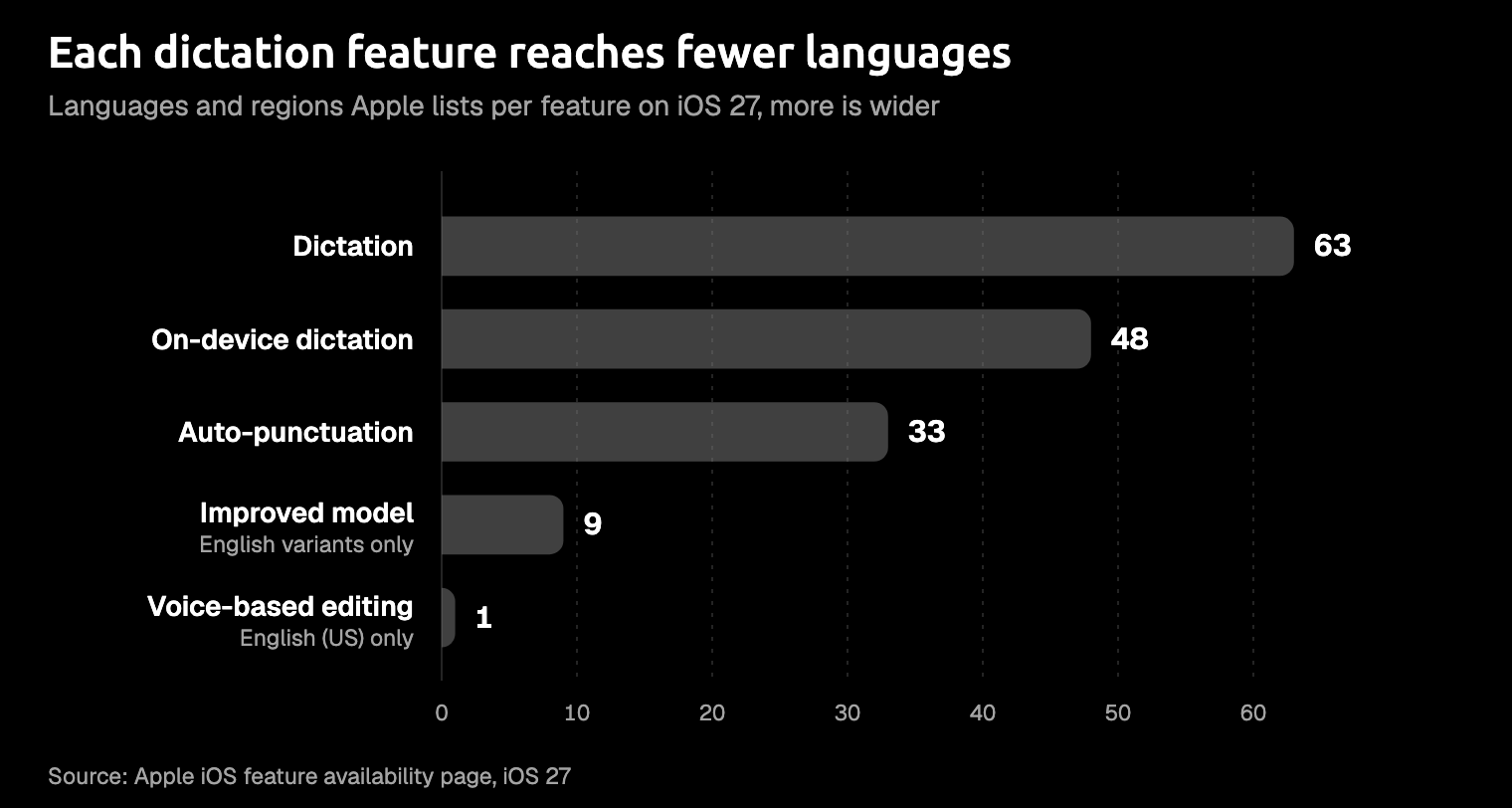
Where your speech is processed depends on your language. Apple says dictation "is processed on your iPhone in many languages, and no internet connection is required." For other languages, your audio goes to Apple's servers. On Apple's iOS 27 feature-availability page, dictation covers 63 languages and regions, and on-device dictation covers 48. Hindi (India) and Polish are on the first list but not the second.
This explains dictation that dies without a signal, and where your audio goes; we found nothing tying server processing to wrong words. A server-processed language has nothing to fall back on in a train tunnel. Your Keyboard settings say whether your language is processed on your iPhone. Our guide to whether Apple dictation works offline goes further.
The better model skips older iPhones and most languages
iOS 27's dictation upgrade is real, but it reaches only some iPhones. With Apple Intelligence, dictation uses an on-device model to improve spelling, punctuation, and capitalization. Going by Apple's support page and newsroom, it works in English on the iPhone 17 Pro, 17 Pro Max, Air, Duo, and the iPhone 18 Pro models. The language list is nine English variants, from Australia to the United States.
The standard iPhone 17 isn't listed. If that's your phone, you missed the upgrade by one word on the box.
Early reactions are positive and anecdotal. An AppleVis user trying iOS 27 on an iPhone 17 Pro Max before its release said they were "definitely happier" than with iOS 26 dictation.
Each feature narrows the list again: 33 languages and regions get auto-punctuation, nine get the improved model, and voice-based editing works in just one, English (US).
Reports from iPhone 18 Pro and 17 Pro owners
Owners of the newest Pro iPhones report problems of their own, mostly in French and German. In a MacRumors forum thread from late September 2026, an iPhone 18 Pro owner reports French dictation that "types two or three words and then stops". A German user there says it "misses the start or the end of sentences", and another poster says English dictation "will just spin". On Apple's German forum, iPhone 17 Pro and 18 Pro users describe correct words replaced and compound nouns split, though a helper there says that isn't proof of a general decline.
French site Consomac reports that Apple support is aware of the problem, with no statement from Apple itself. One forum poster says the public test version of iOS 27.2 "works perfectly in French". That's one person on a prerelease, so treat it as hope rather than a fix.
If you dictate in French or German on one of these iPhones, the reports point to a software problem, not to anything you're doing.
Auto-punctuation and capitals guess wrong
Apple adds punctuation for you, and sometimes it guesses wrong. In supported languages, Apple says, dictation inserts commas, periods, and question marks automatically. That helps until it drops a comma where you only stopped to think. Stray commas and random capitals are a running theme in the TidBITS thread.
Capitals can go wrong the other way, too. In February 2026, an iPhone 16 Pro owner on Apple Community found that dictated text no longer started with a capital letter, and 11 people said "Me too". For the odd capital in the middle of a sentence, one TidBITS poster has a theory: it's often a word that matches a name in your contacts.
So if "Rose" keeps turning up with a capital in your shopping list, look in your contacts first.
It doesn't know your names
Apple's iPhone dictation page lists no custom vocabulary, and Apple documents no setting where you teach it a colleague's name or your team's jargon. Text Replacement, which some forum replies suggest, expands shortcuts you type; it isn't a dictation feature.
So your client Pearce arrives as "pears" in every message, and you fix the fruit by hand each time.
Our guide to custom vocabulary in speech-to-text shows how apps that have one put it to work.
Accents and how you speak
If your accent is the problem, no one can tell you by how much: Apple publishes no accuracy data by accent, so there's nothing to check yours against. What you can control is the match between your settings and the way you speak. Apple notes that dictation features vary by language and region, and one iPhone guide warns that English (UK) and English (US) may not substitute for each other. TidBITS users also suggest speaking at your normal pace instead of slowing down for the phone.
If English is your second language, our guide to dictation for non-native English speakers covers what else helps.
Talk the way you'd leave a voice note for a friend.
How to fix iPhone dictation
Work down this list from the top, and stop at the step that matches your symptom. Unless a step says Apple documents it, it comes from users or third-party guides.
- Test in Notes. If a sentence dictated at your normal pace comes out clean there, the app you were in is probably the problem.
- Check Enable Dictation. In Settings > General > Keyboard, make sure Enable Dictation is on; Apple documents this as the fix for a missing Dictate button. Turning it off and on again is a common tip.
- Pick the right language. Long-press the mic key to choose your dictation language, and match your region, such as English (UK) or English (US). Apple says dictation also works in the languages of other keyboards you add, where Apple offers dictation for them. Changing the dictation language has every path.
- Try the punctuation switches. In Settings > General > Keyboard, turn Auto-Punctuation off if it adds commas you didn't ask for; Apple documents the switch. If the first letter won't capitalize, check Auto-Capitalization; it fixed that for one Apple Community poster but not for another.
- Check Screen Time. Under Screen Time > Content & Privacy Restrictions > Allowed Apps & Features, make sure Siri & Dictation is on.
- Test the mic. Record yourself in Voice Memos and play it back, clean the mic openings, or try AirPods.
- Restart, then update iOS. We'd guess an update is the only real cure for a regression, but read the reports first: after iOS 26.3, AppleVis told people who rely on dictation to wait.
- Reset the keyboard dictionary, as a last resort. Go to Settings > General > Transfer or Reset iPhone > Reset > Reset Keyboard Dictionary; it deletes all your custom words and shortcuts. An Apple Community answer suggests it for wrongly learned words, but Apple doesn't document it as a dictation fix.
- Delete your Siri & Dictation history, also a last resort. It's a community suggestion, not an Apple fix, and Apple's Mac guide limits deletion to history under six months old, so don't count on it.
- Send Apple Feedback. Include what you said and what it typed; a helper on Apple's forum recommends examples Apple can reproduce.
Steps eight and nine erase things you can't get back, which is why they sit at the bottom.
Does iOS 27 fix it?
Partly. On the iPhones it supports, Apple says dictation "captures what users say as polished text with greater precision", with capitalization, punctuation, and formatting handled for you. TidBITS also lists new editing commands in iOS 27: "Capitalize", "Lowercase", "Replace (word) with (word)", "Select", and "Undo that". In theory, "Replace then with than" now fixes the word you've been correcting by hand since iOS 26.
The limits are the ones from above. The improved model is English only and needs a newer iPhone, and Apple lists Voice-Based Editing for English (United States) alone. A TidBITS reader says the commands fail in British English. Apple's iOS 27.0.1 notes, as summarized on MacRumors, don't mention dictation, and we found no Apple note listing a fix for the iPhone 18 Pro reports.
So iOS 27 is a real upgrade for an English speaker with a new Pro iPhone, and a smaller one for everyone else.
When settings can't fix it: use a different keyboard
What's left after the fix list are limits that settings don't reach. Apple's dictation page lists no word list for your names, and the polished cleanup in iOS 27 is kept for newer iPhones and English. An AI voice keyboard handles both. It's a third-party keyboard that sends your speech to a speech model and tidies the text before it reaches the chat box.
If you send messages by voice every day, switch. Amical is the one to try, for five reasons:
- It cleans up as you speak. Amical's keyboard adds punctuation, capitals, and formatting, and filler words go away, on every iPhone it supports.
- It learns your names. Custom vocabulary covers names, acronyms, and technical terms, and it syncs with Amical on Mac and Windows. Custom vocabulary shows how to add words.
- It speaks your languages. Amical handles 100+ languages with automatic detection, and Amical Cloud copes with Japanese and English in the same sentence. It's one speech model across all of them, not an upgrade that stops at English; multi-language support has the details.
- It doesn't need a new iPhone. It runs on iOS 18.3 or later, and the speech work happens in Amical Cloud, so a standard iPhone 17, which isn't on Apple's list, gets the same cleanup as a 17 Pro.
- It's built for speed. Amical Cloud runs Amical's own speech model, designed for low latency.
Here's the kind of message it's built for. It's an illustration of the idea, not a recorded run. What you say:
um hey can you tell kiran the demo moved to thursday and uh she should bring the deck
The kind of mistakes dictation without cleanup can make:
Um hey can you tell Karen the demo moved to Thursday, and uh she should bring the Deck
What Amical's keyboard aims to type, with Kiran in your custom vocabulary:
Hey, can you tell Kiran the demo moved to Thursday? She should bring the deck.
The "um" stays in your head, where it belongs, instead of in the team chat.
What to know before you switch:
- Apple's dictation is free and built in. Amical has a free plan with a weekly limit, and Pro in the app, the same plan as Premium on our site, is $9.99 a month or $83.99 a year.
- Apple's dictation works offline in many languages. On iPhone, Amical runs on Amical Cloud only, so it needs internet and a sign-in. Amical's App Store listing says your audio is streamed for transcription and not stored, and that transcripts stay on your phone. Besides audio, Amical Cloud also receives settings such as your custom vocabulary, and the listing's privacy details cover what's collected. So keep Apple's dictation for the train tunnel and use Amical for everything else; on Mac and Windows, Amical's local mode works offline with no account.
- It needs Full Access. That's the iOS permission that lets the keyboard send your speech for transcription; without it, Amical types like a normal keyboard but can't dictate. Its App Store listing says it doesn't read what you type on other keyboards or collect app contents.
- iOS 26.4 changed how third-party keyboards work. According to Superwhisper's docs, iOS no longer returns you to your app automatically after you tap a keyboard's button, so you swipe back yourself.
- The listing had no App Store ratings as of late October 2026. So the free plan is your test, and one real message is all it costs.
Setting it up follows the App Store listing and the iOS quick start:
- Install Amical from the App Store; it needs iOS 18.3 or later.
- Open Amical, sign in, and allow the microphone.
- Add the Amical keyboard in Settings and turn on Allow Full Access.
- In any app, long-press the globe key and choose Amical.
- Tap the microphone and speak; if iOS leaves you in the Amical app, swipe back to yours.
- Add the names you type every week to your custom vocabulary.
For the full comparison, read AI voice keyboard vs iPhone dictation. For other options, see the best dictation apps for iPhone and Amical vs Apple Dictation.
FAQ
Has iPhone dictation gotten worse?
For some people on some versions, yes, by their own reports. The clearest case is iOS 26.3, after which AppleVis told people who rely on dictation to skip the update. French and German reports on the iPhone 18 Pro are the latest cluster.
Why does iPhone dictation stop on its own?
Apple says dictation stops when you tap Dictate, say "Stop dictation", or stay silent for 30 seconds, and its page states no maximum length. One 2021 Apple Community reply about iOS 14 gives a limit of about 60 seconds, but that's a user's answer, not Apple's. Users also report dictation cutting off mid-sentence, on the iPhone 16 Pro under iOS 18 and in French on the iPhone 18 Pro, and we found no Apple explanation.
Does iPhone dictation send my voice to Apple?
It depends on your language. When dictation is processed on your iPhone, Apple says your audio and transcripts aren't sent to its servers. Otherwise they are, and Apple doesn't store them unless you opt in to Improve Siri and Dictation. If you do opt in, Apple may keep that data for up to two years. Apple's Siri and Dictation privacy page has the full picture.
Can I add words to iPhone dictation?
Apple's dictation page lists no custom vocabulary, and Text Replacement works on typed shortcuts, not speech. If names are your problem, a keyboard with custom vocabulary, like Amical's, is the practical answer. Without one, the word list lives in your head, and you retype from it every Monday.
Try it on the message dictation keeps getting wrong
Think of the message you fixed three times last week, the one with the name dictation never gets right. Download Amical, set up the keyboard with the iOS quick start, add that name to your vocabulary, and dictate the message again. The free plan covers it. If it comes out right the first time, you'll know what to do with the next one.