Unfolded, the iPhone Duo is a treat: a 7.6-inch screen and, for the first time on an iPhone, two apps side by side. Then you fold it to stand in the coffee queue, a message comes in, and you're answering on the 5.4-inch outer screen with one thumb.
The big screen gets the glory. The small one gets your replies.
That's where a good dictation app earns its place on the iPhone Duo. You say the reply, and the message is there before your name gets called.
This guide covers five voice keyboards, checked on October 25, 2026, two days after the Duo went on sale. For each one you get what it does well, what its maker says about the Duo, the in-app price and free start, and how to set it up. Apple's built-in dictation is the baseline every pick has to beat.
Our pick is Amical. Built-in dictation writes down your words with punctuation; Amical tidies what you said into a message you can send, and lets you teach it the names you use. It's also on Mac, Windows, iPad, and Android, so the habit comes with you.
You should know where we stand: Amical publishes this blog, and Amical Pro (Premium on our website) is how we get paid. What each app does on the Duo comes from its maker; none of it is our own testing.
Why voice fits a foldable
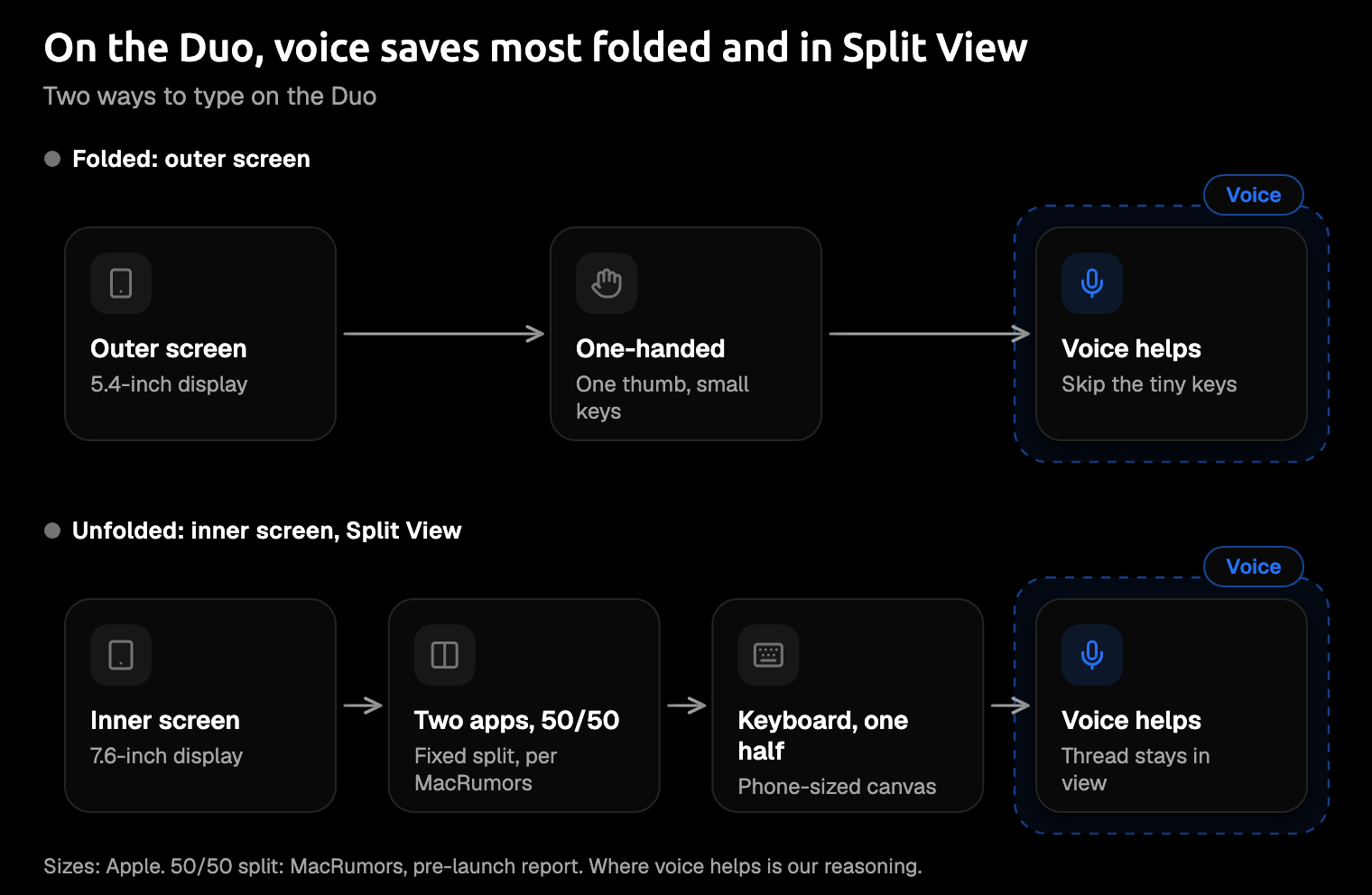
Folded, the Duo is a one-thumb phone. Unfolded, it gives you Split View, two apps side by side.
MacRumors reported before launch that the split is fixed at 50/50 with no divider to drag, likely because both screens share an aspect ratio. If that holds, each app gets roughly a phone-sized half, and once you start typing, the keyboard takes a big share of it.
To be fair to the keyboard, typing on the Duo isn't broken. In landscape, the keyboard can split so each half sits under a thumb, and in early hands-on videos covered by 9to5Mac, one reviewer found texting on the outer screen easier than expected.
The Duo didn't make typing worse. It made screen space more valuable, and the keyboard is the hungriest thing on your screen.
Voice means you lean on that keyboard less. Picture the email thread open on one half and your reply on the other, in the same two-app Split View Apple uses to show Siri next to Mail. You read the thread, say your answer, and tap far less on a keyboard squeezed into half a screen. If the keyboard also writes the finished message, you skip the tidy-up too.
The baseline: iOS 27's built-in dictation
Before you install anything, try what's already on your phone. Apple says iOS 27 brings systemwide dictation that adds capitalization, punctuation, and formatting as you speak, on what it calls its most advanced on-device model ever, and the Duo is on the supported list.
One thing to check first. In Apple's first developer build, the new dictation was off by default and lived under Settings > General > Keyboards, and reports don't say whether that changed at release. Open the setting and make sure it's on.
If your messages are short and plain, that may be plenty, and it costs you nothing. Apple's iOS 27 announcement doesn't mention custom vocabulary, or drafting a message from a spoken instruction.
So pay for a voice keyboard only if you want one of three things: names and jargon spelled right, a rambling thought tidied into a message, or one tool on both your phone and your laptop. If none of those matter to you, the free option already in your pocket may be all you need. Amical vs Apple Dictation goes through the differences in more detail.
Quick picks
Short on time? Here's the pick for each kind of Duo owner.
- Best overall: Amical, for a tidied message, with apps for your laptop too.
- Best if you want a local model: Superwhisper, whose privacy policy keeps audio and transcripts on your device when you use one, and whose maker has published a Duo note.
- Best if you already use it on your computer: Wispr Flow.
- Most Duo-specific layout work: DictaFlow, by its own release notes.
- Simplest free start: Aqua Voice, with 1,000 free words.
| App | Minimum iOS | iPad too? | Where speech is processed | Free start | Pro price in the app | Maker's Duo note |
|---|---|---|---|---|---|---|
| Amical | iOS 18.3 | Yes | Amical Cloud | Weekly limit (number not published) | $9.99/month or $83.99/year | None published |
| Superwhisper | iOS 26.0 | No | Local or cloud model, per its policy | Free download | $8.49/month, $84.99/year, or $249.99 lifetime | "iPhone Duo compatibility" |
| Wispr Flow | iOS 18.3 | Not listed | Cloud | A few hundred words a week | $15.00/month or $143.99/year | None published |
| DictaFlow | iOS 17.0 | Yes | Offline or cloud, per its site | 2,000 cloud words a month | $8.99/month or $79.99/year | Inner and outer layouts, compact keyboard |
| Aqua Voice | iOS 17.0 | No | Cloud, per its iPhone page | 1,000 words | $12.99/month or $119.00/year | None published |
Prices are App Store in-app prices as of October 25, 2026, which isn't always what the same plan costs on the maker's website.
The 5 best dictation apps for iPhone Duo
1. Amical
Best for: a finished message, on your phone and your laptop.
Amical's App Store listing puts the job plainly: it uses AI to punctuate, format, and tidy what you said. In Split View, that looks like this.
Say you've got the team thread on one half of the screen and your reply on the other. Here's the kind of thing you might say (an illustration, not a recorded run):
hey so um I read through it and the venue looks good to me but can we move the dinner to friday instead, oh and can someone check with saoirse if she's coming
And here's the kind of reply that comes out:
Hey, I read through it and the venue looks good to me. Can we move the dinner to Friday instead? Also, can someone check with Saoirse if she's coming?
Notice the name. Saoirse is exactly the kind of word a speech model has to guess at. You can teach Amical names, acronyms, and technical terms, and its listing says they then come out right. Custom vocabulary shows you how.
It works in your languages, too. Amical covers 100+ languages with automatic detection. Amical Cloud also handles Japanese and English mixed in one sentence, so a reply that mixes the two stays in one piece. Multi-language support has the details.
And it's quick. By Amical's own figures (there's no public benchmark yet), Amical Cloud returns finished text in under 300 ms for a short dictation and under 500 ms for a longer one. It runs on a speech model we built for low latency, which is why we call Amical the industry leader in dictation speed. That's quick enough for the text to be waiting before your thumb reaches Send.
The habit travels. Amical is also on Mac, Windows, iPad, and Android, so the Duo isn't the only place you can talk instead of type. On a Mac or Windows laptop, the free plan includes unlimited local dictation and 2,000 cloud words a week.
On iPhone, the download is free, and Amical Pro is $9.99 a month or $83.99 a year as an in-app purchase. Free users get a weekly dictation limit that Pro removes, but Amical hasn't published the iPhone number yet, so check pricing before you plan a week of long emails around it.
On the Duo: Amical's App Store release notes don't mention the Duo, while Superwhisper's and DictaFlow's do. It's a standard iPhone keyboard that needs iOS 18.3 or later, and the Duo ships with iOS 27, so it should run there. By our reading of MacRumors' report, each Split View half is roughly phone-sized, which is the canvas a phone keyboard was made for.
On iPhone, Amical uses Amical Cloud only, so it needs an internet connection, a sign-in, and Full Access to send your speech for transcription. With Amical Cloud, your audio and some context for formatting go to Amical's servers (that's how the desktop app works; we haven't confirmed the iPhone details). The open-source (MIT) repo covers the desktop app, not the phone apps.
Amical Cloud's stated policy is "No data retention" and "No training on your data". If you need your speech to stay on the phone, Superwhisper's local models and DictaFlow's offline dictation are the ones to look at, but check what each iPhone app actually offers before you pay.
AI tidying can still get a detail wrong now and then, so give names and times a glance before you send. We make Amical, so weigh our view with that in mind. Still, if you want a finished message and dictation on your computer too, this is the one to install first.
How to start:
- Install Amical: AI Voice Keyboard from the App Store and sign in.
- Add the Amical keyboard in Settings and allow Full Access.
- Fold the Duo, switch to Amical with the globe key, and dictate one real reply.
The iOS quick start walks you through each screen.
2. Superwhisper
Best for: a local-model option, with a Duo note from the maker.
Superwhisper's privacy policy depends on the model. With a local model, audio and transcripts never leave your device. With a cloud model, audio, transcript, and prompt are sent, and they aren't stored after the request. We couldn't confirm that the iPhone app offers a local model, so look before you lean on one. Amical vs Superwhisper compares the two side by side.
It's an iPhone keyboard for iOS 26.0 or later, and its docs say iPad isn't supported. The download is free; Pro costs $8.49 a month, $84.99 a year, or $249.99 for life.
One habit to learn on day one: since iOS 26.4, buttons that open the main Superwhisper app don't take you back to the app you were in, so you swipe back yourself. By the second day, your thumb does it without asking.
On the Duo: the release notes for version 2.26.1 list "iPhone Duo compatibility".
How to start:
- Install Superwhisper from the App Store.
- Add it as a keyboard and allow Full Access.
- Pick a model, then dictate a reply.
3. Wispr Flow
Best for: people who already use Wispr Flow on a Mac or Windows PC.
Wispr Flow runs on Mac, Windows, iPhone, and Android, so if it's already your desktop habit, the iPhone keyboard keeps it going. Wispr says transcription always happens in the cloud. It deletes your audio once it's transcribed, unless you turn on cloud storage for dictation.
The iPhone app needs iOS 18.3 or later. It's free up to a few hundred words a week, per Wispr's docs, and Pro costs $15.00 a month or $143.99 a year in the app. On the web, the yearly plan works out to $12 a month.
It needs Wi-Fi or a cellular connection, and number, phone, and email fields fall back to the system keyboard. So when you tap the address field in a new email, you're briefly back on Apple's keys.
If you live in Wispr Flow on your desktop, it's the natural pick. If you don't, note that it's $15.00 a month in the app, next to $9.99 for Amical Pro. Amical vs Wispr Flow covers how the two compare.
On the Duo: we found no Duo notes on Wispr's listing, docs, or pricing page.
How to start:
- Install Wispr Flow from the App Store and follow its setup.
- Add the keyboard and allow Full Access.
- Dictate a reply while you're on Wi-Fi or cellular.
4. DictaFlow
Best for: the most Duo-specific layout work so far.
DictaFlow has made the most explicit Duo claim of any app here. Its site also says offline dictation runs on the device and doesn't count against your cloud allowance, while AI cleanup uses the cloud. We couldn't confirm that the iPhone keyboard offers offline dictation, or which plan includes it, so check in the app before you rely on it.
It runs on iPhone and iPad from iOS 17.0, and there's a Mac app too. The free plan gives you 2,000 cloud words a month, and Pro runs $8.99 monthly or $79.99 yearly in the app.
Its App Store page shows 4.6 stars from 15 ratings so far, which is still thin evidence. If layout matters most to you, it's worth a look; just treat it as early.
On the Duo: the version 1.2.44 notes from October 14 say DictaFlow "now adapts to iPhone Duo, with layouts for the inner and outer displays and a compact dictation keyboard". A compact keyboard is exactly what the outer screen asks for, which makes this the app to watch if you mostly reply folded.
How to start:
- Install DictaFlow from the App Store.
- Add it as a keyboard and follow its setup.
- Fold the Duo and try the outer-screen layout on a short reply.
5. Aqua Voice
Best for: trying an AI keyboard without a commitment.
Aqua Voice has the simplest free start: its listing says you can start free with 1,000 words. The free starts here work differently, though: Wispr Flow's resets each week and DictaFlow's each month, while Aqua's reads as a one-time allowance. Use it on real replies, and you'll soon know whether talking beats thumbing for you.
It's an iPhone-only keyboard for iOS 17.0 or later, and in the app, Pro is $12.99 monthly or $119.00 for a year.
Its iPhone page says cloud dictation sends your audio and relevant text context to Aqua Voice's servers. Its privacy page adds that with Privacy Mode off, transcripts may be stored. If you'd rather they weren't, check the app for Privacy Mode before your first real message.
On the Duo: Aqua Voice hasn't published any Duo notes; its listing, iPhone page, and changelog don't mention the Duo. It needs iOS 17.0 or later, and the Duo runs iOS 27.
How to start:
- Install Aqua Voice from the App Store and open it.
- Turn on its keyboard and Full Access in Settings, then allow microphone access.
- Switch to Aqua with the globe key and dictate a real reply.
How to pick in one minute
- If you want a finished message on your phone and your computer, pick Amical.
- If you need your speech to stay on the phone, look at Superwhisper's local models or DictaFlow's offline dictation, once you've checked the iPhone app offers them.
- If Duo-specific layouts matter most, pick DictaFlow and watch its updates.
- If you're just testing the idea, start with Aqua Voice's free words.
- If you want nothing to install, turn on Apple's built-in dictation and see how far it gets you.
If you're weighing a cloud keyboard against on-device processing, our guide to cloud vs local dictation explains what each one sends and what it costs you.
Then try two of them for a day each, folded, on the outer screen. You'll know quickly which one feels natural. The right one is the one you stop noticing.
By the end of the second day, you're the person in the coffee queue who has already replied.
Fold it and send one reply
Download Amical, fold your Duo, and dictate the next reply you'd normally thumb out on the outer screen. Say it the way you'd say it to the person, then read what comes back before you send it.
The download is free, and free users get a weekly allowance, so you can try that first reply before you decide on Pro.