You have Typeless open in one tab and Wispr Flow in the other, and every comparison page you find disagrees on the basic numbers: the free tier, the time limit, sometimes even the price. Checked against the vendors' own pages, Typeless vs Wispr Flow comes down to a few plain answers:
- Price: a tie on annual plans, both $144 a year. Billed monthly, Typeless costs twice what Wispr Flow does.
- Free tier: Wispr Flow puts a weekly number on its pricing page. Typeless doesn't.
- Limits and platforms: on desktop, Wispr Flow lets you talk longer in one go. Typeless runs on Linux.
- Privacy: both say they transcribe your speech in the cloud.
For most people, this is closer than those pages make it look. What decides it is how you pay, which computer you use, and how long you talk.
There's also a third option. Amical, which publishes this blog, costs less than either on a paid plan, and where both rivals say they transcribe in the cloud, Amical can also do it on your own computer.
Most pages ranking for this search come from rival dictation vendors, and so does this one. That's why the numbers below link to the vendors' own pages wherever they have one.
Typeless vs Wispr Flow at a glance
Most of this table is settled fact. The Typeless free tier is the one cell people are still arguing about.
| Typeless | Wispr Flow | Amical | |
|---|---|---|---|
| Pro, billed monthly | $30 a month | $15 a month | $10 a month (Premium) |
| Pro, billed yearly | $144 a year ($12 a month) | $144 a year ($12 a month) | $84 a year (Premium) |
| Free tier | A weekly limit; pricing page gives no number (disputed) | 2,000 words a week on desktop (help center: blocked only above 5,000); less on phones (varies by account) | Unlimited in local mode on desktop, plus 2,000 cloud words a week |
| Longest single dictation | 9 minutes | 20 minutes on desktop, 5 on Android | Up to 2 hours a session |
| Platforms | Mac, Windows, Linux, iPhone, Android | Mac, Windows, iPhone, Android | Mac, Windows, iPhone and iPad, Android |
| Languages | 100+ | 100+ | 100+ with Amical Cloud; local: 99 (Whisper) or 25 European (Parakeet) |
| Where speech is transcribed | Cloud | Cloud | Amical Cloud, or on your computer in local mode |
| Student offer | 50% off Pro with a school email | 50% off Pro after a 3-month trial | None listed |
| Compliance | Says it's ISO 27001 certified and GDPR and HIPAA compliant; HIPAA controls and a BAA on Enterprise | SOC 2 Type II, ISO 27001; signed BAA on any plan | SOC 2 in progress for Enterprise; local mode keeps audio on your computer |
Prices and limits checked October 25, 2026, from each vendor's own pages; "disputed" and "varies by account" mark the cells the vendors leave open.
Price: a tie on annual, not on monthly
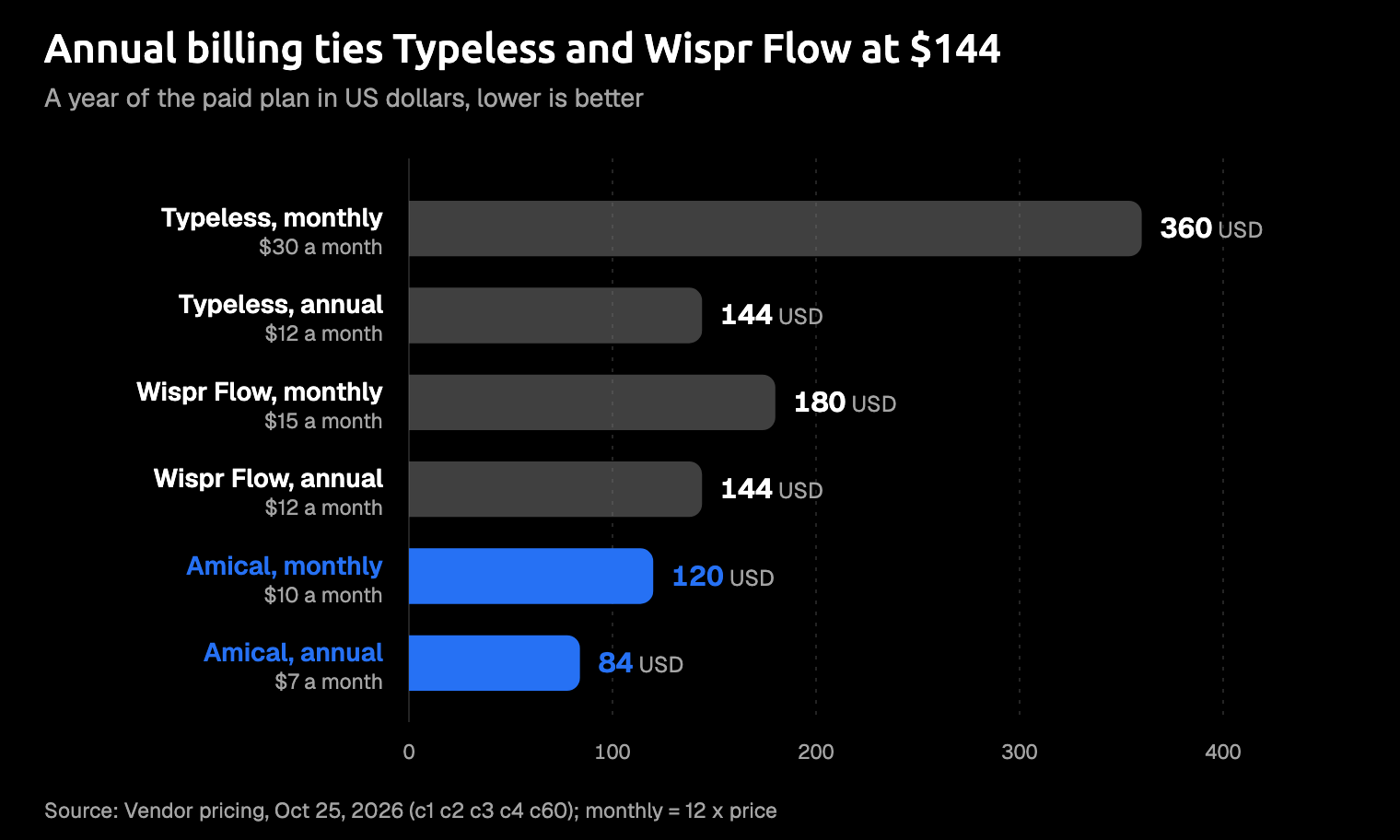
If you pay for a year up front, Typeless and Wispr Flow cost exactly the same. Both Pro plans work out to $12 a month, billed as $144 a year.
Month to month, they split. Wispr Flow Pro is $15 a month and Typeless Pro is $30, so a monthly Typeless subscriber pays double. Over a full year of monthly billing, that's $360 for Typeless against $180 for Wispr Flow.
Want to try a month before you commit? That's where the gap stings. Buy that month directly from Typeless and it's a real purchase: its terms say refunds "will only be issued when legally required," and app-store purchases follow the store's own rules. Wispr Flow's help center mentions a 14-day trial its pricing page doesn't, and Typeless's pricing page lists no trial.
Students get half off either way, by different routes. Typeless takes 50% off Pro with a verified school email, at desktop checkout only. Wispr Flow gives students new to Pro a 3-month trial, then Pro at $6 a month billed yearly, with a .edu email or other proof of enrollment. Its pricing page also notes that the ordinary free plan is open to everyone, students and non-profits included. Our guide to speech-to-text for students covers the wider options.
If you'll commit for a year, price doesn't decide this one. If you won't, Wispr Flow costs half as much as Typeless.
Amical Premium undercuts both on either billing period, and pricing lists what each plan includes.
The free tier: the number nobody agrees on
Wispr Flow's free plan is the easy one to describe. Its pricing page lists 2,000 words a week on Mac and Windows. Its help center adds that a limit notice appears at 2,000, new dictation is blocked only above 5,000, and the count resets every Sunday at 23:45 UTC.
Phones get less. The same help center says iPhone dictation slows after 550 words a week and stops at 750, while Android slows after about 1,000 and stops at 1,500. It also says your account may have different limits, so treat those figures as a guide rather than a promise.
For a sense of scale, 2,000 words covers a few short emails and Slack replies a day across a working week. Light users will fit. Anyone who dictates most of the day will see that notice well before Sunday.
Typeless is harder to pin down. Its pricing page and billing help say only that Free includes "limited words each week," with no number. Its own blog put the figure at 8,000 words a week in August 2026, and that post is still up. Then a writer on note.com reported an in-app notice saying Free would drop from 8,000 to 2,000 words a week starting September 22, 2026. Aqua Voice, Voibe, and Willow Voice, all of which sell competing apps, report the same cut.
A free tier you can't count is hard to budget for, so if you try Typeless for free, assume 2,000 words a week.
Nobody wants to find the limit halfway through a Thursday reply.
Amical's free plan is built differently. Local mode on your Mac or Windows PC is unlimited, and you also get 2,000 Amical Cloud words a week. On iPhone and Android, which run on Amical Cloud, the cloud allowance is the whole free plan. Pricing has the details.
How long you can talk
For emails and Slack replies, all three caps are plenty. The cap only matters if you think out loud in long stretches, like a rambling prompt to a coding agent that keeps going well after you meant to stop.
On desktop, Wispr Flow gives you more room than Typeless. Wispr's help center says one session on Mac and Windows can run 20 minutes on Free or Pro, with a notice at 19. On Android, the limit is 5 minutes.
VoiceDash and Voibe, both rival vendors, still give Wispr Flow's cap as about 6 minutes, but Wispr's own page is the one to go by.
Typeless stops at 9 minutes, and a 60-second countdown starts at the 8-minute mark, so you get fair warning.
Amical gives you the most room of the three: one recording session runs up to 2 hours. Most messages take a small slice of that to say. In hands-free mode, Amical stops by itself after 5 seconds of silence; hold the push-to-talk key instead and a long pause won't cut you off.
Platforms and languages
Typeless covers the most ground. It runs on Mac (Apple Silicon and Intel), Windows, Linux, iPhone, and Android. Wispr Flow runs on Mac, Windows, iPhone, and Android, and its Notetaker is Mac and Windows only. Amical runs on Mac, Windows, iPhone and iPad, and Android, with no Linux version.
If you use a Linux desktop at work and a Mac at home, Typeless is the only one of these that follows you to both. For Linux users, that settles it.
On iPhone, Typeless needs iOS 16.1 or later. Amical needs iOS 18.3 or later, and so does Wispr Flow, going by LumeVoice's comparison table. If your iPhone hasn't been updated in a while, check before you install. If Android is your main device, the best dictation apps for Android compares the options there.
Both rivals list 100+ languages, and Typeless says it detects the language by itself and handles mixed-language speech. Amical covers 100+ languages with Amical Cloud; in local mode, Whisper covers 99 and Parakeet covers 25 European languages, not Japanese. Amical Cloud also handles Japanese and English mixed in one dictation. Multi-language support explains the settings.
Where your voice goes
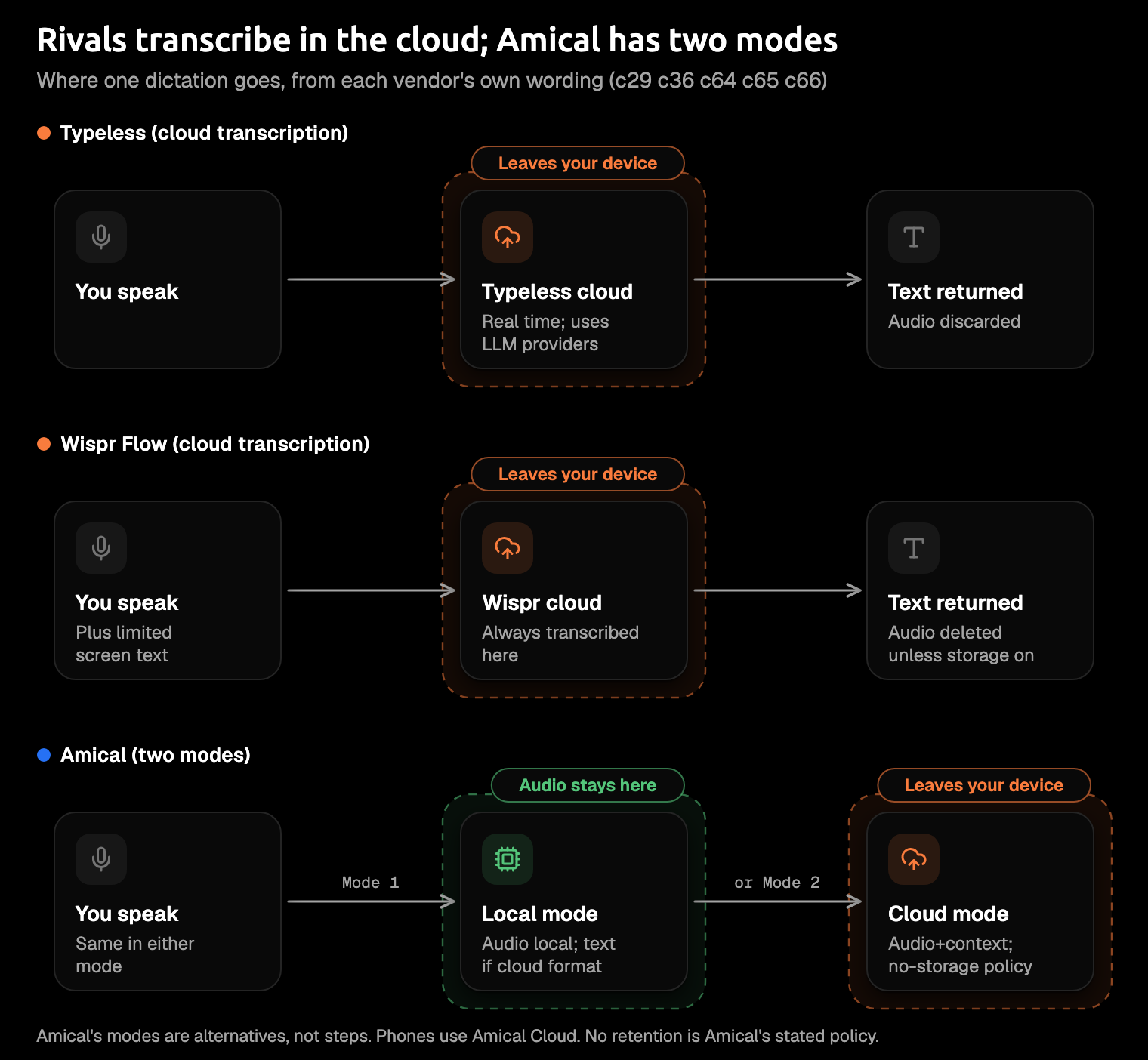
Typeless and Wispr Flow both say they transcribe your speech in the cloud. What differs is what happens around it.
Typeless's data controls page says your audio isn't stored, and its privacy policy says audio and context are "immediately discarded once the transcription result is returned." Its AI step relies on large LLM providers such as Microsoft and Google. Your history text stays on your device unless you turn on History cloud sync.
On training, Typeless's pages don't quite agree. The data controls page says dictation data isn't used for training "by us or any third party," while its Terms say you can control whether your content is used to train Typeless's models. If that matters to you, check the setting in the app.
Wispr Flow's privacy page says transcription always happens in the cloud and that audio is deleted once it's transcribed, unless you've turned on Dictation cloud storage. It also reads "limited text from the app you're dictating into" for context, and you can switch that off. Training on your data can be turned off too, and on the Growth and Enterprise plans it's off by default and locked.
For compliance, Wispr Flow is SOC 2 Type II and ISO 27001 certified. Its privacy page offers a signed business associate agreement (BAA) on any plan. Typeless's homepage says it's ISO 27001 certified and GDPR and HIPAA compliant. Its pricing page lists HIPAA controls and BAA availability on Enterprise, through sales.
None of this is legal advice: if you handle health data, take the agreement to whoever signs off on compliance at your work.
Amical gives you a different shape. In local mode, your audio is transcribed on your computer, no account is needed, and it works offline once a model is downloaded. Text leaves only if you pick a cloud provider for formatting. With Amical Cloud, your audio and some formatting context (such as the app name and the text near your cursor) go to Amical Cloud, under a stated policy of no data retention and no training on your data. Local AI models covers the setup, and telemetry covers what the app itself reports.
Picture dictating a client's name into a support reply: in local mode, that audio never leaves your laptop.
Both rivals describe their cloud setups plainly. The real question is whether you want your speech transcribed in the cloud at all, and cloud vs local dictation walks through that choice.
How each one writes
Both apps do more than transcribe, with different emphasis. Typeless says it removes filler words and repeats, keeps only your final version when you correct yourself, and formats lists. Wispr Flow says it learns names and jargon, and both keep a personal dictionary.
Typeless lists more rewriting on top. It says it learns your tone and adjusts it by app, translates while you speak, edits selected text by voice, and adds "Ask anything" on desktop for questions and actions.
Wispr Flow leans toward teams. Its free plan includes snippets, saved blocks of text you call up by voice, plus a limited Notetaker. Pro lets your whole team share one dictionary and one set of snippets.
VoiceDash, which sells a competing app, describes Typeless as "restructuring the thought" and Wispr Flow as prioritizing "fidelity to what was said." A writer on note.com reports users saying Typeless "organizes" what they say.
Picture the two styles on one line (an illustration, not a recorded run). You say:
so the review is on wednesday, um, actually, make that thursday, and can you bring the slides
Close to your words, the style VoiceDash credits to Wispr Flow:
The review is on Thursday, and can you bring the slides?
Tidied, the style it credits to Typeless:
Review is Thursday. Please bring the slides.
Amical's AI formatting rewrites your words for the app you're in, so the same thought comes out as a proper email in Gmail and a short line in Slack. Personalization (preset, polish, and tone per app) and custom vocabulary are on the free plan. With Amical Cloud, Draft writes from a spoken instruction, and you review the text before it goes in. Voice commands are coming soon.
If VoiceDash has it right, Typeless suits people who want their thoughts tidied, and Wispr Flow suits people who want their own words, cleaned.
The third option: Amical
Maybe you wanted Wispr Flow's monthly price and a free tier you can count on, and neither plan quite fits. That's the honest reason to look at a third app.
The case is mostly made above: a lower price on either billing period, a free local mode on your computer, apps for your phone too, and per-app formatting on the free plan. The one thing left to add is speed. By Amical's own figures, Amical Cloud returns formatted text in under 300 ms for a short dictation.
It isn't the pick for everyone.
- No Linux. If you work on Linux, pick Typeless.
- Amical Cloud and the phone apps need sign-in, and phones transcribe with Amical Cloud only. Local mode on desktop needs no account and works offline once a model is downloaded.
- Local Whisper models need macOS 15 or later and run slower on Intel Macs. Parakeet runs on macOS 14 and Intel Macs but covers only 25 European languages, so for Japanese there, use Amical Cloud, which has neither limit.
To try it on a Mac:
- Download Amical and open it.
- Choose Amical Cloud (sign in) or local mode (download a model, no account needed; on macOS 14 or an Intel Mac, pick Parakeet).
- Click into the app you want to write in.
- Hold
Fn, speak, and let go. The text lands where your cursor is.
If you're weighing it against Wispr Flow alone, Amical vs Wispr Flow goes feature by feature, and free Wispr Flow alternatives covers the other cheaper routes.
Which one should you pick?
The billing period decides more than any feature. After that, match the app to your week:
- You want the lowest paid price on desktop and phone, a free local mode on your computer, or room to talk in long stretches: Amical.
- You want the cheaper of the two on monthly billing, or a BAA without an Enterprise contract: Wispr Flow.
- You're on Linux, want live translation, or want rewriting tools like voice edits and tone per app: Typeless.
- You'll pay yearly and have no special needs: either one. Dictate the same message on both free tiers and keep the app whose text you'd actually send.
Feature lists flatter everyone. Your own message is the fairer test.
Run the same message through all three
We have a stake in the answer, so don't take our word for it. Pick one real message you'd send today, ideally the reply you've been putting off. Dictate it in Typeless and Wispr Flow, then download Amical and say it once more. The free plan covers the test, and the version you'd send without editing is your answer.