You type a one-line prompt into ChatGPT and get back something polite, tidy, and generic. Then the follow-ups start: no, it's for a client; no, shorter; no, we tried that already. Talking to ChatGPT instead of typing gives it the things you'd never bother to type.
Open dictation in the chat box (not voice mode), talk through the whole task for a few minutes, then ask the model to play back what it heard before it answers. That's the ramble prompt, and it works in ChatGPT, Claude, or anywhere else you write.
AI researcher Andrej Karpathy described the habit on X in July 2026: "One pattern I find useful for working with LLMs is a nice long ramble session." We call what comes out of it the ramble prompt.
For anything with context behind it, talking beats typing. It's how the prompt you'd never sit down and type finally gets written.
Amical publishes this blog, and we think its dictation app is the best way to ramble in whichever app you're in. The free tools inside ChatGPT and Claude come first.
What the ramble prompt is
The ramble prompt is a long, unplanned spoken prompt. You brief the model the way you'd brief a colleague, and you let it sort out the mess. Karpathy's reason is simple: when a model needs more context than he wants to type, he switches to voice and talks for about ten minutes.
He sometimes warns the model that the transcript will be full of typos, and sometimes turns the ramble into a short interview. He also says models are good at rebuilding a messy ramble into something clearer, which saves corrections later.
The replies added useful twists. Matt Pocock noted that people give the model the "what" and skip the "why", and said he prefers being interviewed. Jerry Liu was less keen: he said leaning on it had made his own writing worse.
Both are fair. If Pocock is right that people say the what and leave out the why, a ramble is where the why finally gets said. But if you write to work out what you think, keep typing.
Treat the ramble as a tool for context-heavy asks, not a rule for every prompt. Nobody needs a monologue to find a synonym for "busy".
Why talking beats typing for long prompts
Talking helps because the model needs context, and speech makes context cheap.
Start with context. Anthropic's prompting guide puts it this way: "Think of Claude as a brilliant but new employee who lacks context on your norms and workflows." OpenAI's prompting advice asks you to be specific about the context, outcome, length, format, and style. Neither vendor tells you to ramble. They both tell you to give context, and a ramble is mostly context.
Anthropic also suggests a colleague test: could someone with little context act on your prompt? Picture handing a new hire a sticky note that says "write the onboarding plan." They'd come back with questions. Unless you tell it to ask, the model guesses, politely.
Then there's speed. In a Stanford and Baidu lab study, people entered English text by voice at 153 words per minute, against 52 on an iPhone keyboard, nearly three times as fast. That was a lab test with short messages and a 2016 speech engine, so read it as a direction, not a promise. When saying the background costs you almost nothing, you stop leaving it out.
We found no study that tests whether rambling gets better answers from ChatGPT or Claude. There's vendor guidance asking for context, and there are reports from people who tried it and kept going. AgentConn's write-up offers a sensible reason: when we type, we skip the context that feels obvious, and models are good at sorting messy input.
Your prompt was never too long. It was too short.
Three ways to talk to ChatGPT and Claude
ChatGPT and Claude each let you talk in two ways, and a dictation app adds a third. Most guides blur them, and for a ramble the difference matters: two of the three work, and one fights you.
Built-in dictation turns your speech into text in the message box, and you send it when you're ready. That's the microphone icon in ChatGPT's text box, dictation in Claude on web, mobile, and desktop, and /voice in Claude Code, Anthropic's coding tool for the terminal.
Built-in voice mode is a spoken conversation: ChatGPT Voice and Claude's voice mode talk back. It's lovely for thinking out loud with a partner, and the wrong tool for a ramble. A live conversation can answer the moment you pause for breath, and a ramble is mostly pauses.
A system-wide dictation app sits outside the chatbot and types wherever your cursor is. Amical is our example; Wispr Flow is another, with dictation on Mac, Windows, iOS, and Android (how the two compare).
Claude's own guide to voice mode and dictation draws the same line: use dictation for a long or messy request, or when you want to review before sending. The table follows each vendor's help pages as of October 2026.
| Option | You review before it sends? | Works in other apps? | Where the audio goes | Known limit |
|---|---|---|---|---|
| ChatGPT dictation | Yes, you can edit the text first | No | Sent to OpenAI for transcription | |
| Claude dictation | Yes, it lands in the message box | No | ||
Claude Code /voice | Yes, it lands in the prompt | No, Claude Code only | Streamed to Anthropic, not processed locally | If you tap to record instead of holding, it stops after 15 s of silence or 2 minutes |
| ChatGPT Voice | No, it's a live conversation | No | Live and Advanced voice: saved with the chat, clips kept 30 days. Standard voice: deleted after transcription unless you opt in to sharing | 3 hours per rolling 24 hours on Go and Plus |
| Claude voice mode | No, it's a spoken conversation | No | Counts toward your usage limits | |
| Amical (system-wide app) | Yes, it pastes at your cursor | Yes, it pastes into whichever app you're in | Audio goes to Amical Cloud; stays on your computer in local mode | Up to 2 hours per recording; hands-free stops after 5 s of silence |
A blank cell means the help pages don't say. Neither ChatGPT nor Claude lists a length limit for dictation, and Anthropic saves voice mode conversations as text without saying where the audio goes.
For a ramble, use dictation every time. Save voice mode for when you actually want a conversation.
How to ramble well
A good ramble has a shape, even when it doesn't sound like it. These steps work with any dictation tool:
- Set it up. Start with "I'm going to ramble, it'll be messy, don't answer yet." Karpathy sometimes warns the model about typos for the same reason.
- Say the what and the why. Cover the task, who it's for, your constraints, what you've tried, what you're unsure about, and what a good answer looks like.
- Let it interview you. Not sure what matters? Ask the model to question you first.
- Make it play back. Ask for the objective, assumptions, and constraints as it understood them, then correct anything that's off, by voice.
- Type the precise bits. Stack traces, file paths, exact figures, and names that must be spelled right go in by keyboard or paste.
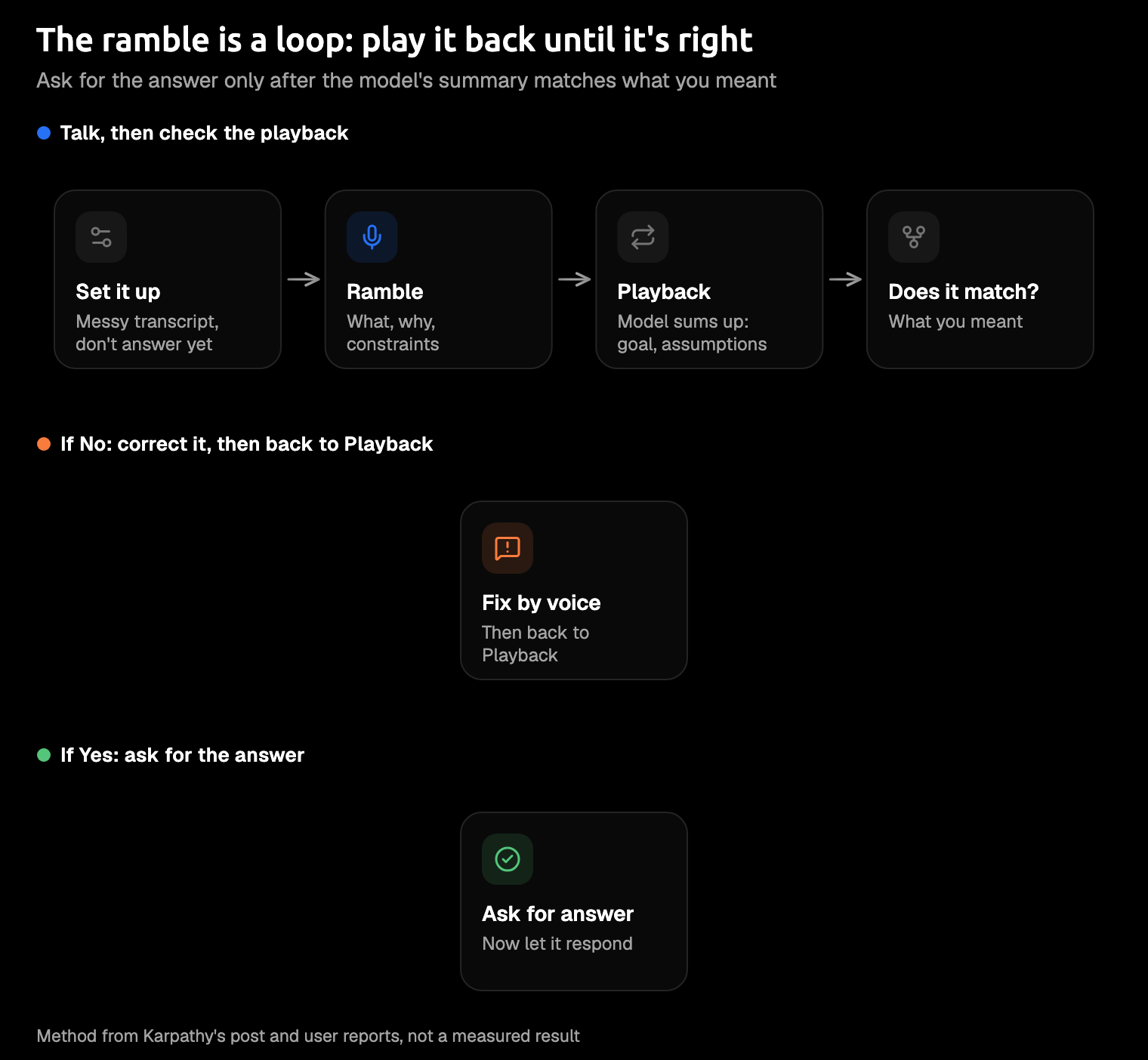
The playback step is the one to keep if you keep nothing else. You learn what the model heard before it spends a whole answer on the wrong version.
Here's an illustrative ramble, written for this post rather than taken from a real session:
okay, I'm going to ramble, don't answer yet. I need an onboarding plan for a new support hire. Um, she's coming from retail, so she's great with people but has never used a ticketing tool. I want her answering real tickets soon, not reading docs forever. Wait, sorry, back up. Some reading is fine, I just don't want her stuck there. Our tone is casual. Oh, and refunds are where people get nervous, so, actually, refunds need their own section. I'm not sure if she should shadow someone first or start on easy tickets. Tell me what you think I'm asking for before you write anything.
And the kind of playback to expect, also an example:
Objective: an onboarding plan that gets a new support hire answering real tickets soon. Assumptions: she's strong with customers but new to ticketing tools. Constraints: a casual tone, with refunds covered separately. Open question: shadowing first, or easy tickets first. Did I get that right?
Notice the refunds. You mentioned them once, after an "oh, and", and the playback kept them: that's the detail a typed prompt quietly loses. Now you correct by voice ("yes, and she's remote, so shadowing means screen sharing") and ask for the plan.
Do it in any app with Amical
The best voice feature is the one that's in every app you use.
The built-in tools are free and already there, so they're a fine place for your first ramble. The catch is that each one lives in a single app, with its own button and its own limits. Build the habit in ChatGPT, and you start over in Claude Code, in Cursor (an AI code editor), and in Slack. A system-wide dictation app makes it one shortcut, wherever your cursor is.
On a Mac, you hold Fn to talk or press Fn+Space to talk hands-free, and you can change either in Shortcuts. AI formatting then tidies the transcript for the app you're in and pastes it at the cursor: a prompt in Cursor, a chat message in Slack. It pastes into terminals too, so dictating to Claude Code works the same way. Your ramble in ChatGPT and your Slack reply to "so what's the plan?" use the same key.
With Amical Cloud, a short dictation comes back in under 300 ms and a longer one in under 500 ms, which Amical says makes it the fastest in the category. It's the same app on Mac, Windows, iPhone, iPad, and Android; there's no Linux version. And Amical Cloud understands 100+ languages, so if you think more clearly in Japanese, ramble in Japanese.
To try it:
- Download Amical and follow the quick start.
- Click into the chat box: ChatGPT in a browser, the Claude app, Claude Code in a terminal, or Cursor.
- Hold
Fn, say your setup line, and ramble, pauses and all. Let go when you're done. - Read what Amical pasted, fix anything that matters, and send.
One recording runs up to 2 hours, so Karpathy's ten-minute ramble fits in a single take, with plenty of room for the detail you remember halfway through.
Prefer your hands free? Fn+Space works if you keep talking, but it stops after 5 seconds of silence, while a held Fn waits through any pause. The dictation docs cover both modes.
Where Amical falls short
- Amical Cloud sends more than audio. Your language and vocabulary settings go too, plus some context for formatting: the app name, browser URL, selected text, and text around your cursor. Amical's pricing page states no data retention and no training on your data. In local mode, speech is transcribed on your computer with no account, and text leaves only if you pick a cloud provider for formatting. More in cloud vs local dictation.
- Long rambles use up the free plan's weekly cloud words quickly. Local dictation is unlimited and never counts toward them, and Premium makes cloud dictation unlimited.
- In local mode, the Whisper speech model needs macOS 15 or later and is slower on Intel Macs. On an older Mac, choose Parakeet, the other local model, which runs on macOS 14 and Intel Macs, or use Amical Cloud, which has neither limit.
- The phone apps use Amical Cloud and need sign-in. On desktop, local mode needs no account.
FAQ
Is talking to ChatGPT better than typing?
For long, context-heavy asks, Karpathy thinks so: you say more, and he finds the model needs fewer corrections later. Nobody has measured it. For precise inputs like code, file paths, or exact figures, type.
Should I use dictation or voice mode?
Dictation. You see the text before it goes, and nothing talks back mid-thought. Voice mode suits a back-and-forth.
How long should a ramble be?
Karpathy goes for about ten minutes. A few minutes on a real task is plenty for a first try: long enough that you start saying things you'd never have typed.
Does my audio leave my computer?
ChatGPT dictation sends audio to OpenAI, and Claude Code's /voice streams it to Anthropic. Amical Cloud receives audio and formatting context; in local mode, your audio stays on your computer.
Ramble the message you were about to type
You probably have a prompt you've been putting off because typing it all out felt like homework. That's your first ramble. Download Amical, click into the chat box, talk it through, and let the model play it back before it answers. The free plan includes 2,000 cloud words a week plus unlimited local dictation, so you can ramble freely in local mode while you decide whether you'd rather talk than type.