It's the end of a full clinical day. The sessions went well, and the notes are still blank. You'd gladly talk them out instead of typing, but many dictation tools built for therapists want something first: the session audio, on their servers.
You don't have to make that trade. Our pick for the note you write after a session is Amical in local mode, with formatting on your own computer too. Your speech is transcribed on your computer by Whisper or Parakeet, two open speech models, and you don't need an account. Then Ollama, a tool that runs AI models on your own machine, turns what you said into a clean note. Set up that way, no audio or note text leaves your computer.
Wanting to talk instead of type shouldn't turn into a compliance project.
Amical publishes this blog, and we make our money from Amical Cloud subscriptions. The setup we recommend here is the one we don't charge for: local dictation is unlimited on the free plan, on Mac and Windows. If you'd rather have the whole session recorded and written up, that's a job for an AI scribe. We cover those too.
Where your words go with each kind of dictation tool
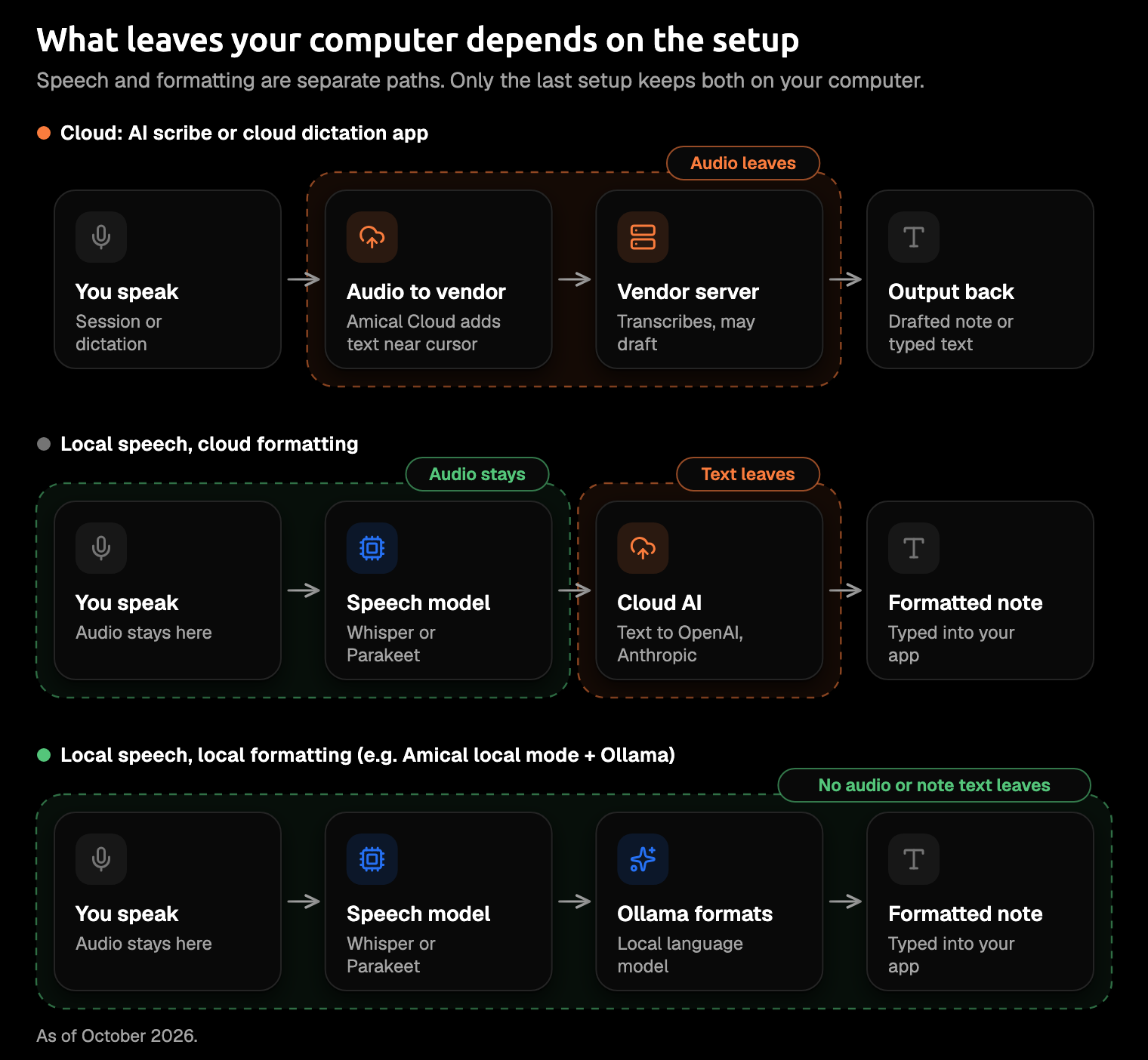
The useful question isn't "is it HIPAA compliant?" It's "who receives the audio, and who receives the text?" Each kind of dictation tool answers that differently.
Most AI dictation does two jobs, and they can happen in different places. A speech model turns your voice into text. Then a language model rewrites that text into something finished: full sentences, headings, no "um".
Those are two separate paths. An app can transcribe on your laptop and still send every word to a cloud AI model for cleanup, which is how you end up with an "offline" app whose formatting quietly isn't.
| Kind of tool | Who receives the audio | Who receives the text | What you get |
|---|---|---|---|
| AI scribe | The vendor, often for the whole session | The vendor | A drafted note from the session |
| Cloud dictation app | The vendor | The vendor, and some apps add on-screen context | A formatted note from what you dictate |
| Built-in OS dictation | Your computer or the maker's servers: System Settings tells you on a Mac, and on Windows it depends on the PC | Wherever the audio goes | A transcript to tidy up yourself |
| Local dictation app | Nobody: it stays on your computer | Nobody, unless formatting uses a cloud AI provider | A formatted note, if formatting is on |
A data path tells you more than a badge does. Familiar tools land in different rows, as of October 2026:
- Wispr Flow, a cloud dictation app, says its transcription always happens in the cloud.
- Apple Dictation tells you in System Settings > Keyboard whether your voice input is "processed on your device and not sent to Siri servers"; sharing audio recordings with Apple is a separate opt-in.
- Windows voice typing needs a connection and uses Microsoft's Azure Speech; only fluid dictation on Copilot+ PCs, in English, runs on the device.
- Amical Cloud receives your audio, your language and custom-vocabulary settings, and context for formatting: selected text, up to 500 characters around your cursor, the app name, and the browser URL. Its stated policy is "No data retention" and "No training on your data."
- Amical in local mode transcribes on your computer, and the text leaves only if you pick a cloud provider such as OpenAI or Anthropic for formatting.
Our cloud vs local dictation guide goes deeper on that trade-off for everyday writing.
What HIPAA asks of a dictation tool
HIPAA's question about a dictation tool comes down to one thing: does the company behind it handle your clients' health information for you? If it does, you need a contract with that company first. If it doesn't, the contract question generally doesn't arise.
The rules apply to you as a covered entity if you send health information electronically for a transaction the rules cover, such as billing insurance.
A BAA, or business associate agreement, is the contract you need before a company handles your clients' health information for you (see the rule). The rule calls that company a business associate: anyone who, on your behalf, "creates, receives, maintains, or transmits protected health information" (45 CFR 160.103). Your own staff don't count.
The contract sets the vendor's limits: what it may do with the information, how it protects it, and what it reports to you. Its subcontractors sign up to the same limits.
Now apply that to dictation. A tool that transcribes and formats on your own computer sends nothing to its maker, so the maker isn't receiving or keeping anything for you. That's why local processing generally means there's no business associate to sign with. It's our reading of the definition, not an official ruling or legal advice, so check your setup with your compliance advisor or state board.
Local mode turns "do I trust this vendor?" into "is my laptop locked?", a question you already answer every day.
Your own duties stay. The Security Rule requires a risk analysis of where electronic health information could be exposed, and it lists encryption as an "addressable" safeguard. With a local setup, much of that work lands on the laptop, which is why the setup below ends with disk encryption.
You'll also see "HIPAA compliant" on plenty of product pages. That badge describes the vendor's side of things, not your setup. No app can make a practice compliant on its own.
Amical doesn't state a BAA for Amical Cloud, so keep identifiable client details in local mode. Amical Cloud is still the quickest way to dictate in Amical: by Amical's own figures, a short dictation comes back as finished text in under 300 ms. That makes it a good fit for everything that isn't a client note, like the thank-you to a referring doctor or the practice newsletter.
Progress notes vs psychotherapy notes
HIPAA treats two kinds of notes differently, and the difference matters for where you dictate them.
Psychotherapy notes are a mental health professional's notes documenting or analyzing what was said in a counseling session, kept separate from the rest of the record (the definition). The definition leaves out chart material such as medications, session times, the treatment plan, and progress. So the SOAP, DAP, or BIRP note in your chart is ordinary protected health information, and the BAA question above is the one to ask.
Process notes kept separately get extra protection. Using or disclosing them generally needs the client's authorization, with exceptions such as your own use for treatment. A client's right of access doesn't reach them. And yes, the notebook in your desk drawer can count: the definition covers notes "recorded in any medium".
If you dictate process notes, keep them fully local, speech and formatting both. Sending them to any vendor could count as a disclosure, so a BAA alone may not settle it; that's one more question for your compliance advisor.
Set up Amical for private notes
The private setup has three parts: speech on your computer, formatting on your computer, and a few settings that decide what stays on disk. It's a short job once, and after that every note is a key press.
Use the desktop app on a Mac or on Windows 10 or later. It's open source under the MIT license, so what it sends is checkable, not just promised. Amical doesn't run on Linux; if that's what your office uses, our roundup of open source dictation apps covers apps that do.
- Choose a local speech model. For Whisper, open Settings > AI Models > Speech, download a Whisper model, and pick it as your Default Speech Model. Whisper needs macOS 15 or later and runs slower on Intel Macs. On macOS 14 or an Intel Mac, choose Parakeet, the other local speech model, which runs on both and on Windows.
- Install Ollama and download a model. Ollama is for formatting, not speech, and this is the step to give the most time. Download Ollama, then download one language model through it; Local AI models has the exact commands. Then open Settings > AI Models > Language, pick Ollama, and choose one of the synced models as your Default Language Model. Already use LM Studio? Pick OpenAI-compatible and point Amical at it instead. Our post on private local cleanup goes further.
- Turn formatting on. In Settings > Dictation, switch on Formatting and choose your Ollama model in the Formatting model picker. The switch stays greyed out until a local model is synced. AI formatting explains what it does to your text.
- Set how long audio is kept. Open Settings > Advanced > History Retention and pick 1, 7, 14, or 28 days. The default is Never, which keeps every recording on your disk; after the cutoff, the audio is deleted and the transcript text stays in History. So if you've wondered whether last week's audio is still on your laptop: until you change this, it is. Transcription history shows the setting.
- Decide on telemetry. Anonymous usage data is on by default and never includes transcripts, audio, notes, or your vocabulary; you can turn it off in Settings > Advanced > Anonymous Telemetry. The Report button is the exception: it sends the audio and the transcript to Amical's team, so never use it on anything with client details. Telemetry lists what's collected.
- Add your clinical words. Open Settings > Vocabulary > Add Word and add the names you say every day, such as EMDR, DBT, or PHQ-9. For a word that keeps coming out wrong, turn on Replacement, with the misheard form on the left and the correct one on the right. Custom vocabulary has examples.
- Lock the laptop. Turn on disk encryption (FileVault on a Mac, BitLocker or Device encryption on Windows) and a screen lock that starts quickly.
Installing Ollama is the one fiddly part. If you'd rather skip it, leave formatting off and speak your section headings; the templates below are built for exactly that.
To dictate on a Mac, click into the note field, hold Fn, speak, and let go. For a longer section, Fn+Space keeps listening hands-free. Both shortcuts can be changed; on Windows, see Shortcuts to check or set yours.
Voice templates for SOAP, DAP, and BIRP
Say the section name out loud, then its content. The heading lands in the text as a word, so your note keeps its structure even with formatting off (you may add a line break or two). With formatting on, Amical's AI formatting tidies each section into clean sentences. It can also reword a term, so read each note before you sign it.
The section name said out loud is the cheapest formatting there is.
Dictate one section at a time. It's easier to think that way, and easier to check. Length won't stop you: one recording session runs up to 2 hours. Hands-free mode does stop after 5 seconds of silence, so if you pause to think mid-section, hold the push-to-talk key (Fn on a Mac) instead. Amical's own page for therapists describes it as a tool for documentation, not for transcribing the session.
Payers generally don't mandate a note format; they mandate content, as Behave Health, a behavioral health software company, puts it in its DAP guide. The headings are conventions, so use the one your practice or payer expects.
SOAP: Subjective (what the client reports), Objective (what you observed: appearance, affect, behavior), Assessment (your interpretation and progress), Plan (next steps, interventions, follow-up).
You say (an invented example, no real client):
Subjective: client says the week was hard, um, slept badly most nights, but used the breathing exercise before work. Objective: on time, tearful at first, brighter by the end. Assessment: anxiety still high, but they're using the skills, which is progress. Plan: keep the breathing practice, start a sleep log.
With formatting on, Amical types something like:
Subjective: Client reports a difficult week with poor sleep most nights. Used the breathing exercise before work.
Objective: Arrived on time. Tearful early in the session, brighter by the end.
Assessment: Anxiety remains high. Client is applying coping skills, which indicates progress.
Plan: Continue breathing practice. Begin a sleep log.
DAP: Data (what the client reports and what you observed, together), Assessment (your impression, progress on goals, risk), Plan (interventions, next steps, follow-up).
You say:
Data: more arguments at home this week, says they walked away instead of shouting, calm today. Assessment: using the time-out skill, no safety concerns raised. Plan: practice it with their partner.
Amical types:
Data: Client reports increased conflict at home and walking away instead of shouting. Calm in session.
Assessment: Applying the time-out skill. No safety concerns raised.
Plan: Practice the skill with partner.
BIRP: Behavior (what the client presents with), Intervention (the techniques you used), Response (how the client responded), Plan (goals, homework, referrals). GIRP is the same shape with Goal in place of Behavior, for notes that track specific goals.
You say:
Behavior: avoiding the grocery store, heart racing just thinking about it. Intervention: built an exposure ladder, practiced grounding. Response: engaged, a bit anxious, agreed to the first step. Plan: first step before next session, grounding daily.
Amical types:
Behavior: Client reports avoiding the grocery store, with a racing heart when thinking about it.
Intervention: Built an exposure ladder. Practiced grounding.
Response: Engaged, mildly anxious. Agreed to the first step.
Plan: Complete the first step before next session. Daily grounding as homework.
One warning about templates: they make notes look alike, and alike is a problem. Another Behave Health guide calls identical or near-identical notes across sessions "a primary audit red flag" and adds: "Every session must reflect the actual encounter."
The template is the scaffold; the session is the content. You'll feel the pull on a Friday afternoon, batching the week's notes as they start to read alike. That's the moment to say one thing per section that only happened in that room.
If you want the whole session captured
An AI scribe does a different job. It listens to the session (or a recap you record), then writes the note for you. That's a real help if writing from memory is the bottleneck. But the vendor receives the session audio, so you want one that signs a BAA.
Before you sign up, check that the BAA covers your plan and the feature you'll use, not just the top tier. Ask how it's signed: a countersigned contract, or a click-through in the app. Then find out when the audio and transcripts are deleted, and whether your data can train their models.
- Mentalyc, an AI scribe for therapists, lists a BAA and consent forms on all plans as of October 2026, and deletes audio once the note is ready. Every plan can opt out of data used for note context; only Super and Team can opt out of any product enhancements. Its plans start at $14.99 per clinician a month, billed annually.
- Wispr Flow is a dictation app rather than a scribe. Its Growth and Enterprise plans include a standard BAA, and Growth is $18 per user a month, billed annually. On those plans, your organization's admin handles the BAA; on an individual Mac or Windows account, you sign it yourself in Settings > Data & Privacy. It's click-through ("Wispr does not countersign BAAs"), and signing turns cloud storage and model improvement off, as its HIPAA page explains.
- Upheal's pricing page says "100% HIPAA compliant" and Heidi's links to a HIPAA page, but neither mentions a BAA, so ask them directly before you record anything.
Recording a session also brings consent rules, and those differ by state, so check yours. It helps to have your answer ready before a client asks, "Are you recording this?"
FAQ
Can I use Amical Cloud for client notes?
Not for identifiable client details; the HIPAA section above explains why. For everything else you write, it's the quickest option Amical has.
Is Apple Dictation or Windows voice typing private enough?
It depends on the device, as the first section shows. On a Mac, check that the text under Dictation in System Settings > Keyboard says your voice input is processed on your device. On Windows, it depends on the PC. Mentalyc's guide also says Apple offers no BAA for built-in iPhone dictation or Siri. Either way, you get a transcript rather than a finished note. Our comparisons with Mac dictation and Windows voice typing show the difference, and so does Amical vs Apple Dictation.
Can I dictate notes on my phone?
Not client notes. The iPhone, iPad, and Android apps use Amical Cloud only and need sign-in, so dictate client notes on your Mac or Windows computer. The phone apps are still handy for everything else, grocery list included.
Can I dictate during the session?
Amical is built for the note you write afterwards, one section at a time, as the templates section describes. If you want the session itself captured, that's the AI scribe's job.
Dictate tonight's Plan section
Pick one note you still owe today. Download Amical, set up local mode with the steps above, and dictate just the Plan section. It's the shortest one, and you'll know by the end of it whether talking beats typing for you.
Want to try it on something with no client details first? Dictate an email to a colleague instead.
The free plan covers local dictation, which is everything this setup needs.