On this page
Willow Voice and Wispr Flow do the same job at the same Pro price, and each vendor's comparison page rates its own app as the more accurate one. Pick Wispr Flow if you have an Android phone or dictate in long stretches at your desk. Pick Willow if you live on a Mac and an iPhone and want an offline mode on both, which comes with its Pro plan.
Each comparison page is a good sales page, which makes it a poor referee.
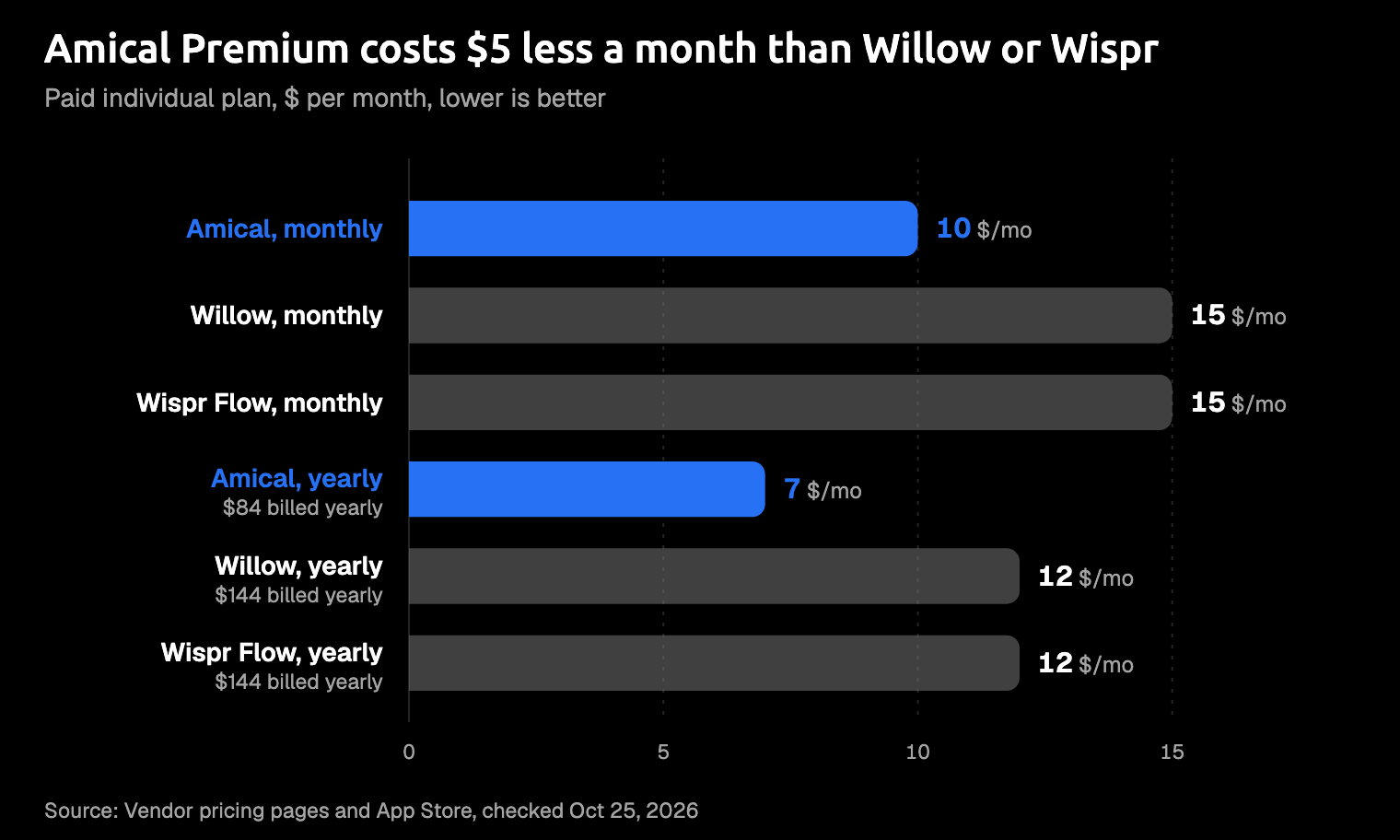
There's a third option, and it's ours: Amical publishes this blog. Amical runs on Mac, Windows, iPhone, iPad, and Android, lets you choose cloud or local transcription on your computer, and costs $10 a month for Premium. If you want Android and that choice for less than either rival charges, it's our pick.
Willow Voice vs Wispr Flow at a glance
Pro price and language count match. Almost everything else in the table differs.
| Willow Voice | Wispr Flow | Amical (ours) | |
|---|---|---|---|
| Free plan | 2,000 words a week and 5-minute dictations, per its help center; 20 Scribe uses a week | Weekly allowance of 2,000 words on desktop, 550 on iPhone, 1,000 on Android | Unlimited local dictation, plus 2,000 cloud words a week |
| Pro, monthly / yearly | $15 a month / $12 a month | $15 a month / $12 a month | $10 a month / $84 a year (Premium) |
| Platforms | Mac, Windows, iPhone; no iPad app; Android coming soon | Mac, Windows, iPhone, Android; no iPad app | Mac, Windows, iPhone, iPad, Android |
| Where speech is transcribed | Cloud, in the US | Cloud, always | Amical Cloud, or on your computer in local mode |
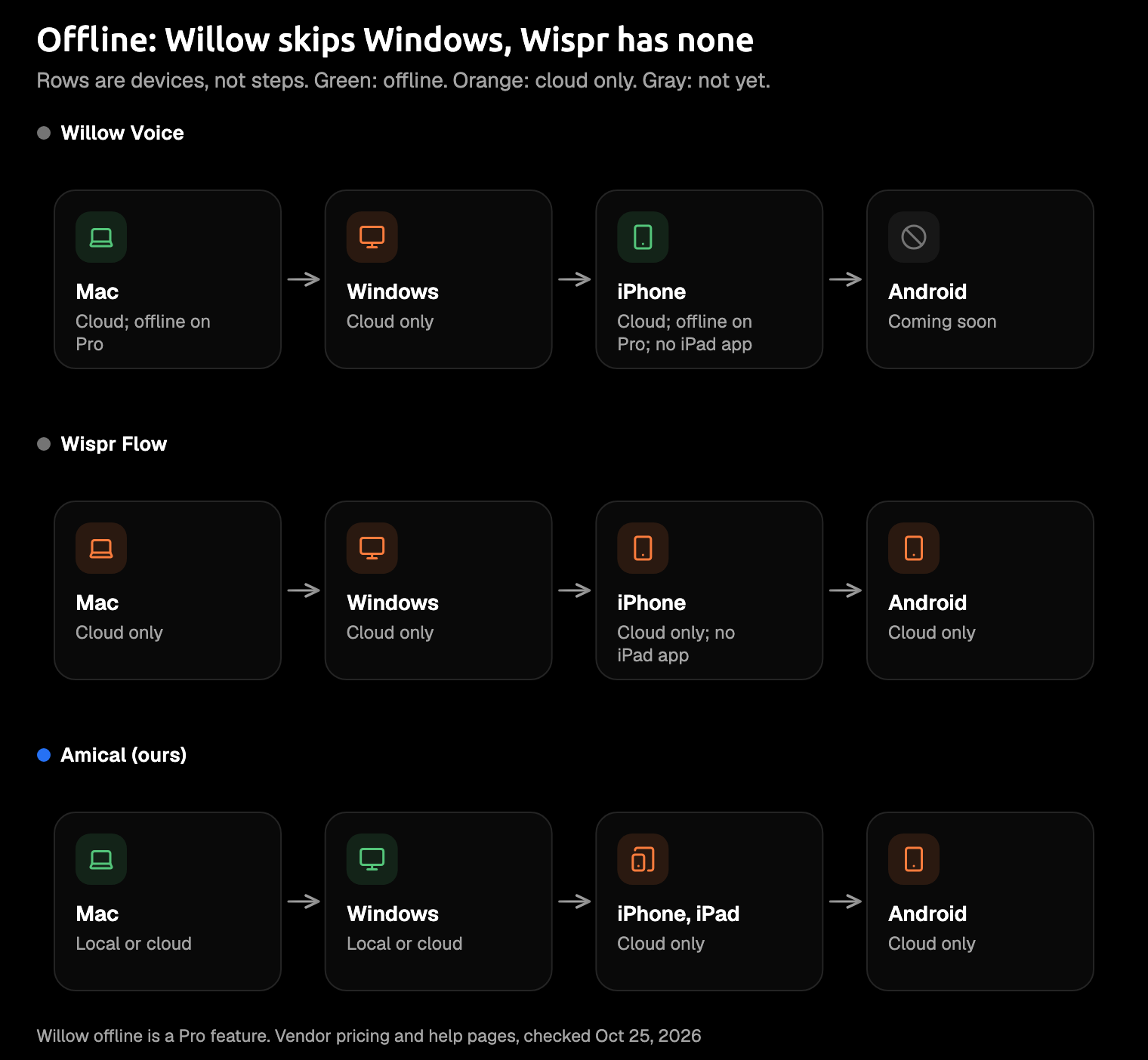
| Offline | Pro only, on Mac and iPhone | No | Local mode, on Mac and Windows |
| Privacy default | Private Mode on: nothing kept on its servers | Audio deleted after transcription unless cloud storage is on | Local mode: audio stays on your computer. Amical Cloud: stated no data retention |
| Training on your data | Opt-in, off by default | A toggle you can switch off; default for individuals not stated; locked off on Growth and Enterprise | Amical Cloud: stated no training |
| Certifications | SOC 2 Type II; BAA where applicable | SOC 2 Type II, ISO 27001; BAA on every plan | SOC 2 in progress; no HIPAA claim |
| Longest dictation | 5 minutes free, 8 paid | 20 minutes on desktop, 5 on Android (iPhone not listed) | 2 hours per recording session |
| Languages | 100+ | 100+, one per dictation | 100+ with Amical Cloud (Japanese and English mixed), 99 in local mode |
| Beyond dictation | Scribe: writes, replies, and edits by voice | Command Mode, Snippets, Notetaker | Per-app AI formatting; Draft with Amical Cloud |
Prices and limits checked October 25th, 2026, on each vendor's own pricing and help pages.
Three rows do most of the separating: platforms, offline, and how long one dictation can run. If none of those matters to you, you could pick either app and be happy.
Price and the free plan
Pro costs the same on both: $15 a month, or $12 a month if you pay for the year. The free plans are where they part ways.
Wispr Flow's free plan is the easier one to read. Its plans doc gives each device a weekly word allowance: 2,000 on Mac and Windows, 550 on iPhone, and 1,000 on Android. Phones get far less. Everything resets on Sunday.
Willow's free plan is harder to pin down. Its help center says 2,000 words a week and dictations of up to 5 minutes, but its pricing page shows no word figure at all. What the pricing page does list is what Willow calls a "weaker" model, Frontier Mini, and 20 uses a week of Scribe, its writing assistant. Check the limit in the app before you plan a week around it.
A weekly allowance tends to run out on a Thursday, right when the replies pile up.
If you'll stay on a free plan, Wispr's desktop allowance is the easier one to plan around, because it's written down in one place.
Two offers are worth knowing if you're paying. Willow takes money off Pro for students, educators, nonprofits, and veterans. Wispr Flow gives you a 14-day Pro trial by default, long enough to find out whether you actually like talking to your laptop.
For teams, Wispr's Growth plan costs $23 a month for dictation only, or $33 with Notetaker; billed yearly, those come to $18 and $26 a month. Willow's team plans are on its pricing page.
Amical's free plan gives you unlimited local dictation on your computer plus 2,000 cloud words a week. On phones, which run on Amical Cloud, that cloud allowance is the whole free plan. Pricing lists what each plan includes.
Mac, Windows, iPhone, Android: where each one runs
Wispr Flow runs on all four: Mac, Windows, iPhone, and Android. There's no iPad app, and Windows PCs on ARM chips aren't supported.
Willow runs on Mac, Windows, and iPhone, and its download page lists Android as coming soon. Its App Store listing shows an iPhone app only, with no iPad app.
The extras don't travel as far. Wispr's Notetaker and Command Mode work on Mac and Windows only.
An Android phone makes this decision for you.
Think of the reply you want to send from the train, on a phone that isn't an iPhone. Wispr Flow can take it, and Willow can't yet.
Amical runs on Mac, Windows, iPhone, iPad, and Android. The phone apps transcribe with Amical Cloud only. The Android quick start covers setup, and the best dictation apps for Android compares the wider field.
Offline is where the platforms really split. Wispr Flow is always online, and Amical's local mode works offline on Mac and Windows. Willow's offline mode is thinly documented: its help center lists it under Pro, and its blog names Mac and iPhone. Neither says which model runs offline or which languages it covers.
Privacy: where your audio goes
Both apps send your speech to the cloud to transcribe it by default. By default, neither keeps your audio afterwards, though they get there through different settings.
Willow runs on cloud servers in the United States. Private Mode is on by default, according to its privacy help page, so no audio, transcripts, or context are saved on Willow's servers. Your history stays on your device. Training is opt-in and stays off unless you switch it on.
Wispr Flow's privacy page says transcription always happens in the cloud, and your audio is deleted once it's transcribed unless you turn on cloud storage. There's also a toggle that lets Wispr use your dictation to improve its model. The page doesn't say whether it starts on or off for individuals; on Growth and Enterprise, training is off and locked.
Both apps also look at what's on your screen. Wispr Flow reads limited text from the app you're dictating into, and you can turn that off. Willow's Scribe replies to text on your screen, and with Private Mode on, Willow doesn't save that context on its servers.
Both are worth a quick look in settings before you dictate a client's name into a support reply.
On compliance, the two make similar promises. Both list SOC 2 Type II and offer a BAA, the agreement HIPAA work needs. Willow offers it "where applicable"; Wispr Flow offers it on every plan, though signing one switches off Notetaker. Wispr also adds ISO 27001. This isn't legal advice: if you handle health data, take the agreement to whoever signs off on compliance where you work.
Willow's defaults are the better documented: Private Mode is on from the start, and training stays off until you opt in. Wispr's controls are fine once you've checked them.
For Amical, the answer depends on the mode. In local mode, your audio is transcribed on your computer. No account needed. It works offline once a model is downloaded, and text leaves only if you pick a cloud provider for formatting. With Amical Cloud, your audio goes to Amical Cloud along with your language and vocabulary settings and some formatting context. The stated policy is no data retention and no training on your data. Cloud vs local dictation walks through the trade-off.
What each does beyond dictation
Both apps clean up your speech and keep a dictionary of your words. Willow's dictionary learns on its own, and it has per-app style presets, such as Email and Work Messaging. Wispr Flow has a dictionary, Snippets for text you reuse, and Styles that run from Formal to Very casual.
Willow's Scribe goes a step further. It writes from what you say you want, replies to text on your screen, and edits text you've selected. It's built into Willow's iPhone keyboard, too. It's the tool for the moment you look at a paragraph you've already written and say "make this friendlier."
Wispr Flow's Command Mode also edits and drafts by voice, but only on Mac and Windows, and only on Pro. It stays off until you turn it on under Settings > Experimental. Wispr also has Notetaker for meetings on Mac and Windows. Which plans include it is less clear. Its launch notes say Notetaker comes with your existing plan, while its plans doc prices a separate Growth tier with Notetaker. Check before you buy for meetings.
On a phone, Scribe has no counterpart in Wispr's docs: it sits in the keyboard, and Command Mode is desktop-only. If meetings are part of your job, try Wispr Flow.
Speed, accuracy, and limits
Each vendor rates its own app faster or more accurate than the other, and none of the comparison pages or docs checked for this post explains how the numbers were measured. Willow says text appears "in as little as 200ms," and Wispr Flow's comparison page claims "95%+ accuracy" for its own app. Ours is the same kind of claim: by Amical's own figures, Amical Cloud returns finished, formatted text in under 300 ms for a short dictation, and there's no public benchmark yet. Treat all three as claims, not test results.
Limits, at least, you can check. Willow stops a free dictation at 5 minutes and a paid one at 8. Wispr Flow lets one session run 20 minutes on Mac and Windows, and 5 on Android.
For emails and Slack replies, any of these caps is plenty. If you dictate long reports, it's the difference between finishing a thought and hitting the cap halfway through it.
Both list 100+ languages. Wispr's docs add that it records one language per dictation, and that mixed-language speech is less reliable. That matters if your messages switch languages halfway: with Amical Cloud, you can mix Japanese and English in a single dictation.
What users say reaches us secondhand. A SwitchMyTool roundup of r/macapps threads, last edited in July 2026, reports users calling Willow unusually fast. It also cites an r/ProductivityApps user who disliked Willow treating a spoken "delete" as an edit command. The same roundup says complaints about Wispr Flow focus on the monthly subscription, the need for internet, and occasional slow output.
Where Amical fits
If you'd pay $15 a month for either rival, check what $10 buys. The Android phone Willow skips and the iPad neither rival has an app for? Both run Amical. On Mac and Windows, you can also choose Amical Cloud or local mode, which keeps your audio on your computer and works offline. And one recording session runs up to 2 hours, against Wispr Flow's 20 minutes on desktop, so a long report fits in one take.
Like Willow's style presets and Wispr's Styles, Amical's AI formatting writes the message for the app you're in. Say you dictate this (an illustration, not a recorded run):
hey priya so the client moved the review to friday, um, can you send me the deck before then and let sam know too
In Gmail, it comes out as an email:
Hi Priya,
The client has moved the review to Friday. Could you send me the deck before then? Please let Sam know too.
Thanks
In Slack, it stays a quick message:
Client moved the review to Friday. Can you send me the deck before then, and let Sam know too?
With Amical Cloud, Draft does part of what Scribe and Command Mode do: it writes from a spoken instruction or rewrites text you've selected, and you review the result before it goes in. That review step is what keeps "make this friendlier" from coming back as a sonnet.
A few limits might rule Amical out for you:
- SOC 2 is in progress, and Amical makes no HIPAA claim. If your compliance team needs SOC 2 Type II today, Willow and Wispr Flow both claim it. Ask for the report and the plan it comes with: Willow's pricing page lists it under Business. Otherwise, local mode keeps your audio on your computer.
- The phone apps and Amical Cloud need sign-in, and phones run on Amical Cloud only. Wispr Flow's phone apps are cloud too, and Willow's iPhone app is cloud unless you use its Pro offline mode. On desktop, local mode needs no account.
- Local mode's Whisper model needs macOS 15+ and runs slower on Intel Macs. (Whisper is an open speech-to-text model.) Parakeet, NVIDIA's open model, runs on macOS 14+ and on Intel Macs. Amical Cloud has no macOS limit; local AI models explains both local options.
- No Linux, and neither rival has it. If you're on Linux, the best open source dictation apps covers the ones that run there.
Trying it on a Mac is quick:
- Download Amical and open it.
- Click into Gmail, Slack, or wherever you want the text.
- Hold
Fn, speak, and let go. The text lands where your cursor is.
For longer messages, press Fn+Space to dictate hands-free. Amical vs Wispr Flow compares those two feature by feature. If you're still shopping, free Wispr Flow alternatives and Typeless vs Wispr Flow cover the rest of the field.
Which should you pick?
On price, Willow and Wispr Flow are a tie. Your phone settles more of this than any feature list.
- Android, long recordings, and a choice of cloud or local on your computer, for $10: Amical.
- Android and meetings: Wispr Flow.
- A Mac and an iPhone, offline on both with Pro, or Private Mode and opt-in training from the start: Willow.
- SOC 2 Type II today: Willow or Wispr Flow, on the plan that includes it.
Try one real message in each
We make one of these three apps, so let a real message be the judge. Pick a reply you'd otherwise type today, the one that's been sitting in your drafts. Download Amical and dictate it on the free plan, then say the same message into whichever of the two you were leaning toward. Keep the app whose version you'd send without editing.