You've got a row of Hugging Face tabs open, and the model cards have started to look alike: NVIDIA, 0.6B, a wall of tables, and "streaming" somewhere near the top. Two names keep coming back. Nemotron 3.5 ASR Streaming is the multilingual follow-up to NVIDIA's English Nemotron Speech Streaming model. Parakeet is NVIDIA's family of open speech-to-text models.
Nemotron vs Parakeet comes down to when you need the words. Nemotron is built for text that appears while you're still talking: live captions, voice agents, long hands-free dictation. Parakeet TDT v3's card shows it transcribing whole files, with a documented chunked streaming option. And if your app works push-to-talk and pastes on release (hold a key, speak, let go), you never watch the words stream in anyway: what you feel is how fast and how right the finished text is.
Nemotron is the popular one: 1,139,887 downloads on Hugging Face's 30-day count in late October 2026, against 583,059 for Parakeet TDT v3. Popular isn't the same as right for your job.
The short answer
Same company, same size, three different jobs, which is why the cards blur together.
- Pick Nemotron 3.5 if text must appear while someone is still talking, in more than English: captions, voice agents, live notes.
- Pick Parakeet TDT v3 for finished recordings, or push-to-talk dictation, in a European language.
- Pick Parakeet Unified EN for English with one model that does both.
- For push-to-talk dictation, judge a model on the finished text: how fast and how right.
- Check where it runs: the card lists only NVIDIA GPUs on Linux, but NVIDIA's own NeMo-Speech.cpp runtime also installs on a Mac, using Metal on Apple Silicon or the CPU.
| Nemotron 3.5 Streaming | Parakeet TDT v3 | Parakeet Unified EN | |
|---|---|---|---|
| Released | June 2026 | August 2025 | April 2026 |
| Size | 600M parameters | 600M parameters | 600M parameters |
| Built for | Streaming: text while you talk | Whole recordings, with a chunked streaming mode | Both, in one model |
| Languages | 40 locales in three tiers, 32 usable out of the box | 25 European, detected automatically | English |
| License | OpenMDW-1.1 | CC-BY-4.0 | NVIDIA Open Model License |
From each model's Hugging Face card, as of October 2026.
What Nemotron 3.5 ASR Streaming is
Nemotron 3.5 ASR Streaming is a 600M-parameter automatic speech recognition (ASR) model, released on Hugging Face on June 4, 2026.
It isn't a new design. NVIDIA took its English-only streaming model and added language-ID conditioning, a small signal that tells the model which language to expect. You set the language yourself, or set target_lang to auto and let the model detect it.
It's the English model with a passport.
Under the hood, one part listens and one part writes. The listener, a cache-aware FastConformer encoder, keeps a memory of the audio it has already heard. The writer, an RNNT (recurrent neural network transducer) decoder, puts out words as the audio arrives, which is what streaming needs. You get punctuation and capital letters, not one long lowercase run-on.
40 locales, in three tiers
The card lists 40 locales in three tiers, and only the first two will work for you out of the box.
- Transcription-ready (19): English (US and UK), Spanish (US and Spain), French (France and Canada), Italian, Portuguese (Brazil and Portugal), Dutch, German, Turkish, Russian, Arabic, Hindi, Japanese, Korean, Vietnamese, and Ukrainian.
- Broad-coverage (13): Polish, Swedish, Czech, Norwegian Bokmål, Danish, Bulgarian, Finnish, Croatian, Slovak, Chinese (zh-CN), Hungarian, Romanian, and Estonian.
- Adaptation-ready (8): Greek, Lithuanian, Latvian, Maltese, Slovenian, Hebrew, Thai, and Norwegian Nynorsk, which need fine-tuning first.
So the headline 40 is really 32 locales you can use today, and 13 of those are rough.
Word error rate (WER) is the share of words a model gets wrong, so lower is better. On FLEURS, a multilingual test set, the broad-coverage tier averages 22.13% at its most accurate setting, against 8.84% for the transcription-ready tier. (The card scores Chinese, Japanese, and Korean by characters rather than words.) With more than one word in five wrong, you're rewriting, not proofreading.
Check your language's tier before you get attached. For dictation in many languages, Amical Cloud, from the team behind this blog, covers 100+ languages; see Multi-language support.
License: OpenMDW-1.1
The card says you can use Nemotron commercially: it calls the model "ready for commercial use" and lists its license as OpenMDW-1.1. OpenMDW's site describes it as "a permissive license crafted for machine-learning models", introduced by the Linux Foundation and PyTorch Foundation in 2025.
The Parakeet models differ. TDT v3 is under CC-BY-4.0, while Parakeet Unified and the English-only Nemotron use the NVIDIA Open Model License. Four sibling models, three licenses, so don't assume one covers the others.
Read the license text itself before you ship the model in a product; this is a pointer, not legal advice.
How cache-aware streaming works
Streaming models work in chunks: short slices of audio that the model transcribes one after another while you're still talking.
Buffered streaming runs overlapping windows, so every new chunk means re-reading audio the model has already processed. Cache-aware streaming keeps a cache of each encoder layer's work and processes every audio frame exactly once. It's the difference between rereading the last few pages each time you turn one and simply turning the page.
The idea comes from a 2023 NVIDIA paper, Stateful Conformer with Cache-based Inference for Streaming Automatic Speech Recognition.
Picture a long sentence in 560 ms chunks, a little over half a second each. Each chunk is encoded once, as it arrives. By the time you stop talking, only the last one is left.
That's why it's cheap at scale: a server handling many callers stops paying for the same audio twice. On your laptop, with only you talking, it matters far less.
Chunk size is a dial
With Nemotron, you choose the chunk size when you run the model, from 80 ms up to 1,120 ms, without retraining. Smaller chunks put text on screen sooner; larger ones give the model more audio, so it makes fewer mistakes. That 80 ms is the chunk size, not the delay you'd see on screen; model and processing time come on top.
The card's English FLEURS figures show the trade: 9.43% WER at 80 ms and 7.91% at 1,120 ms, with a note that its scoring may inflate both. That's roughly one and a half more wrong words per hundred when you pick speed.
For dictation, the big chunk is the sensible setting. You wait for bigger slices of audio and make fewer corrections.
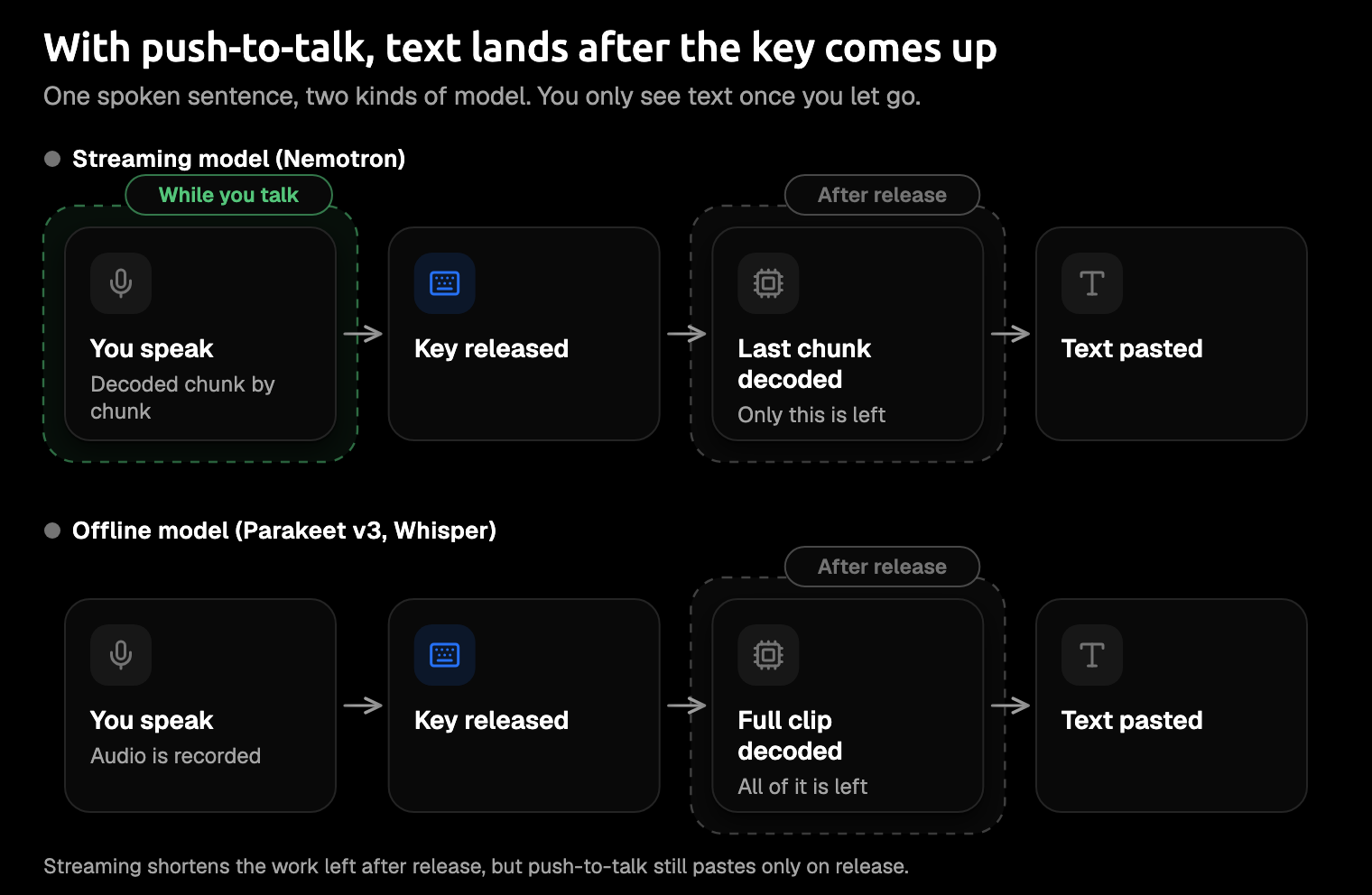
With push-to-talk, the text lands after you let go either way. Streaming changes how much work is left at that moment.
Nemotron vs Parakeet: how they differ
The multilingual Nemotron streams first. Parakeet TDT v3 pairs a FastConformer encoder with a different decoder, TDT; its card's examples transcribe whole files, and it documents a chunked streaming option. Parakeet Unified EN does both modes in English, with buffered streaming that recomputes earlier audio for each chunk. You've met that re-reading already: it's the cost cache-aware streaming avoids.
The closest like-for-like match-up is the English-only Nemotron (nemotron-speech-streaming-en-0.6b) against Parakeet Unified EN. Both are English models that stream. Each card reports average WER on the same eight English test sets from the Open ASR Leaderboard, Hugging Face's public speech recognition benchmark, with punctuation not scored.
If you need text almost instantly, the English-only Nemotron holds at 8.43% at 80 ms while Unified jumps to 15.63%. At 1,120 ms the order flips: Unified leads, 6.29% to 6.93%. Unified is also ahead at 560 ms, and those bigger chunks are the ones that suit dictation. The chart below has all four chunk sizes.
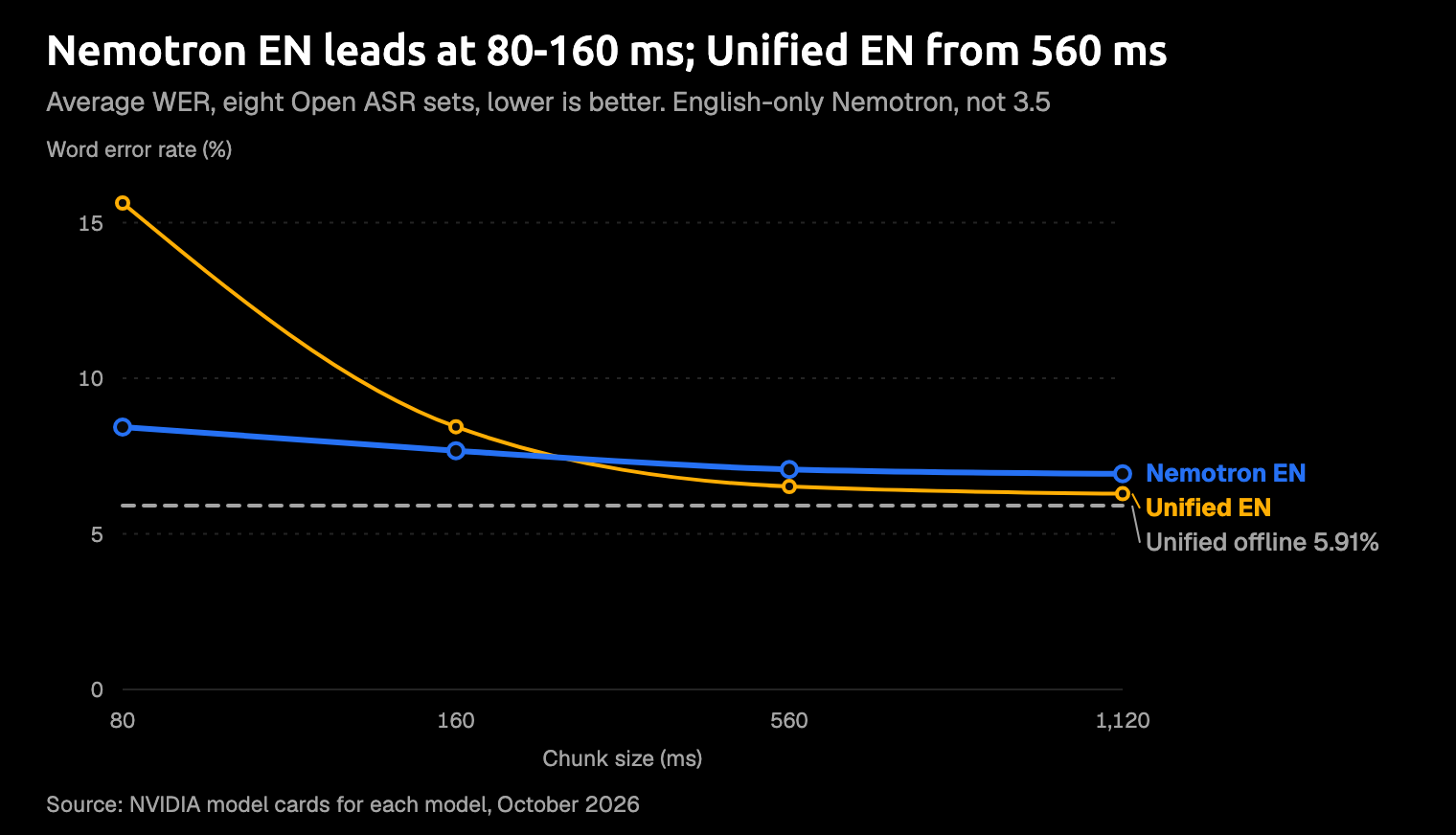
English-only Nemotron (nemotron-speech-streaming-en-0.6b) figures from its own Hugging Face card; Parakeet Unified EN and its offline line from Unified's card. Punctuation isn't scored. Unified's card prints its own figures for the English-only Nemotron, all within 0.3 points of these, and labels its settings by latency (chunk plus right context).
Unified's own card says quality drops at 160 ms and recommends the English-only Nemotron for 80 ms. When a model card sends you to its sibling, believe it.
Two models sit outside the chart. Parakeet TDT v3 reports the same eight sets offline only, at 6.34% on average: lower than the English-only Nemotron at any chunk size, though Unified EN's 5.91% offline is lower still. The multilingual Nemotron reports FLEURS, a different test set, so its numbers don't line up with the Parakeet cards.
NVIDIA's headline claim for the multilingual Nemotron is throughput, and it's a server number. In NVIDIA's own comparison on one H100 data-center GPU, it serves 240 concurrent streams at 80 ms chunks, against 14 for Parakeet RNNT 1.1B multilingual. If you're one person dictating on a laptop, you won't feel any of it.
So which one wins depends on whether you're watching the screen. When English text has to appear almost instantly, at 80 or 160 ms, the English-only Nemotron wins. If you can give it bigger chunks or the whole recording, Parakeet does. For more, see our Parakeet TDT v3 guide and Parakeet Unified vs v3.
Does streaming matter for dictation?
It depends on how you dictate. With push-to-talk, you hold a key for each message. With hands-free, you start recording and keep talking, and live text starts to matter.
Push-to-talk: text lands when you let go
Push-to-talk goes hold, speak, release, paste. While you hold the key, you're looking at an empty text box, whatever model is underneath. What you notice is how fast the text arrives after you let go, and how right it is.
No one has published a time-after-release test for these models, so this section reasons from the card numbers.
Streaming does leave less work at that moment: only the last chunk, as the diagram shows. An offline model starts on the whole recording when you let go, but it hears all of it, and that buys accuracy. On Parakeet Unified's card, the same model scores 5.91% offline and 6.29% when it streams at 1,120 ms. It's a small gap, and it points one way: more context, fewer mistakes.
Here's how it plays out in Amical, a push-to-talk dictation app. Amical publishes this blog, and Amical Cloud is how we make money (Premium is $10 a month); local dictation is free and unlimited. Hold Fn (you can rebind it in Shortcuts), speak, let go, and the text is pasted wherever your cursor is; AI dictation has the details.
- In local mode, Amical runs Parakeet v3 on your Mac or Windows PC, including Intel Macs and macOS 14. It transcribes when you stop speaking, not as you speak. See Local AI models.
- With Amical Cloud, you get the fastest dictation in the category, by Amical's own figures (no public benchmark yet): finished, formatted text in under 300 ms for a short dictation and under 500 ms for a longer one. See Cloud AI models.
Either way, AI formatting rewrites your words for the app you're in, so Gmail gets an email and Cursor gets a clean prompt. By the time you look back at the screen, the email is already written.
What Amical doesn't do is run Nemotron. For push-to-talk, our read of the cards is that you won't miss it: the finished message is where speed and accuracy count.
Hands-free and live captions: where streaming earns its place
Streaming earns its place when text must appear while someone is still talking: live captions, meeting transcripts, long hands-free dictation, and voice agents. An agent that waits for you to finish your paragraph before it starts working feels like a bad phone line.
This is Nemotron's job. NVIDIA's blog on the English-only model reports a 24 ms median time to final transcript in its voice-agent pipeline, without saying which hardware produced it. It's a vendor figure, not what you'd see dictating on a laptop.
If you need words on screen while you talk, Nemotron is the model to try, and a Mac isn't shut out: NVIDIA's own NeMo-Speech.cpp runtime installs there, as the next section shows.
Amical has hands-free dictation too (Fn+Space); in local mode, Parakeet v3 still transcribes when you stop speaking.
How to try Nemotron 3.5
NVIDIA's model card has the quickstart, with three ways to run it: NeMo, Hugging Face Transformers, and NeMo-Speech.cpp. The card's hardware list names only NVIDIA GPUs on Linux, but NeMo-Speech.cpp, NVIDIA's lightweight C++ runtime, installs on Linux and macOS, with Metal builds for Apple Silicon and CPU builds that need no GPU. Its docs give no speed figures for a Mac, so your own machine is the benchmark.
-
Check your machine. For NeMo, the card lists NVIDIA GPUs from Volta on, plus Jetson, running Linux. If your computer has no NVIDIA GPU, Mac included, use NeMo-Speech.cpp.
-
Install NeMo-Speech.cpp. Its README gives a one-line installer for Linux or macOS that downloads the prebuilt archive for the latest release and checks it; on Apple Silicon it picks the Metal build, and the install docs explain how to get the smaller CPU one instead:
curl -fsSL https://github.com/NVIDIA/NeMo-Speech.cpp/raw/main/scripts/install.sh | sh -
Download the model and transcribe a WAV. NeMo-Speech.cpp loads the model from a single GGUF file; these are the card's commands to download the q8_0 file and transcribe one:
hf download nvidia/nemotron-3.5-asr-streaming-0.6b \ nemotron-3.5-asr-streaming-0.6b.q8_0.gguf \ --local-dir models nemo-speech transcribe audio.wav \ --model models/nemotron-3.5-asr-streaming-0.6b.q8_0.gguf \ --language en-US -
Or use Python. Install Hugging Face Transformers 5.13.0 or later (
pip install "transformers>=5.13.0"), then run the card's pipeline example:from transformers import pipeline pipe = pipeline("automatic-speech-recognition", model="nvidia/nemotron-3.5-asr-streaming-0.6b") out = pipe("https://huggingface.co/datasets/hf-internal-testing/dummy-audio-samples/resolve/main/bcn_weather.mp3") print(out) -
Set the language with a locale such as
en-US, or useautoto detect it. -
For live streaming, use NeMo, NVIDIA's speech toolkit. The card's cache-aware streaming script takes the chunk setting
att_context_size:[56,0]gives 80 ms chunks and[56,13]gives 1,120 ms. Go small for captions and agents, and large when accuracy matters more.
Community ports are other routes, if you'd rather use CoreML, MLX, or ONNX:
- Soniqo, a runtime vendor, offers CoreML and MLX builds. It lists the CoreML INT8 build at 612 MB on disk, with a 1,238 MB streaming peak on an M5 Pro.
- onnx-community publishes an ONNX INT4 version, optimized for 560 ms chunks. Its card says MIT, not the base model's OpenMDW-1.1, so check which license applies to you.
On a Mac, treat Nemotron as an experiment. It's a good weekend project, not yet the tool you'd trust with Monday's inbox.
Which should you use?
- Live captions or voice agents in many languages: the multilingual Nemotron, once you've checked your language's tier. Run it with NeMo on an NVIDIA GPU, or with NeMo-Speech.cpp on a Mac.
- The lowest-latency English streaming: the English-only Nemotron, which Parakeet Unified's own card recommends for 80 ms.
- English with one model for live and finished audio: Parakeet Unified EN, which leads the English-only Nemotron at 560 ms and 1,120 ms.
- Finished recordings in European languages: Parakeet TDT v3.
- Push-to-talk dictation into email, Slack, or an AI prompt: Amical, on Amical Cloud for speed or local Parakeet v3 for offline.
- Linux: there's no Amical app, so run Nemotron through NeMo directly.
Amical runs on Mac, Windows, iPhone, iPad, and Android, and the phone apps use Amical Cloud. In local mode, your audio stays on your computer, and text leaves only if you pick a cloud provider for formatting.
For dictation, pick the app first and the model second. A speech model gives you a transcript, but what you send is an email, a Slack reply, or a prompt, and AI formatting turns one into the other. For the wider field, see our guide to the best speech recognition models and Parakeet vs Whisper.
Dictate one real message twice
Download Amical and dictate the next email or AI prompt you'd otherwise type with Amical Cloud: hold Fn, talk, let go. Then switch to local Parakeet v3 and dictate another. One real message on each shows you the difference between the fastest option and the one that keeps your audio on your computer.
The free plan covers both: unlimited local dictation plus 2,000 cloud words a week, and local dictation never counts toward them. If you later want unlimited cloud words, Pricing has the plans.