You open the model list in your dictation app, and next to the Whisper models you already know there's another name: Parakeet v3. Someone on X says it's faster, and now you're wondering whether to switch.
Parakeet TDT 0.6B v3 is NVIDIA's open speech-to-text model, with 600 million parameters, a CC-BY-4.0 licence that allows commercial use, 25 European languages, and punctuation in the output. In NVIDIA's own paper, it makes fewer English errors than Whisper Large v3 (OpenAI's widely used open model), at 6.32% against 7.44% word error rate. It also gets through big batches of audio far faster, though batch speed isn't the same as how quickly your dictation comes back. If you dictate in English or one of its better-covered languages, such as Italian, Spanish, Portuguese, German or French, it's a strong model for dictation.
This guide is for you if you want Parakeet running on your own Mac or PC for dictation. The easiest way to get there is an app that already runs it: Amical in local mode, Handy, or MacWhisper. Amical publishes this blog, so here's our case up front: Amical runs Parakeet v3 in local mode on Mac and Windows, adds AI formatting that turns your words into the message you meant, and puts Amical Cloud in the same app for the languages Parakeet doesn't cover.
The model card gives benchmark numbers, but it doesn't say what they mean when you hold a key and talk: which languages are really usable, what the model leaves for the app to do, and how to get it running. That's what this post covers. If you're a developer, the last part also shows how to run the model yourself with MLX, CoreML, ONNX or NVIDIA's NeMo toolkit.
What Parakeet TDT 0.6B v3 is
NVIDIA released the model in August 2025, and if you only want the essentials, here they are from NVIDIA's model card:
| Parakeet TDT 0.6B v3 | |
|---|---|
| Made by | NVIDIA |
| Size | 600M parameters |
| Licence | CC-BY-4.0, commercial and non-commercial use |
| Languages | 25 European languages, detected automatically |
| Output | Punctuation, capitals, word-level timestamps |
The name describes the design, and you only need one idea from it. A FastConformer encoder turns audio into features the model can work with, and a TDT (Token-and-Duration Transducer) decoder turns those features into text. TDT means that the decoder predicts each piece of a word along with how many audio frames it can skip next, and that skipping is a big part of why the model is fast.
You don't need to pick a language in settings, because the model card says it detects the language of the audio and transcribes it without extra prompting.
You don't need the training details to dictate either, but here's the one worth knowing: most of the audio was pseudo-labelled, which means other models wrote the transcripts. The total is about 660,000 hours from a dataset called Granary, plus about 10,000 hours that people transcribed. If you want the full story, it's in the paper, "Canary-1B-v2 & Parakeet-TDT-0.6B-v3", published in September 2025.
v2 vs v3, and the Moondream retrains
v2 vs v3
If you've seen Parakeet TDT 0.6B v2 in an app, that's the May 2025 model, and it's English only. v3 kept the same size and licence and added 24 more languages.
Word error rate (WER) is the share of words a model gets wrong, so lower is better. The WER figures in this post ignore punctuation and capitalisation, so they measure the words you said, not the formatting. Different sources also report slightly different averages for the same model, so compare numbers only within one source.
The extra languages cost you very little in English: per NVIDIA's model cards, v2 averages 6.05% WER on the English test sets of the Open ASR Leaderboard (a public benchmark that tests speech models on the same recordings), and v3 averages 6.34%.
So if you only dictate in English, either one works, and for any other language on the list you want v3.
Parakeet Ultra and Redux (Moondream, September 2026)
Around September 2026, per their Hugging Face pages, Moondream released two retrained versions of v3, and you'll now see them in some apps and developer kits. Every figure in this section is Moondream's own. We couldn't find an independent test of them, so treat them as Moondream's claims rather than settled results.
Parakeet Ultra is v3 with extra training: the same architecture, the same 0.6B size, the same CC-BY-4.0 licence, and the same 25 languages. If you care most about accuracy, it's the one to look at. Moondream reports lower WER than v3 everywhere it tested: 5.80% vs 6.26% on seven English test sets, 9.55% vs 11.62% on FLEURS (a multilingual test set), and 5.82% vs 6.72% on noisy audio.
Parakeet Redux is a ternary (1.58-bit) build, which means each of its encoder weights is stored as one of just three values. If you're short on disk space, that matters: the download is 178 MB, against 1.2 GB for the original. Moondream built it for CPUs and Apple silicon. The trade-off, by Moondream's numbers, is that you get slightly more errors on English (6.55% vs 6.26%), noticeably more in noise (9.04% vs 6.72%), and a few fewer on FLEURS (10.56% vs 11.62%).
Moondream's figure for v3 differs slightly from the one on the NVIDIA card, so when you read the chart below, compare the three models with each other, not with the card. Both retrains run in the Photon runtime from Moondream (Redux needs the moondream package, version 2.4.0 or later), and FluidAudio also ships CoreML builds of both. If you plan to build on Photon, check its licence terms first, because this post does not cover them.
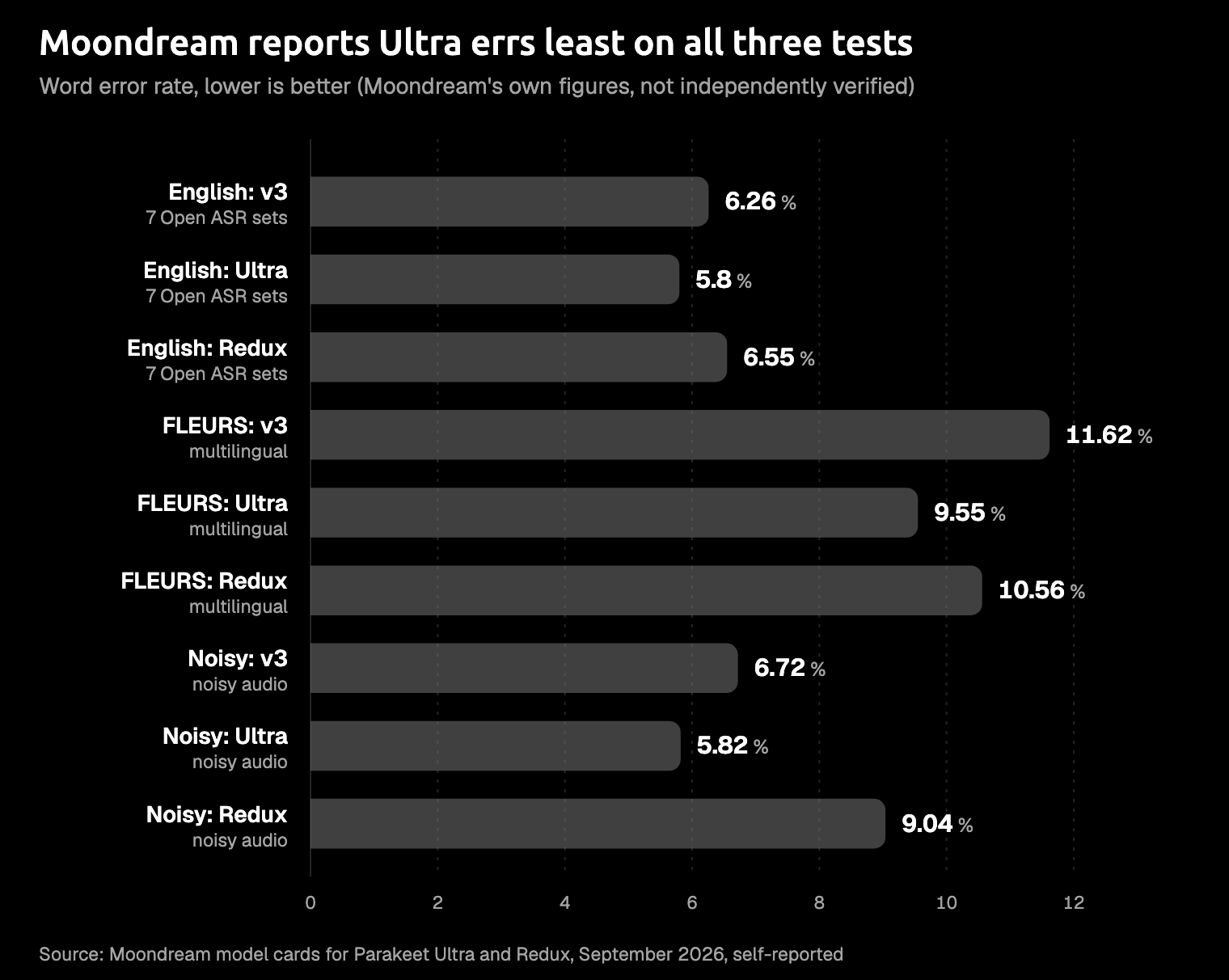
Word error rate as reported by Moondream (September 2026); self-reported, not independently verified.
If you want English with live streaming instead, look at NVIDIA's Parakeet Unified EN 0.6B (April 2026), which is a separate model with its own trade-offs.
How accurate is it, and in which languages
If you dictate in English, you're in good shape: on the Open ASR Leaderboard's English test sets, v3 averages 6.32% WER in the NVIDIA paper (6.34% on the card), against 7.44% for Whisper Large v3 in the same table.
What you're recording matters a lot. NVIDIA's card lists 1.93% WER on LibriSpeech test-clean (clear audiobook reading) and 11.31% on AMI (recorded meetings), so expect more mistakes on meeting-style speech than on clear, single-speaker audio.
Noise costs you words too: the card shows the average WER rising from 6.34% on clean audio to 8.23% at a signal-to-noise ratio of 5 dB, and to 11.66% at 0 dB, where the noise is as loud as your voice. A quiet room is fine, but if you dictate in a loud café, plan to fix more words afterwards.
For many of you, the language list is what decides it. NVIDIA's card lists these 25 languages: Bulgarian, Croatian, Czech, Danish, Dutch, English, Estonian, Finnish, French, German, Greek, Hungarian, Italian, Latvian, Lithuanian, Maltese, Polish, Portuguese, Romanian, Slovak, Slovenian, Spanish, Swedish, Russian, and Ukrainian.
Accuracy varies widely between them, so check your own language before you switch. On FLEURS, NVIDIA's card lists 3.00% WER for Italian and 3.45% for Spanish, but 22.84% for Latvian and 24.03% for Slovenian. If you dictate in Slovenian, that means roughly one word in four comes out wrong. The FLEURS average on the card is 11.97%, and the paper's own FLEURS figure differs slightly, so again, compare these numbers within one source. The paper also reports a combined average over 24 languages across FLEURS, CoVoST and MLS: 9.7% for v3 against 9.9% for Whisper Large v3, which is close to a tie.
If you speak Portuguese, note that the training data is European Portuguese, while most benchmarks use Brazilian Portuguese.
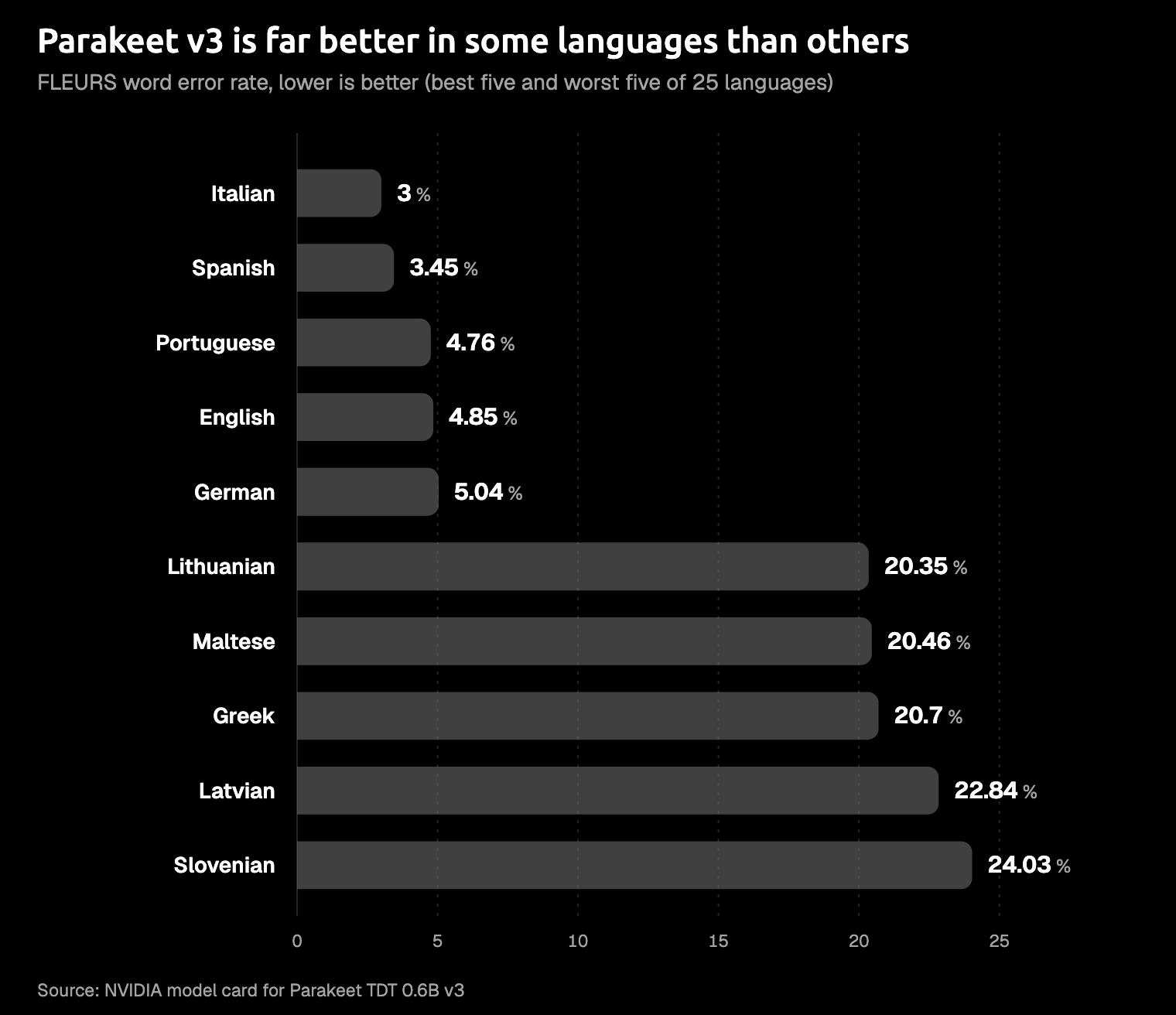
FLEURS word error rate by language, from NVIDIA's Parakeet v3 model card (plain decoding, with no add-on language model).
If you dictate in Japanese, Chinese, Korean, Arabic or Hindi, or in any other language outside those 25, Parakeet v3 isn't built for you. For Japanese, NVIDIA has a separate model, parakeet-tdt_ctc-0.6b-ja, also CC-BY-4.0, at about 0.6B parameters, with punctuation.
If you mix English with a language that isn't on the list, a Parakeet-only setup can't follow you. In Amical, you can switch to Amical Cloud for those dictations: it covers 100+ languages and handles Japanese and English mixed in one sentence. You'll find the settings in Multi-language support.
Is it good for live dictation?
Benchmarks run on files, but dictation means you hold a key, talk for twenty seconds, and want the text to appear where your cursor is. The model card skips that part, so this section reads each spec the way you'll feel it.
- Speed. The real-time factor (RTFx) says how many seconds of audio a model gets through per second of work. In NVIDIA's paper, v3 scores 3,332.74, against 145.51 for Whisper Large v3 in the same table. That's throughput for large batches of files, though, not how long one push-to-talk clip takes to come back on your laptop. On-device figures do exist: FluidAudio reports v3 running about 110 times faster than real time on an M4 Pro on its CoreML model card, and about 190 times in its README. We couldn't find a published end-to-end dictation latency for v3, so we won't guess one.
- Punctuation. Punctuation and capitals come straight out of the model, so your raw text reads as sentences. It still won't turn "tell sam the deploy moved to friday" into a polite email or a short Slack reply. That's a separate step, AI formatting, and it's what a dictation app adds on top.
- Jargon. NVIDIA's card warns that words missing from the training data are unlikely to be recognised. That means product names, your colleagues' names, and terms like "kubectl". Custom vocabulary is the fix, and in Amical it applies when you run Parakeet v3 in local mode; see Custom vocabulary.
- Length. For dictation, the 24-minute single pass (with full attention on an A100 80 GB GPU, per the card) won't get in your way, because it's far longer than any clip you'd hold a key for.
- Streaming. NeMo can stream through a chunked-inference script, and parakeet-mlx has a streaming API. Many push-to-talk apps transcribe when you release the key, so this matters mainly if you're building your own tool.
Put together, the model gives you good punctuated text in its languages, and the rest of a good dictation setup comes from the app around it.
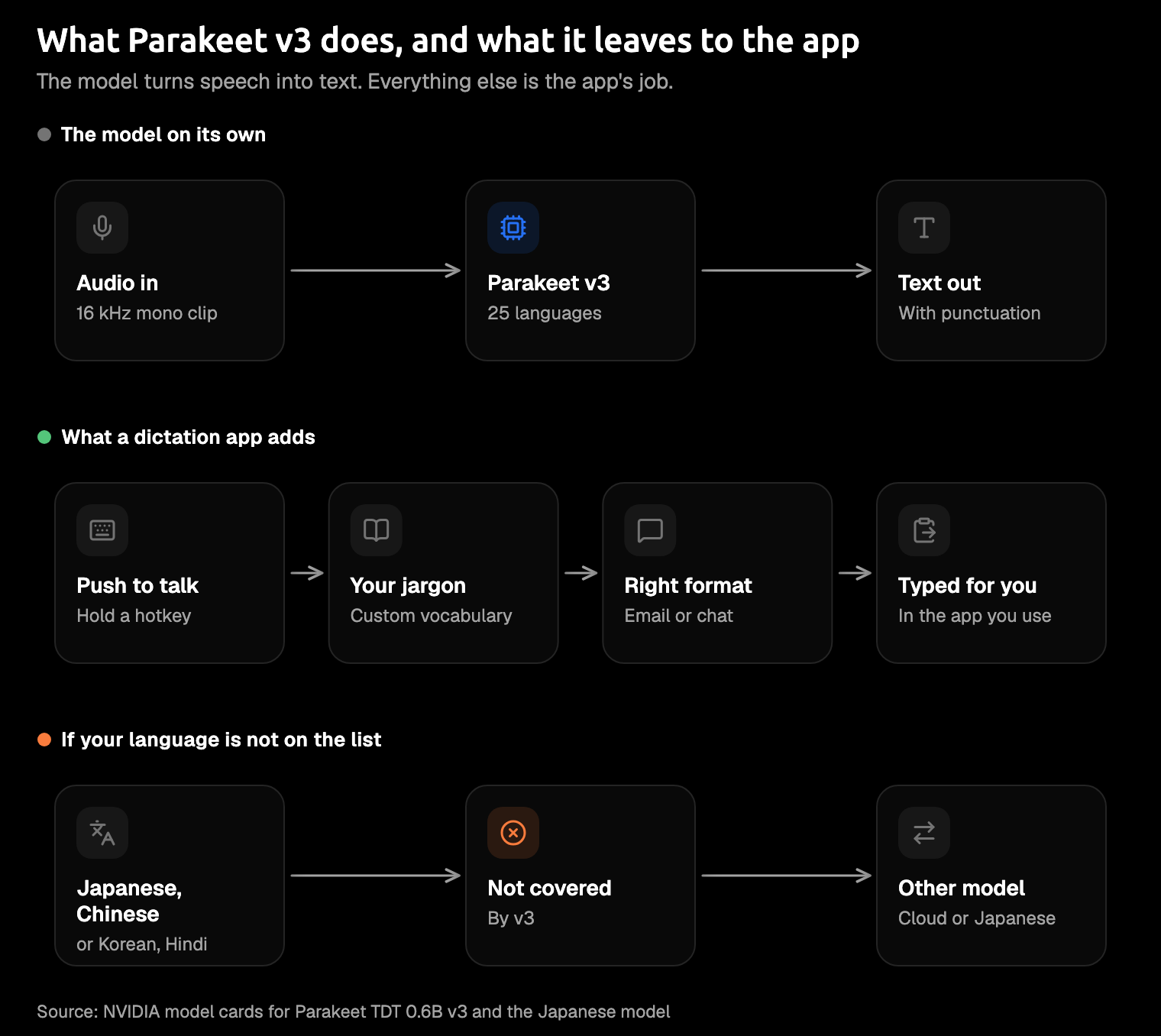
The easiest way: an app that runs it
If you'd rather not install Python, you can use an app that already runs the model, and there are four good ones to pick from.
Amical. Amical is the pick if you want Parakeet v3 plus the parts this post says the model leaves out. It runs on Mac, Windows, iPhone, iPad and Android, it formats your words for the app you're in, and it gives you local mode and Amical Cloud in one app. On Mac and Windows, Amical runs Parakeet v3 in local mode, so it works offline once you've downloaded the model, it's free, and you don't need an account. Local dictation doesn't count toward your weekly cloud allowance either, so there's no quota to watch.
AI formatting rewrites your words for the app you're in, custom vocabulary teaches it the names and jargon Parakeet misses, and both apply to Parakeet v3. For example, you might say "hey sam the deploy moved to friday I'll send notes after". In Slack, you'd get something like "Deploy moved to Friday, I'll send notes after." In Gmail, you'd get a short email with a greeting and full sentences. (That's an illustration, not a measured run.)
When the Parakeet language list isn't enough, or you want the fastest option in Amical, Amical Cloud is in the same app. It's Amical's own speech model, and it covers 100+ languages. By Amical's own figures, short dictations come back in under 300 ms and longer ones in under 500 ms, though there's no public benchmark yet. On your iPhone, iPad or Android phone, Amical always uses Amical Cloud, so Parakeet v3 is a desktop option. Setup for each is in Local AI models and AI formatting.
There are three limits to know about before you pick Amical:
- Handy has far more GitHub stars than Amical (34,553 to 1,569 as of October 2026), and it runs on Linux, which Amical doesn't support. Stars measure attention, not features: on Linux, Handy is the better fit, and on Mac and Windows, Amical gives you phone apps, Amical Cloud, and formatting for the app you're in.
- Parakeet v3 in local mode on a Mac needs macOS 14 or later, though it runs on Intel Macs as well as Apple silicon. That limit applies to local mode only, so Amical Cloud is your answer on an older Mac.
- Amical Cloud and the phone apps need sign-in, but local mode on desktop needs no account.
Handy. Handy is free, MIT-licensed, and runs on Windows, macOS and Linux. You choose Whisper or Parakeet V3, which its README describes as "CPU-optimized" with automatic language detection, and you can turn on optional LLM cleanup of your text. If you're on Linux, it's the one to pick.
MacWhisper. On a Mac, MacWhisper has offered a Parakeet v3 download since version 12.18 (reported in August 2025), and its command-line docs list that model at 494 MB.
Spokenly. Spokenly lists v3 on Mac, Windows and Linux, and it also offers Ultra and Redux (per its site, October 2026).
If you want side-by-side comparisons of dictation apps, you'll find them on Compare.
Run it yourself: MLX, CoreML, ONNX, NeMo
This section is for developers, so skip it if you just want to dictate. A few terms first: MLX is Apple's machine learning framework for Apple silicon, CoreML is the Apple framework for running models on Macs and iPhones, ONNX is an open model format that runs on most platforms, and NeMo is NVIDIA's own toolkit for speech models.
| Path | Platforms | Install |
|---|---|---|
| MLX (parakeet-mlx) | Apple silicon Macs | pip install parakeet-mlx -U, plus ffmpeg |
| CoreML (FluidAudio) | macOS 14+, iOS 17+ | Swift SDK |
| ONNX (sherpa-onnx) | Windows, Linux, macOS, Android | Prebuilt int8 model, about 640 MB |
| ONNX (onnx-asr) | Windows, Linux, macOS | pip install onnx-asr[cpu,hub] |
| NeMo | Linux, NVIDIA GPUs | pip install -U nemo_toolkit['asr'] |
Whichever path you take, the model itself is CC-BY-4.0. The tools you run it with have their own licences: parakeet-mlx and FluidAudio are Apache-2.0, onnx-asr is MIT, and NeMo is Apache-2.0.
MLX (Apple silicon). On an Apple silicon Mac, install parakeet-mlx, and make sure ffmpeg is installed too:
pip install parakeet-mlx -UThe default model is mlx-community/parakeet-tdt-0.6b-v3, which is 2.51 GB of F32 files, so you'll want the disk space. You also get a streaming API, transcribe_stream, and long files are split into 120-second chunks with a 15-second overlap by default.
CoreML with FluidAudio (Mac, iPhone). For a Swift app, FluidAudio is an Apache-2.0 Swift SDK that runs the model on the Apple Neural Engine, the part of Apple chips built for AI work. Its CoreML model card lists macOS 14+ and iOS 17+, with 16 kHz mono input. It also ships Ultra and Redux if you want them, and its README recommends Ultra over v3; Redux needs macOS 15+ or iOS 18+.
ONNX (Windows, Linux, Mac). sherpa-onnx has an int8 build, sherpa-onnx-nemo-parakeet-tdt-0.6b-v3-int8, of about 640 MB, which you load with --model-type=nemo_transducer. Its docs cover a Windows build and an Android APK too. If you'd rather stay in Python, onnx-asr (Python 3.11 to 3.14) installs like this:
pip install onnx-asr[cpu,hub]Then load the model with load_model("nemo-parakeet-tdt-0.6b-v3"). For recordings longer than about 20 to 30 seconds, onnx-asr suggests adding voice activity detection (VAD), which splits your audio at the pauses.
GGUF. If your tools use GGUF (a single-file model format used by many local AI tools), NVIDIA's repo also includes a q8 GGUF file of 713,975,456 bytes.
NeMo (the reference path). If you have an NVIDIA GPU server, this is NVIDIA's own route:
pip install -U nemo_toolkit['asr']The model card names NeMo 2.4, Linux, and NVIDIA GPUs (Ampere, Blackwell, Hopper, Volta), with at least 2 GB of RAM to load the model. The NeMo repo asks for Python 3.12+ and PyTorch 2.7+, recommends a GPU for inference, and doesn't confirm Mac or Windows. That makes it the right path for a GPU server, and a poor fit if you want to dictate on a laptop.
Whichever path you take, give the model your audio as 16 kHz mono WAV or FLAC.
Should you use Parakeet v3 for dictation?
Your answer depends mostly on your language, and on whether you want an app or a project:
- Yes, if you dictate in English or one of its better-covered languages (Italian, Spanish, Portuguese, German, French), and you want fast, offline, punctuated text on your own machine. If your language is on the list but further down, check the chart above first: Lithuanian, Maltese, Greek, Latvian and Slovenian all get more than one word in five wrong on FLEURS.
- Consider Ultra or Redux, if you're building your own setup. By Moondream's numbers, Ultra is the more accurate one, and Redux is the much smaller download if you can accept more errors in noise.
- Not on its own, if you dictate in Japanese, Chinese or another language off the list, or you mix languages. Use Amical Cloud for those, or NVIDIA's Japanese model if you're building.
Amical publishes this blog, so weigh our advice with that in mind: download Amical, follow the desktop quick start, pick Parakeet v3 in local mode, and dictate one real email you'd otherwise type today.
If you want to compare, dictate the same email again with Amical Cloud and see which result you'd rather send. The free plan covers both, with unlimited local dictation plus 2,000 cloud words a week. The details are on Pricing.