Maybe you dictate with Whisper, OpenAI's open speech-to-text model, or maybe you were about to wire OpenAI's speech API into a tool of your own. Then OpenAI shipped two speech models in July 2026, GPT-Transcribe and GPT-Live-Transcribe, and a month later it set a shutdown date for the Whisper API. So which should you use: GPT-Transcribe or Whisper?
Here's the short version. For plain transcription, GPT-Transcribe is an upgrade over OpenAI's hosted Whisper API, and at $0.0045 a minute against $0.006, it's cheaper too. But OpenAI's shutdown notice says nothing about the open Whisper you run on your own computer.
The real choice is cloud vs local, not old vs new.
For dictation, you probably don't want to build on a raw API at all. Our pick is Amical: it runs open Whisper on your computer or Amical Cloud, its own speech model built for speed, and it rewrites your words for the app you're in. Amical publishes this blog and sells Amical Cloud (not OpenAI's speech API), so weigh our pick accordingly.
Below, you'll find what the two models do, what they cost, how accurate they are, what the Whisper shutdown actually covers, and how to try each one.
The short answer
OpenAI names GPT-Transcribe and GPT-Live-Transcribe as the replacements for its Whisper API, which shuts down on February 26, 2027. GPT-Transcribe is for finished audio, while GPT-Live-Transcribe is for text that appears while people talk, and it costs more per minute. Whisper on your own computer is a separate choice: in Amical's local mode, your audio stays on your machine and dictation works offline.
| GPT-Transcribe | GPT-Live-Transcribe | Whisper API (whisper-1) | Whisper on your computer (in Amical) | Amical Cloud | |
|---|---|---|---|---|---|
| What it is | OpenAI cloud model for finished audio | OpenAI cloud model for live audio | OpenAI's hosted Whisper | Open Whisper model files, run by whisper.cpp | Amical's own cloud speech model |
| Price | $0.0045 a minute | $0.017 a minute | $0.006 a minute | No per-minute bill; free and unlimited in Amical | 2,000 words a week free; unlimited on Premium |
| Live text while you speak | No live partials: finished files or finished turns | Yes | No, it takes uploaded files | Push-to-talk: text appears when you let go | Push-to-talk: text appears when you let go |
| Context hints | Prompt, keywords, languages | Prompt, keywords, languages | Prompt up to 224 tokens, one language | Custom vocabulary | Custom vocabulary |
| Formats text for your app | No | No | No | Yes, with AI formatting | Yes, with AI formatting |
| Runs offline | No | No | No | Yes, once the model is downloaded | No |
| Status | Current | Current | Shuts down February 26, 2027 | Not part of the shutdown | Does not use OpenAI's speech API |
What GPT-Transcribe and GPT-Live-Transcribe are
OpenAI released both models in its API on July 28, 2026: one for audio that is already recorded, and one for audio that is still coming in.
GPT-Transcribe: finished audio
gpt-transcribe is for audio that already exists, like a voice memo or a recorded meeting. You send the file to the transcriptions endpoint, and OpenAI's speech-to-text guide lists the size limit and the file types it accepts. Inside a Realtime session (Realtime is OpenAI's API for live, two-way audio), it writes the final text of each finished turn.
There's also file streaming, which shows you partial text while a finished file is processed. That's handy for a progress view, but it isn't live audio, because the recording has to exist before you send it.
GPT-Live-Transcribe: text while you speak
gpt-live-transcribe is streaming-only: it takes live audio through Realtime transcription and sends text back in small pieces while you're still talking. You can choose one of five delay settings, from minimal to xhigh, and a lower setting shows text sooner while a higher one may be more accurate.
At the time of writing, OpenAI's model pages and guides list no latency figure for either model, so you can't look up how fast minimal really is. The only measured numbers we found come from one DataCamp author, who timed one clip three times per setting: a median of 0.70 seconds to the first partial text at minimal, and 2.91 seconds at xhigh.
That's one clip on one connection, so read it as a rough sense of the range, not a benchmark.
One limit is worth knowing: the live model doesn't tell you which language it heard.
Context hints: keywords, prompt and languages
Both models accept three kinds of hints: a prompt with free-form context, keywords with exact terms that might come up, and languages, a list of the languages you expect.
OpenAI calls keywords "hints, not required output", so the model won't force a word into your text if it didn't hear it. For gpt-transcribe, the languages list replaces the old single language field, which helps when you switch between, say, Japanese and English in one recording. In a Realtime session, gpt-transcribe also uses your earlier turns as context automatically.
Compare that with whisper-1, whose prompt was capped at 224 tokens; OpenAI's guide gives no token limit for gpt-transcribe's prompt.
Does context help? OpenAI reports that on its own Context Aware benchmark, adding free-form context lifts gpt-live-transcribe's semantic accuracy (higher is better) from 38.5% to 44.6%. That's OpenAI's test of OpenAI's model, so take it as a direction, not proof.
If you've used a dictation app, you already know this idea as custom vocabulary. You tell the tool the names and jargon you use, so "Kubernetes" doesn't come out as something your keyboard would never type. In Amical, that's custom vocabulary.
Pricing: GPT-Transcribe is cheaper than Whisper's API
OpenAI prices its speech models by the minute of audio, and the batch model undercuts the old Whisper API. Here's the current list, from OpenAI's pricing page:
| Model | Price per minute | What it's for |
|---|---|---|
gpt-transcribe | $0.0045 | Finished audio |
gpt-live-transcribe | $0.017 | Live audio |
whisper-1 | $0.006 | Finished audio (shutting down) |
gpt-4o-transcribe | $0.006 | Finished audio (shutting down) |
gpt-4o-mini-transcribe | $0.003 | Finished audio (shutting down) |
By our arithmetic, one hour of audio costs you $0.27 with gpt-transcribe, $1.02 with gpt-live-transcribe, and $0.36 with whisper-1.
Live costs about 3.8x as much as batch.
The pricing page lists no free tier for these models. It's a pay-as-you-go API, so you pay for each minute of audio you send, starting with your first request.
Whisper on your own computer has no per-minute bill. You pay in disk space, memory, and your computer's time instead: in Amical, Whisper models range from about 78 MB for Tiny to about 3.1 GB for Large v3.
In Amical, local dictation is free and unlimited, and the free plan adds 2,000 Amical Cloud words a week. Premium, at $10 a month or $84 a year, makes cloud dictation unlimited; the pricing page has the details.
Accuracy: ahead of whisper-1, behind the leaders
Word error rate (WER) is the share of words a model gets wrong, so a lower number is better. Here's what is published, starting with the numbers you should trust least.
OpenAI-reported. OpenAI's launch figures, as reported by AlphaSignal, put gpt-transcribe's error rate at 19.27% against 40.37% for whisper-1 on Common Voice, Mozilla's public speech dataset, across 22 languages. On Real-World Audio, OpenAI's own test set covering 9 languages, the figures are 8.98% against 15.21%. That works out to about 52% fewer errors on Common Voice, but these are the vendor's numbers, relayed by AlphaSignal, which calls the measure an error rate and does not say it is WER.
Independent. Artificial Analysis, an independent benchmarking site, scores speech APIs on one blended measure called AA-WER: 50% from its AA-AgentTalk set, 25% from VoxPopuli, and 25% from Earnings22. On its GPT Transcribe page, GPT Transcribe scores 3.3%, against 4% for GPT-4o Transcribe and 4.1% for Whisper Large v2 hosted by OpenAI. Whisper Large v3 scores anywhere from 4.1% to 10.1%: the same Whisper Large v3 model, served by different hosts.
So the two sources differ on the size of the gap: OpenAI reports a large drop in errors against whisper-1, while on Artificial Analysis it's 3.3% against 4% and 4.1%, and the most accurate models listed sit at 1.7% to 2.2%.
Leaderboard. The Open ASR Leaderboard, a public ranking of speech models on Hugging Face, added gpt-transcribe on October 9, 2026. We haven't quoted a score from it here.
Whisper's known limits. These apply whichever app runs it. Whisper listens in 30-second windows, and it can write text nobody said or repeat itself. Large v3 Turbo, the faster large model, has a decoder cut from 32 layers to 4, and OpenAI calls the result a "minor quality degradation".
We haven't found a like-for-like test of gpt-transcribe against Whisper Large v3 running locally on dictation audio, and we haven't published our own yet. We also haven't published accuracy figures for Amical Cloud, so it's not in the chart below.
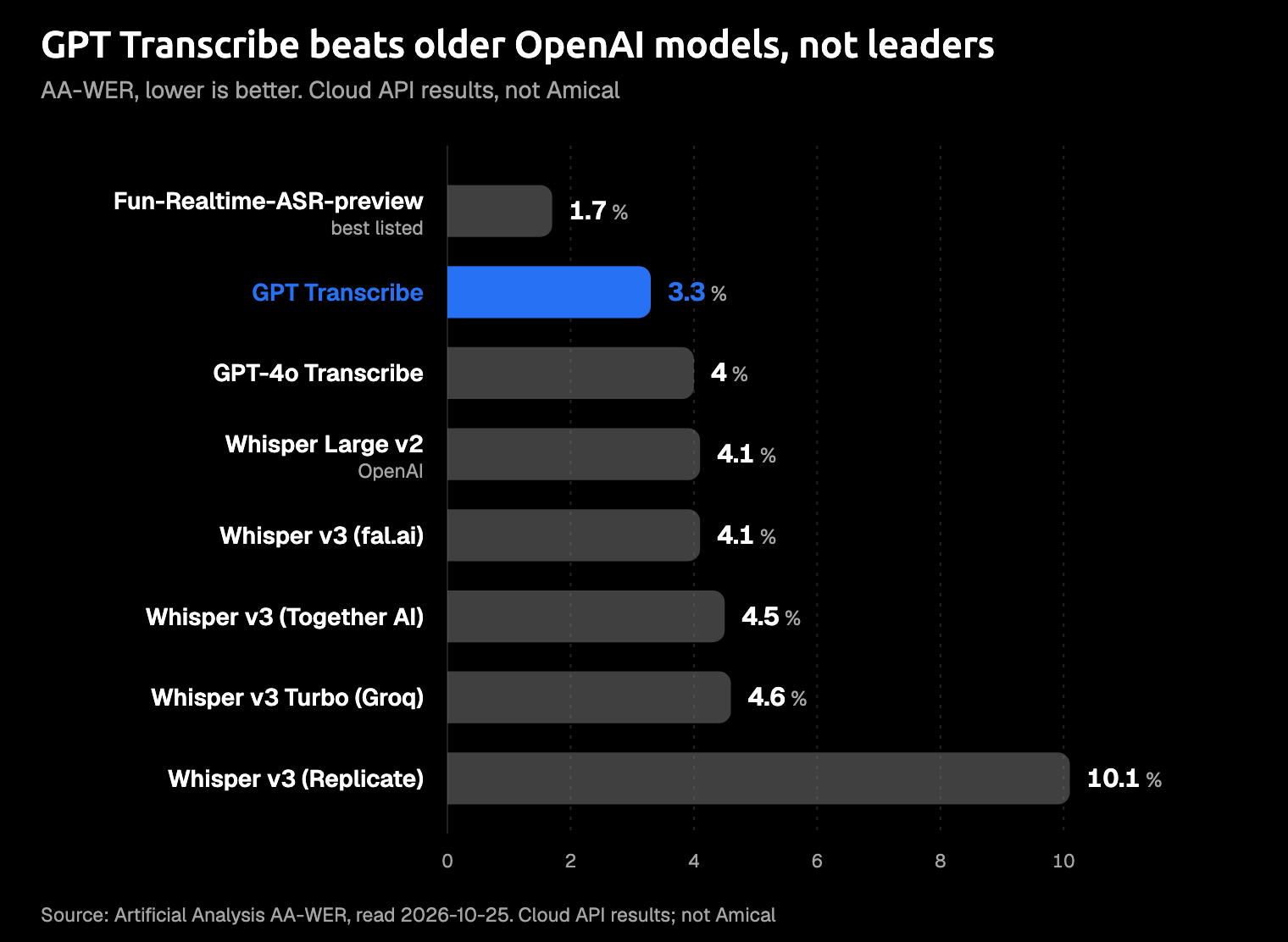
Artificial Analysis AA-WER, read 2026-10-25: cloud API results, not Amical.
"Whisper" is being shut down, but only one of them
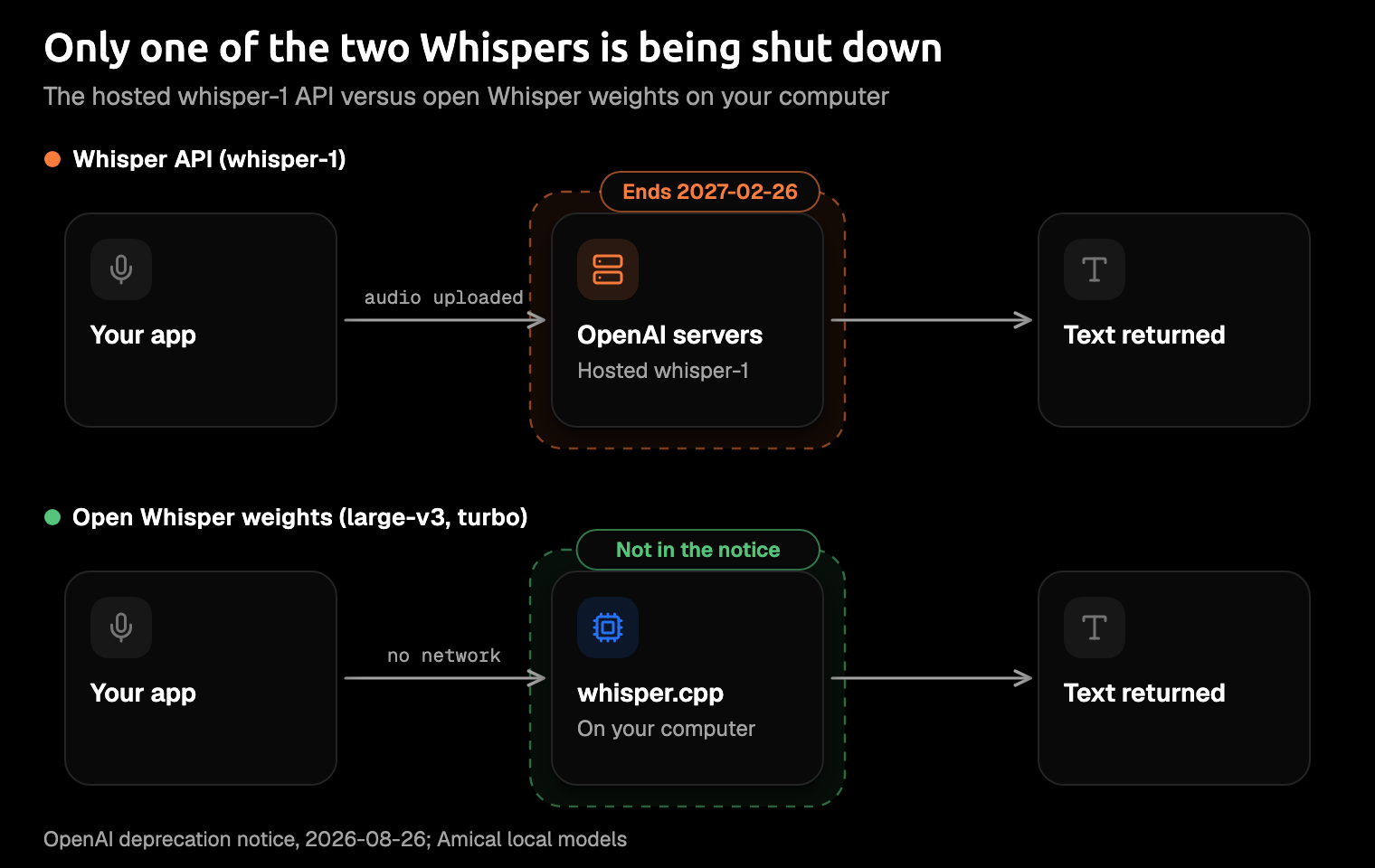
"Whisper" now means two different things, and the shutdown only covers one of them.
On August 26, 2026, OpenAI announced it will shut down four speech models in its API: whisper-1, gpt-4o-transcribe, gpt-4o-mini-transcribe, and gpt-4o-transcribe-diarize. The shutdown date is February 26, 2027, and the replacement is gpt-transcribe or gpt-live-transcribe. The translation endpoint, which turns speech in other languages into English text, shuts down on February 26, 2027, too. The full list is on OpenAI's deprecations page.
If you call whisper-1 in your own code, check what you rely on before you switch. OpenAI's guide documents word timestamps, SRT and VTT subtitle files, and translation into English for whisper-1, but not for gpt-transcribe. If you need speaker labels, that's gpt-4o-transcribe-diarize, which is on the same shutdown list.
Now the other Whisper. OpenAI's notice says nothing about the open Whisper model files. Those files are on GitHub and Hugging Face under an open license (MIT on GitHub), and they keep running wherever you've installed them. That includes Amical's local mode, which runs Whisper through whisper.cpp, a version of Whisper built to run fast on ordinary computers.
We won't guess at OpenAI's plans for the open model: the shutdown is about an API, not about the files on your disk.
Cloud API vs local Whisper for dictation
If you dictate all day, the real question isn't GPT-Transcribe vs the Whisper API. It is a cloud model vs a model on your own computer, so here's how the two compare, point by point.
What leaves your machine. With the API, your audio goes to OpenAI. At the time of writing, OpenAI says data sent to its API is not used to train its models by default. Its data page lists no abuse-monitoring retention for the transcriptions endpoint, while Realtime sessions keep abuse-monitoring logs for up to 30 days.
With Amical Cloud, your audio goes to Amical Cloud, along with your language and custom-vocabulary settings and some context for formatting: selected text, the text around your cursor, the app name, and the browser URL. Amical's pricing page states no data retention and no training on your data, and Cloud AI models explains how the cloud side works.
In Amical's local mode, no audio or text leaves your computer, and dictation works offline once the model is downloaded. One catch: if you pick a cloud provider such as OpenAI or Anthropic for AI formatting, that provider receives your transcribed text. For fully local, pick a local formatting model through Ollama (a free tool for running AI models on your computer).
Speed. At the time of writing, OpenAI lists no latency figure for either new model. Local speed depends on your chip and the model size you pick. In Amical, local transcription on a Mac needs macOS 15 or later and is slower on Intel Macs, and local Whisper runs on Windows too.
With Amical Cloud, Amical says short dictations return in under 300 ms and longer ones in under 500 ms (Amical's own figures; no public benchmark yet). The simplest check is your own voice: dictate the same note in local mode and with Amical Cloud, and see which one keeps up with you.
Batch vs live for push-to-talk. This part is our reasoning, not a published test. A push-to-talk dictation is a short, finished clip: you hold a key, talk, and let go. That is what the batch model is for, and the live model costs more per minute.
The live model earns its price when text has to appear while someone is still talking, like captions or calls. The batch model's own limit is file size: up to 25 MB per file.
Languages. Whisper covers 99 languages on its model card, though OpenAI's API guide says 98. At the time of writing, OpenAI publishes no language list or count for gpt-transcribe or gpt-live-transcribe, only the language codes you can pass as hints. Amical Cloud covers 100+ languages, and Multi-language support explains how to set yours.
What an API doesn't give you. An API mostly gives you text back, and you still need a hotkey, a way to capture your microphone, text that lands in whichever app you're using, and formatting that fits that app.
That's the job of a dictation app. In Amical, AI formatting rewrites your words for the app you're in: a proper email in your email app, a short reply in Slack.
Most speech APIs hand you a transcript, and you wanted the email.
Which should you use?
Our pick for dictation is Amical: Amical Cloud when you want speed and formatted text, and local Whisper when you want your audio to stay on your computer. Both run in the same app, so you do not have to choose once and live with it. Here is how every option fits.
- You call
whisper-1in your own code. Move to gpt-transcribe before February 26, 2027. It costs $0.0045 a minute against $0.006, and the OpenAI-reported figures show fewer errors. Check first whether you rely on word timestamps, SRT or VTT files, or translation. - You need text while people talk, like captions or calls. Use gpt-live-transcribe, at about 3.8x the batch price.
- You dictate all day and want speed and finished text. Use Amical Cloud. Amical says short dictations return in under 300 ms and longer ones in under 500 ms (Amical's own figures; no public benchmark yet). It covers 100+ languages and formats your words for the app you're in. As an illustration, not a measured run: say "tell sam the deploy moved to friday and I'll send notes after", and in an email app you get a short email that opens with "Hi Sam", while in Slack you get "Deploy moved to Friday, I'll send notes after." Your audio and some formatting context (such as the app name and the text near your cursor) go to Amical Cloud. See Cloud AI models.
- You want your audio to stay on your machine, offline, with no per-minute bill. Use open Whisper in Amical's local mode, or Parakeet, NVIDIA's open speech model. If your computer can handle it, Large v3 Turbo (about 1.5 GB) is a sensible fast large model, and on an older machine you can start with Base or Small. See Local AI models.
- You want GPT-Transcribe itself inside a dictation app. Amical does not offer GPT-Transcribe as a speech model. At the time of writing, Spokenly, another dictation app, says its Pro route offers it, with your audio also passing through Spokenly's servers, and its page recommends local Parakeet or Whisper for private dictation.
Whisper Large v3 isn't the most accurate model on the Artificial Analysis tests, which score hosted versions, not local ones, and we haven't seen a number for local mode. What local mode gives you is audio that stays on your computer. To see which mode suits your voice, dictate the same thing both ways and keep the one you prefer.
Two limits to know about Amical: there is no Linux version, and Amical Cloud needs sign-in, while local mode on desktop needs no account. On a Mac, local mode needs macOS 15 or later.
How to try each
GPT-Transcribe. You need an OpenAI API key. Then you send your audio file to the transcriptions endpoint with the model set to gpt-transcribe, and you get text back. OpenAI's speech-to-text guide has a ready-made example request.
Whisper locally with Amical. The desktop quick start covers setup step by step:
- Download Amical and install it.
- Open Settings > AI Models > Speech.
- Download a Whisper model, then set it as your Default Speech Model.
- Click into any text field, hold
Fn(the default push-to-talk key on a Mac), and talk. Let go, and your text appears where the cursor is.
Amical Cloud. In the same Settings > AI Models > Speech screen, click Sign In on the Amical Cloud row, then pick Amical Cloud as your Default Speech Model.
Try both on one real email
Download Amical and dictate one real email with local Whisper (Amical publishes this blog, so we're biased). Then switch to Amical Cloud and dictate the same email again, and keep whichever fits the way you work. The free plan covers both, with unlimited local dictation plus 2,000 cloud words a week.