You just talked through a bug for a minute: the error, the file you suspect, the fix you already tried. You pressed send, and instead of a prompt, the ChatGPT desktop app put a banner at the top of the chat: "Codex dictation usage limit reached." Now you have a banner and a minute of explanation to say again.
The banner reads like a Codex-allowance message. OpenAI documents that desktop Voice uses your Codex usage; it hasn't said the same about Dictate, but people hit this banner while dictating. Check Settings > Usage first. If you're out, wait for the reset or add credits. If you still have allowance left, try the web or phone app and report it. Either way, you can keep talking today.
Being blocked from saying words you're still allowed to type is the annoying part. It's also the fixable part.
Since we have a stake in the fix: Amical publishes this blog, and it's the dictation app we recommend for keeping going. It types into the composer like a keyboard, so your dictation skips the Dictate button and whatever Codex gate sits behind it. If the banner was a one-off and ChatGPT on the web works for you, you may not need it at all.
What "Codex dictation usage limit reached" means
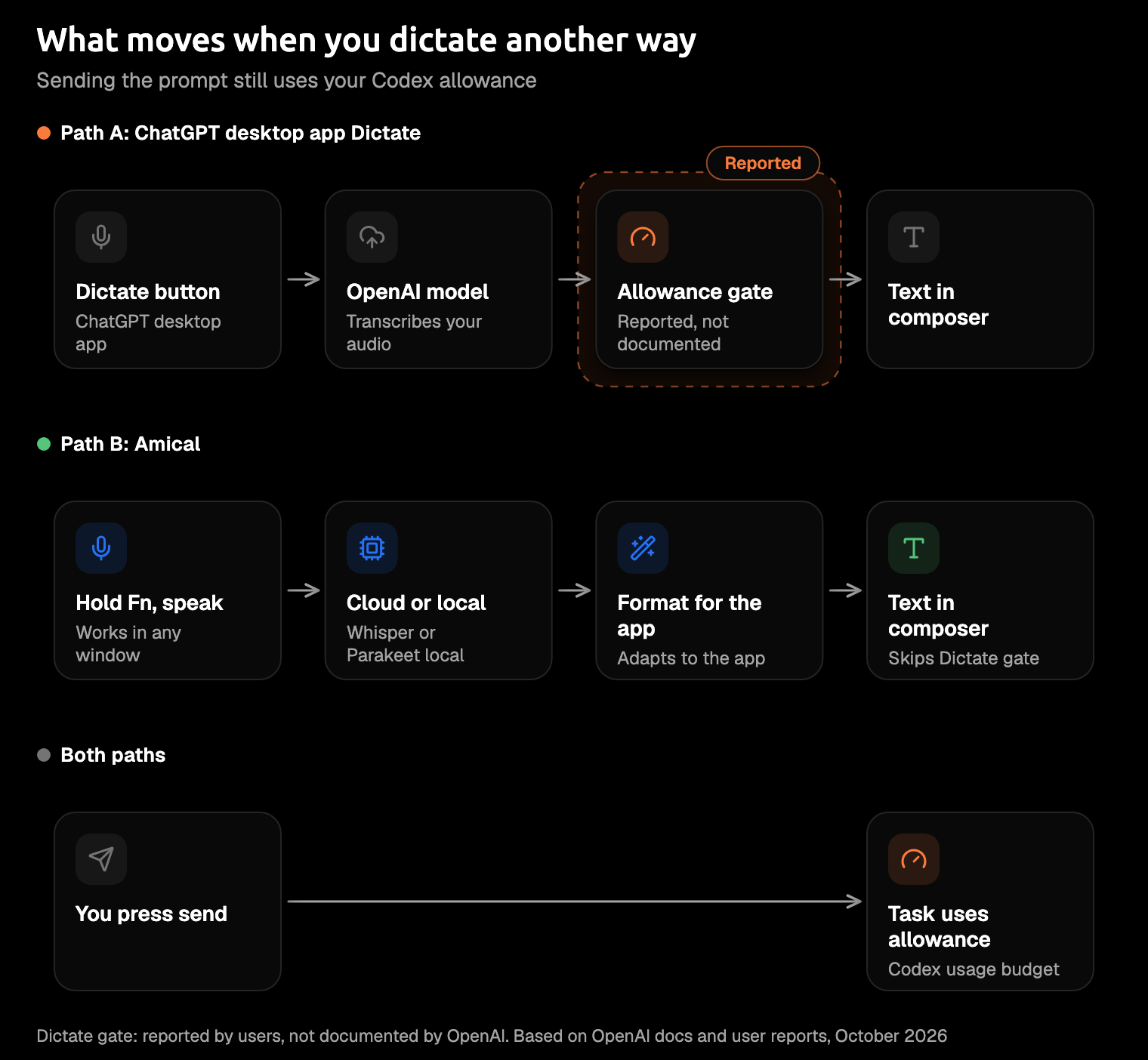
OpenAI's pricing page says, as of late October 2026, that Voice in the desktop app draws on your Codex usage budget and shares your plan's limits with tasks. It hasn't said that about Dictate, and no dictation allowance, cap, or number appears in its pricing page, help articles, or Voice docs. Users still get the banner while dictating. Until OpenAI says otherwise, treat it as a Codex-allowance message.
The ChatGPT desktop app has two voice features, and the banner sits awkwardly between them. Dictate, in the composer, turns your speech into prompt text that waits for you to review and send. Voice is a live, two-way conversation.
What users report is about Dictate. One user on the OpenAI forum reported the banner in September, on a Free plan, after dictating in the macOS app; the same account dictated fine on iPad and the web. A Plus user on Windows who relies on dictation for accessibility opened GitHub issue #46701, saying dictation stops once Codex and Work usage runs out and asking that it stay available. In late October, they asked OpenAI whether that's intended, a defect, or a limit it should document. OpenAI hasn't answered either report.
The button looks like a microphone, but the banner talks like a billing page.
Check whether you're actually out
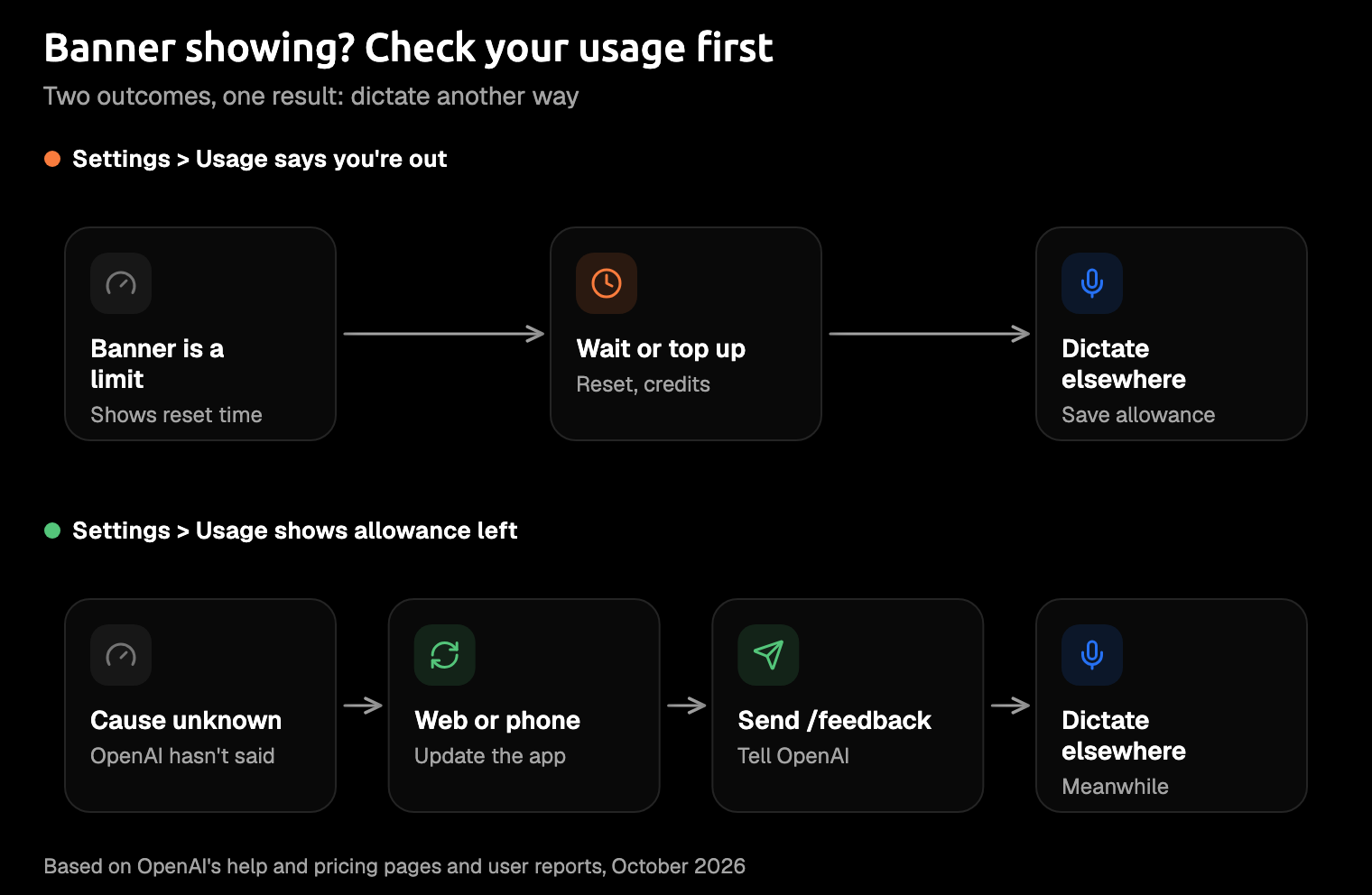
Open Settings > Usage in the app before you do anything else. It shows how much allowance you have left and when it resets.
How it refills depends on your plan. Plus and Standard Business run on five-hour windows, and weekly limits may also apply. Pro plans currently have no five-hour limit.
You'll find one of two things:
- You're out. Go to the next section: wait, add credits, or use a banked reset.
- You still have allowance left. Skip to the section after that.
Look before you wait, or you may spend an afternoon waiting out a reset that was never the problem.
If you're out: wait, add credits, or use a banked reset
If Settings > Usage says you're out, the allowance has to refill or be topped up, and OpenAI Support won't reset it for you. OpenAI does occasionally give a one-time reset; a full banked reset refreshes both the five-hour and weekly windows.
Credits are the other way through. Once you reach your included limits, available credits let you keep working, and Plus and Pro users can buy extra.
Don't buy credits just to get the microphone back. OpenAI documents no rate for Dictate, so you'd be paying without knowing what it buys. Paying for agent time to do a keyboard's job is a poor trade, so dictate another way and keep the allowance for the tasks themselves.
If you still have allowance left
If the usage page shows allowance left and the banner still appears, you're not alone, and OpenAI hasn't said why. Another user on the same forum thread reported 96% of their monthly limit left while dictation failed on two macOS app builds. Pressing Try again on the failed recording, under Settings > Voice > Recently Used Recordings, returned the same error. Safari and the iOS app worked fine for the same account, so the quickest unblock may be one tab away.
- Dictate in ChatGPT on the web or in the phone app for now.
- Update the desktop app to the latest version.
- Report it with
/feedbackand include your app version, which is what OpenAI Support asked for on a related dictation thread. - Add your case to GitHub issue #46701, where users are raising it in public. It has no reply from OpenAI yet, so don't wait on it.
Reinstalling didn't help that forum user, so don't spend your morning on it.
Other dictation problems that look like the limit
None of these is the usage limit, so no reset will fix them, however patiently you wait. From the OpenAI community forum, as of October 2026:
- The mic button is missing. OpenAI Support said in September that it "has since been resolved." If you still don't see it, email support with your plan, macOS version, app version, and a screenshot.
Users also report Dictate needing two clicks on Windows (no fix yet) and dictation breaking after an app update (a restart or the next update fixed it for some).
Keep dictating without the Dictate button
The lasting fix is to stop depending on the Dictate button:
- ChatGPT on the web or phone, when only the desktop app shows the banner.
- Your operating system's dictation. On a Mac, turn it on in System Settings > Keyboard > Dictation; it has no time limit and stops after 30 seconds of silence. On Windows, press
Win+Hin a text box; voice typing needs internet and runs on Azure Speech, except for English on-device dictation on Copilot+ PCs. See AI dictation vs Mac dictation and AI dictation vs Windows voice typing for what each one can't do. - A system-wide dictation app, which runs outside the ChatGPT app and types into whichever window has focus.
None of these gives you more Codex. The prompt you send still starts a task, and tasks draw on the shared allowance. Only the dictation step moves.
Amical is the third kind. It's another app to install rather than a button in the composer, and in return one key works in the ChatGPT desktop app and every other window. The steps use Amical's default keys on a Mac. Every key can be changed, on Windows too, and Shortcuts covers how.
- Install Amical. Download it and follow the desktop quick start.
- Choose Amical Cloud or local mode. Amical Cloud is the fastest and needs sign-in; local mode runs offline with no account.
- Click into the composer in the ChatGPT desktop app.
- Hold
Fn, say the prompt, and release. Amical pastes the text at your cursor. - Read it once, then send.
- Press
Fn+Spacefor a long prompt to dictate hands-free. One recording runs up to 2 hours, but hands-free stops after 5 seconds of silence, so holdFninstead if you pause to think. AI dictation covers both ways of recording.
By Amical's own figures, Amical Cloud returns a short dictation, formatted, in under 300 ms. Local mode runs Whisper or Parakeet, open speech models, on your own computer. On a Mac, local Whisper needs macOS 15 or later and is slower on Intel; Parakeet runs on macOS 14 and Intel Macs, and Amical Cloud has neither limit.
In coding apps and prompts, Amical's AI formatting adapts the text to the app you're in, so you get a prompt rather than a raw transcript. For example, you might say:
The settings page goes blank when a user has no saved address. I think the form assumes the address object always exists. Add a null check, leave the API client alone, and tell me your plan before you change anything.
The same Fn works in Terminal, iTerm2, Warp, and Cursor, so a terminal running Claude Code gets it too. Dictating to Claude Code covers coding agents in more detail. One key in every window beats a different button in every app, each with its own banner.
Your dictation shouldn't depend on the agent you're talking to.
What leaves your computer
Where your voice goes depends on the tool and, for Amical, on the mode. One thing doesn't change: the prompt you send goes to OpenAI, however you dictated it.
- The Dictate button: OpenAI's dictation FAQ for ChatGPT says the recording goes to OpenAI's models for transcription and is kept while the chat stays in your history, then generally deleted within 30 days after you delete the chat, with exceptions for security or legal reasons. Consumer users who share audio may have it used for training; you can opt out in data controls.
- Windows voice typing sends audio to Azure Speech, except for English on-device dictation on Copilot+ PCs.
- Amical in local mode transcribes your speech on your computer, with no account. Your text leaves only if you pick a cloud provider for formatting.
- Amical Cloud receives your audio, your language and vocabulary settings, and context for formatting: selected text, up to 500 characters around your cursor, the app name, and the browser URL. In the composer, the text around your cursor is your own prompt, and a prompt can contain code. Its stated policy is "No data retention" and "No training on your data."
If you'd rather your speech stayed on your computer, use local mode and keep formatting off the cloud. That covers your voice, not the prompt: once you press send, the text goes to OpenAI, which is rather the point of sending it. For everything else, Amical Cloud is the quicker choice. Local AI models and Cloud AI models cover setup, and cloud vs local dictation covers the trade-off in full.
Which fix to use
- Allowance left, and the web works: dictate on the web or phone for now, then update the app and report it.
- Out of allowance, and you mainly need to dictate: use your OS's dictation or Amical, and save the allowance for tasks.
- Out of allowance for tasks too: wait for the reset shown in Settings > Usage, or add credits.
- You dictate into more than the ChatGPT app, or want local mode or Amical Cloud's speed: use Amical.
Amical gives you one dictation key in every app on your Mac or Windows PC, with Amical Cloud for speed and, in local mode, your audio transcribed on your computer. The free plan includes unlimited local dictation and 2,000 cloud words a week. If you live in the cloud, Premium makes it unlimited for $10 a month or $84 a year.
Sort out the dictation part once, and stop checking the usage page before you speak.
FAQ
Does Codex dictation cost $0.05 a minute?
OpenAI documents $0.05 a minute for Voice in the desktop app, drawn from your Codex usage budget. It doesn't document a rate or a limit for Dictate.
Does the Codex CLI have dictation?
OpenAI removed the CLI's built-in voice transcription in version 0.118.0, in March 2026, and later releases have changed CLI voice again, so the release notes are the place to check. For dictation in a terminal, a system-wide app such as Amical pastes your words into Terminal, iTerm2, or Warp.
Does dictating with another app use my Codex usage?
Only the prompt you send does. The dictation happens outside the ChatGPT app, and the task you start draws on your shared allowance, as if you'd typed it.
Say the prompt anyway
Next time the banner shows up, don't retype the whole explanation. Download Amical, click into the composer, hold Fn, and say the prompt you were about to type. Read it once, then send.
Let the desktop app keep its button. The free plan covers this, and local dictation has no word cap.