You've got Claude Code in one terminal, Cursor in another window, and a Codex task running somewhere behind them. Typing the same long explanation into each one gets old, so you go looking for a microphone button. This guide checks which AI coding tools have voice input built in. Claude Code, Cursor, VS Code, Warp, the Codex app, and Aider all have built-in dictation. The Codex CLI has voice chat but no dictation, and opencode has no dictation either, only experimental voice calls in its desktop app. "Voice" now means two things, too: typing a prompt by speaking, or holding a spoken conversation with the agent.
A tool's own voice input is fine until you open a second tool. Then you're learning a different key to talk in every window, and a few windows have no key at all.
That gap is where a system-wide dictation app comes in: it types into whatever window has focus, so one key works in all of them. Amical is one of those apps, and it's our pick if you work across more than one agent. We make Amical and publish this blog, so you know where our interest lies.
Dictation or voice chat: two kinds of voice
Dictation turns your speech into prompt text. The words land in the input box, you fix anything odd, and you send it yourself. Voice chat is a call: you talk, the agent answers out loud, and the work happens inside the conversation.
The tools now name these apart. Cursor's changelog says voice chat "is separate from dictation, which earlier releases called Voice Mode." OpenAI's docs describe dictation as the choice for when you only want speech turned into prompt text, and ChatGPT Voice as a live conversation. VS Code has built-in dictation plus a separate, experimental Voice Mode that reads answers aloud. And the Codex CLI's /voice command starts a realtime conversation, not dictation.
For prompting, we think dictation is usually what you want. You want the careful explanation of the bug sitting in the box, ready for you to edit.
Asking for a text box and getting a phone call is a surprise nobody ordered.
AI coding tools with voice input: the table
| Tool | Native dictation | Voice chat | How to start | Where audio goes | Main limit |
|---|---|---|---|---|---|
| Claude Code | Yes | None documented | /voice, then hold Space | Anthropic's servers | claude.ai login only; no SSH |
| Codex CLI | No | Yes, /voice | /voice, F8 to toggle | n/a (no dictation) | No dictation, by design |
| Codex app | Yes | ChatGPT Voice | Dictation in the composer; hotkey not documented | Not documented | Some users report a usage-limit error |
| Cursor | Yes | Yes, on Grok Voice | Cmd+Shift+Space (IDE), hold Ctrl+M (Agents Window) | Not documented | Docs cover the chat input only |
| VS Code (Copilot) | Yes | Voice Mode, experimental | Cmd+Option+V (editor), Cmd+I (chat) | Your device, on desktop | Intel Macs need the Speech extension |
| Warp | Yes | None documented | Hold Fn (Mac) or Alt+Right | Wispr Flow, in real time | Warp only; anti-abuse limits |
| Aider | Yes | None documented | /voice, Enter to finish | Not stated | PortAudio setup on Mac and Linux |
| T3 Code | Yes, opt-in cloud (stable) | None documented | Opt-in, in stable releases | Opt-in cloud (OpenAI, Grok or OpenRouter); local path unconfirmed | Not in the README yet |
| opencode | None found | Voice calls, experimental (desktop app) | None; see Hex below | n/a (no dictation) | Calls need your own OpenAI key; its team makes Hex |
Checked against each tool's docs and release notes as of November 8, 2026. Where a row says "not documented" or "none found", that's the docs going quiet, not a verdict on what the tool can do.
Tool by tool
Claude Code
If you sign in with claude.ai, Claude Code gives you dictation right in the prompt. Type /voice to turn it on, then hold Space to talk; /voice tap switches to tap mode, where one tap starts and the next one sends. You can rebind the key with voice:pushToTalk in ~/.claude/keybindings.json. It's tuned for coding words, and it sends your project name and git branch as recognition hints. Transcription doesn't use your Claude messages or tokens, and it doesn't count toward your limits in /usage. You get 20 languages, in the CLI and the VS Code extension, on macOS, Linux, and Windows.
The catch is in the fine print. Your audio streams to Anthropic's servers, with nothing transcribed locally. It needs a claude.ai login, so it isn't available with an Anthropic API key, Amazon Bedrock, Google Cloud's Agent Platform, or Microsoft Foundry. It also needs a local microphone, which rules out SSH and cloud sessions. Tap mode stops after 15 seconds of silence or two minutes total.
If your team runs Claude Code on an API key, voice isn't part of your setup, however many times you type the command.
If Claude Code is your only agent and you sign in with claude.ai, its built-in covers you well. Our guide to dictating to Claude Code walks through the setup.
Codex: the CLI and the app
Codex is two products with two different answers. In the Codex CLI, /voice starts a realtime spoken conversation: the model listens and replies with audio. Voice conversations are on by default, with F8 to toggle. If you want dictation in the CLI, you won't find it, and that's deliberate. An OpenAI maintainer closed the request in September 2026 with: "We don't have plans to bring dictation to the CLI."
The Codex desktop app does have dictation. Users report that the text appears only after you stop, and that the wait grows with the length of the recording. Some users on macOS and Windows also report a "Codex dictation usage limit reached" error while their usage shows plenty left, and OpenAI support said in early November that it's investigating.
The CLI is the clearest gap on this list. If you live in the Codex CLI and want your prompts typed, the fix has to come from outside it, because the CLI has made its plans clear.
Cursor
Cursor has both kinds of voice, kept apart. Dictation turns your speech into text in the chat input, and you review it and send. Press Cmd+Shift+Space in the IDE, or hold Ctrl+M in the Agents Window. Voice chat is a separate two-way call where the agent answers aloud, running on Grok Voice while your coding agent keeps the model you picked. You need a signed-in Cursor account for it, so API-key sessions can't start a call. A call hangs up after about ten minutes of your silence when the agent has nothing in progress, and there's a daily call limit whose amount isn't published.
The gaps are documentation and reach. Cursor's docs don't state dictation's model, languages, limits, or plan availability. They describe dictation in the chat input and don't say it works anywhere else, so don't count on it in the terminal running your tests or the issue you're writing in a browser. Re-typing the same bug report into a second window is the part that wears you out.
Good for Cursor's chat, and that's where the docs stop.
GitHub Copilot in VS Code
VS Code has dictation built into the editor itself, in three places. In the editor, press Cmd+Option+V (Ctrl+Alt+V on Windows and Linux); in chat, click the mic or press Cmd+I (Ctrl+I), and the text goes in without being sent. In the terminal, run Voice: Start Dictation in Terminal from the Command Palette, and it adapts what you say for command-line input. Hold a dictation shortcut if you want push-to-talk.
On desktop, the default speech model processes your audio on your device and needs no internet after the model downloads. VS Code for the Web sends your audio to Microsoft's AI voice service instead. There's also an experimental Voice Mode, a spoken conversation that reads answers aloud, on eligible individual Copilot plans.
The gaps are platform and place. Built-in dictation isn't available on Intel-based Macs, 32-bit and Arm32 builds, or musl Linux such as Alpine; there, you install the VS Code Speech extension. And it works in VS Code only.
Of the tools here whose docs say where audio goes, VS Code on desktop is the one that keeps it on your device. If you've ever wanted to say a commit message straight into the terminal panel, this is the place to try it.
Warp
Warp is the terminal here with voice built in. Hold Fn on macOS or Alt+Right on Windows and Linux (both configurable), or click the mic in Agent Mode, then release to transcribe. Transcription is powered by Wispr Flow, processed in real time and not kept as a recording afterward. You can use it in Agent Mode, the terminal, the Find dialog, and Warp's other input fields, on macOS, Windows, and Linux.
Warp's mic works only in Warp, which is fine until you switch to the browser to file the bug. Its docs also say anti-abuse limits apply and may change, and they don't list languages.
opencode and T3 Code
As of November 2026, opencode has no dictation in its docs or its changelog. What it does have is an experimental voice-call feature in its desktop app, added in v2.2.0: that's voice chat, not dictation, and it runs on your own OpenAI API key. Its team went another way. Anomaly, the team behind opencode, makes Hex, a separate dictation app that works system-wide; both repos sit under the same anomalyco organization on GitHub. In late October 2026 the OpenCode account announced Hex's stable release, pitched at whichever agent you use. Hex gets its own paragraph further down.
T3 Code's dictation is now in its stable releases: v0.1.8, out November 9, 2026, ships opt-in cloud dictation through OpenAI, Grok, or OpenRouter, so you don't have to install a transcription model. The nightlies also let you pick a transcription model, sorted by size, speed, or accuracy, and they include dictation fixes for iOS and Android. The README still doesn't mention dictation.
So T3 Code will type your prompt if you're happy to send the audio to a cloud provider, and opencode's team points you to Hex, a separate app, for dictation. A voice call is a fine way to think out loud, but it won't leave a prompt in the box for you to edit.
Aider and the others
Aider's /voice is refreshingly plain: speak, press Enter, and Aider treats what you said as if you'd typed it. It uses PortAudio, which needs nothing on Windows, brew install portaudio on macOS, and sudo apt-get install libportaudio2 on Linux.
Three more deserve a line each; treat each as unconfirmed until you see it work on your machine. Windsurf shipped Speak to Cascade in version 1.11.0 in July 2025, but its current status in the editor isn't clear from the docs. Gemini CLI's changelog lists a real-time voice mode with cloud and local backends in v0.41.0, yet its command reference shows no /voice command. And we found no first-party dictation in Zed's docs or releases.
System-wide dictation: one key for every agent
A system-wide dictation app works at the level of your operating system, not inside one tool. You hold a key, speak, and it types into whatever window has focus: a terminal, an editor, a browser tab, a chat. So it reaches the Codex CLI and opencode, which have no dictation of their own, along with everything else you use.
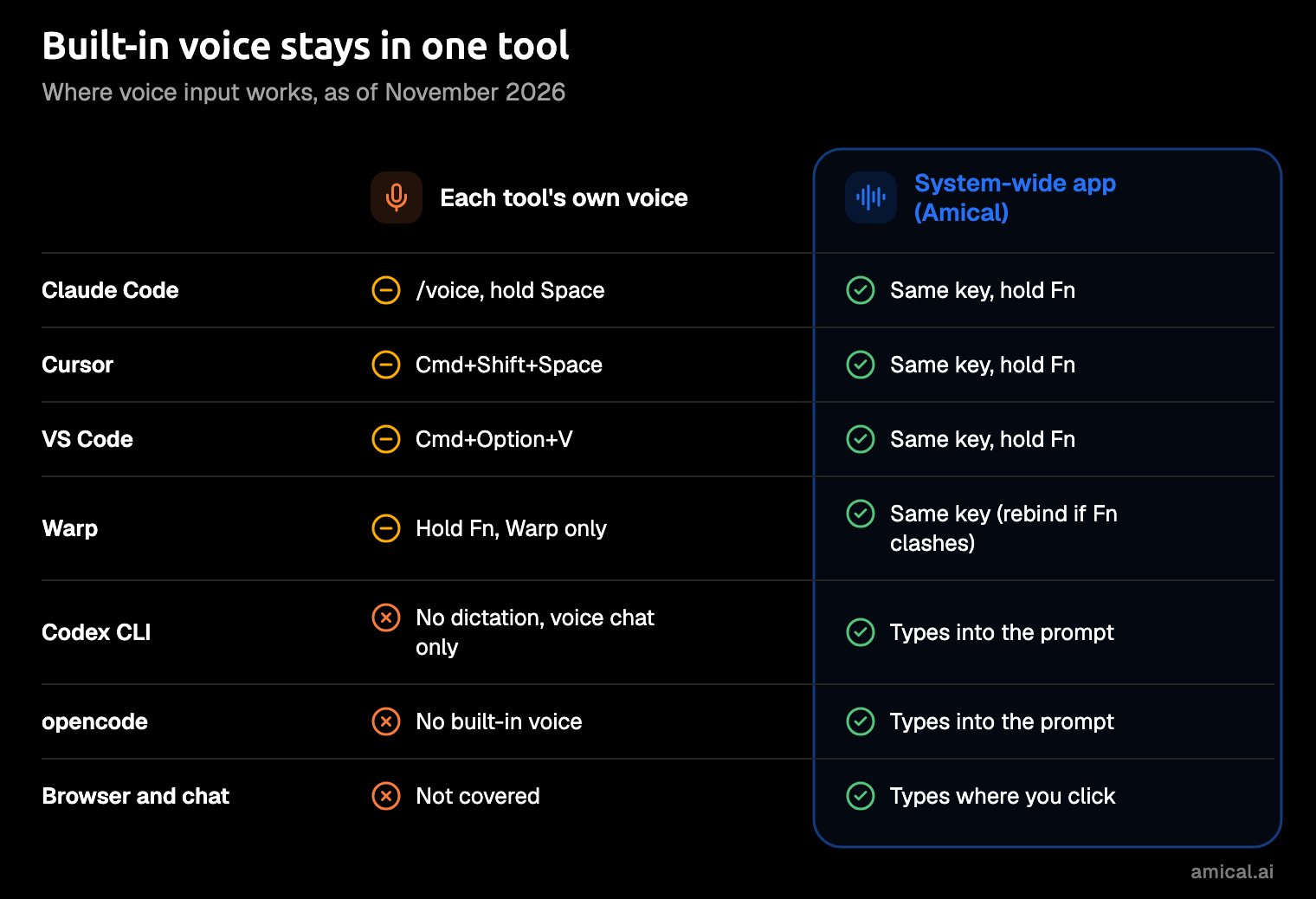
Amical works this way. On a Mac, hold Fn, speak, and release; on Windows, hold Ctrl+Win. For a long prompt, press Fn+Space to dictate hands-free, and change any key in Settings > Shortcuts. It pastes into Terminal, iTerm2, Warp, and Cursor like any other app. One recording session runs up to 2 hours, so your rambling brief won't get cut off halfway.
Three things set it apart from a built-in mic:
- Your own vocabulary. An identifier like
useAuthRefreshcan come back as ordinary words, leaving you to fix it by hand. Claude Code softens this with your project and branch names as hints. In Amical, you add identifiers, library names, and teammates' names to custom vocabulary, and they come back spelled your way. It's on the free plan. - Formatting for the app you're in. AI formatting adds punctuation and casing and shapes your text for the app you're in. In a Cursor prompt it applies a prompt style, in a terminal it's a plain cleanup, and in Gmail it writes an email, so one app handles your prompts and your replies.
- Your choice of where it runs. With Amical Cloud, formatted text is ready in under 300 ms for short dictations and under 500 ms for longer ones, by Amical's own figures, in 100+ languages. In local mode, Amical runs Whisper (OpenAI's open speech model) or Parakeet (NVIDIA's) on your computer with no account; your audio stays on your machine, and text leaves only if you pick a cloud provider for formatting.
With Amical Cloud, your audio and some formatting context (such as the app name and the text near your cursor) go to Amical Cloud, which states no data retention and no training on your data. If you're torn, cloud vs local dictation walks through the trade-off. Amical also runs on Mac, Windows, iPhone, iPad, and Android, so the habit comes with you to your phone.
One practical note for Warp users on a Mac: Warp's voice key is also Fn, so rebind one of them and keep both. Two apps fighting over one key is nobody's idea of hands-free.
Amical has real limits too:
- No Linux. On Linux, use the agent's own voice, Warp, or Hex.
- Amical doesn't talk back. It does dictation and voice commands, not voice chat.
- Local Whisper needs macOS 15 or later and is slower on Intel Macs. Parakeet runs on Intel Macs and macOS 14, and Amical Cloud has neither limit.
- Amical Cloud and the phone apps need sign-in. Local mode on desktop doesn't.
Amical isn't alone in this lane. Hex, from the opencode team, is local and MIT-licensed, and on a Mac you hold Option to dictate. It runs on Apple silicon Macs with macOS 15 or later, Windows, and Linux. It downloads a speech model on first run, after which nothing leaves your machine; its page doesn't name the model or its languages.
Next to Hex, Amical adds phone apps and Amical Cloud, and its local Parakeet option runs on Intel Macs and macOS 14.
Handy, OpenWhispr, and VoiceInk are open source options too: Handy and OpenWhispr run on Linux, and VoiceInk is a GPL-3.0 app for macOS only. Our roundup of open source dictation apps compares them.
One key everywhere beats learning a new one for every tool.
Which should you use
- Only Claude Code, with a claude.ai login: use
/voice. - Only Cursor: use its dictation with Cmd+Shift+Space.
- VS Code, and you want audio to stay on your device: use its built-in dictation.
- You want to talk with the agent, not dictate: try voice chat in the Codex CLI or Cursor, or Voice Mode in VS Code.
- On Linux: the agent's own voice, Warp, or Hex.
- Several agents, the Codex CLI or opencode, Claude Code on an API key, your own vocabulary, your phone, or local mode: Amical, which types into your terminal like any other window.
Start with the built-in you already have: it's free, it's installed, and if it covers your whole day, you're done. Add a system-wide app the day you catch yourself hunting for a second microphone key.
The free plan includes unlimited local dictation and 2,000 Amical Cloud words a week, and Premium is $10 a month for unlimited cloud. Pricing has the rest. If you're also weighing Wispr Flow, the dictation service behind Warp's voice, our Amical vs Wispr Flow comparison sets them side by side.
Try it on a real message
The test that matters is one real prompt in the agent you already use:
- Install Amical and open it.
- Choose Amical Cloud for speed, or a local model for offline use.
- Click into your agent's prompt: Claude Code, the Codex CLI, Cursor, wherever you're working.
- Hold
Fn(Ctrl+Winon Windows). - Say the goal, what you've already tried, and what done looks like.
- Release, read it once, and send.
Here's the kind of thing you might say. It's an illustration, not a recorded result:
okay so the login test keeps failing on CI but it passes locally, I think it's the session cookie, I already tried clearing the cache and bumping the timeout, can you find out why the cookie isn't set in the test environment and fix it, done means the test passes on CI and nothing else changes
Talking to a terminal may feel strange the first time. Give it a week, and typing that much context may start to feel like the strange part.
When your prompts run longer, ramble prompting shows you how to talk a problem through and let the agent sort it out.
FAQ
Does Claude Code's voice dictation use my usage limits?
No. Transcription doesn't consume your Claude messages or tokens, and it doesn't count toward the limits in /usage.
Can I dictate in the Codex CLI?
Not with a built-in feature. The CLI's /voice is a spoken conversation, and OpenAI has said it has no plans for CLI dictation. A system-wide app like Amical types into the CLI's prompt like any other terminal window.
Does opencode have voice input?
Not dictation, as of November 2026. Its desktop app has experimental voice calls, which are voice chat and need your own OpenAI API key, and its team makes Hex, a separate system-wide dictation app, instead.
Can I use a built-in and Amical together?
Yes, as long as the keys differ. Claude Code holds Space by default and Amical holds Fn, so they can share your desk; Warp also uses Fn on a Mac, so rebind one of those two.
Your next prompt, out loud
Pick the agent you talk to most, hold Fn in its prompt, and say the next thing you were about to type. Download Amical and try it on that one prompt; the free plan covers it, and you'll learn more from one real prompt than from this whole guide.