You dictate a few emails, a stack of Slack replies, maybe a prompt or two. Then the renewal email arrives, usually in the week you dictated least, and you start to wonder whether a dictation app with no subscription could do the same job.
It can, and you have more choices than the pricing pages suggest. "No subscription" covers three different deals: apps that are free because they run on your own computer, apps you pay for once, and subscriptions cheap enough to stop stinging. Here they are by how you pay, with what a one-time price leaves out and which to try first.
Amical publishes this blog, so here's where we stand: Amical Cloud is how we make money (Premium is $10 a month or $84 a year), and local dictation in Amical costs nothing and has no word limit. It's also our pick. On the free plan, local mode runs on Mac and Windows, and AI formatting rewrites what you say for the app you're in. The iPhone, iPad and Android apps run on a weekly allowance of Amical Cloud words.
Our opinion, up front: for most people, the best no-subscription dictation app is a free one. Pay once only when an app does something specific you'd miss.
The short answer
- Best overall: Amical. Free local dictation on Mac and Windows, Amical Cloud on your phone, and AI formatting for the app you're in, all on the free plan.
- Best if you never want to see a pricing page: Handy. Free, open source, and one of the Linux picks.
- Best cheap pay-once Mac app: VoiceInk, from $25 for one Mac.
- Best pay-once for every device: Superwhisper lifetime, $249.99 once.
- Best if you'd rather install nothing: Apple Dictation or Windows voice typing.
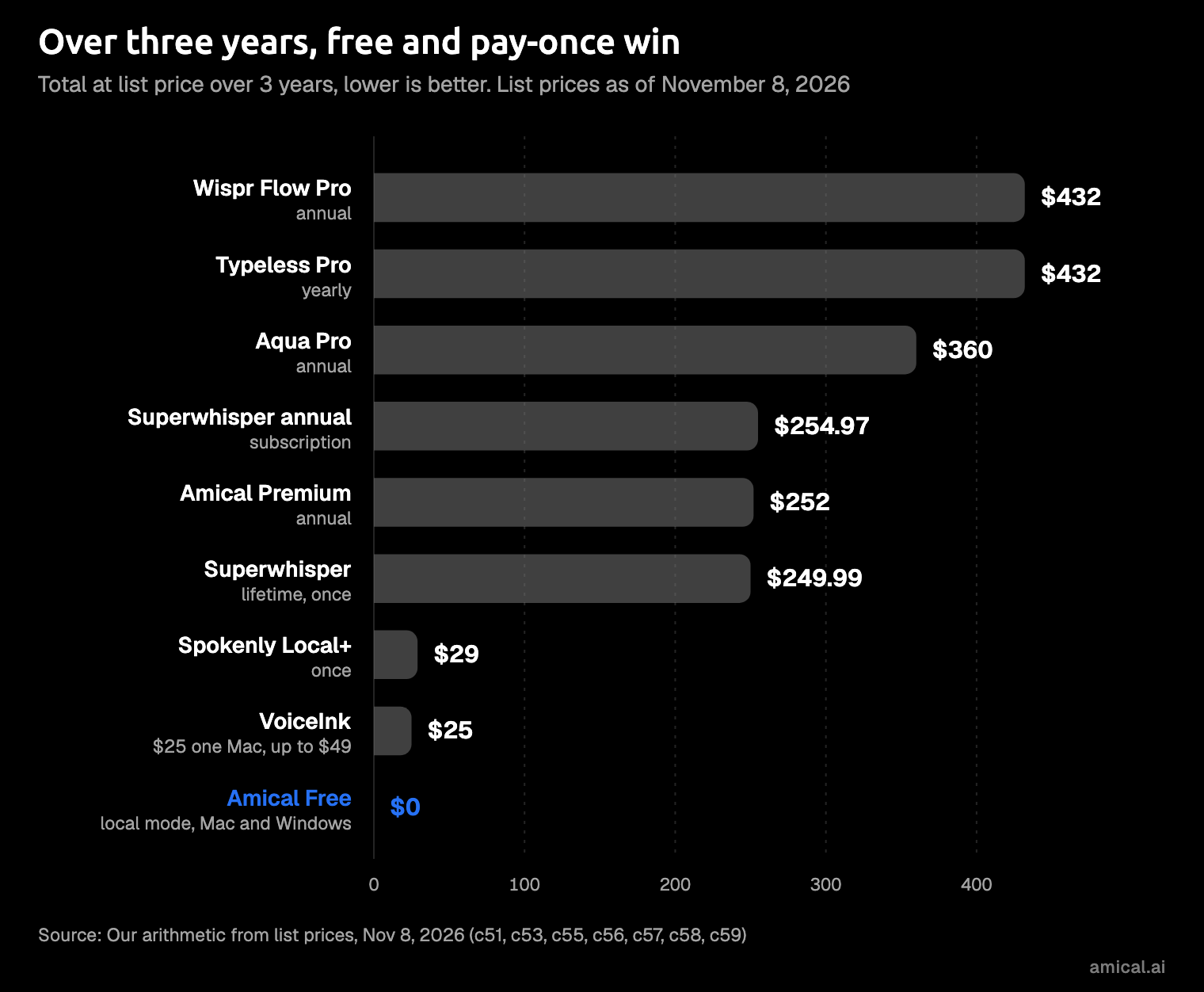
Prices are list prices in US dollars as of November 8, 2026. The three-year column is our own arithmetic from those list prices, before tax or promotions.
| App | How you pay | Price | Over 3 years | Runs locally? | Platforms | Cloud features |
|---|---|---|---|---|---|---|
| Amical (Free plan) | Free | $0 | $0 | Yes, on Mac and Windows | Mac, Windows; iPhone, iPad, Android via Amical Cloud | 2,000 cloud words a week |
| Amical Premium | Subscription | $10 a month or $84 a year | $252 on the annual plan | Yes, on Mac and Windows | Mac, Windows; iPhone, iPad, Android via Amical Cloud | Unlimited cloud words |
| Handy | Free | $0 | $0 | Yes | Mac, Windows, Linux | No paid plan |
| VoiceInk | Pay once | $25 (one Mac), $39 (two), $49 (three) | $25 to $49 | Yes | Apple silicon Macs | No cloud features stated |
| Superwhisper lifetime | Pay once | $249.99 | $249.99 | Yes | Mac, Windows, iPhone, Android | Not spelled out (docs: same features as every plan) |
| Apple Dictation, Windows voice typing | Built in | Free with the OS | Free | Apple: on-device for some languages. Windows: needs internet, except English on Copilot+ PCs | Mac; Windows | None |
| Wispr Flow Pro (for reference) | Subscription | $15 a month, or $12 a month billed annually | $432 on the annual plan | No, cloud only | Mac, Windows, iOS, Android | Included |
A price column hides the one thing a subscription is good at: adding up quietly. Over three years, some monthly plans cost more than a lifetime license, and the chart shows where each one lands.
Free and local: $0, no meter
The strongest no-subscription option is local dictation: the app runs a speech model on your own computer, so there's no server bill for anyone to pass on to you. It's free because it runs on the laptop you already paid for. If you want the longer version of that trade-off, see cloud vs local dictation.
Our view: for everyday email and chat, the free apps get the words down. Where they differ is what happens next. Some paste exactly what you said, "um" included, and some rewrite it for the app you're in.
Amical (our pick)
Amical's free plan has two parts. Local mode runs Whisper or Parakeet (open speech-to-text models) on your Mac or Windows PC, works offline once a model is downloaded, needs no account, and has no word limit. Amical Cloud covers the rest, including the iPhone, iPad and Android apps: you get 2,000 cloud words a week, and local dictation never counts toward them. Details are on the pricing page.
What sets it apart is AI formatting, which is on the free plan. With Amical Cloud, it works with nothing to set up. In local mode, it needs a local model (Ollama or LM Studio, say) or your own cloud key. Either way, Amical turns your speech into text, then rewrites it for the app you're in. Say this (an illustration, not a measured result):
hi team, um, the launch moved to next thursday and I'll send the new plan tomorrow, thanks
In Mail, it comes out as an email:
Hi team,
The launch has moved to next Thursday. I'll send the new plan tomorrow.
Thanks
In Slack, it stays a quick message:
Hi team, the launch moved to next Thursday. I'll send the new plan tomorrow, thanks!
Same sentence, two messages, and no "um" in either. On Amical, that's a free-plan feature, not an upgrade.
In local mode, your audio is transcribed on your computer, and text leaves only if you pick a cloud provider for formatting, which then receives the transcript and the text around your cursor. One recording can run up to 2 hours, so long voice notes fit too. The local AI models guide shows how to pick a model.
What you give up:
- It isn't a pay-once app. Premium is a subscription; the free plan is the no-subscription option, and it costs less than any license on this page.
- No Linux. Use Handy or Spokenly Local there.
- The phone apps run on Amical Cloud and need sign-in, so on iPhone, iPad and Android the free plan means the weekly cloud allowance. Local mode on desktop needs no account.
- Local Whisper needs macOS 15 or later and is slower on Intel Macs. Parakeet runs on macOS 14 and Intel Macs, and Amical Cloud has no such limit.
- Local formatting takes a little setup, a local model or your own key as above. Amical Cloud skips that step.
Also free
The free list is long now, which is good news for your budget and less good news for your afternoon.
- Handy: free and open source (MIT) on Mac, Windows and Linux, kept going by donations. It's one of the Linux picks.
- BetterWispr: free and open source (Apache-2.0), transcribes on your Mac with built-in models, and needs macOS 14 or later.
- Spokenly Local: $0, with unlimited on-device transcription and no account, on macOS, Windows, Linux and iPhone.
- Superwhisper Free: unlimited dictation with local Whisper models; AI modes and cloud models need Pro.
- Apple Dictation and Windows voice typing: built in and free. Apple's stops after 30 seconds without speech and runs on-device for some languages. Windows voice typing (
Win+H) needs internet, except on Copilot+ PCs, where on-device dictation works in English. Neither adapts your words to the app you're in as you dictate.
For full profiles, see our free Wispr Flow alternatives, the best free Mac dictation apps, and the best open source dictation apps.
Pay once: what a one-time price buys
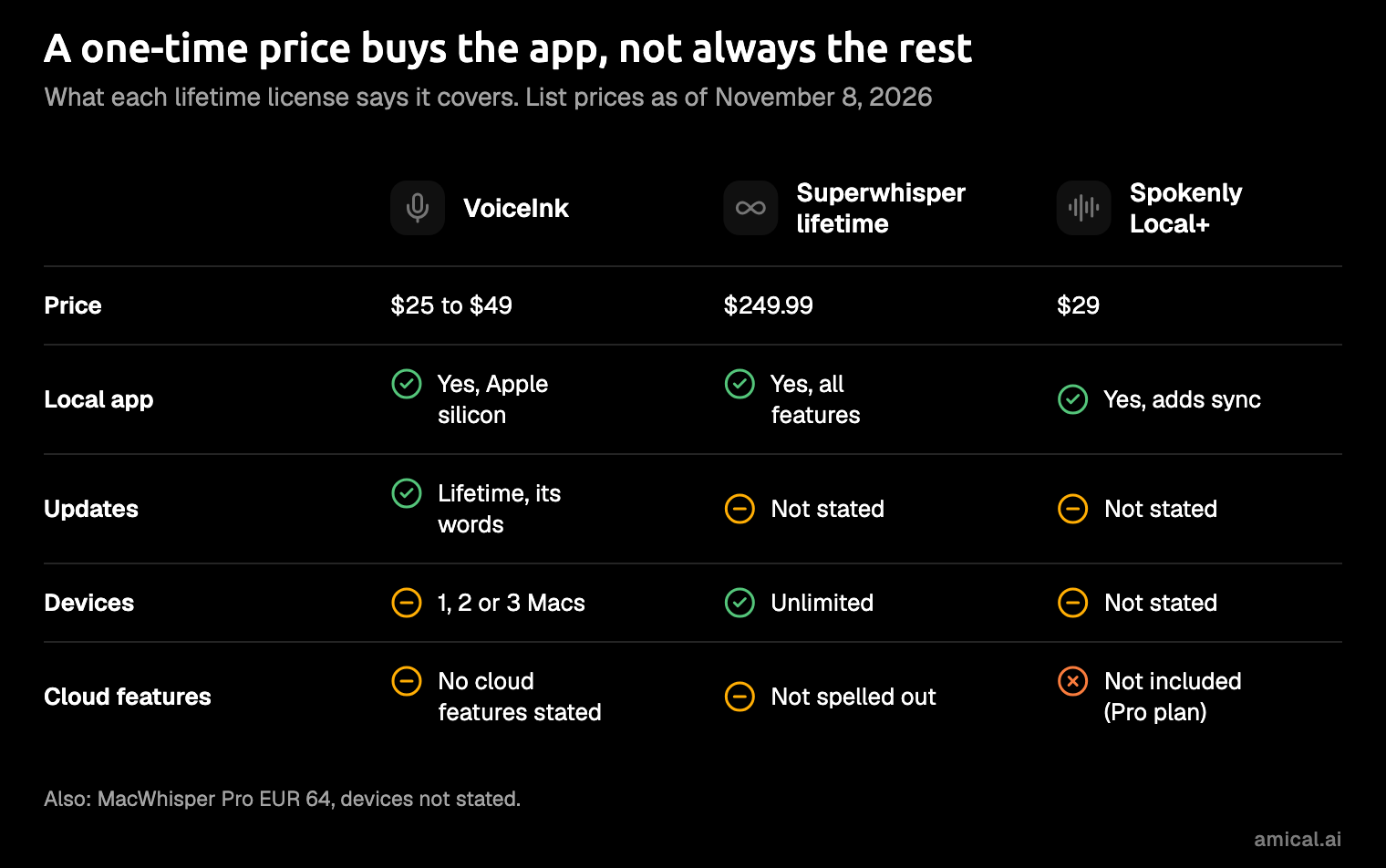
A one-time license buys the local app and, depending on the vendor, its updates. Cloud features are where the wording varies. Spokenly Local+ leaves out managed cloud models and hosted text processing, which come with the Spokenly Pro subscription. Superwhisper's docs say its lifetime license has the same features as every plan, without spelling out whether that covers cloud models.
So read "lifetime" carefully. Sometimes it means the app's lifetime, not its cloud's.
VoiceInk
Best for: one Mac, a small one-time price, and open source code.
VoiceInk costs $25 for one Mac, $39 for two and $49 for three, paid once. The pricing page promises a "lifetime of updates" and a 14-day money-back guarantee. It's open source under GPL-3.0, so you can build it yourself; the paid build adds automatic updates and priority support. You're paying for the pleasure of not compiling it, which is a fair trade for most people.
It's the cheapest serious pay-once option on a Mac. Its README says it processes everything offline with local models.
What you give up: it works only on Apple silicon Macs, so your phone and any Windows PC need something else.
Superwhisper lifetime
Best for: every feature on every device, paid once, for the long haul.
Superwhisper's lifetime license is $249.99, paid once. Its docs say it gets the same features as every plan, on unlimited Macs and Windows PCs plus iPhone and Android. That price equals about 2.9 years of its own annual plan, so it pays off only if you're still dictating in year three. If you want everything, everywhere, and you know you'll keep it, this is the pay-once pick.
What you give up: the highest up-front price here. The docs page doesn't mention future updates, and the offline models run well only on Apple silicon.
Spokenly Local+
Best for: Spokenly Local fans who want to pay the developer.
Spokenly Local+ is $29 once on the website. It adds settings sync, the Notch and Capsule recording styles on macOS, and priority support to the free local app. It doesn't include managed cloud models or hosted text processing; those come with Spokenly Pro, a subscription at $15 month to month or $12 a month billed yearly. In other words, you're buying sync, a nicer recording pill and priority support, which is a fine reason if you like the developer. What you give up: nothing on the dictation side, since that's already free in Spokenly Local.
MacWhisper
MacWhisper Pro is €64 once, with lifetime updates per its site. It lists transcription and dictation but not how many devices a license covers.
Subscriptions, for comparison
If your complaint is the monthly bill, that's fair. A subscription costs the same whether you dictated a novel that month or a grocery list. If you stay on one, pay annually and pick the cheaper plan. The totals are the annual plan over one, two and three years, our arithmetic from list prices.
| Plan | Monthly | Billed annually | 1 year | 2 years | 3 years |
|---|---|---|---|---|---|
| Wispr Flow Pro | $15 | $12 a month | $144 | $288 | $432 |
| Typeless Pro | $30 | $12 a month | $144 | $288 | $432 |
| Aqua Voice Pro | $12 | $10 a month | $120 | $240 | $360 |
| Superwhisper Pro | $8.49 | $84.99 a year | $84.99 | $169.98 | $254.97 |
| Amical Premium | $10 | $84 a year | $84 | $168 | $252 |
Willow Voice Pro is $15 monthly or $12 a month on the annual plan. Wispr Flow has a free plan too: 2,000 words a week on desktop, per Wispr's docs.
The monthly toggle is where the money goes. Wispr Flow's monthly plan comes to $540 over three years, well above the annual total in the table. The annual switch is the cheapest upgrade on any pricing page.
Amical Premium sits at the low end: cheaper than Wispr Flow and Typeless, and level with Superwhisper. Whichever plan you're on, local dictation stays free.
A subscription still makes sense for some people. Cloud plans give you hosted speech models, apps on your phone, and nothing to set up. If you dictate all day, much of it from your phone, that's worth paying for.
How to pick
Match the app to the way you work:
- You want messages written for the app you're in, free, on your computer and your phone: Amical, with local mode on Mac and Windows and Amical Cloud on the phone.
- You're on Linux, or never want to see a pricing page: Handy.
- One Mac, pay once, as cheaply as possible: VoiceInk.
- Every device, pay once, and you'll keep it for years: Superwhisper lifetime.
- Nothing to install: Apple Dictation on a Mac, or
Win+Hon Windows. - Cloud dictation all day, on your phone too: a subscription, paid annually. Amical Premium is the one we'd pick.
Start free. Pay once only when the free option is missing something you'd use every day. A lifetime license for a habit you haven't formed yet is an optimistic purchase.
Try it on one real message
Since this is our blog, you know where we'd start. Download Amical, set it to local mode with the desktop quick start, and dictate one message you'd otherwise type today: the reply you've been putting off is a good candidate. It runs on the free plan.