You saw a free dictation app for the Mac on Hacker News, then another on Reddit, then a third on X. Now you have a row of GitHub READMEs open in tabs, each one promising to type what you say. Picking the best free Mac dictation app shouldn't cost you an afternoon of install instructions.
This guide does the reading for you. For each app in the table you get what kind of free it is, where your audio goes, which Macs it runs on, and when it last shipped. We checked the new apps' sites, READMEs and release pages on November 8, 2026. Apple Dictation sits in the list as the baseline, since it's already on your Mac.
Full disclosure: Amical publishes this blog, and Amical is our pick. The case in two lines: the free plan gives you unlimited local dictation plus 2,000 cloud words a week, and its AI formatting writes the message for the app you're in, not just the words.
Free is easy to find. Free, still maintained and good at writing the actual message is rarer.
Quick picks
- Amical: best overall. Free local dictation with no word limit on Mac and Windows, a fast cloud mode that also runs on your phone, and formatting for the app you're in.
- Hex: a small, open source local app, and a good pick if you also use Linux.
- BetterWispr: open source and local, and the one to try on an Intel Mac or macOS 14.
- Lavoi: a local app with one key to hold, if you only use a Mac and dictate in a European language.
- Sayso: open source on Mac, Windows and Linux, and shipping often.
- Jot: worth a look if you already have a Gemini API key.
- Apple Dictation: for when you'd rather install nothing at all.
| App | Kind of free | Audio stays on your Mac? | Macs supported | Other platforms | License | Last release | GitHub stars |
|---|---|---|---|---|---|---|---|
| Apple Dictation (baseline) | Built into macOS, no time limit | Depends on the language; Keyboard settings say which | Any Mac on macOS; better on-device English model on M3 or later with 12 GB+ in macOS 27 | None listed | Part of macOS | Ships with macOS | Not on GitHub |
| Amical | Free plan: unlimited local dictation, 2,000 cloud words a week | In local mode, yes; Amical Cloud sends it to Amical | Apple silicon and Intel (local Whisper slower on Intel); local Whisper needs macOS 15+, Parakeet runs on macOS 14 | Windows; iPhone, iPad and Android with Amical Cloud | MIT (desktop app) | v1.13.0, Nov 7, 2026 | On GitHub |
| Hex | Free, open source | Yes, after the first model download | Apple silicon only | Windows, Linux | MIT | 3.3.0, Nov 2, 2026 | 5.8k |
| BetterWispr | Free, no account or API key | Yes by default; optional cloud on your own provider | macOS 14+; Apple silicon recommended, Intel build available | None listed | Apache-2.0 | 0.1.5, Oct 12 | 518 |
| Lavoi | Free for individuals, no account or word limit | Yes, after a one-time model download | Apple silicon, macOS 14+ | Mac only | Not stated | Not stated | Not listed |
| Sayso | Free official build, no license key | Yes by default; optional cloud on your own keys | Apple silicon, macOS 14+ | Windows, Linux | GPL-3.0 | v0.15.0, Nov 4, 2026 | 49 |
| Jot (Gemini demo) | Free app; you pay Google for Gemini API use (free tier exists) | No, audio goes to the Gemini API | macOS 14+ | None listed | Apache-2.0 | v0.4.0, Aug 27 | 556 |
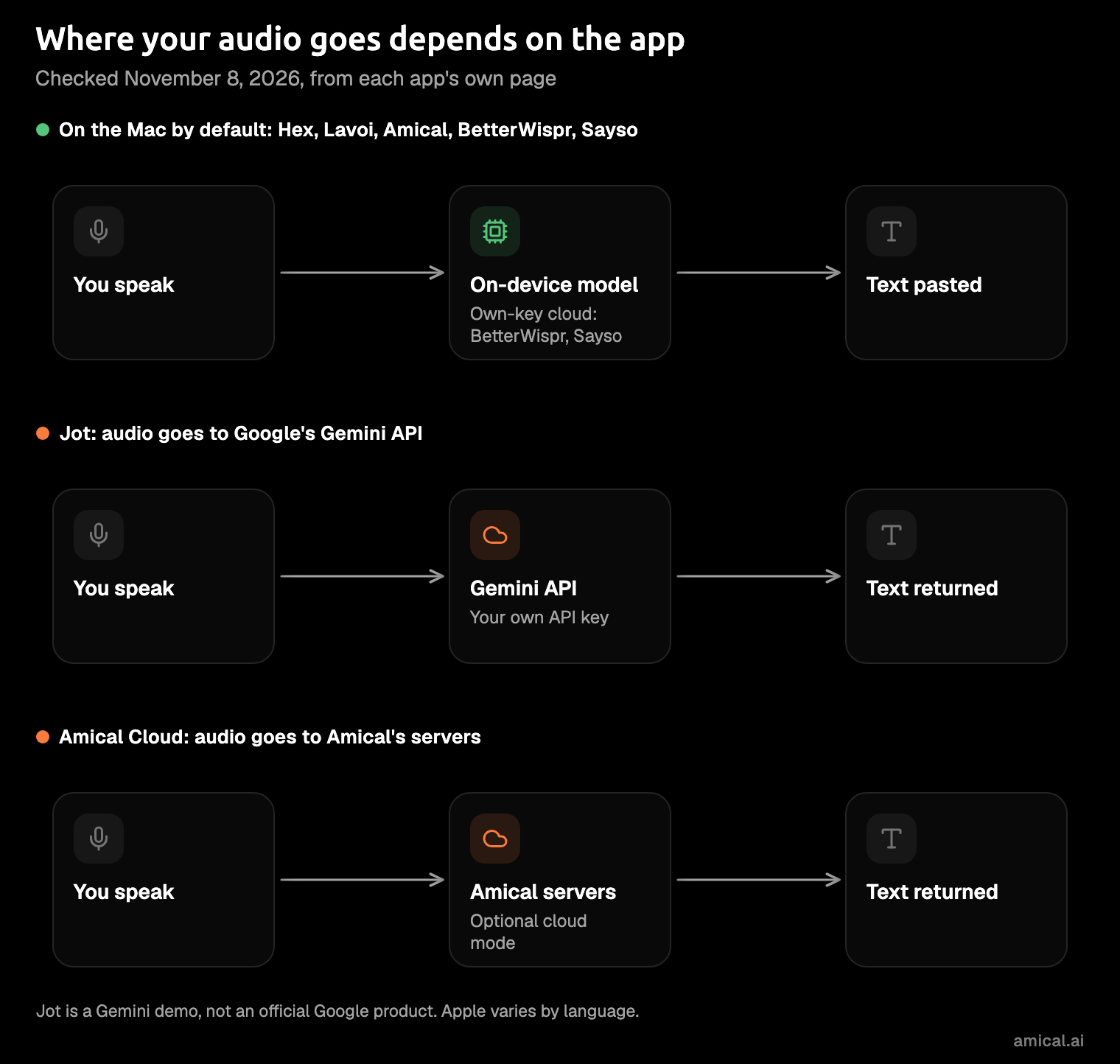
A yes or no column flattens privacy, and the real answers come in a few shapes. Some apps never send audio anywhere, some stay local until you add your own cloud key, one always uses the cloud, and Amical gives you both modes in one app. If you want the trade-off in depth, cloud vs local dictation walks through it.
The free Mac dictation apps
1. Amical (our pick)
Best for: people who want the finished message, not a transcript, on every device they own.
Most free dictation apps type your words. Amical types them, then its AI formatting rewrites them for the app you're in: a proper email in Mail, a loose reply in WhatsApp, a clean prompt in Cursor. That works on the free plan, with per-app tone and polish settings. See AI formatting for how it picks the style.
Here's an illustration of the idea, not a measured result. You say:
tell the team the launch review moved to friday morning, um, sorry for the short notice, agenda's the same
In Mail, you get:
Hi team,
The launch review has moved to Friday morning. Sorry for the short notice. The agenda is unchanged.
Thanks
In WhatsApp, you get:
Heads up: launch review moved to Friday morning, sorry for the short notice. Same agenda.
Same sentence, two messages that each sound like you, minus the "um".
The free plan is $0 and gives you unlimited local dictation plus 2,000 Amical Cloud words a week. Local dictation never counts toward those cloud words. In local mode, Amical runs Whisper or Parakeet on your Mac. Both are open speech-to-text models, and once one is downloaded it works offline, with no account, and your audio stays on your computer. Your text stays too, unless you pick a cloud provider for formatting. Local AI models covers the offline setup.
Amical Cloud is the fast lane. It returns finished text for a short dictation in under 300 ms, by Amical's own figures. Your audio and some context for formatting go to Amical's servers. Pricing shows Premium, which is $10 a month or $84 a year for unlimited cloud words.
It runs on Apple silicon and Intel Macs and on Windows; on iPhone, iPad and Android it dictates with Amical Cloud. The desktop app is open source under MIT, and v1.13.0 shipped on November 7, 2026.
What you give up: there's no Linux version, so Linux users should look at Hex or Sayso. Local Whisper needs macOS 15 or later, and on Intel Macs it runs slower without a GPU. On macOS 14 or an Intel Mac, use Parakeet v3 (25 European languages) or Amical Cloud, which has no macOS 15 requirement. Formatting in local mode needs Ollama or a provider key. Ollama is a free app that runs AI models on your Mac; with Amical Cloud, formatting works with nothing to set up. The phone apps and Amical Cloud ask you to sign in; local mode on the Mac doesn't. And Amical has fewer GitHub stars than Hex or Handy. Stars count attention, though, not phones, cloud speed or a reply already formatted for WhatsApp.
2. Hex
Best for: a small, local, open source app you can also run on Linux.
Hex comes from the anomalyco GitHub org, which also hosts opencode. It's MIT licensed, and it works the way dictation should: hold a key, speak, and it pastes. The model downloads on first run, and after that, its README says, nothing leaves your machine.
It runs on Apple silicon Macs, Windows and Linux, and you can install it from a DMG, Homebrew, the AUR, Nix or .deb and .rpm packages. Hex shipped 3.1.0 through 3.3.0 on November 1 and 2, 2026. Three versions in two days is a project with someone awake at the keyboard.
What you give up: there's no Intel Mac build. Its README describes plain transcription and pasting, mentions no AI cleanup, and doesn't name the speech model.
3. BetterWispr
Best for: an Intel Mac, macOS 14, or anyone who likes choosing their own model.
BetterWispr is free, with no subscription, account or API key, and donations are optional. It's open source under Apache-2.0, from the opennookorg GitHub org. It runs locally by default, and you choose the engine: Apple's on-device speech, Parakeet v3 for 25 European languages, Parakeet v2 for English, or Whisper large-v3 turbo. Four engines to pick from is either a gift or a dropdown you didn't know you needed.
If you'd rather use the cloud, you can connect your own Sarvam AI, Smallest AI or OpenAI-compatible provider, or route through Claude Code or Codex. It needs macOS 14 or later; Apple silicon is recommended, and there's an Intel build. The latest release is 0.1.5, from October 12.
What you give up: it's young, still on version 0.1. The cloud options send your dictation to that provider, so pick them knowingly.
4. Lavoi
Best for: a Mac-only setup in a European language, where you hold one key and talk.
Lavoi is from the CoIsland family of apps, and its page says dictation "stays free for individuals," with no account, card, trial or word limit. It runs on the device: models download once from Hugging Face, then it works offline, checking for updates once a day. It covers 25 European languages, and your dictation history stays on your Mac and is deleted after a month by default.
You hold Right Cmd to talk. It works with Claude Code, Codex, Cursor and any app with a text cursor, and it never presses Return. If you've ever dictated half a prompt into an AI coding agent and watched it fire off early, you'll see why that matters. It needs an Apple silicon Mac on macOS 14 or later.
What you give up: it's Mac only and Apple silicon only. The page doesn't say whether it's open source, which speech model it uses, or which version is current. Meeting transcription is listed as in development.
5. Sayso
Best for: early adopters who want one open source app across Mac, Windows and Linux.
Sayso is an open source dictation app under GPL-3.0, and the official build is free with no license key. On a Mac you press Option+Space to talk. It runs locally by default, on a model called Parakeet Unified (about 1.3 GB), with Whisper variants and others to choose from. Its README says nothing leaves the computer unless you choose a cloud model or a cloud-backed AI style, and cloud providers use your own API keys.
It runs on Apple silicon Macs with macOS 14 or later, Windows 10 (1809) and 11, and Linux on both X11 and Wayland. It ships fast: four releases between October 27 and November 4, 2026, ending at v0.15.0. That's exciting if you like tinkering, and a moving target if you want something to leave alone.
What you give up: it has 49 GitHub stars so far. There's also no Intel Mac build.
6. Jot (Gemini demo)
Best for: people who already have a Gemini API key and are happy in the cloud.
Jot is a free Mac app in the google-gemini GitHub org, built by Ammaar Reshi as a demo of Gemini 3.5 Transcribe. Its README is clear about what it is: "This is not an officially supported Google product." You hold fn, speak and release. It's open source under Apache-2.0 and needs macOS 14 or later.
Jot is free to download, not free to run. It's cloud only: your audio goes from your Mac to the Gemini API with your own key, while your history and the key itself stay on the Mac. You pay Google at its Gemini API rates, though a free tier exists. So the app costs nothing, and the meter runs at Google.
What you give up: your audio always leaves your Mac, and you need a key from Google AI Studio with access to the transcription model. It's a demo, not a supported product, and its latest release, v0.4.0, is from August 27.
7. Apple Dictation (the baseline)
Best for: a quick note when you'd rather install nothing.
Apple Dictation is already on your Mac: turn it on in System Settings > Keyboard > Dictation, and change the shortcut there if you like. There's no limit on how long you speak, though it stops after 30 seconds of silence. Whether your audio stays on the Mac or goes to Siri servers depends on your language and region, and the Keyboard settings tell you which. In macOS 27, with Apple Intelligence, an on-device model improves spelling, punctuation and capitalization in English, on Macs with M3 or later and at least 12 GB of memory.
It types your words well enough. It doesn't write the message, so you dictate the reply and then fix it by hand anyway. AI dictation vs Mac dictation and our Apple Dictation comparison go into the gap.
What you give up: it doesn't adapt to the app you're in, doesn't take custom vocabulary, and can't draft from an instruction.
Also free, and not new
Not new, still worth the tab, and some details here date from October 24, 2026, so check each site before you commit.
- Handy: MIT, local Whisper or Parakeet V3, optional AI cleanup, no paid plan, on Windows, Mac and Linux. Version 0.10.0 shipped on November 2, 2026.
- Superwhisper: the free plan works in any app with unlimited local Whisper models and over 100 languages. Pro is paid; its site has the current price.
- Wispr Flow: the free plan gives you 2,000 words a week on desktop, and transcription always runs in the cloud.
- VoiceInk: the source is open under GPL-3.0, but the ready-made builds are paid.
If Wispr Flow is the app you're trying to replace, free Wispr Flow alternatives is the head-to-head. For the open source side across platforms, see the best open source dictation apps.
How to pick
Start with what the text is for. Then check your Mac, since several of these apps skip Intel Macs.
- You want the finished message, not a transcript, and you want it on your phone too: Amical.
- You also work on Linux: Hex or Sayso.
- You have an Intel Mac or macOS 14: BetterWispr, or Amical with Parakeet or Amical Cloud.
- You dictate prompts into Cursor or Claude Code and don't want them sent early: Lavoi, which never presses Return.
- You already have a Gemini API key: Jot.
- You don't want to install anything: Apple Dictation.
Our advice: try Amical first. The new apps are worth a look, and some will grow into favorites. Before you rely on one, check when it last shipped. A launch post is easy; the months of fixes after it are the test.
Try it on a message you'd type anyway
Amical publishes this blog, so take the bias into account, then test it yourself. Download Amical, pick local mode or Amical Cloud, and dictate one real message you'd otherwise type today: the email you've been putting off, or the WhatsApp reply you've left on read. The free plan covers it, with unlimited local dictation and 2,000 cloud words a week.