You're sending a quick note to a colleague, so you say it the way you'd say it out loud: "kal meeting hai, send the deck?" What lands on screen is one language, with the other half bent into words you never said. Dictation in two languages at once trips up most tools for a simple reason. They settle on one language per recording, then force every word into it.
If you mix Hindi and English, Amical Cloud handles it well, and it's the mode we recommend for mixing Japanese and English.
For any other pair, try one real message before you trust any app with it.
Amical publishes this blog, so read our pick with that in mind. Everything we say about other apps comes from their own pages or public listings.
Why code-switching breaks most dictation
Code-switching means moving between languages inside one conversation, often inside one sentence: an English noun in a Hindi sentence, an English phrase dropped into Japanese. For people who live in two languages, it isn't a quirk. It's just how talking works. Most dictation was built for a speaker who stays in one language from start to finish.
Whisper shows the problem clearly. It's the open speech model from OpenAI that runs inside many dictation apps, including ones that work offline. When no language is set, Whisper listens to up to the first 30 seconds, picks the single most likely language, and transcribes the whole recording in it. The English-only versions of the model skip the guess and assume English. In the Hugging Face discussion for OpenAI's Whisper demo, a user pointed out that it picks one language per clip, and a reply called that the expected behavior.
Phonexia, which sells speech-to-text built on Whisper, describes the effect in its own docs. Within each block of speech, the majority language wins. A short passage in the other language can come out in the majority language, with no warning.
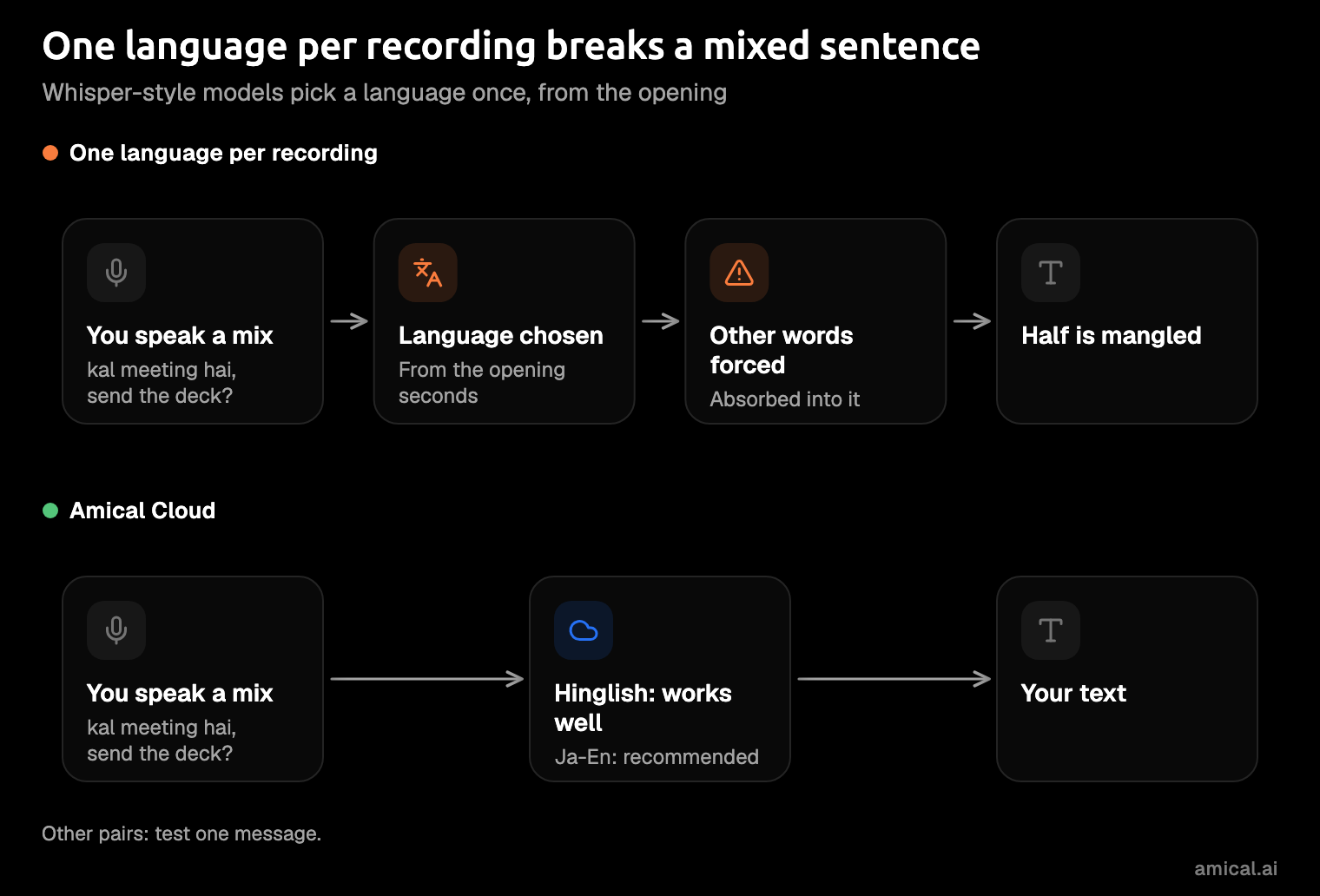
So when a tool that picks one language per recording flattens your sentence, it's not your accent. It's a design choice.
If you've re-recorded the same message, slower and louder each time, wondering whether you mumbled, you didn't. The model had picked its language before you reached the borrowed word.
For the full story on the model itself, see does Whisper handle two languages in one sentence?
What each kind of tool does today
Apple, Microsoft, and Wispr Flow document switching languages or one language per dictation, not mixing inside a sentence. What follows comes from each app's own pages, or a listing where noted, as of November 2026; prices and requirements can change.
Built-in dictation on Mac and Windows
Apple lets you add several languages in Keyboard settings, then switch between them as you dictate by clicking the language indicator or pressing the Globe key. Apple's guide also notes that dictation isn't available in all languages or regions.
That's switching, not mixing.
Windows works the same way. To change the voice typing language, you change the input language, from the taskbar or with Windows+Spacebar. Microsoft's page describes switching only and doesn't say voice typing can recognize several languages at once. Voice typing also needs an internet connection, except on Copilot+ PCs dictating in English on the device.
Switching is fine when you write one paragraph in each language.
It doesn't help with the single English word you borrow in the middle of a Hindi sentence, unless you enjoy pressing Globe in the middle of a thought. More on the built-in option in how Amical compares with Apple dictation.
Whisper-based apps (Superwhisper, and local Whisper in general)
Superwhisper's docs point you to the Automatic language setting when you mix languages within one dictation, and warn that with Automatic, non-English dictation sometimes comes out as English text. A fixed language "removes the guesswork" when you stick to one, and a vocabulary hint lets you switch between languages in a single session without changing settings, though the effect varies by model.
So the setting built for mixing is also the one to check most closely.
Local Whisper in general inherits the model's habit of picking one language per recording. Amical's local mode belongs in this group. It runs Whisper models on your computer through whisper.cpp, an open source version of Whisper built to run on ordinary computers. In Amical, local Whisper is for one language at a time, not for mixing. See Amical vs Superwhisper for the wider comparison.
Wispr Flow
Wispr Flow's help center is direct: "Flow detects one language per dictation, not per word." For mixed Hindi and English you select Hinglish yourself, and its troubleshooting page adds that auto-detect (the setting where the app guesses your language) never produces Hinglish. Choosing a small set of languages improves detection but doesn't lock every dictation to them. Auto-detect works on Mac, Windows, and iOS, but not Android.
Flow's page for bilingual professionals says it "can detect and switch languages as it writes", without saying whether that happens mid-sentence. The two pages read differently, and only the help center talks about mixing directly.
Flow always transcribes in the cloud, and picking Hinglish by hand is one more thing to remember mid-thought. The Amical vs Wispr Flow comparison covers prices and the rest.
The new bilingual Mac apps: Ploca and Univocal
Two small Mac apps we found make mixing their main feature. Ploca says its Indian mode is tuned for code-mixed speech, with "English, Hinglish or Tanglish, switched mid-sentence", plus English mixed with Marathi and Bengali. It runs only on Apple Silicon Macs with macOS 26 or later, with no Windows, Intel, or phone version. Ploca says transcription happens on your Mac, though the app also checks in for launch, daily updates, and its license, and it offers a 7-day free trial.
Univocal is harder to pin down, since we couldn't find a vendor site. Its AlternativeTo listing describes it as local-only Mac dictation that handles mixed-language speech, while the same listing's language field shows only English. The listing puts it at $39 one-time for up to three Macs, with a 14-day trial, on Apple silicon and macOS 14 or later.
Both are worth a trial if you only use a Mac and must stay offline. Keep in mind that the mixing claims are theirs, not independent results.
A trial costs you an afternoon, which beats finding out halfway through an important email.
Willow Voice: the hardest case, no score
Willow Voice, another dictation app, calls code-switching "the hardest case for any dictation tool, Willow included", and its September 2026 benchmark publishes no code-switching score. Its advice is sensible: test a mixed paragraph before you rely on any tool.
We found no independent benchmark of code-switching accuracy for any of these apps. Until someone publishes one, the only leaderboard is your own Tuesday email.
Amical: Cloud for mixing, local for one language
Amical Cloud is our pick for both pairs. It runs on Mac, Windows, iPhone, iPad, and Android, and the phone apps use Amical Cloud, so the mix comes with you when you leave your desk.
Hinglish works well on it, in Latin (Roman) script, so "kal meeting hai" lands the way you'd type it.
A long language list isn't a mixing promise, though. Amical Cloud covers 100+ languages, but for pairs beyond those two, treat it as something to test, not a guarantee.
Mixing needs Amical Cloud, so you need an internet connection and a sign-in. Your audio, language and vocabulary settings, and some formatting context go to Amical, which states a policy of no data retention and no training on your data. If you'd rather your Hinglish voice notes never reach a server, that's a fair instinct. Use local mode on the days you dictate in one language: your audio is transcribed on your computer, and text leaves only if you pick a cloud provider for formatting.
Local mode has its own limits. Local Whisper needs macOS 15 or later and is slower on Intel Macs. Parakeet, the other local model, runs on macOS 14 and Intel Macs, but it covers 25 European languages and not Japanese.
Cloud is also the faster side. By Amical's own figures, Amical Cloud returns a short dictation in under 300 ms and a longer one in under 500 ms. A quick Slack reply is usually in the box before you've looked back at it. Cloud AI models and cloud vs local dictation go deeper on the trade-off.
Amical's AI formatting also fixes grammar as it formats. That helps when English is the language you write in but not the one you think in, which is what dictation for non-native English speakers is about. See multi-language support for how Amical handles languages.
The free plan includes unlimited local dictation and 2,000 cloud words a week, and local dictation never counts toward that allowance. Premium is $10 a month or $84 a year for unlimited cloud words. The free allowance is plenty to test your pair on a week of real messages before you spend anything. Pricing has the details.
Set it up and test your pair
The only test that counts is your own pair, in your own words, in the app you'd send from.
- Install Amical on your Mac or Windows PC with the desktop quick start.
- Sign in and choose Amical Cloud as your speech model.
- Check your languages. New installs start with English plus your operating system's language, set during onboarding. If your second language isn't your system language, add it in Amical's language settings.
- Open the app you'd actually send from, hold
Fn(the Mac default, which you can change in Settings > Shortcuts), and dictate one real mixed message. - Read the borrowed words first. That's where a mixed sentence goes wrong, if it does: the "deck" in "kal meeting hai, send the deck?"
- Add names, places, and jargon to custom vocabulary so they come out right next time.
- Hindi-English: expect it to work on Amical Cloud. Speak the way you'd say it to a colleague.
- Japanese-English: use Amical Cloud, the mode we recommend for a sentence like "明日のmeetingの資料、送ってもらえますか?" Don't switch to local Parakeet for this one, since it doesn't cover Japanese.
- Spanish-English, Tamil-English, and every other pair: try it. Run the same test, and if the borrowed words come out wrong, dictate each language as its own recording.
FAQ
Does local Whisper handle mixed languages?
Not reliably. Whisper picks one language from up to the first 30 seconds of a recording and transcribes the rest in it, so use Amical Cloud when you mix.
Can Apple dictation do Hinglish?
Apple's guide doesn't say it can: it documents adding languages and switching between them as you dictate, not mixing two in one sentence.
Does Spanish-English mixing work in Amical?
We don't make a claim for it. Try it on one real message using the free plan's weekly cloud words.
Does Wispr Flow detect Hinglish automatically?
No: its help center says to select Hinglish explicitly, and its troubleshooting page says auto-detect never produces it.
Try one mixed message today
We make Amical, so of course we'd like you to try it, but the test works on any app. Download Amical, switch to Amical Cloud, and dictate one message you'd really send, in both your languages, the way you'd say it. The free plan covers the test, and the first message will tell you whether your pair comes through.