You've narrowed your dictation shortlist, and Superwhisper keeps coming up. The short Superwhisper review: it's a Mac-first dictation app whose best parts live in Pro. If you're staying on a Mac, the lifetime license is the best deal it sells.
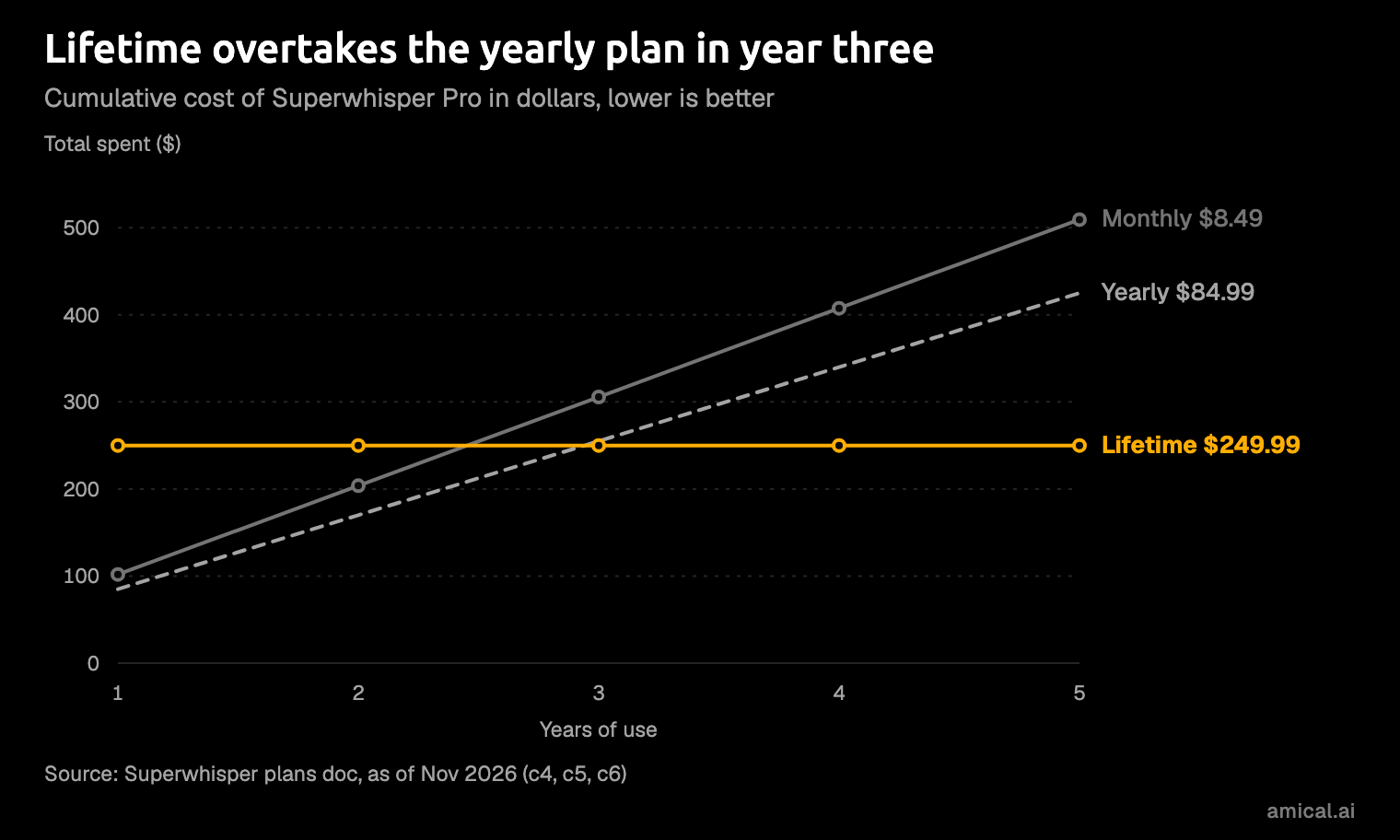
Prices first, as of November 2026: Free is $0, Pro is $8.49 a month or $84.99 a year, and a lifetime license is $249.99, paid once.
The Free plan is raw transcription only. Its "unlimited dictation" means unlimited raw transcripts: local Whisper models, up to two modes, and no AI processing. That covers plain notes; a formatted email needs Pro.
Full disclosure: Amical publishes this blog, and Amical is a rival dictation app. Everything about Superwhisper here comes from its own docs, home page, and blog, not from our testing.
What Superwhisper does
Superwhisper is voice-to-text that types into any app. You press a shortcut, talk, and the text lands at your cursor; on a Mac you hold Right Cmd, or press Option+Space to toggle recording on and off.
Its real idea is modes. A mode is a model plus a set of instructions, so you decide what each kind of dictation turns into. The built-in ones are Message, Super, Mail, Note, and Voice to Text, and custom modes let you set your own formatting rules and pick a model such as GPT, Claude, or Llama.
Super is the clever one. It reads the on-screen, selected, and recently copied text so that what it writes fits the app you're in.
One hotkey, several personalities. Set your modes up well and the same rambling sentence becomes a tidy email in one place and a plain transcript in another.
Underneath the modes sits a choice of speech models, and that choice is where the plans split.
Local and cloud models
Whisper is an open speech-to-text model that can run on your own computer. Superwhisper's Free plan gets the whole Whisper family, from Tiny at 75 MB up to Large v3 at 3 GB, run through whisper.cpp.
Pro adds three more local models: Parakeet (another open speech model, English only, 476 MB), Parakeet Multilanguage (24 languages, 494 MB), and Cohere Transcribe (14 languages, 1.3 GB, Apple Silicon only on the Mac). Pro also opens the cloud models: S1-Voice (100+ languages), Nova, and ElevenLabs Scribe.
So "free and offline" on Superwhisper means Whisper. The other local models sit behind the paywall.
The docs rate each model's speed and accuracy on a scale of 1 to 10, but those are relative ratings, not measurements. Read them as a rough guide, and remember that the biggest download isn't automatically the best one for your Mac.
One hardware note from its own FAQ: offline models run well only on Apple Silicon, and Intel Macs work best with cloud models, which are Pro.
Meetings
Superwhisper's Meetings feature records your microphone and your Mac's audio, shows a live transcript with speaker labels, and writes a summary at the end. No bot joins the call. It's Mac only and needs Superwhisper 3.0 or later.
The standout in its docs is a fully local setup. Pair Cohere Transcribe or Parakeet with a small local language model (Tiny Aya 3B or Qwen 3.5 2B), and the audio, transcript, and summary all stay on the Mac. The docs say local summaries are shorter than cloud ones, which is a fair trade for a meeting you'd rather not upload. Data leaves that setup only if you create a share link, connect an agent, or copy the summary somewhere else.
As documented, that's a genuine strength, and it deserves the credit.
Meetings are a Pro feature. On Free they spend your trial words, and when those run out, a meeting in progress stops (the audio is kept). Don't make the important client call the one that ends when your trial does.
The docs also point out that Superwhisper doesn't announce itself, so it's on you to tell attendees you're recording.
CLI and MCP
In July 2026, Superwhisper announced a command-line tool (CLI) that can search and export your dictation history, show stats, and manage vocabulary and snippets. It also includes an MCP server. MCP (Model Context Protocol) is a standard way for AI tools to plug into apps and data, so a coding agent can read what you've dictated. Plugins exist for Claude Code, OpenCode, Codex, and Pi.
It works on the history stored on your device, and Superwhisper's Windows doc lists the CLI as missing there.
This is useful if your dictation history is something you'd actually query. "Ask my coding agent what I said about the login bug on Tuesday" is an odd sentence to write, and a handy thing to be able to do.
Superwhisper pricing, plan by plan
Superwhisper keeps the menu short: one Free plan and one Pro plan with three ways to pay, and every Pro billing option includes the same features.
| Plan | Price | What you get |
|---|---|---|
| Free | $0 | Unlimited dictation with local Whisper models, up to two modes with no AI processing, custom vocabulary, text replacements; Meetings only on trial words |
| Pro | $8.49 a month, $84.99 a year (about 17% off), or $249.99 paid once | AI processing, the Super and Mail modes, unlimited modes, cloud models, and full Meetings |
Put simply, Free transcribes and Pro writes. The fine print is mostly in your favor:
- Trial. New users get 3,000 words of every Pro feature, Meetings included, then drop back to Free with nothing deleted.
- Devices. One Pro license covers unlimited Macs and Windows PCs, plus an iPhone and an Android phone.
- Where to buy. Buy on the website, since the App Store and Google Play cost more because of platform fees.
- Discounts. Verified students, educators, academic institutions, and non-profits get 40% off, but you have to ask before you buy, and it doesn't apply to App Store purchases.
- Refunds. The home page FAQ promises a no-questions-asked refund within 30 days of purchase; the plans doc doesn't state refund terms.
- Enterprise. Custom pricing, with SOC 2 Type II listed on the home page.
The trial is enough to run Super mode over your own inbox before you decide anything, which beats guessing from a feature list.
The lifetime license is the standout. Against yearly billing it pays for itself in about three years, and every year after that costs nothing. If you're sure you'll stay with Superwhisper, it's the pick.
Which plan to buy
- Just trying it: Free plus the trial.
- Using it daily but not sure yet: Pro monthly.
- A year in and happy: Pro yearly.
- On a Mac for keeps: the lifetime license.
- Student, teacher, or non-profit: ask for the discount first, then pick one of the above.
Don't buy lifetime on day one. Use the trial, then a month of Pro, and buy lifetime once the habit has stuck. The license covers unlimited Macs, so a new laptop next spring costs you nothing; the real risk is that you stop dictating.
Platforms
Superwhisper is a Mac app that also runs elsewhere, so buy it for the Mac. These limits are as Superwhisper's docs listed them on November 8, 2026, and some are marked as in development or planned, so check again before you buy.
- Mac: macOS 14 or later, with the full feature set.
- Windows: Windows 10 and 11, on x64 and ARM64, with the same app and license. It lacks Meetings (there's a Meeting mode with system audio instead), the CLI and coding-agent integrations, and Filesync, which is in development. On Windows ARM, Cohere Transcribe and Whisper Large v3 Turbo aren't supported yet.
- iPhone: supported through a custom keyboard that needs Allow Full Access; iPad isn't supported.
- Android: phones only, through a floating bubble; tablets aren't supported.
- Linux: not on the list.
On iPhone and Android, modes and vocabulary are stored per device and don't sync from your Mac or PC yet; cloud sync is planned. Until then, you set up your modes twice, once per device, which is exactly the kind of chore dictation was supposed to remove.
Privacy, by configuration
Superwhisper's sensitive-data doc is clear about what leaves your Mac. It comes down to two choices, where the voice model runs and where the AI processing runs, and only the two all-local setups send nothing out.
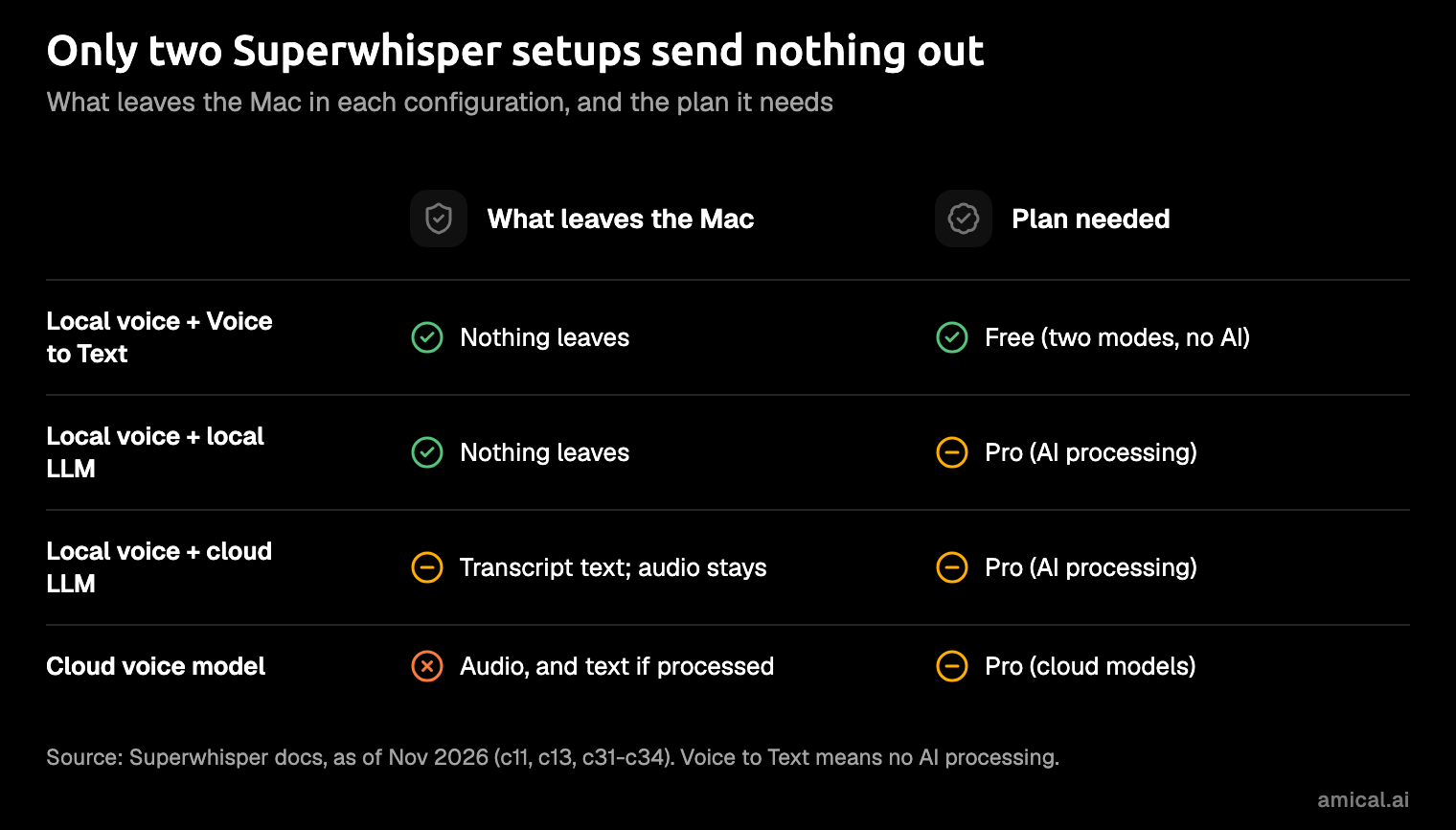
For the cloud setups, Superwhisper says data from its API integrations isn't used to train AI models, and it has zero-data-retention terms with its providers. If you bring your own API key, your own agreement with that provider applies, and your history is stored locally either way. Custom vocabulary travels with cloud audio as recognition hints; with a local voice model, it never leaves the device.
The catch is the plan. On Free, the private setup is also the one with no AI, because local AI processing is a Pro feature. Private, formatted, free: pick two.
If you're weighing those setups in general, our guide to cloud vs local dictation walks through the trade-off.
Weak spots
Superwhisper's model and mode docs flag a couple of quirks of their own:
- Parakeet "may struggle with punctuation," in the docs' own words.
- Super mode may need a more capable model, such as Claude or GPT.
The rest you've met above: the Free plan's two-mode cap with no AI, the Pro-only local models, phone apps whose modes don't sync, and the Windows gaps.
The platform gaps matter most if you're on Windows or a tablet. On a Mac, the real cost is simpler: the good parts are Pro.
Who should pick Amical instead
This is where our stake comes in. Amical is the AI dictation and note-taking app we make: you speak, it transcribes, then its AI formatting rewrites the words for the app you're in, so you get a proper email in Gmail, a loose reply in Slack, or a clean prompt in Cursor. For four kinds of reader, we think it's the better pick.
You want AI formatting without paying. Amical's free plan includes AI formatting and per-app Personalization, with 2,000 cloud words a week and unlimited local dictation on Mac and Windows. In local mode, formatting can run on your own model through Ollama (a free tool for running language models on your computer), so that setup never touches the weekly cap. Superwhisper's Free plan stops at raw transcripts; Amical's includes the formatting. Here's an illustration of the idea (not a measured result), said into Gmail:
hi sam um so the invoice went out this morning, let me know if finance needs anything else thanks
And what AI formatting puts in the message body:
Hi Sam,
The invoice went out this morning. Let me know if finance needs anything else.
Thanks
You use an iPad, or switch between phone and computer. Amical runs on Mac, Windows, iPhone, iPad, and Android, and the free and Premium limits apply across all of them. The phone apps transcribe with Amical Cloud, so dictation on your phone counts toward the weekly cloud words. The iOS quick start covers iPhone and iPad.
You want free local Parakeet, or open source. In local mode, Amical runs Whisper or Parakeet TDT 0.6B v3 (25 European languages) on Mac and Windows at no cost. In local mode, no audio leaves your computer, and text leaves only if you pick a cloud provider for formatting. The desktop app is open source under the MIT license, on GitHub. The local AI models docs cover setup.
You want speed with a number on it. Amical publishes its own cloud latency: by Amical's own figures, finished, formatted text from Amical Cloud is ready in under 300 ms for a short dictation and under 500 ms for a longer one. Superwhisper's docs rate speed only on a relative scale, so there's no head-to-head figure to put next to it. In cloud mode, your audio and some formatting context (such as the app name and the text near your cursor) go to Amical Cloud, which states no data retention and no training on your data.
If fully local meeting notes on a Mac are why you're here, Superwhisper makes the clearer case. Amical keeps meeting transcripts in the same app as your notes and voice notes.
Where Amical gives ground:
- Price. Premium is $10 a month or $84 a year, so monthly costs more than Superwhisper's $8.49 and yearly is within a dollar of its $84.99. There's no lifetime license either, but local dictation with local formatting costs nothing, so the buy-once reader has a $0 option.
- Coding-agent history. Superwhisper's CLI and MCP server let a coding agent query your dictation history, and that's its edge if you want that. Amical's voice commands are shipped, and its MCP voice commands (a different feature) are coming soon. It also types into Cursor and terminals such as Terminal, iTerm2, and Warp, with formatting suited to each.
- Sign-in. Amical Cloud and the phone apps need an account; local mode on the desktop doesn't.
- Older Macs. Local Whisper needs macOS 15 or later and is slower on Intel Macs, but Parakeet runs on macOS 14 and Intel, and Amical Cloud has neither limit.
- No Linux, same as Superwhisper.
For the feature-by-feature table, see Amical vs Superwhisper, and Amical's pricing for the plans.
Verdict
- Mac-first and buying once: Superwhisper's lifetime license, after you've used the trial.
- Want AI formatting for free, an iPad, or open source: Amical.
- Either way: try it on a real message today.
A week of real messages tells you more than any review, this one included.
So start with the email you've been putting off. Download Amical, follow the quick start, and dictate that email on the free plan, which includes the AI formatting that turns your rambling into something you'd send. If Superwhisper is still your lean, run the same email through its trial. Same email, two apps, and you'll know by lunch.