You start dictating with AirPods in, and two things go wrong at once: the words come out garbled, and your music suddenly sounds like a phone call. It's easy to blame the app. Check the mic first; it's the part you can change in a minute.
So what's the best microphone for dictation? For most people, wired earbuds or a wired headset (USB-C pairs exist if your laptop has no headphone jack). The built-in laptop mic is fine in a quiet room, and a USB mic suits one fixed desk. Bluetooth headsets, AirPods included, are the convenience pick: they often drop to call-quality audio while the mic is on.
A quick disclosure: Amical publishes this blog, and we make a dictation app. The mic advice here works with any app, ours included. After the why, you'll set your mic up on a Mac, on Windows, and in Amical, where you can rank your mics so it records with the highest-ranked one that's plugged in. Then you'll test it on a sentence you'd really say.
The short answer
Our advice, in one table: wired beats wireless for dictation, and where the mic sits matters more than what it cost.
| Mic | Setup | Distance from your mouth | Room noise | Drops to call-quality audio | Best for |
|---|---|---|---|---|---|
| Built-in laptop mic | None | Changes as you lean in or sit back | Hears the whole room | No | Quiet rooms, short messages |
| Wired headset or earbuds | Plug in | Stays the same | Less than a laptop mic, since it's nearer your mouth | No | Most people, most days |
| USB desk mic | Plug in and place it | Steady while you stay at the desk | Good when it's close and aimed at you | No | Long sessions at one desk |
| Bluetooth headset or AirPods | Pair once | Stays the same | Depends on the headset | Often, while the mic is on | Quick replies on the move |
There's no price column on purpose: the most useful upgrade in this guide is moving the mic you already own.
Why your mic matters
A dictation app can only work with what the mic sends it. Every one of them, from the dictation built into your computer to Amical, turns a stream of audio into words, and a muddy stream gives it less to go on.
Dragon's help pages say it plainly: "Correct microphone positioning is one of the most important ways to enhance recognition accuracy." That's Dragon for Mac's guide, but the advice holds for any app.
Dragon tells you to keep a headset mic about an inch from the side of your mouth, not touching it, and in the same position every time. Aqua Voice's guide says 6 to 12 inches for a general setup.
Picture the person who dictates from across the room with the window open, then decides the app can't hear. They may be blaming the wrong thing. Before you buy anything, move the mic closer and shut the window.
Why AirPods and Bluetooth headsets sound worse when you dictate
Classic Bluetooth audio has two modes, and a headset can't use both at once. A2DP is for listening: stereo, and playback only. HFP, the hands-free mode built for phone calls, carries your voice too, but in mono and at call quality.
Microsoft's Bluetooth audio documentation spells out when the switch happens on Windows 11: the moment an app opens the microphone. If music is playing, it drops into HFP along with your voice and returns to A2DP only after the mic closes. Windows 10 is blunter and discards the stereo audio while the mic is open.
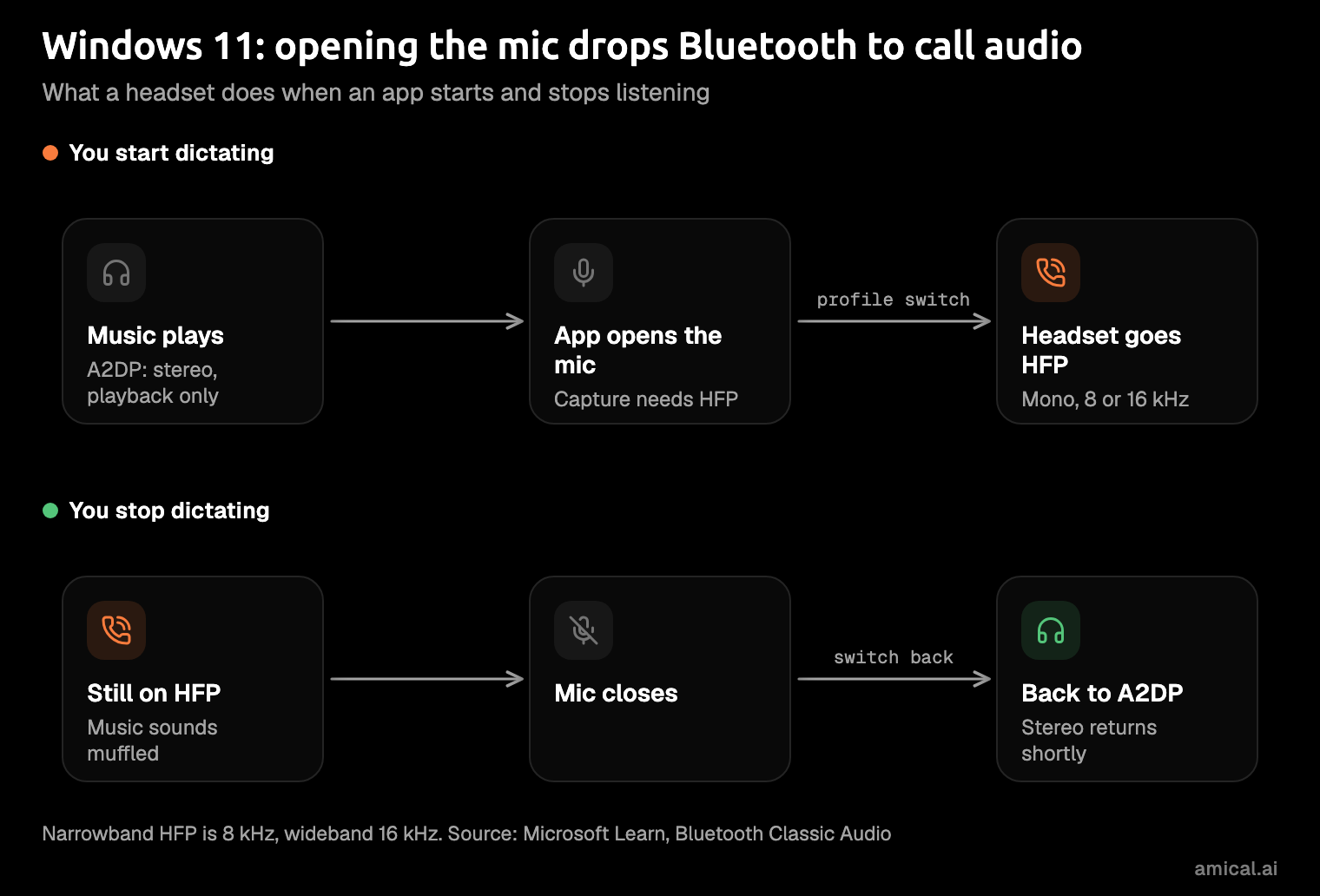
That's the muffled-music moment: your headset is politely turning your playlist into a conference call.
Those details are Microsoft's, for Windows; Apple doesn't document the switch for Macs in the sources we checked.
Our reading of the Windows docs: the weak link is often the switch to call-mode audio, not the mics in your earbuds. That makes Bluetooth usually the weakest choice for dictation, unless your headset and your app both support high-quality recording.
What changed with newer AirPods
Newer AirPods are better at this, but only in some apps. In June 2025, Apple announced "studio-quality audio recording" for AirPods 4, AirPods 4 with Active Noise Cancellation, and AirPods Pro 2, crediting "the H2 chip, beamforming microphones, and computational audio." It came as a free firmware update with iOS 26 and macOS Tahoe 26, and Apple's firmware notes add AirPods Pro 3. "Studio-quality" is Apple's description, not an independent measurement.
Apple names the Camera app, Voice Memos, dictation in Messages, and video calling apps such as Webex. Other apps have to opt in: since iOS 26, a developer can turn on a high-quality Bluetooth recording option, and apps that don't fall back to HFP.
It's a real improvement with a guest list, and your dictation app may not be on it. If yours isn't, the wired earbuds in your drawer are the safer bet.
The four options, by situation
Each mic suits a different kind of day. Pick by where you dictate, not by the spec sheet.
Built-in laptop mic
This is the zero-effort option, and in a quiet room it's often enough. The trade-off is distance: it moves every time you lean in, sit back, or turn to a second screen. Aqua Voice's mic guide, as of November 2026, rates recent MacBook mics (M1 and later) as good, and notes they aren't available in clamshell mode, when the lid is closed and you're on an external display.
Placement tip: sit square to the screen and keep your head at roughly the same height. Start here: if the built-in mic gets your words right, you may never need anything else.
Wired headset or wired earbuds
This is the pick for most people. The mic sits at the same distance from your mouth every time, there's no Bluetooth profile switch, and a basic pair is inexpensive (or free, if one is already in a drawer). Aqua gives Apple's wired EarPods its top rating, alongside desk and studio mics.
Placement tip from Dragon: keep the mic element just to the side of your mouth, not straight in front, so your breath doesn't hit it.
They're unglamorous and they tangle. They're also very hard to beat.
USB desk mic
A USB mic suits one fixed desk where you dictate for hours. Placement stays consistent as long as you do. Aqua's top ratings include several desk and studio mics, though its guide doesn't single out USB as a type.
The trade-offs are our own judgment. A desk mic sits farther from your mouth than a headset, so it hears more of the room, and it only works where it lives: step away and you're back on the laptop mic.
Placement tip: keep it within the distance Aqua suggests and aim it at your mouth, not your keyboard. A good desk mic is a commitment to a chair.
Bluetooth headset or AirPods
This is the convenience pick. Expect call-quality capture from a classic Bluetooth headset, which is fine for a quick reply and tiring for a long document.
Aqua's view: "Prefer wired. Bluetooth adds latency." It rates the first two generations of AirPods and AirPods Pro "Don't bother" for its app, citing "Highly compressed audio," and gives AirPods Max 3 out of 5, calling them "the best AirPods to use with Aqua."
LE Audio, the newer kind of Bluetooth audio, arrived on Windows 11 in version 22H2. No source we checked shows it fixing voice capture on today's headsets, so don't buy one on that promise.
Placement tip: there isn't much to adjust, so control the room instead. If you dictate on trains or in cafés, our guide to dictating in noisy environments has more.
How to pick your microphone
Set the mic in your OS first. The harder part is keeping it right as you plug earbuds in and out, or wander off with AirPods in. A quick look here can save you a morning of dictating into a webcam mic across the desk.
On a Mac
These steps follow Apple's sound input help.
- Open
System Settingsand clickSound. - Click the
Inputtab. - Select your mic from the list. The built-in mic appears under your Mac's model name.
- Drag the input volume slider until your normal speaking voice registers clearly.
On Windows 11
These steps follow Microsoft's microphone setup help for Windows 11.
- Open
Start, thenSettings,System, andSound. - Under
Input, select your microphone. - Choose the arrow beside it to open its properties.
- Under
Input settings, selectStart test, speak, selectStop test, thenPlayto hear yourself back. - Adjust the
Input volumeslider if you sound too quiet or too loud.
In Amical
Amical, on Mac and Windows, lets you rank your mics instead of picking just one. If you haven't installed it yet, the desktop quick start walks you through it.
- Open Amical's Microphone setting.
- Rank your mics. Our advice: wired headset or earbuds first, the built-in mic next, AirPods last.
- Speak a few words and watch the live level meter on the active mic. If it barely moves, move the mic closer or raise the input volume in your OS.
Amical records with the highest-ranked mic that's connected. Unplug your earbuds and it falls back down the list to the next one, so you don't have to remember to switch.
A good mic gets Amical clean audio. Its AI formatting then rewrites the words for the app you're in: a proper email in Gmail, a looser reply in Slack.
Test your own mic before you buy one
Rating tables, including the one in this guide, can't hear your voice, your room, or your mic. A short test can.
- Write one sentence you'd really say, with a person's name, a day of the week, and a word from your job. For example: "Tell Priya the Henderson proposal moves to Friday, and copy Marco on the invoice."
- Put the mic where you'd use it on a normal day, not where it looks best.
- Dictate the sentence once with each mic, at your usual distance and volume. In Amical, hold
Fnon a Mac orCtrl+Winon Windows while you talk. - Compare what was typed. Look at the name and the job word first; that's where mistakes are easiest to spot.
Keep the mic that got it right, and put it at the top of your list. A few minutes with your own voice beats an afternoon of mic reviews.
FAQ
Do I need an expensive mic for dictation?
No. In our view, placement matters more than price. Dragon calls positioning one of the most important things you can do for accuracy, and Aqua says its app doesn't need a special mic. The mic you already own, moved closer, is the cheapest upgrade you'll find.
Why does my music get worse when I dictate with AirPods?
On Windows, Microsoft documents the cause: opening the mic switches a classic Bluetooth headset into its calling mode, and your music shares that call-quality link until the mic closes, as the diagram above shows.
Can I dictate with AirPods in Amical?
Yes. Amical records from any connected microphone you rank in its Microphone setting, AirPods included. When accuracy matters most, rank wired earbuds or the built-in mic above them.
My dictation stops mid-sentence: is it the mic?
Check the recording limit first. In Amical, one recording session runs up to 2 hours, paid plans have unlimited use, and hands-free mode stops on its own after 5 seconds of silence. If it stops sooner than that, a headset that disconnects or a mic that changed in your system settings is worth ruling out. The AI dictation docs explain both modes.
Try it on one real message
Pick the mic that won your test, then download Amical, put that mic first in its Microphone setting, and dictate one real Slack reply or email you'd otherwise type today. The free plan gives you unlimited local dictation and 2,000 cloud words a week, so trying it costs nothing.