Replying from your wrist is one of the small joys of an Apple Watch. You're carrying groceries, a message buzzes, you raise your wrist and say "on my way," and it's sent. Then a reply needs two sentences instead of three words, and the built-in tools start to pinch.
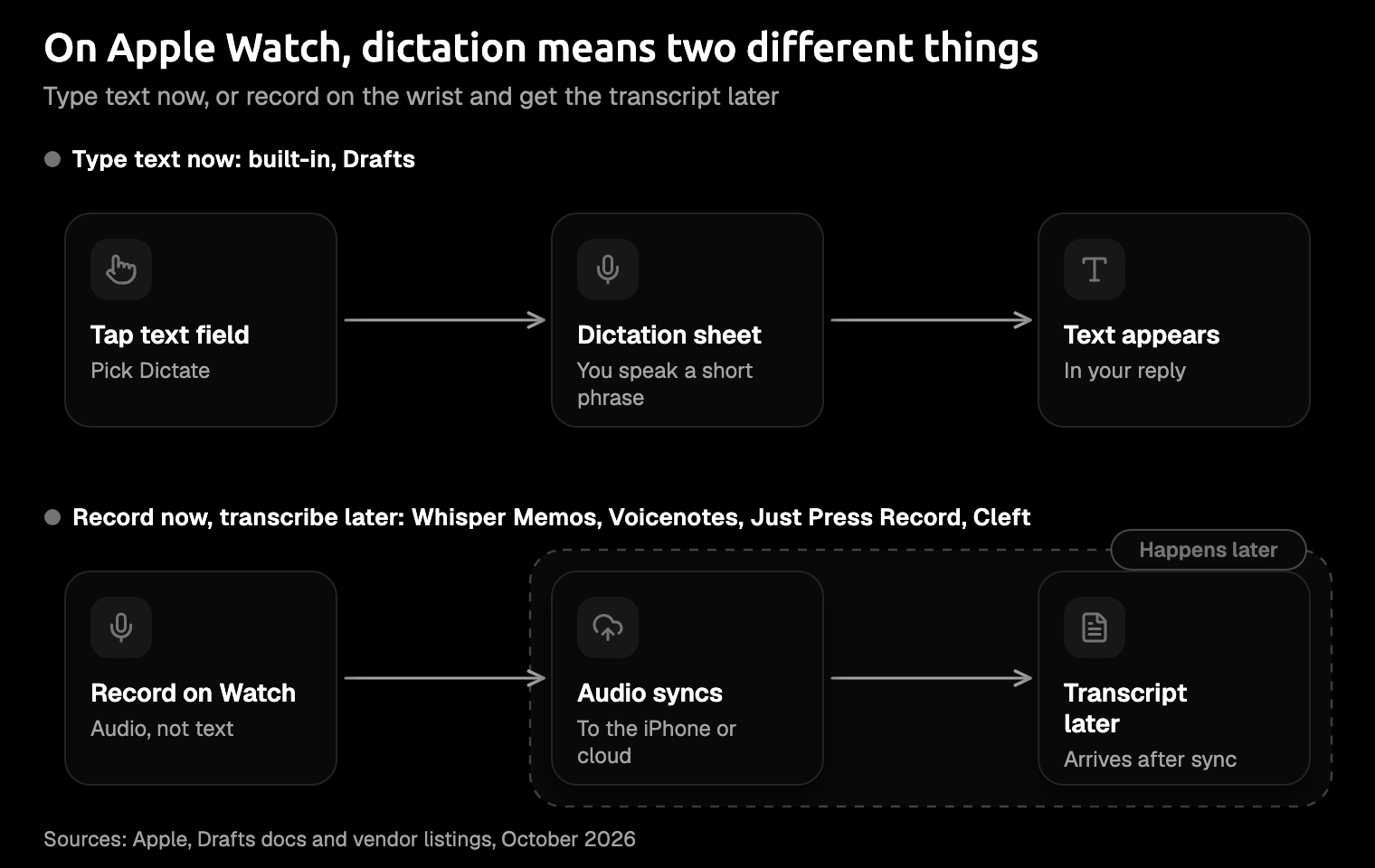
So you go looking for a better dictation app for Apple Watch, and you find very few. The ones that really run on the Watch work in one of two ways. Some type text now, through Apple's own dictation. Others record your voice on the wrist and turn it into text later, on your iPhone or in the cloud. This guide covers five that do run there, which way each one works, and what each costs. You'll most likely need one of them, not all five.
Amical publishes this blog, and its App Store listing shows iPhone and iPad only (as of October 2026), so it isn't one of the five. It gets one section near the end, for the reply that outgrows your wrist.
Quick picks
- Drafts: best for text you can use right away.
- Whisper Memos: best for long thoughts recorded away from your phone.
- Voicenotes: best for a free plan with a clear weekly allowance.
- Just Press Record: best for paying once.
- Cleft: best for thinking out loud in English.
If you want text, start with Drafts. If you'd rather talk until the idea runs out, start with Whisper Memos.
| App | How it turns speech into text | Watch needs | Away from your iPhone | Price | Free option |
|---|---|---|---|---|---|
| Drafts | Types text now, with Apple's dictation | watchOS 9.0+ | Works offline with limits; its docs say dictation needs a connected phone or network | Pro: $2.99/mo or $24.99/yr | Free to use; Pro adds extras |
| Whisper Memos | Records, then transcribes after upload | watchOS 10.6+ | Records standalone; cellular models upload right away | $9.99/mo or $69.99/yr | None mentioned on its site |
| Voicenotes | Records, then transcribes once connected | watchOS 10.6+ | Records offline | $14.99/mo or from $89.99/yr | 100 transcription minutes a week, per its website |
| Just Press Record | Records, then transcribes on your iPhone | watchOS 10.6+ | Records without your iPhone nearby | $6.99 once | None |
| Cleft | Records, then turns it into a note on your iPhone | watchOS 10.0+ | Release notes say you can record with your phone out of range | Plus: $6.99/mo or $39.99/yr | Free download; free tier's limits not stated |
Prices are App Store in-app prices as of October 2026, and "away from your iPhone" is how each app's own listing, site, or docs describe it.
The baseline: dictation built into watchOS
You already have dictation on your Watch, and for short replies it's all you need. Apple's guide lists it next to the onscreen keyboard and Scribble as the three ways to enter text. Here's how to use it:
- Tap a text field, then tap the button at the bottom right.
- Choose Dictate and say your message.
- Say punctuation and emoji out loud, like "question mark" or "thumbs up emoji."
- To fix a word, tap it and say the replacement.
Saying "question mark" to your wrist in a quiet elevator takes a little nerve, but it works.
The limits are length and language. Apple's guide doesn't state a time limit, and the reported ones are short. MacStories' watchOS 26 review reports two minutes for languages processed on the device and one minute for the rest. Dictation isn't offered in every language, and Apple Watch SE 3 has no onscreen keyboard.
Apple's page also doesn't say whether dictation needs a connection. Drafts' documentation says it does: "a connected phone or network."
It's fine for "running late." It's the wrong tool for a paragraph. If you're weighing Apple's dictation against an AI dictation app more broadly, Amical vs Apple Dictation puts them side by side.
The 5 best dictation apps for Apple Watch
Drafts types text on your wrist. The other four record your voice and give you text later, so pick the kind that matches how you'd use it.
Each one starts as an iPhone app, and by default your Watch adds its Watch version by itself. If it doesn't, open the Watch app on your iPhone, tap My Watch, then Apps, and tap Install next to it under Available Apps. Apple's guide also describes installing from the App Store on the Watch: tap Get or the price, then double-click the side button.
1. Drafts
Best for: capturing text, not audio, that goes into a note or on to your other apps.
Drafts is the only pick here that writes text on the wrist. Its listing puts it simply: you capture text on your Watch "using nothing more than your voice." The Capture complication opens a new draft in one tap, and the text is waiting on your iPhone when you get there. It's made for the idea that turns up halfway through a walk and is gone by the front door. For most people, it's the first one to install.
On Apple Watch: Drafts needs watchOS 9.0 or later. Its listing says Drafts is "always free to use," and its Pro list doesn't include Watch capture. At $2.99 a month or $24.99 a year, Drafts Pro is the cheapest subscription on this list, and it adds extras like themes and workspaces.
The catch: On older watchOS, Capture opens to the keyboard or Scribble, and dictation takes an extra tap on the microphone. The developer says watchOS 11 remembers that you prefer dictation, so after the first time it opens straight to it. Drafts' docs, written for watchOS 8, also say Siri can no longer create a draft.
How to start:
- Add the Capture complication to your watch face.
- Tap it, then say your note. If the keyboard or Scribble opens first, tap the microphone.
- Open Drafts on your iPhone and send the text where it needs to go.
2. Whisper Memos
Best for: long thoughts, recorded while your phone is somewhere else.
Whisper Memos records on your Watch and turns the audio into text after it uploads. Its listing promises "standalone recording," and its site says the Watch app works without your iPhone nearby. On a Watch with cellular, recordings upload right away; on a Wi-Fi-only model, they sync at the next connection. One recording can run up to 90 minutes, and the site lists more than 50 languages.
That's room for the run that started as exercise and ended as a project plan. If you think in long stretches, start here.
On Apple Watch: Whisper Memos needs watchOS 10.6 or later. In the app, it costs $69.99 a year or $9.99 a month.
The catch: The listing's plan summary quotes a lower "starting at" price than its own in-app prices, so you should budget for the in-app ones. The site doesn't mention a free tier.
How to start:
- Open it on your Watch and start recording.
- Talk for as long as the thought takes.
- Read the transcript in the app once the recording has uploaded.
3. Voicenotes
Best for: starting on a free plan with a clear weekly allowance.
Voicenotes puts recording one tap from your watch face. Its instructions are three verbs long: raise your wrist, tap the complication, and start recording. It records offline and, in its words, "transcribes it as soon as you're connected again."
It's the one app here that puts a number on its free plan. Voicenotes' website lists a Basic plan at $0 with 100 transcription minutes a week, shared across meetings, memos, and dictation. That's the site's figure for the plan as a whole, not one it gives for the Watch, but it covers a lot of grocery lists and half-formed ideas before you spend anything.
On Apple Watch: Voicenotes needs watchOS 10.6 or later. On the App Store, its in-app plans are $14.99 a month or from $89.99 a year, the priciest on this list.
The catch: The App Store and the website don't agree on price: the site lists Pro at $9 per user a month. Check which one you're paying through before you subscribe.
How to start:
- Add its complication to your watch face.
- Raise your wrist, tap the complication, and talk.
- Let it transcribe once you're connected again.
4. Just Press Record
Best for: people who'd rather pay once than keep a subscription.
Just Press Record costs $6.99 once, with no in-app purchases listed. Its Watch app records even when your iPhone isn't nearby, then sends the recording to your iPhone, which transcribes it in over 30 languages. There are no plans to compare and no renewal date to forget, which makes it the simplest deal on this list.
On Apple Watch: It needs watchOS 10.6 or later. There's no free version, so you pay before you try.
The catch: Nothing is transcribed on the wrist, so you won't see text until the recording reaches your phone. Its listing also warns that transcription needs a clean audio signal. Wind noise on a bike ride is exactly the kind of thing that comes back as creative spelling.
How to start:
- Open it on your Watch and press record.
- Bring your Watch back near your iPhone so the recording can transfer.
- Read the transcript on your iPhone.
5. Cleft
Best for: thinking out loud and getting a note back, not just a transcript.
Cleft describes itself as an app "for verbal thinkers," and its Watch app lets you record notes from your wrist. Its release notes say you can record on the Watch even with your phone out of range, and the recording is transcribed later, on your iPhone. Other release notes add a choice of how each note is written, plus rules Cleft always follows, like "keep it brief." That suits ideas more than messages: a rambling thought can come back as a note instead of a transcript you'd never replay.
On Apple Watch: Cleft needs watchOS 10.0 or later. It's free to download, and Cleft Plus costs $6.99 a month, or $39.99 for a full year.
The catch: It lists one language: English. Plus adds 30-minute recordings and "Customize Cleft," for telling it how you want notes shaped. The listing doesn't say what the free tier covers, so you can't tell whether note styles, rules, or Watch recording need Plus. It also has the fewest App Store ratings of the five, with 70 ratings averaging 4.7 as of October 2026.
How to start:
- Start a recording on your Watch and say your note.
- Open Cleft on your iPhone after it syncs, and read the note.
Also on the Watch, and the names that aren't
Speakwise also has a Watch app, for watchOS 10.0 or later. Its listing tells two stories, though. The latest release notes say "no iPhone needed," while the description says recordings are "synced to your iPhone and transcribed automatically." Until the two agree, try it near your phone before you count on it away from one.
Some well-known names aren't here at all. As of October 2026, the App Store listings for Wispr Flow, Superwhisper, and Otter show no Apple Watch version.
When the reply outgrows your wrist: Amical on iPhone
Some replies start on the Watch and turn out to need a second paragraph. That's when you lift your phone, and that's where Amical fits. The wrist is for capture. The phone is for the message you'll actually send.
On iPhone, Amical is a voice keyboard, so the reply your wrist couldn't hold doesn't have to be thumbed out. Switch to it in the app you're replying in and say the whole message in one go; the text lands right there, with no copying it over from a notes app. It transcribes with Amical Cloud, Amical's own speech model, which covers 100+ languages with automatic language detection and follows Japanese and English mixed in one sentence. Amical runs on iOS 18.3 or later, and the same tool comes with you to iPad, Mac, Windows, and Android.
The trade-off is that on iPhone, Amical Cloud is the only option: you sign in, and the keyboard needs Allow Full Access to send your speech to its transcription service. The App Store listing says your audio is streamed for transcription and "is not stored on our servers," and that transcripts and dictation history stay on your device. The App Privacy label, which Amical fills in itself, also lists audio data, your email, and a user ID as linked to you.
Amical Pro costs $9.99 a month or $83.99 a year on the App Store. The iOS quick start covers setup, and our roundup of iPhone dictation apps shows how it compares on the phone.
Which one should you install?
Pick one, by how you already use your Watch. Two recorder apps on one wrist just means two places for voice memos you'll never play back.
- You want text, not recordings, at no cost: Drafts.
- You talk for minutes at a time, phone left behind: Whisper Memos.
- You want free recording with a stated weekly allowance: Voicenotes.
- You'd rather pay once: Just Press Record.
- You think out loud in English: Cleft.
- You only send short replies: the built-in dictation is enough.
- The reply needs more room than your wrist: Amical on iPhone.
Try one on your next note
Pick one app from the list and dictate your next real note on your wrist, before it's gone by the front door. When a reply needs more room than the Watch gives you, download Amical on your iPhone and dictate that one message there. (Yes, that part is our app.) It's free to use, with a weekly limit on how much you can dictate. Use it to find out whether talking beats thumb-typing on your phone too.